Minecraft Game on Roblox: A Practical Side-by-Side Guide
Explore how Minecraft-style experiences on Roblox compare to the official Minecraft game, covering features, performance, safety, and best-use scenarios in a detailed, analytical guide.


Minecraft-style experiences on Roblox offer accessible building and exploration, but they are not the official Minecraft. On Roblox you’ll find many user-created worlds that imitate crafting, survival, and voxel aesthetics, with rapid iteration and social gameplay. According to Blox Help, Roblox versions shine for creativity and community-led development, while official Minecraft remains the deeper, IP-backed ecosystem.
What minecraft game on roblox means in practice
The phrase minecraft game on roblox describes a broad category of Roblox experiences that imitate core Minecraft concepts—building with blocks, exploring voxel-inspired worlds, crafting items, and surviving against hazards. These games are created by Roblox developers who leverage Roblox Studio, Lua scripting, and community-created assets. They are not the official Minecraft product, and they cannot use the Mojang/Microsoft IP without permission. In practice, players encounter block-based construction systems, simplified survival loops, and social play that emphasizes shared progress. Because Roblox is inherently social, most minecraft-themed experiences encourage collaboration, shared bases, and mini-games that extend beyond a single world. The result is a rapidly evolving ecosystem where players experiment with textures, terrain generation, and custom recipes, often teaching newcomers about basic game design through approachable tools. For many Roblox players, this is a natural entry point to Minecraft-like gameplay before transitioning to the original title or using Roblox as a scaffold for education and imagination. According to Blox Help, these experiences leverage Roblox’s social features to help beginners prototype ideas quickly and iteratively.
Core differences: Roblox vs Minecraft
Minecraft is a single, IP-backed game with official development, frequent global updates, and a defined set of core mechanics that have evolved over years. Roblox, by contrast, hosts thousands of player-made titles that share thematic similarities but diverge widely in scope, controls, and monetization. The key differences to track include ownership rights, platform reach, and the balance between creativity and structure. In practice, Roblox games emphasize rapid iteration, cross-game sharing, and community-made content, while Minecraft emphasizes consistent progression systems, a unified world-generation approach, and a more curated set of core tools. For players, this means Roblox can feel more accessible for social play, but Minecraft offers a deeper, more predictable progression path and stronger modding ecosystems. The practical takeaway is to treat each as a distinct category: Roblox for experimentation and social builds; Minecraft for a coherent survival and crafting experience. From a design perspective, the two platforms reward different skill sets: scripting and user interface design thrive on Roblox, while world-building and combat balance are central in Minecraft.
Popular Roblox Minecraft-inspired experiences and why they exist
The Roblox ecosystem hosts a spectrum of Minecraft-inspired titles, including survival arenas, creative build battles, skyblock-like challenges, and adventure maps. Developers create these experiences to exploit Roblox’s low entry barriers, social features, and rapid publishing cycles. These games often ship with tutorial worlds, starter chests, and simplified crafting trees that mimic popular Minecraft motifs but reduce complexity to fit Roblox controls. Why this matters: it lowers the barrier to entry for new players and educators who want to demonstrate game design concepts or classroom-style collaborative projects. The demand for accessible, shareable content fuels community-driven competitions, weekly updates, and cross-title collaboration, which can help new players learn by watching and copying successful strategies. For players, the catalog offers frequent experimentation, peer feedback, and a natural pathway from quick mini-games to more ambitious build projects.
Building mechanics: blocks, physics, and tools
Roblox builds rely on 3D parts and physics constraints rather than Minecraft’s fixed voxel blocks. A typical Roblox Minecraft-inspired game lets players place, rotate, and customize cube-like parts to form structures, but underlying systems are scripted components rather than native voxel engines. This distinction matters for performance, cross-platform compatibility, and tool availability. Players encounter a mix of traditional Roblox tools (move, clone, anchor) and project-specific building panels created by developers. Unlike Minecraft, where a global block palette defines the world, Roblox titles often feature tailored palettes and resource packs generated by the game or the community. For builders, this means more flexibility and more reliance on scripting for features such as auto-saving, redstone-like logic, or inventory-based building challenges. The result is a creative toolkit that rewards experimentation, but it also places a premium on understanding scripting concepts and how they translate into playable systems.
Survival, crafting, and progression
In Minecraft, survival hinges on resource gathering, food, health, and carefully timed progression through gear upgrades. Roblox-inspired experiences emulate these ideas but adapt them to Roblox controls and economies. Crafting is often simplified, with recipes embedded in UI panels or scripts rather than a universal crafting table. Progression across a Roblox title tends to be session-based—new worlds, speed runs, or collaborative bases—rather than a long-running, shared universe. This makes early mastery accessible but can limit long-term identity. The upside is that players can quickly switch between servers and gameplay modes, keeping content fresh and social. From a design perspective, educators and beginners can observe how a crafting loop interacts with a reward system, without the commitment of a full Minecraft-like world.
Graphics, performance, and optimization
Roblox’s rendering pipeline enables broad device compatibility, from low-end hardware to modern PCs and consoles. Minecraft relies on a distinct voxel aesthetic that scales differently across hardware. A minecraft game on roblox typically faces performance considerations related to particle effects, lighting, and complex scripts. Developers optimize by batching rendering, limiting particle counts, and capping world size per instance. Roblox players may experience frame-rate fluctuations depending on internet bandwidth and device performance. For players, ensuring you meet or exceed the minimum requirements for Roblox and customizing in-game quality settings can significantly improve the experience. The analysis from Blox Help shows that a well-optimized Roblox experience, even with Minecraft-like visuals, can run smoothly on mid-range devices with thoughtful asset choices and efficient scripting.
Community, safety, and moderation
Roblox emphasizes safety with parental controls, content moderation, and reporting features for inappropriate content. Minecraft-like experiences on Roblox inherit these protections but vary in quality and enforcement across titles. Communities form around popular servers, build competitions, and collaborative projects. Parents and guardians should review each game's privacy settings, chat filters, and age recommendations. Community-driven content can be a double-edged sword: it accelerates learning and creativity but may expose players to unpredictable interactions. The Blox Help analysis notes that selecting consistently moderated titles with clear reporting paths yields a safer, more enjoyable experience for younger players.
Monetization and ownership: IP and monetization
Official Minecraft is a paid product with Mojang’s IP ownership, ongoing updates, and a global ecosystem. Roblox, by contrast, centers on user-created games with optional monetization through game passes, cosmetic items, and virtual economies. This means that a minecraft game on roblox does not confer Minecraft ownership or the same licensing protections; developers generate revenue through Roblox’s economy rather than through Mojang. For players, this distinction affects long-term value, collectibility of items, and cross-game progression. For educators and creators, Roblox offers a lower-cost pathway to prototype ideas and explore monetization strategies, albeit with a different licensing framework. The distinction supports a broader understanding of how digital worlds can be built and shared across platforms.
How to evaluate a Roblox Minecraft-like game: criteria and checklist
When evaluating a Roblox Minecraft-like title, consider the following criteria: (1) building and crafting depth versus user experience; (2) stability and performance across your device; (3) safety features and chat filtering; (4) content quality and update cadence; (5) monetization methods and the impact on play; (6) server population and community activity; (7) accessibility features and controls; (8) the presence of tutorials or learning aids. Use a checklist to compare a handful of titles side-by-side: play a few hours on different servers, note the balance between challenge and fun, and measure load times. This approach helps identify titles that align with your goals—creative exploration, social play, or survival challenges.
Best practices for players: getting started, tips
To get started with minecraft game on roblox, search for well-moderated titles with clear instructions and starter guides. Create a Roblox account if you don’t already have one, join a popular server with a friendly community, and begin with a simple build project or beginner quest. Use the in-game tutorials to learn the building tools, inventory management, and basic survival strategies. Regularly check for updates and participate in community events to discover new content; this helps you stay engaged while learning the platform’s mechanics and scripting opportunities.
For developers: turning a Minecraft-inspired idea into a Roblox game
Developers looking to translate a Minecraft-inspired concept into Roblox should start by outlining core mechanics first: building, crafting, progression, and exploration. Design a modular system where blocks or parts form a coherent world, then implement a robust saving mechanism to prevent progress loss. Create accessible tutorials and onboarding experiences to help new players learn quickly, and plan regular content updates to sustain engagement. Finally, study successful Roblox titles to understand monetization options, best practices for community moderation, and performance optimization to deliver a reliable, scalable game.
Comparison
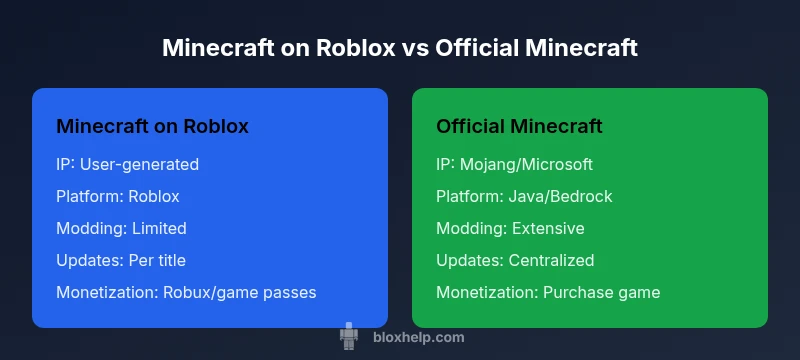
| Feature | Minecraft on Roblox | Official Minecraft |
|---|---|---|
| IP/Ownership | Roblox user-generated experiences with no official Minecraft IP | Official Minecraft IP owned by Mojang/Microsoft |
| Platform availability | Roblox platform (PC, mobile, consoles via Roblox) | Minecraft Java/Bedrock on multiple platforms |
| Modding/customization | Limited to Roblox assets and scripts; no external mods | Full modding and server plugins (Java edition) |
| Graphics and visuals | Blocky, Roblox-styled visuals; performance depends on device | Distinct voxel visuals; high-quality world design and shaders |
| Updates/maintenance | Developer-driven updates per title; consistency varies | Official, centralized updates from Mojang/Microsoft |
| Community content | Massive library of user-created games; rapid iteration | Community content exists but is more limited by IP scope |
| Monetization | Free-to-play with Robux/game passes | Paid product with optional DLC/skins depending on platform |
| Best use case | Quick entry for social build-and-play; rapid prototyping | Authentic Minecraft experience with consistent updates |
Benefits
- Low barrier to entry for Roblox players
- Strong social and collaborative play
- Rapid iteration for ideas and education
- Extensive catalog of user-generated content
What's Bad
- Licensing and IP ownership limits
- Quality and consistency vary widely across titles
- Limited/mod-friendly ecosystems compared to Minecraft
- Performance depends on device and Roblox optimization
Roblox Minecraft-style experiences are excellent for quick, social building and prototyping, but for a faithful, IP-backed Minecraft experience, official Minecraft remains superior.
Choose Roblox for fast, collaborative creativity and rapid learning. Choose official Minecraft for depth, consistent updates, and a unified ecosystem; your choice should match your goals and device capabilities.
Questions & Answers
What does 'minecraft game on roblox' mean?
It refers to Roblox experiences that imitate Minecraft-like building and exploring. They are user-created, run on Roblox's platform, and do not carry the official Minecraft IP. These titles vary in depth, quality, and updates, offering a social, accessible entry point to voxel-inspired play.
Minecraft-style games on Roblox are user-made experiences that mimic Minecraft, not the official game. They run on Roblox, differ by title, and focus on social play and rapid updates.
Is it legal to play Minecraft-like games on Roblox?
Yes, it is legal to play user-created Minecraft-inspired games on Roblox as long as developers properly license assets and comply with Roblox's rules. These experiences do not claim the Minecraft IP, and players should respect the terms of service and content policies of Roblox and any individual title.
Yes, playing Roblox Minecraft-like titles is legal as long as you follow Roblox rules and the game's own guidelines.
Can you install mods in Roblox Minecraft games?
Modding in Roblox Minecraft-inspired titles is limited. Roblox games use Lua scripting and Roblox assets instead of external mods. Creature or world changes come from developers' updates, not from a universal modding system like Minecraft Java.
Mods aren’t a thing in Roblox Minecraft games the same way they are in Minecraft; changes come from the game's own updates.
Are Roblox Minecraft-inspired games safe for kids?
Safety depends on the title and the platform's protections. Roblox offers chat filters and parental controls, but you should review individual game settings and moderation. Stick to well-rated titles with clear privacy and safety policies.
Yes, if you choose well-moderated titles and enable safety features.
Can you transfer progress between Roblox and official Minecraft?
Progress does not transfer between Roblox games and official Minecraft. They use separate systems, with distinct accounts, inventories, and progression. Treat each ecosystem as isolated for progression and item ownership.
Progress doesn't transfer between Roblox and official Minecraft; they are separate worlds.
Is Roblox free to play?
Roblox is free to download and play, with optional purchases for cosmetics and game passes. Individual Minecraft-inspired experiences may charge Robux for access or special features, but the platform itself remains free to join.
Roblox is free to join, with optional purchases inside games.
The Essentials
- Evaluate IP ownership and licensing before choosing a game.
- Prioritize optimization on your device for best performance.
- Use Roblox for quick prototyping and social play; Minecraft for deep crafting.
- Check safety features and parental controls for younger players.