Roblox Greenville: A Comprehensive How-To Guide
Learn how to play Roblox Greenville with step-by-step setup, driving, jobs, exploration, and customization. This beginner-friendly guide from Blox Help covers fundamentals, troubleshooting, and advanced tips to help you progress in Roblox Greenville.


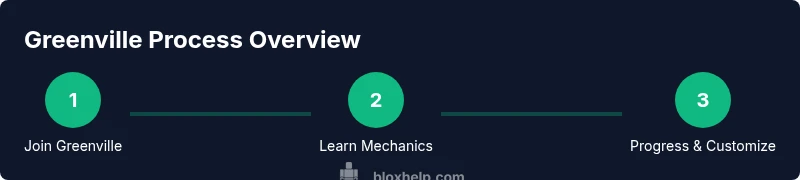
Learn how to play Roblox Greenville effectively, from joining a server to mastering driving, jobs, and customization. Prerequisites: a Roblox account, a compatible device, and a stable internet connection. This quick guide highlights the essential steps to start smoothly and build skills quickly, with practical tips for new players. Expect hands-on examples and clear next steps.
What is Roblox Greenville?
Roblox Greenville is a popular roleplay and driving experience on Roblox that blends city life, car culture, and cooperative tasks. Players explore a stylized town, take on jobs, drive vehicles, and follow city rules. According to Blox Help, Greenville’s broad appeal comes from its realistic vehicle physics, thoughtfully laid-out map, and social interaction that rewards teamwork. The Blox Help team found that beginners often underestimate how quickly currency and progression come from completing simple tasks and following a routine. If you’re curious about how Greenville fits into the wider Roblox ecosystem, think of it as a small virtual city where your choices determine your day-to-day life and the pace of advancement.
In this guide, we’ll break down core mechanics, practical setup steps, and tested strategies to help you get more from Greenville—whether you’re new to Roblox or an experienced player chasing efficiency.
Getting Started: Setup and First Steps
To begin, you’ll need a Roblox account, a compatible device, and a reliable internet connection. Start by launching the Roblox app or website and logging in. Search for Greenville in the game catalog, or join a friend’s server to reduce wait times. When you first spawn, take a moment to locate the job boards and the spawn area, so you know where to start each session. The key is to set up your controls, adjust your avatar, and pick a basic job to begin earning currency. As you play, you’ll unlock new vehicles, houses, and cosmetics that personalize your experience. The goal is to establish a consistent routine—drive, work, and explore in balanced sessions so you don’t burn out.
If you encounter trouble signing in or joining a server, check your network connection and Roblox status, then restart the app. A clean cache can also fix minor sign-in hiccups. For players who prefer mobile play, ensure your device has enough storage and that you’re using the latest Roblox app version. The setup phase is short but crucial for smooth progression.
Core Mechanics: Driving, Jobs, and Roles
Greenville combines driving physics with interactive jobs that simulate city life. Vehicles range from compact cars to larger trucks, each with handling that encourages deliberate driving rather than casual speed. Jobs provide a sense of purpose and revenue, which unlocks new areas and customization options. Roles can include delivery, police, or service industry tasks, each rotating you through different maps and challenges. Mastery comes from understanding how tasks chain together—completing one job often unlocks the next tier of tasks and pays out more currency, allowing faster progression. Build a routine that alternates driving practice with job sessions to maximize rewards. The more you familiarize yourself with the city’s layout, the quicker you’ll move from novice to a trusted member of Greenville’s community.
Navigating the Map: Places to Visit
Greenville’s map is designed to feel like a real town, with distinct neighborhoods, business districts, and service areas. Start near the spawn to access essential services, then branch out to workplaces, residential zones, and the highway system for longer routes. Keeping a mental map helps you plan efficient routes for delivery jobs, patient zero tasks, or vehicle tests. Look for landmarks such as gas stations, car dealerships, and central plazas that often host events or special tasks. The more you explore, the more opportunities you’ll unlock, including hidden shortcuts and timed challenges. Remember to respect traffic rules where applicable; Greenville rewards consistent, lawful navigation with smoother task flow and fewer penalties.
Player Progression: Cars, Customization, and Upgrades
Progression in Greenville revolves around currency earned from jobs and completed tasks, then reinvested into vehicles, cosmetics, and property. Upgrading a vehicle improves speed, handling, and durability, which translates into higher efficiency for jobs and longer routes. Customization options extend to clothing, accessories, and car decals, allowing you to express personality while maintaining practical performance. A balanced approach is best: upgrade one reliable vehicle first, then diversify your fleet to tackle different task types. Regular practice and mindful spending prevent gaming fatigue while keeping you motivated to push toward higher ranks and more complex jobs. Always review task requirements to determine which upgrades yield the most immediate benefits.
Common Challenges and Troubleshooting
New Greenville players often encounter navigation confusion, inconsistent vehicle handling, or lags during high-traffic periods. If you notice lag, check your device performance, reduce in-game graphics quality, and ensure background apps aren’t consuming bandwidth. For vehicle handling issues, reset steering settings or re-calibrate your controller if you’re using one. Joining a friendly community or reading patch notes can clarify changes to job balance or map layout after updates. If you still struggle, practice in a low-traffic server or with a friend to isolate whether the problem is hardware, network, or game-specific behavior. Remember: gradual practice yields steady improvement.
Tips for Efficient Gameplay and Safety
Efficiency comes from smart routing, task chaining, and consistent practice. Start with easy jobs to build currency, then progressively tackle more complex tasks that unlock valuable upgrades. Use quick travel where available to reduce repetitive driving, and keep an eye on your in-game timer for time-limited challenges. Safety-wise, be mindful of collisions and traffic rules in public servers to avoid penalties and dropped rewards. If you’re playing with younger players, set parental controls and in-game safety rules to ensure a positive experience. Regularly save progress and keep personal information private when interacting with others. A calm, methodical approach beats frantic grinding.
Advanced Tips for Aspiring Builders in Greenville
For players who want to extend Greenville beyond basic gameplay, consider learning Roblox Studio basics and exploring community-created scripts that influence vehicle physics or job logic (within platform guidelines). Start by testing simple changes in a private server to avoid disrupting others. Document your experiments and track outcomes to learn which adjustments yield meaningful improvements. As you become more confident, participate in modded groups or developer circles responsibly, share your findings, and solicit feedback. Remember: respect the game’s rules and the community’s norms while experimenting with enhancements.
Community Resources and Support
Tap into community resources to accelerate your Greenville learning curve. Official Roblox help pages offer foundational guidance on account setup and safety. Community forums, YouTube tutorials, and Discord servers host a wealth of tips, including route optimizations, job strategies, and patch updates. When in doubt, compare community advice with official notes to verify compatibility. Blox Help recommends starting with well-reviewed beginner guides and gradually branching into advanced topics as you gain confidence. By connecting with the Greenville community, you’ll discover coordinated play, seasonal events, and new content faster.
Frequently Asked Scenarios in Greenville
Q: How do I join a Greenville server fast? A: Use friends’ servers or look for low-latency regions, then join when slots open. Q: What’s the fastest way to earn currency? A: Prioritize high-yield jobs and efficient routes, then upgrade your vehicle to maximize return on time. Q: Can I play Greenville on mobile? A: Yes, but performance may vary; ensure your device is up to date and you have a stable connection. Q: Are there safety concerns? A: As with any online game, avoid sharing personal information and report suspicious activity through official channels. Q: How often is Greenville updated? A: Updates occur periodically; check patch notes and community channels for the latest changes.
Final Checklist before Starting Greenville
- Confirm you have a Roblox account and the app installed on a compatible device.
- Join Greenville on a low-latency server or with friends to minimize wait times.
- Review job boards, map landmarks, and your vehicle options.
- Pick a primary job path to start earning currency and unlock upgrades.
- Adjust graphics and controls to your comfort and device performance.
- Keep a learning mindset, track progress, and engage with the Greenville community for ongoing tips.
Tools & Materials
- Roblox account(Create or log in to your Roblox account.)
- Compatible device(PC, Mac, iOS, Android, Xbox, or tablet with Roblox installed.)
- Stable internet connection(Prefer reliable broadband or strong mobile data connection.)
- Headphones or microphone(Useful for in-game chat; optional but recommended for teams.)
Steps
Estimated time: 45-60 minutes
- 1
Create or log in to Roblox
Open the Roblox app or website and sign in to your account. Verify your device supports Greenville and that you’ve installed any required updates. This step sets the foundation for a smooth session and ensures you can access Greenville’s jobs and vehicles.
Tip: If you forget your password, use the account recovery options available on the Roblox login page. - 2
Search for Greenville and join a server
Use the search function to locate Greenville, then choose a server with low latency and a friendly community. Joining with friends can reduce wait times and improve coordination for group tasks.
Tip: Try a private or friends-only server first to learn controls without crowded public traffic. - 3
Survey the spawn area and job boards
Take a moment to locate the spawn zone, map entrances, and the job boards. Understanding the layout helps you plan efficient routes and start earning currency quickly.
Tip: Note the location of the first few easy jobs to build confidence early on. - 4
Choose a basic job path
Select a beginner job that matches your playstyle, such as courier or shop assistant. Completing early tasks builds currency and unlocks additional opportunities.
Tip: Consistency beats switching tasks; pick one path and stick with it for a while. - 5
Learn basic driving controls
Familiarize yourself with steering, throttle, braking, and reversing. Practice smooth starts and stops to avoid penalties in timed tasks.
Tip: Use practice routes or open road areas to refine handling before tackling busy streets. - 6
Complete your first few jobs
Finish the initial tasks tied to your chosen job to earn currency and experience. This early momentum unlocks upgrades and new vehicles.
Tip: Track earnings on a simple notepad to see which jobs yield the best payoff per minute. - 7
Upgrade a vehicle when possible
Invest earnings into a more capable vehicle to improve speed and handling. Better vehicles reduce task time and increase throughput.
Tip: Balance cost with expected time saved; expensive upgrades aren’t always the best return initially. - 8
Customize your avatar and gear
Personalize cosmetics and vehicle decals to express your style while ensuring you are easily identifiable in crowded servers.
Tip: Keep cosmetics lightweight to avoid performance issues on older devices. - 9
Explore map locations
Travel to key landmarks like gas stations, dealerships, and central plazas to discover new tasks and events. Map familiarity accelerates route planning.
Tip: Mark useful spots on a mental map or take screenshots for quick reference. - 10
Join community groups
Engage with Greenville communities for tips, events, and group tasks. Collaboration often yields better schedules and rewards.
Tip: Be respectful in chat and follow server rules to maintain a positive experience. - 11
Troubleshoot common issues
If the game lags or you experience control glitches, lower graphics, close background apps, or restart the game. Check Roblox status pages for outages.
Tip: Test in a different server if you suspect server-side issues. - 12
Practice daily and set goals
Set small, achievable goals for each session, such as completing three jobs or earning a set amount of currency. Regular practice compounds skill and progress.
Tip: Keep a simple written log of goals and outcomes for accountability.
Questions & Answers
Is Roblox Greenville free to play?
Yes, Greenville is a free-to-play Roblox experience. Some cosmetics and premium options may require Robux, but the core game is accessible without spending money. This makes it beginner-friendly and widely accessible.
Greenville is free to play, with optional paid cosmetics.
What’s the best way to earn currency early?
Start with simple, high-yield jobs and complete them efficiently to accumulate currency quickly. Consistency matters more than taking on every task at once, so pick a path and stick with it for several sessions.
Begin with easy jobs and build a routine, then upgrade as you earn.
Can I play Greenville on mobile devices?
Greenville supports mobile play, but performance varies by device. Ensure your Roblox app is up to date, and minimize background apps to improve stability.
Yes, Greenville works on mobile, but performance varies by device.
How do I join a Greenville server quickly?
Joining with friends or choosing a server with lower latency helps. If you’re new, ask a friend to invite you to a less crowded server.
Join with friends or pick a low-latency server.
Are there safety concerns for younger players?
As with any online game, avoid sharing personal information and use built-in safety features. Report anything suspicious and stick to moderated servers when possible.
Be mindful of online safety and report anything suspicious.
Watch Video
The Essentials
- Join Greenville with a goal-oriented plan.
- Master driving and basic jobs first.
- Explore map zones to unlock new tasks.
- Upgrade selectively and customize for efficiency.
- Engage with the community for ongoing tips.