Roblox Basics: A Beginner's Guide
A practical, beginner-friendly guide to Roblox basics. Learn account setup, navigation, safety, and a gentle intro to Roblox Studio to start playing and creating today.


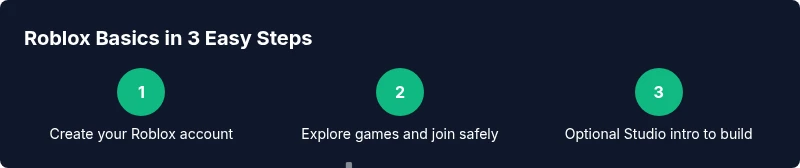
Master Roblox basics with practical steps: set up a safe account, explore the Home screen, find games, learn core controls, and try a gentle intro to Roblox Studio. Ensure you have a compatible device and reliable internet. Follow the step-by-step sections below to build confidence quickly and safely.
Roblox Basic Essentials for Beginners
If you're new to Roblox, the term roblox basic often means the core skills and concepts you need to start playing, customizing, and even making experiences. According to Blox Help, understanding these basics unlocks access to the wide universe of games and tools on Roblox. In this guide, we’ll cover what Roblox is, how to create an account, and how to navigate common features. You don’t need to be a veteran to get value from Roblox; with a little guidance, you’ll move from curiosity to confident exploration. The goal is to build a solid foundation you can grow from, whether you’re here to play with friends, explore user-created games, or learn the basics of game development. Throughout, you’ll see practical steps, screenshots you can compare to your own screen, and gentle reminders to keep your account safe while you learn.
As you begin, keep in mind that the Roblox basic journey is a series of small, repeatable actions. By mastering the essentials, you’ll reduce friction in later steps and set yourself up for longer, more meaningful play sessions. This approach also helps you steadily expand into simple projects and experiments in Roblox Studio if you decide to level up. Let’s start with the first concrete step—creating your account—and then build from there.
Setting Up Your Roblox Account Safely
Your Roblox journey begins with a solid, secure account. The basics include choosing a unique username, securing your login with two-factor authentication (2FA) when available, and adjusting privacy settings to control who can contact you or join your games. From a safety perspective, the most important actions are enabling 2FA, limiting who can chat with you, and keeping your password private. For younger players or parents, enable parental controls where offered and review app permissions regularly. The goal is to minimize interruptions from strangers while you focus on learning the ropes of gameplay, exploration, and basic game creation. Remember: a strong password and thoughtful privacy settings are foundational to your Roblox basic experience.
Pro tip: Set a simple, memorable recovery method and keep it updated. If you forget your password or lose access, you’ll thank yourself later. The more you secure your account at the start, the easier it will be to explore safely without repeatedly worrying about safety issues.
Navigating the Roblox Home Screen and Menu
The Roblox home screen is your launchpad for discovery. At its core, you’ll find three main sections: Discover, Games, and Create. The Discover tab helps you browse popular experiences and new releases; Games showcases playable experiences; Create points you toward Roblox Studio and creator tools. Start by exploring featured games that match your interests—action, adventure, simulators, or role-play experiences. Use filters and search to narrow down results, and pay attention to user ratings and age recommendations to find appropriate experiences. Familiarize yourself with the interface by locating your avatar, your profile, and the friend system so you can connect with other players as you grow your Roblox basic skills.
When you find a game you like, read the description and check the controls. Some games require specific actions or keyboard bindings—knowing these ahead of time makes your first playthrough smoother and more enjoyable.
How to Find and Join Games: A Beginner's Guide
Finding and joining games is a central activity for new players. Start with a genre you enjoy and look for titles labeled as beginner-friendly. Click into a game’s page to review screenshots, descriptions, and the user rating. If the game supports multiplayer and voice chat, consider adjusting those settings before you join. Once you’re ready, press the Play button to load the experience. While you’re waiting for a game to load, you can review the controls or read tips from the community in the game’s description or discussion boards. This approach helps you ramp up your Roblox basic skills quickly and safely.
Tip: Join a simple, low-lag game to minimize setup friction and maximize early success. If a game is laggy or unresponsive, back out and try another title rather than forcing a poor first experience.
Basic Controls Across Devices: Move, Jump, and Interact
Controls vary a bit by device. On PC, you’ll typically use WASD to move, Space to jump, and your mouse to look around and interact. On mobile, use the on-screen joystick and touch controls; on consoles or Xbox, similar mappings apply with a controller. The key is to practice the core actions in a safe, calm environment—move, look, jump, and interact with objects. Early practice builds muscle memory and helps you handle more complex gameplay later. If you’re ever unsure about a control, pause the game or check the in-game help section for a quick refresher.
Tip: Create a tiny practice run in a non-competitive space to get comfortable with multiple control schemes before diving into action-heavy games.
Avatar Customization: Personalize Your Roblox Look
Your avatar reflects your Roblox basic identity. Start by selecting a basic body type, skin tone, and clothing that fit your style. Roblox offers a wide range of cosmetic items, including hats, shirts, and gear, which you can unlock or purchase with Robux. Early on, focus on a few staple looks to avoid overwhelm: a clean outfit, a recognizable color scheme, and a unique accessory that makes your avatar stand out in a crowd. As you grow more confident, you can experiment with more elaborate outfits and gear. Remember, avatar customization is part of your Roblox basic experience and can be a fun way to express yourself while you learn the platform.
Intro to Roblox Studio: A Gentle Starter for Builders
If you’re curious about creation, Roblox Studio is the place to learn. A soft introduction is enough to get you started: open Studio, explore the interface, and try building a simple scene. The goal here is not to become a pro creator overnight, but to discover the basic workflow: place objects, adjust properties, and test your space in Play mode. You can move at your own pace and gradually tackle more advanced concepts like scripting and custom assets as you gain confidence. A careful, incremental approach is what makes Roblox Studio approachable for beginners within the Roblox basic framework.
Safety, Privacy, and Etiquette in Roblox
Online safety is a cornerstone of the Roblox basic experience. Set privacy settings to limit messaging or friend requests to people you know. Use in-game reporting features if you encounter harassment or unsafe content. Practice good etiquette: be respectful in chat, avoid sharing personal information, and report any behavior that feels uncomfortable. If you’re a parent or guardian, consider enabling parental controls and setting time limits to ensure a healthy balance between play and other activities. By prioritizing safety and respectful communication, you’ll enjoy your Roblox basic journey with fewer distractions and more learning opportunities.
Learning Paths: Practice, Projects, and Community Resources
A clear path helps you advance from beginner to confident creator. Start with small, achievable practice goals: complete a few beginner-friendly games, try a basic avatar customizer, and explore one simple Studio project. Document what you learn and revisit confusing concepts until they click. Join community forums or official Roblox Help resources to learn from others and share your progress. By combining hands-on play with guided tutorials, you’ll steadily expand your Roblox basic knowledge, unlocking more complex experiences and potential projects later on.
Common Issues and Quick Fixes
Even seasoned players encounter hiccups. If a game won’t load, check your internet connection, ensure the Roblox app is up to date, and try restarting your device. If you can’t join a game, confirm you’re using the correct platform and region settings. For chat or account issues, review privacy settings and enable two-factor authentication where possible. When problems persist, visit Roblox Help or community forums for troubleshooting steps and recommendations. Staying patient and methodical is part of the Roblox basic learning curve.
Next Steps: Resources and Growth Paths
You’ve learned many foundational concepts—now it’s time to grow. Create a personal practice plan that includes a mix of playing, exploring studios, and watching tutorials. Consider a structured study path: start with basic navigation, then move to simple Studio projects, and finally explore coding concepts and community-created assets. Stay curious, document your progress, and engage with other learners to share tips and feedback. The Roblox basic journey is ongoing, and steady, thoughtful practice yields meaningful progress.
Tools & Materials
- Roblox account(Create a free account on roblox.com or the mobile app.)
- Stable internet connection(Ensure consistent connectivity to avoid interruptions.)
- Compatible device(PC/Mac, iOS/Android, or Xbox; verify system requirements.)
- Headphones or speakers(Optional for in-game audio and chat.)
- Privacy and security basics(Enable 2FA where available and review privacy settings.)
Steps
Estimated time: 60-120 minutes
- 1
Create your Roblox account
Visit Roblox and sign up with a valid email or phone number. Choose a username that you’re comfortable sharing and set a strong password. Complete any basic verification prompts. This establishes your foundation for all Roblox activities, from playing to learning.
Tip: Use a memorable yet unique username and enable two-factor authentication if offered. - 2
Secure your account with privacy settings
Open account settings and enable essential privacy controls. Limit who can message you, who can join you in games, and who can access your profile. This reduces unwanted interactions as you start exploring Roblox basics.
Tip: Review settings weekly after big platform updates. - 3
Customize your profile and safety preferences
Update your avatar options and set age-appropriate restrictions. Tailor your display name, bio, and visibility so you feel comfortable while learning and playing.
Tip: Keep personal information private and use caution with shared content. - 4
Explore the Home screen and Discover tab
Take a guided tour of the Home screen. Use Discover to find games aligned with your interests, check the age rating, and read user reviews. This step helps you build a curated Roblox basics library.
Tip: Save a few beginner-friendly games to a favorites list for quick access. - 5
Find and join your first game
Search for a beginner-friendly game, review its controls, and join. Observe the user interface, learn how to respawn, and practice basic interactions like moving and jumping.
Tip: Choose a low-lag game with a gentle learning curve to build confidence. - 6
Learn core controls across devices
Practice movement and interaction on your chosen device. On PC use WASD and space; on mobile use on-screen controls; on consoles use the controller mappings. Mastering cross-device basics makes future transitions smoother.
Tip: If you’re on mobile, enable in-game guidance to learn touch controls quickly.
Questions & Answers
What does Roblox basic mean for a new player?
Roblox basic refers to the fundamental steps new players take to start playing, navigating, and learning how to create experiences on Roblox. It includes account setup, basic controls, safety practices, and a gentle introduction to Roblox Studio.
Roblox basic means learning the essential steps to start playing and building safely on Roblox.
Is Roblox free to play?
Yes, many experiences on Roblox are free to play. Some games offer optional purchases or in-game items, but you can enjoy a large portion of the platform without spending money.
Roblox can be played for free; some games may offer optional paid items.
Can I play Roblox on mobile devices?
Yes, Roblox supports mobile devices. You can download the Roblox app for iOS or Android and play many games with touch controls.
Roblox works on mobile devices, so you can play on the go.
Do I need Roblox Studio to start?
No, you can start with playing games right away. Roblox Studio is optional and useful if you want to create or customize experiences, but beginners can learn the basics through game play first.
Roblox Studio is optional for beginners; you can start by playing games.
How do I stay safe while playing Roblox?
Set privacy controls, avoid sharing personal information, and report anything suspicious. Use parental controls if available and practice respectful behavior in chat.
Stay safe by using privacy settings and reporting anything unsafe.
What should I do if a game won’t load?
First, check your internet connection and the Roblox status. If problems persist, restart the app or try a different game. Clearing cache and updating the app can help.
If a game won’t load, check your connection and try a different game or restart the app.
Watch Video
The Essentials
- Master Roblox basics by starting with safe account setup
- Explore the Home screen to find beginner-friendly games
- Practice core controls across devices to build confidence
- Customize your avatar to express yourself while learning
- Consider a gentle Studio intro to begin your creator journey