Why Are Some Roblox Games Unavailable? A Troubleshooting Guide
Urgent troubleshooting guide for why Roblox games become unavailable and how to restore access quickly, with practical steps and expert tips from Blox Help.


Unavailable Roblox games usually stem from connectivity issues, regional restrictions, or server maintenance. Start with a quick status check and your internet connection, then rule out local blocks or parental controls. If it still won’t load, restart your device, clear cache, and verify your region and device compatibility before seeking support.
Roblox Unavailability: The Big Picture
Roblox games can become unavailable for a variety of reasons, and the first clue is whether the issue is local to you or affects the platform globally. According to Blox Help, most problems are solvable with a structured approach: confirm Roblox status, test your connection, and review account or device settings. This urgent guide helps players and aspiring developers quickly triage the problem by filtering out common culprits like regional blocks, maintenance outages, or device compatibility issues. Understanding the landscape—whether a game was retired, restricted by region, or blocked by parental controls—gives you a clear path to a fix and reduces wasted time. Treat every unavailable game as a signal: identify the layer at fault and apply targeted steps until you regain access.
Roblox Unavailability: The Big Picture
Roblox games can become unavailable for a variety of reasons, and the first clue is whether the issue is local to you or affects the platform globally. According to Blox Help, most problems are solvable with a structured approach: confirm Roblox status, test your connection, and review account or device settings. This urgent guide helps players and aspiring developers quickly triage the problem by filtering out common culprits like regional blocks, maintenance outages, or device compatibility issues. Understanding the landscape—whether a game was retired, restricted by region, or blocked by parental controls—gives you a clear path to a fix and reduces wasted time. Treat every unavailable game as a signal: identify the layer at fault and apply targeted steps until you regain access.
Why It Happens to Different Users Differently
Access can vary by account type, device, and region. A game may be available for PC but blocked on mobile, or visible to players in one country but not another due to licensing deals. In some cases, developers retire content or shift permissions, causing games to disappear from libraries without notice. As you troubleshoot, keep in mind that permissions and outages can overlap, so you might see a mix of symptoms across devices. The aim is to isolate the factor—network, region, or account—and then apply the right remedy.
Example Scenarios and What They Mean
- Scenario A: A single title shows “Unavailable” on all devices. This often signals a Roblox server issue or a game-wide block rather than a device problem. Check Roblox Status and social feeds for outages.
- Scenario B: The same title loads on Wi-Fi but not on mobile data. This points to a network routing issue or carrier-level blocks; switching networks can reveal the root cause.
- Scenario C: A family account with parental controls hides certain games. Review account safety settings and allowed content to restore access.
What to Do Next: Quick Wins Before Deep Troubleshooting
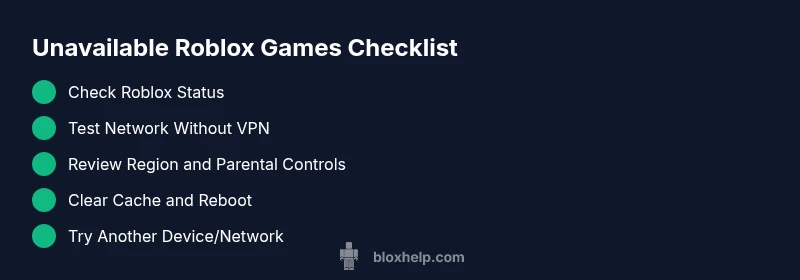
- Confirm Roblox Status: go to the official status page or trusted social channels for outage notices.
- Check Your Internet: run a speed test and try a different network or device.
- Review Regional Settings: confirm your account region matches your actual location and that no regional blocks apply.
- Clear Cache and Reboot: a simple refresh can resolve many loading problems.
- If Necessary, Contact Support: provide game title, platform, region, and screenshots to speed up help.
Steps
Estimated time: 30-45 minutes
- 1
Check Roblox status and outage feeds
Open the official Roblox Status page and trusted social channels to confirm whether the game or service is down. If an outage is active, all fixes on your end are likely temporary and you should wait for Roblox to resolve the issue.
Tip: Note the time of outage and any affected regions to track patterns. - 2
Test your network without VPN
Disconnect VPNs or proxies and switch to your primary home connection. Run a quick speed test and try loading the game again. If it loads, the issue may be routing or VPN-related.
Tip: Use wired Ethernet when possible for stability. - 3
Review region and parental controls
Sign in to your Roblox account and verify the region is correct. Check parental controls or account restrictions that could hide content. Adjust settings temporarily to test access.
Tip: Document settings before changing so you can revert later. - 4
Clear cache and relaunch
Clear the Roblox app or launcher cache and restart the program. Reopen Roblox and attempt the game again. This clears stale data that can block loads.
Tip: On mobile, clear app cache from system settings if available. - 5
Try an alternate device or network
If the game loads on another device or network, the issue is likely device-specific or network-specific. Compare settings and versions to pinpoint the cause.
Tip: Check for pending updates on all devices used for testing. - 6
Contact Roblox support with details
If none of the above steps fix the issue, collect game title, platform, region, timestamps, and screenshots, then contact Roblox Support. They can confirm whether a game is retired or region-locked.
Tip: Include your device specifications and Roblox version to speed up diagnosis.
Diagnosis: Specific Roblox game won’t load or shows as unavailable
Possible Causes
- highRoblox server outage or maintenance
- mediumRegional restrictions or licensing blocks
- lowAccount restrictions, parental controls, or device compatibility issues
Fixes
- easyCheck Roblox Status page and official channels; wait if there is an outage
- easySwitch networks or disable VPN/proxy; attempt a direct connection
- mediumReview region settings and parental controls; adjust as needed
- easyClear app/launcher cache and restart your device
- easyTest on another device or network to isolate the cause
Questions & Answers
Why are some Roblox games unavailable in my region?
Licensing and distribution deals can make certain Roblox titles unavailable in specific regions. Check official regional notices and Roblox Status for region-wide outages or restrictions.
Some Roblox games aren’t available in your area due to regional licensing; check status and region settings to confirm.
Is Roblox down right now?
Use the Roblox Status page or official social channels to confirm outages. Outages can affect specific games or entire services for hours, not days.
Roblox outages show up on the status page; if it’s down, you’ll need to wait for Roblox to fix it.
Can parental controls block access to games?
Yes. Parental controls or account restrictions can hide or block access to certain games. Review and adjust settings to test access again.
Parental controls may hide games; check your settings to regain access.
What should I do if a game is permanently removed?
If a game is retired or removed by the developer, it won’t be playable again. Look for official notices or alternative games that offer similar experiences.
If a game is retired, it can't be played; look for alternatives.
Why does a game load slowly or crash?
Crashes and slow loads can result from device performance, network quality, or memory constraints. Check system requirements, close background apps, and test different networks.
Slow loads are often device or network issues; try a cleaner environment and different network.
When should I contact Roblox support?
If you’ve exhausted basic fixes and the issue persists for a specific game, contact Roblox Support with details like platform, region, and timestamps. They can verify if a game is restricted or retired.
If fixes don’t work, contact support with all details for a faster diagnosis.
Watch Video
The Essentials
- Check Roblox status before anything else
- Region and parental controls matter
- Test across networks and devices
- Escalate to support with details if needed