Can You Get a Roblox Gift Card from Microsoft Rewards?
Explore whether Microsoft Rewards offers Roblox gift cards, how to check eligibility, and safe alternatives for Roblox purchases. Learn step-by-step methods, tips, and common pitfalls from Blox Help to maximize rewards without risking scams.


Microsoft Rewards does not typically offer a direct Roblox gift card in its catalog. You’ll usually find Microsoft Store or Xbox gift cards instead. This guide explains how to verify availability, what you can redeem, and practical steps to potentially support Roblox purchases through rewards, with safety tips from Blox Help.
How Microsoft Rewards catalogs work and what you can expect
Microsoft Rewards operates a catalog of digital gift cards and premium codes that you can redeem with your points. The catalog varies by country and by promotions, so availability can change month to month. In most regions, you’ll see options like Microsoft Store gift cards, Xbox gift cards, and occasionally partner deals. Roblox gift cards are not a guaranteed line item in most catalogs. According to Blox Help, the key is to check your regional catalog regularly and read the fine print about redemption limits and regional exclusives. If Roblox is ever listed, it will be clearly labeled with a points requirement and delivery method. This means you may need to adapt your plan if Roblox isn’t available in your area, and you should explore legitimate alternatives rather than chasing unlikely listings.
- The catalog often rotates; checking back weekly can capture new promotions and limited-time offers.
- Regional availability affects what you can redeem; you may see different options on desktop vs. mobile.
- Always confirm the coupon or code delivery method (instant vs. email) before redeeming points.
What you can typically redeem for Roblox-related purchases
In practice, Microsoft Rewards generally emphasizes Microsoft-related products. While some players wish for a Roblox gift card, most users leverage Microsoft Store or Xbox gift cards to support related purchases within the Roblox ecosystem, such as Robux purchases on platforms that accept Xbox or Microsoft accounts. The Blox Help Editorial Team notes that this approach works best when Roblox supports partial payment via a connected Microsoft account or Xbox balance. It’s essential to know that you cannot assume Roblox will accept every type of gift card in all regions; always verify in Roblox’s payment options and the Microsoft Rewards catalog. If direct Roblox gift cards aren’t listed, your safest route is to redeem for Microsoft Store or Xbox gift cards and then use those funds where Roblox allows payment through linked accounts.
- Verify which payment methods Roblox accepts in your country.
- If using Microsoft Store or Xbox cards, ensure your Roblox account is linked to the correct region.
- Be aware of expiration dates for any redeemed codes.
Eligibility, timing, and how to check before redeeming
The key to success with Microsoft Rewards is understanding eligibility and timing. You should first confirm that Roblox gift cards appear in your local rewards catalog before you deliberate a redemption. If Roblox is not listed, do not redeem for something else with the expectation of using it for Roblox unless you’ve confirmed compatibility. The timing of redemption matters: some codes arrive instantly, while others may require processing. In all cases, keep a receipt or download your redemption confirmation for your records. As a best practice, set a reminder to recheck the rewards catalog during sales or promotional periods. This section highlights what to verify before redeeming, including country, delivery method, code format, and whether Roblox can be redeemed through the Microsoft ecosystem in your region.
- Double-check your country settings in both Microsoft Rewards and Roblox.
- Read the terms for any regional restrictions and redemption windows.
- Save your redemption confirmation until you’ve used the code successfully.
Step-by-step overview (high level) for pursuing Roblox-related rewards
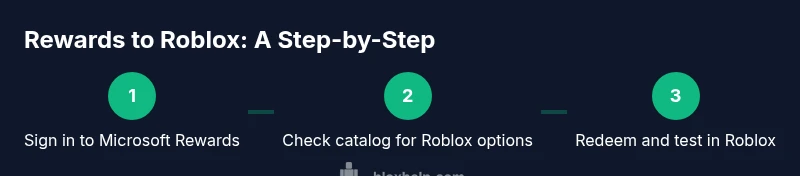
If you’re curious about pursuing Roblox-related rewards, here’s a high-level overview of the process. This section does not replace the formal step-by-step guide below, but it helps you plan your approach and manage expectations. Start by signing into your Microsoft Rewards account, then regularly check the catalog for Roblox or related gift cards. If Roblox isn’t listed, consider alternative methods like Microsoft Store or Xbox gift cards and verify Roblox’s payment options to ensure compatibility. Finally, monitor your account balance after redemption and confirm that the code works as intended in Roblox or on a connected platform.
- Sign in to Microsoft Rewards and scan the catalog for Roblox listings.
- If Roblox isn’t listed, look for compatible alternatives within the same region.
- Confirm code delivery method and test the code in your Roblox account.
Alternatives if direct Roblox gift cards aren’t offered
When direct Roblox gift cards aren’t present in the Rewards catalog, you can still support Roblox purchases by using alternative paths. First, redeem for Microsoft Store or Xbox gift cards and apply them to Roblox where supported by your region’s payment options. Second, consider purchasing Roblox gift cards from reputable retailers outside Microsoft Rewards, which can be redeemed directly in Roblox or charged to your connected account. Finally, explore Roblox Premium or promotions that grant Robux credits through Roblox itself rather than via third-party rewards. Remember to avoid third-party sites that mimic gift card offers, as scams are common in online marketplaces.
- Use trusted retailers for Roblox gift cards when available.
- Verify Roblox’s accepted payment methods before buying.
- Keep an eye on promotions that maximize value without exposing your account to risk.
Safety, scams, and best practices when using rewards for Roblox
Safety should always come first. Never share your Microsoft or Roblox login details, and beware of unsolicited offers that promise Roblox gift cards in exchange for personal data. If a site asks you to enter your password to redeem a Microsoft Rewards code, back away — legitimate catalogs require you to sign in through official portals only. Always verify codes in the official Roblox or Microsoft Rewards interfaces. If something feels off, pause and revert to safer alternatives. The Blox Help team emphasizes sticking to official redemption channels and avoiding “too good to be true” offers.
- Use official portals and trusted devices.
- Watch for phishing attempts via email or pop-ups.
- Regularly review account activity and reward history to catch anomalies early.
Putting it all together: what this means for Roblox players and their budgets
For Roblox players, the possibility of using Microsoft Rewards to fund Roblox purchases varies by region and catalog availability. The prudent approach is to treat Microsoft Rewards as a potential supplement rather than a guaranteed source for Roblox gift cards. Use it to optimize funds if Roblox gift cards appear or to obtain Microsoft Store credits that are compatible with Roblox in your region. In practice, this means staying informed, checking catalogs often, and exploring legitimate alternatives when needed. The key takeaway is to align rewards with Roblox payment options and protect your accounts from fraud, leveraging official channels and trusted retailers whenever possible. The overall strategy is practical: maximize value while minimizing risk, as emphasized by the Blox Help Editorial Team.
Tools & Materials
- Microsoft Rewards account(Active and linked to a region where you can redeem rewards)
- Roblox account(For testing any redemption and payments within Roblox)
- Device with internet access(Desktop or mobile browser for catalog checks and redemption)
- Payment method verification(Ensure Roblox accepts the redeemed gift card type in your region)
Steps
Estimated time: 15-60 minutes
- 1
Sign in to Microsoft Rewards
Open the Microsoft Rewards page and sign in with your Microsoft account. Confirm your country/region is set correctly, as the catalog varies by location. This ensures you see the right redemption options for Roblox-related purchases.
Tip: Double-check region settings before browsing the catalog. - 2
Browse the rewards catalog
Navigate to the rewards catalog and search for Roblox gift cards or related Microsoft Store/Xbox gift cards. If Roblox isn’t listed, note the available alternatives in your region and prepare to adapt your plan.
Tip: Use filters or the search bar to speed up discovery. - 3
Choose a eligible redemption option
If Roblox gift cards are listed, select the option and review the points required, delivery method, and expiration. If not listed, choose a Microsoft Store or Xbox gift card instead and plan how to apply it to Roblox purchases later.
Tip: Read the terms for any regional restrictions. - 4
Redeem your points
Confirm the redemption with your Microsoft Rewards balance. You should receive a code or digital credit in a few minutes, depending on delivery method. Keep the redemption confirmation handy for verification.
Tip: Take a screenshot or save the confirmation email. - 5
Apply the code or credit to Roblox
If you received a Roblox-specific code, redeem it in Roblox or on Xbox/Microsoft store linked to Roblox, following the platform’s payment flow. If you received a Microsoft Store or Xbox card, redeem it in the corresponding store and check Roblox’s accepted methods.
Tip: Ensure the correct Roblox account is linked to the balance. - 6
Test the credit in Roblox
Launch Roblox and attempt a small Robux purchase or Roblox currency transaction to confirm the credit is working. If the credit doesn’t apply, contact support through official channels.
Tip: Test with a low-cost purchase first to confirm validity. - 7
Document the outcome
Record the redemption details, confirmation number, and current balance. If the code didn’t work, note the error message and reach out to support quickly to resolve.
Tip: Keep track of dates and expiration windows. - 8
Review alternatives if needed
If the direct path isn’t available, consider purchasing Roblox gift cards from trusted retailers or using Roblox Premium options to obtain Robux. Always verify compatibility with Roblox payment options.
Tip: Compare value across different sources before buying. - 9
Stay vigilant about safety
Never share passwords or codes with others, and beware of scams posing as rewards programs. Use official portals only and regularly monitor your accounts for suspicious activity.
Tip: Enable two-factor authentication where possible.
Questions & Answers
Can I redeem Microsoft Rewards points for a Roblox gift card directly?
Direct Roblox gift cards are not commonly offered in the Microsoft Rewards catalog. In many regions, you will see Microsoft Store or Xbox gift cards instead. Always verify the current catalog to confirm availability.
Direct Roblox gift cards are not commonly available in Microsoft Rewards; check your region’s catalog for the current options.
What should I redeem if Roblox gift cards aren’t listed?
Redeem for a Microsoft Store or Xbox gift card if available, and verify whether Roblox accepts these funds in your region. If not, consider purchasing Roblox gift cards from trusted retailers outside the Rewards program.
If Roblox isn’t listed, grab a Microsoft Store or Xbox gift card and confirm Roblox accepts it in your region.
Is it safe to use rewards to buy Roblox content?
Yes, as long as you use official portals and trusted retailers. Avoid phishing attempts and never share passwords. If something seems off, stop and contact support.
Rewards can be safe if you stick to official channels and trusted retailers.
How long does it take to receive a redeemed code?
Delivery times vary by method; some codes arrive instantly, others within minutes or hours. Always save the confirmation for reference.
Codes can arrive instantly or within minutes depending on the delivery method.
Can Roblox gifts be used on Xbox only?
If you’re using an Xbox gift card, you can apply it to Xbox-linked Roblox purchases where supported. Roblox on other platforms may have separate payment options.
Xbox gift cards can be used for Xbox-linked Roblox purchases where accepted.
Are younger users restricted from earning rewards?
Microsoft Rewards has age requirements depending on the country. Always check local terms and ensure guardians’ consent where applicable.
Rewards depend on regional age rules, so check local terms.
Watch Video
The Essentials
- Confirm Roblox gift cards appear in your local Rewards catalog before redeeming.
- If Roblox isn’t listed, use Microsoft Store or Xbox gift cards as alternatives.
- Always verify Roblox’s accepted payment methods in your region before buying.
- Keep redemption confirmations and test small purchases first.
- Prioritize official channels and retailer trust to avoid scams.