Roblox Gift Card Redeem: Quick Guide to Robux Today
Learn how to redeem Roblox gift cards to add Robux, check your balance, and troubleshoot common issues across PC, mobile, and consoles. This educational guide from Blox Help walks you through steps, safety tips, and best practices.


Redeeming Roblox gift cards adds Robux to your account and enables purchases in‑game. Redeem codes on PC, mobile, or consoles via the official Roblox page. You’ll need your Roblox account, internet access, and the gift card code. This guide covers the basic steps and how to verify your balance after redemption.
What Roblox gift card redeem means for players
Redeeming Roblox gift cards converts a physical card or digital code into Robux—the in‑game currency used for avatar items, passes, and premium features. When you redeem, your balance typically updates instantly on the Roblox dashboard, letting you spend in a secured environment. The value shown is denominated in Robux, not USD, and taxes may apply depending on your location. Regional rules can affect which items are available, but the core process remains straightforward. According to Blox Help, understanding how this redemption works helps you avoid scams and wasted codes. Always use the official Roblox redeem page and purchase from reputable retailers to protect your code and balance. Private handling of codes is essential; never post codes publicly or share them in chats or forums.
Where to buy Roblox gift cards
Roblox gift cards are available as physical cards in many retailers and as digital codes from authorized online sellers. Buying from trusted sources reduces the risk of counterfeit codes. If you’re managing a family account, digital delivery to a controlled email can prevent loss. In some regions, taxes or local pricing may affect the displayed Robux value. Look for official promotions or bundles on Roblox’s site or from recognized retailers and avoid offers that seem too good to be true.
Roblox balance, Robux vs. memberships
Robux is the in‑game currency earned through purchases or gift cards, while Roblox Premium is a monthly subscription that grants Robux and extra benefits. Gift card redemptions convert to Robux immediately based on the card’s denomination, and Premium benefits are separate from a one‑time gift card. Tracking your balance helps you plan purchases, avatar outfits, and access passes. To maximize value, watch for promotions and bundle deals that provide more Robux per dollar.
How redemption works across platforms
Platform differences primarily affect the UI, not the core redemption flow. On PC/Mac, you typically redeem on the Roblox website; on mobile, you can use the Roblox app or a mobile browser; some codes may be redeemable via a retailer’s app. Consoles like Xbox support Robux purchases through the Roblox app, with the same code entry process. Ensure you stay on the official Roblox domain during redemption to prevent phishing and protect your account. Regardless of platform, a stable internet connection is essential to avoid partial processing.
Common errors and how to fix them
Common errors include invalid codes, region restrictions, or codes already redeemed. If a code fails, recheck for similar-looking characters (O vs 0, I vs 1) and verify there are no extra spaces. Confirm the card’s region matches your account region; some cards won’t work in certain countries. If issues persist, contact Roblox support with the code, purchase location, and account username for faster resolution. Always verify you’re redeeming from the official page to avoid scams.
Verifying balance and using Robux
After successful redemption, the Robux balance usually updates instantly. Open the Roblox app or site and compare your balance with the card’s denomination. If the balance doesn’t reflect correctly, refresh, sign out and back in, or try a different device. Some purchases may appear in the catalog as time‑limited, requiring you to recheck item availability and region compatibility before purchase. Regular checks help you stay on top of your spending and avoid overspending.
Security and scams: protect codes
Treat gift card codes like cash. Do not share codes in public chats, forums, or screenshots. Only buy from official Roblox channels or trusted retailers. If an email or message asks you to share a code for “verification,” verify via Roblox support instead. Enable two‑factor authentication and use a strong, unique password to reduce the risk of account compromise. If you think a code is stolen, contact the retailer and Roblox support immediately.
Alternatives and tips to maximize value
Look for seasonal promotions or bundles that offer more Robux per dollar or exclusive items. Set a personal budget for Robux purchases and use gift cards to manage spending. If gifting to someone else, provide the code securely and guide them through redemption on their own account. Always compare offered Robux value across retailers and time promotions to maximize the return on your gift card purchase.
Tax, regional rules, and timing considerations
Tax rules and regional pricing can affect the final Robux you receive. The Roblox checkout screen usually displays the Robux equivalent before you confirm, helping you decide when to redeem. If you travel or switch regions, ensure your account region aligns with the card’s region to avoid denial. Check local tax policies, as some purchases include tax at the point of redemption.
Practical next steps and brand notes
If you’re new to Roblox, start by redeeming a low‑value card to confirm you can access Robux securely. For ongoing guidance, bookmark the official Roblox support pages and practice safe code handling. By following the steps in this article, you’ll reduce risk and maximize value from your Roblox gift card redeems. The Blox Help team is here to help you get the most from your Robux experience.
Tools & Materials
- Roblox account(You must be signed in to redeem codes.)
- Roblox gift card or digital code(Keep the code private; avoid sharing publicly.)
- Device with internet access(PC, smartphone, or console with browser/app.)
- Code verification method(Have the barcode or digital code handy.)
- Notes for tracking balance(Optional: record balances after redemption.)
Steps
Estimated time: 8-12 minutes
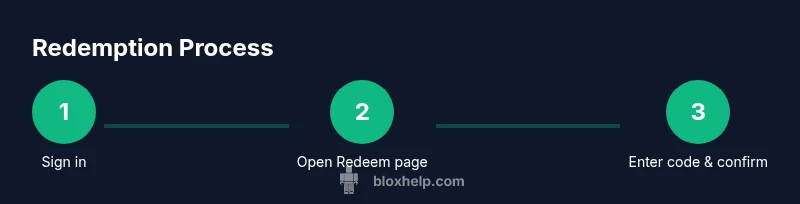
- 1
Sign in to your Roblox account
Open Roblox.com or the Roblox app and sign in with your credentials. This ensures the redemption affects the correct account.
Tip: If you share devices, consider signing out when finished. - 2
Open the Redeem page
Navigate to the official Roblox Redeem page from a trusted device. This is where codes are validated securely.
Tip: Bookmark the page for quick future access. - 3
Enter your gift card code
Type or paste the code exactly as shown on the card. Avoid spaces before or after the code.
Tip: Double‑check similar characters (O/0, I/1) before submitting. - 4
Confirm the redemption
Review the Robux value and confirm. The balance updates immediately in most cases.
Tip: If prompted, sign out and back in to refresh the balance. - 5
Check your new balance
Open your Roblox balance display to verify the Robux amount reflects the card’s value.
Tip: If it doesn’t update, refresh the page and retry. - 6
Redeem on mobile or console
On mobile, use the Roblox app or browser to access Redeem; on consoles, redeem via the Roblox app storefront.
Tip: Keep your device connected to the internet during the process. - 7
Troubleshoot invalid or expired codes
If a code doesn’t work, re‑enter carefully. If still invalid, contact the retailer or Roblox support for replacement.
Tip: Have your receipt, order number, and card details handy. - 8
Secure your codes for future use
Store codes in a private, trusted location and avoid sharing them in chats or screenshots.
Tip: Use two‑factor authentication to protect your Roblox account.
Questions & Answers
What is Roblox gift card redeem?
Roblox gift card redeem converts a card’s value into Robux in your account, enabling purchases in the Roblox catalog. The process is completed on the official Roblox Redeem page.
Redeem a Roblox gift card to add Robux to your account and access catalog purchases.
Can I redeem a Roblox gift card for someone else?
Yes, you can provide the code to the recipient so they can redeem it on their own account. Robux cannot be transferred between accounts, so the recipient’s balance will reflect what their card provides.
The code should be redeemed by the account owner; Robux can’t be transferred between accounts.
Do Roblox gift cards expire?
Roblox gift cards generally do not expire, but terms can vary by region or retailer. Check the card’s terms and the retailer’s policy for any regional limitations.
Most gift cards don’t expire, but always check local terms.
What if the code is invalid or already used?
If a code is invalid, recheck for typos and ensure no spaces. If it’s still invalid or already redeemed, contact the retailer or Roblox support for a replacement.
If a code won’t work, re‑check it and contact support for help if needed.
Is Roblox gift card redemption affected by region or taxes?
Yes, region settings and local taxes can influence redemption availability and Robux value. Ensure your account region matches the card’s origin before redeeming.
Region settings and taxes can affect redemption; make sure your region matches the card's region.
Watch Video
The Essentials
- Redeem on official Roblox pages for safety and accuracy
- Verify balance immediately after redemption
- Protect codes and account with strong security
- Understand regional rules that affect redemption
- Leverage promotions to maximize Robux value