Can You Refund Roblox Items? A Practical Guide
Can you refund items in Roblox? This educational guide explains eligibility, how to request a refund, and practical alternatives, with step-by-step instructions and safety tips for players and aspiring developers.


Roblox generally does not issue refunds for most in-game purchases or Robux. If you suspect a fraudulent charge or a mistaken purchase, you can submit a refund request to Roblox Support via the Help Center. Refunds are evaluated case-by-case and are not guaranteed, so prepare evidence and follow the official process carefully.
What you need to know about refunds for Roblox items
Understanding the question roblox can you refund items starts with recognizing Roblox's overall stance: most virtual purchases, including Robux and in-game items, are considered final once completed. This means refunds are not automatically issued. However, there are limited scenarios where a refund request may be considered, such as unintended charges or suspected fraud. According to Blox Help, the outcome hinges on the specifics of the case, your evidence, and the details you provide. If you are asking how to approach refunds, begin with clear documentation and a calm, precise description of what happened. In practice, you may need to demonstrate that a purchase was unauthorized or that the item was not delivered as described. The question "roblox can you refund items" often boils down to policy interpretation and the substantiation you present to support your claim.
wordCountNum
Tools & Materials
- Roblox account access(Have login handy to verify purchases and access Help Center)
- Purchase receipts or transaction IDs(Screenshots or emails from Roblox confirming the charge)
- Access to the Help Center / Support form(You’ll file a refund request here)
- Evidence of the issue (screenshots/video)(Optional but strengthens your case)
- Device with internet connection(Any device with Roblox access)
- Patience for potential response time(Support may take days to review)
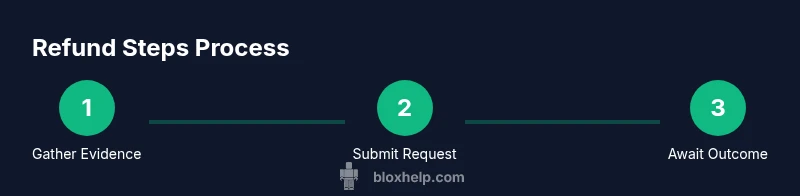
Steps
Estimated time: 45-60 minutes
- 1
Gather purchase details
Collect the exact purchase date, item name, and transaction ID. Take screenshots of confirmation emails or receipts and note any discrepancy between what you expected and what was delivered.
Tip: Having clear, timestamped evidence improves your chances when presenting a refund request. - 2
Check eligibility basics
Review Roblox’s refund guidelines and assess whether your case fits common grounds like accidental charges or non-delivery. Policies can vary by region and item type, so confirm applicable terms for your account.
Tip: If the charge is a fraud concern, report it immediately and document suspicious activity. - 3
Access Roblox Help Center
Open the Roblox Help Center and locate the refund or chargeback form. Use precise language to describe what happened and attach supporting evidence.
Tip: Use a descriptive subject line to ensure your case isn’t overlooked. - 4
Submit the refund request
Fill out the refund form with your account details, purchase information, and a concise explanation of why you believe a refund is warranted. Attach any screenshots or videos.
Tip: Double-check that all details match your records before sending. - 5
Wait for a response
Refund decisions take time as the support team reviews the request. You may be asked for additional information or evidence during the process.
Tip: Set a reminder to check your Help Center messages after a few business days. - 6
Follow up or escalate if needed
If no decision is reached after a reasonable period, send a polite follow-up and, if allowed, consider escalating the issue via official channels or customer service.
Tip: Maintain a professional tone and include your case number when following up.
Questions & Answers
Can I refund a Roblox item if I changed my mind?
Refunds for change of mind are rare; Roblox typically requires a valid reason such as unauthorized access or non-delivery. Gather evidence and submit a formal request.
Refunds for a change of mind are rare, but you can try if you have solid evidence.
Are Robux purchases refundable?
Robux purchases are generally non-refundable, but exceptions exist for fraud or delivery errors. Review your purchase and contact Roblox Support if you believe you qualify.
Robux refunds are uncommon, but possible in specific cases like fraud.
What counts as an eligible refund reason?
Unauthorized charges, incorrect item delivery, or issues where the item fails to function as advertised can be considered for a refund, depending on Roblox policy and evidence.
Eligible reasons include fraud or wrong item delivered, with proper evidence.
How long does Roblox take to respond to a refund request?
Response times vary; expect several days to a couple of weeks. Prepare to provide additional information if requested.
It can take several days to weeks; be ready to share more details.
What should I do if my refund is denied?
If denied, review the reason, gather more evidence if possible, and consider escalation via official support channels or consumer protection options.
If denied, review the reason and ask for clarification or escalate if appropriate.
Watch Video
The Essentials
- Start with clear evidence and a precise description.
- Refunds are not guaranteed and are reviewed case-by-case.
- Use the Help Center to submit a formal refund request.
- Protection and fraud reports should be reported immediately.
- Follow up professionally if you need a faster resolution.