Roblox Game Pass Refunds: A Practical Guide
Explore Roblox refund rules for game passes, eligibility, how to request refunds, and practical tips from the Blox Help team to help you navigate tricky purchases.


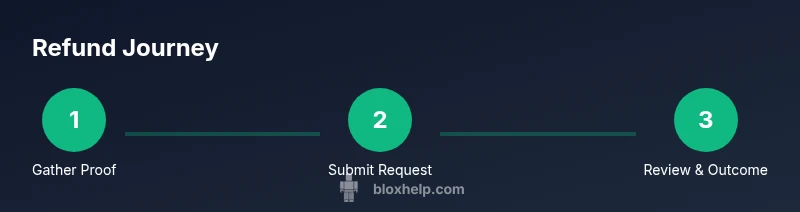
Roblox refunds for game passes are not automatic and depend on Roblox Support's review. To pursue one, gather your purchase proof, account details, and the game pass name, then submit a refund request through Roblox Support. If approved, refunds are issued to your original payment method or as Robux, depending on the case.
What you need to know about Roblox game passes and refunds
Purchasing a game pass in Roblox unlocks features within a game, and many players assume refunds are straightforward. In reality, refunds are not guaranteed and are reviewed on a case-by-case basis by Roblox Support. If you’re asking, you’re not alone: the Blox Help team often fields questions about refunds, especially after accidental purchases or misunderstandings about what the pass provides. The key is to present a clear case with factual details and to be patient through the support process. Remember, refunds are more often granted for legitimate errors or technical issues than for normal usage of a pass. According to Blox Help, the best path is to approach support respectfully, supply evidence, and let them review the specifics of your purchase.
Why some purchases aren’t eligible for refunds
Many game passes are treated like final purchases once the transaction is processed. Roblox’s policy emphasizes that most digital content is non-refundable once delivered, but exceptions can occur if there was a payment error, duplicate charge, or if the item was misrepresented. Because policies can change and may vary by region, it’s important to check the latest guidance on Roblox’s official help pages. If you believe your situation falls into an exception, you should still contact support promptly and provide precise details to improve your odds of a favorable outcome.
How Roblox collects and verifies purchase information
To evaluate a refund request, Roblox Support typically requires you to confirm the exact purchase details. This includes the date of purchase, the order or receipt number, the item name (the game pass), the platform used (PC, mobile, or console), and the account involved. You may also need to show the in-game time when you acquired the pass and screenshots that demonstrate any misrepresentation or error. Keeping records organized (receipts, screenshots, order IDs) will make the review faster and more accurate, increasing your chances of a fair result.
Step-by-step approach to requesting a refund
The most reliable path is to contact Roblox Support and follow their refund process. Start by navigating to the Roblox Help Center, then find the Purchases or Billing section. Submit a ticket with a concise description of the issue, attach proof of purchase, and clearly state why you believe a refund is warranted. After submission, monitor your email and the Help Center for replies. If they request additional information, respond promptly with the requested details to speed up the review.
What information you should gather before contacting support
Before submitting a refund request, assemble: (1) proof of purchase (receipts, order number, date), (2) the game pass name and the game it applies to, (3) your Roblox account username and email on file, (4) a brief explanation of why you want a refund, and (5) any relevant screenshots showing misrepresentation or issues. Having this ready shows you’ve done due diligence and helps support agents resolve your case more efficiently.
The review process: what to expect after submission
Refund reviews can take some time, depending on ticket volume and the specifics of your case. Roblox Support will typically reply with an initial assessment and potential next steps. If a refund is approved, you may receive Robux or a standard refund back to your original payment method, depending on the platform and item. If declined, you’ll usually receive a reason and options to appeal or seek alternatives. Stay patient and respond politely to any follow-ups to keep the process moving.
Common reasons refunds get denied and how to respond
Reasons refunds may be denied include: the pass was shown as delivered, the purchase was not erroneous, or the item was used in a way that implies no error occurred. If you disagree with a denial, you can request a more detailed explanation or provide additional evidence. In some cases, you can appeal or escalate the issue, but avoid demanding outcomes; instead, present a calm, factual case and focus on the specifics.
Alternatives to refunds you can consider
If a refund isn’t granted, you can explore alternatives. Some players swap or exchange items within the game if the developer permits it, or you can keep the pass and use it as intended. Another option is to use the original payment value as Robux if offered by Roblox, or to credit the account for future purchases. Always verify what options are available in your region and on your account.
Best practices to avoid future refund requests
To minimize refund needs, enable spending alerts, set up parental controls if a minor uses the account, and double-check the pass details before purchase. Keeping a list of what you’re buying and the expected outcomes helps you confirm that the purchase matches the described feature set. If you are unsure about a game pass, pause and read user reviews or developer notes before committing.
Tools & Materials
- Roblox account with linked email(Needed to verify identity and access purchase history)
- Proof of purchase (receipt or order number)(Contains date, amount, and item name)
- Screenshots of the purchase and game pass page(Helpful to show what was purchased and what was delivered)
- Device with internet access(Used to submit the refund request and monitor replies)
- List of relevant dates and times(Optional but useful for context and timing)
Steps
Estimated time: 60-90 minutes
- 1
Gather purchase details
Collect the order number, date, game pass name, and the game. This creates a solid foundation for your refund case and speeds up verification.
Tip: Keep everything organized in a single folder or note. - 2
Log in to Roblox Help Center
Access the Roblox Help Center and navigate to the Purchases or Billing section to start a refund request.
Tip: Use a desktop if possible for easier navigation. - 3
Submit a refund ticket
Fill out the ticket with a concise description of the issue, attach proof of purchase, and specify why you deserve a refund.
Tip: Be specific about what happened and why the pass didn’t meet expectations. - 4
Attach supporting evidence
Upload receipts, screenshots, and any correspondence that supports your claim.
Tip: Clear, high-quality images help reviewers understand the case. - 5
Wait for a response
Support will review your submission and respond with a decision or request for more information.
Tip: Response windows vary; check email and Help Center messages regularly. - 6
Provide any requested details promptly
If Roblox requests more information, respond quickly with the exact data requested.
Tip: Delays often occur due to missing or unclear data. - 7
Review the outcome
If approved, the refund will be issued via Robux or your original method based on policy and region.
Tip: Confirm where the refund lands and keep a confirmation screenshot. - 8
Appeal if denied
If denied, review the provided reason and consider submitting a respectful appeal with additional evidence.
Tip: A well-documented appeal can improve odds. - 9
Explore alternatives
If a refund isn’t possible, consider other options like using the credit for future purchases or requesting an exchange if supported by the developer.
Tip: Check developer policies inside the game to see if exchanges are allowed. - 10
Document the process for future purchases
Keep a personal log of purchases, review this before buying, and enable spending alerts to avoid future issues.
Tip: Pre-purchase checks save time and stress later.
Questions & Answers
Can I refund a Roblox game pass?
Refunds are not guaranteed and depend on Roblox Support's review. Provide purchase proof and a solid reason to improve your chances.
Refunds aren’t guaranteed; provide proof and a clear reason, then wait for Roblox Support’s decision.
What information do I need to submit a refund?
You’ll typically need the purchase date, order number, game pass name, game title, and a brief explanation plus any supporting screenshots.
Have your order number, date, game, pass name, and screenshots ready to support your case.
How long does it take to get a refund decision?
Processing times vary; expect a response within a few days depending on ticket volume and case specifics.
Review times vary; you’ll usually get a reply within a few days.
What if my refund is denied?
Ask for a detailed reason and consider submitting an appeal with additional evidence if appropriate.
If denied, request a clear reason and consider appealing with more evidence.
Are there alternative options if a refund isn’t possible?
You might use the value as Robux or look for in-game exchanges if the developer supports it.
If no refund, you could get Robux credit or explore in-game exchange options if available.
Should I enable parental controls before buying game passes?
Yes; enabling controls helps prevent accidental purchases by younger players and can reduce future refund requests.
Enable parental controls to prevent accidental buys and reduce refund needs.
Can I get a refund for a duplicate charge?
Duplicate charges are more likely to be refunded if reported quickly with proof; include both transactions.
If a duplicate charge occurred, report it fast with evidence to improve your odds.
Watch Video
The Essentials
- Know refunds aren’t guaranteed for game passes.
- Gather proof and be precise when submitting requests.
- Respond quickly to information requests from Roblox Support.
- If denied, consider appeals or explore alternatives.
- Prevent future issues with spending controls and careful review.