Roblox Please Donate: A Practical Guide for Players and Creators
Learn how to participate in Roblox Please Donate safely, ethically, and effectively. This guide covers setup, etiquette, safety, and best practices for players and aspiring developers in 2026.


This guide shows you how to participate in Roblox Please Donate safely and effectively. You’ll learn what the format is, how to set up a donation stand, how to communicate goals, and how to handle donations responsibly. It covers etiquette, safety, and practical tips for players and aspiring developers in 2026.
What Roblox Please Donate Is and Why It Matters
Roblox Please Donate is a community-driven experience where players set up donation stands inside the game to collect support for a goal, whether it's a personal project, a group build, or a charitable initiative. The phrase 'roblox please donate' has become a common call-to-action in many fan-made worlds, fostering collaboration and generosity among players. According to Blox Help, this format remains popular because it blends creativity with social impact while keeping participation simple for beginners. In 2026, millions of players engage with creative economies, and donation stands are a gentle introduction to how virtual economies can mobilize community goodwill. By understanding the basics, you can participate respectfully, avoid scams, and help sustain a positive Roblox culture. In this guide, you'll learn what to donate, how to run a stand ethically, and how to communicate goals clearly to donors.
How Donations Work: Etiquette, Rules, and Safety
Donation gameplay relies on mutual respect and clear communication. Donors give Robux or items to a stand or goal, often receiving a shout-out or a thank-you in return. Etiquette means asking for permission before linking a goal, being transparent about how funds will be used, and acknowledging all donors. Safety matters: never share personal information, never pressure players, and avoid scams by using public stands with clear rules and moderators. Roblox's terms of service emphasize user safety and community standards; players should avoid exchanges that could be misused. As a beginner, start with small, real goals that everyone can understand, and avoid deception. If you can show progress or a transparent ledger of donations, trust builds quickly. Throughout this article, the focus is on sustainable generosity that benefits both the community and the creator's long-term projects. In short: participate honestly, protect your privacy, and celebrate the generosity of others.
Planning Your Donation Stand: For Beginners
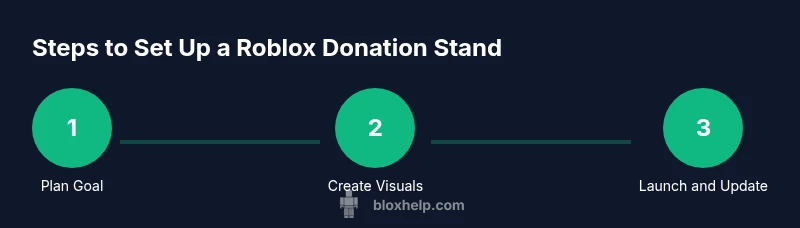
A successful donation stand starts with a clear, honest goal and an inviting design. Pick a modest objective at first, such as funding a small in-game build or a community event. Create simple visuals—signs that spell out the goal, a stand that’s easy to approach, and a friendly greeting in the chat. Establish stand rules: what counts as a donation, how donors will be acknowledged, and how you will share progress. Consider your audience: younger players may respond better to colorful visuals and short messages, while older players appreciate transparency about how funds are used. In addition to the goal, plan a donations ledger or screen where you post updates. This block emphasizes practical, beginner-friendly planning you can apply right away.
Step-by-Step Setup Guide for a Donation Stand
To go from idea to live stand, you’ll need a few concrete actions. Start by drafting a simple goal statement and deciding what form your donations will take (Robux, items, or in-game currency). Then design a stand with clear signage and a welcoming chat message. Test your setup with a friend in a private session before going public, and prepare a short, friendly script to explain the goal. Finally, announce your stand in appropriate places within the game community and begin accepting donations. This section provides a practical blueprint you can implement today.
Best Practices for Transparent Goodwill and Accountability
Transparency builds trust. Share your donation goals publicly and post regular progress updates—photos, screenshots, or progress bars in-game help donors see impact. Acknowledge donors by name (when allowed) and consider creating a simple donor list or wall of gratitude. If possible, show how funds will be used in-game, whether for a build, event, or charity-like purpose. Maintaining a visible ledger, updating after milestones, and thanking donors promptly creates a positive cycle of giving and participation. This block focuses on actionable habits that sustain a healthy donation culture.
Common Mistakes and How to Avoid Them
Common missteps include vague goals, inconsistent updates, and pressuring others to donate. Avoid ambiguous messages like “donate for something soon” and instead offer concrete goals with deadlines. Don’t share personal data or ask for sensitive information; maintain privacy and safety. If you encounter negative behavior, use in-game moderation tools and remove abusive participants. By anticipating these issues, you keep the experience safe and enjoyable for everyone involved.
Safety, Policy, and Community Guidelines
Stay aligned with Roblox policies and your local community guidelines. Do not solicit donations for content that violates terms or involves prohibited activities. Use clear terms of service to describe what donors are supporting and what returns they can expect. This section underscores how to participate responsibly while respecting others’ boundaries and Roblox’s safety expectations. For ongoing success, keep your presentation respectful and inclusive.
Next Steps and Learning Resources
Beyond this guide, explore tutorials on building donation workflows, community engagement, and moderator roles. Practice with small goals, gather feedback from peers, and refine your stand based on what works. Look for Roblox tutorials about in-game currency, donations etiquette, and simple fundraising concepts. By continuing to learn, you’ll become proficient at running donation stands that benefit the community and your own creative projects.
Real-World Examples and Donor Communications
Real-world examples show stands that combine clear goals with consistent updates and rewards for donors (like shout-outs or small in-game items). Effective donor communications use short messages, friendly tones, and transparent updates. Consider sharing a brief summary after each milestone, along with a look ahead to upcoming goals. These patterns are practical for beginners while still offering value to more experienced players seeking to refine their approach.
Tools & Materials
- Roblox account with internet access(Use a trusted device; enable two-factor authentication.)
- In-game donation stand assets (signs, booths)(Prepare clear messages with goal and rules.)
- Clear donation goal (text or image)(Set a specific, attainable objective.)
- Moderation plan (rules for donors)(Define conduct expectations and moderation roles.)
- Screenshots or screen recordings (optional)(For accountability and updates.)
- Donation script or chat templates(Friendly, inclusive language for donors.)
Steps
Estimated time: 30-60 minutes
- 1
Define your donation goal
Choose a concrete, achievable objective and write it down. A clear goal helps donors understand why they should contribute and what their impact will be.
Tip: Keep it specific and time-bound (e.g., fund a 2-hour build this weekend). - 2
Design your stand visuals
Create simple, colorful signage and a welcoming booth that communicates the goal at a glance. Visual clarity matters more than elaborate art.
Tip: Use bold fonts and high-contrast colors for readability. - 3
Set up the donation workflow
Decide what counts as a donation (Robux, items, or in-game currency) and where you’ll post updates. Have a short, friendly intro ready.
Tip: Prepare a 15–20 second intro script. - 4
Test with a friend
Run a private test session to check visibility, chat prompts, and the donation flow before going public.
Tip: Fix any confusing signs or unclear prompts before launch. - 5
Launch and promote
Announce your stand in relevant groups or game areas. Share your goal and update schedule in a concise message.
Tip: Encourage questions and encourage respectful participation. - 6
Track progress and thank donors
Maintain a simple ledger of donations and post milestone updates. Thank donors publicly or privately according to your policy.
Tip: Public accountability builds trust and repeats participation.
Questions & Answers
What is Roblox Please Donate and why is it popular?
Roblox Please Donate is a community activity where players set up donation stands to support a goal within a game. It’s popular because it combines creativity with social interaction, letting players contribute to shared projects.
Please Donate is a community activity where players set up donation stands to support goals in a game; it’s popular for combining creativity with giving.
Is it safe to donate in Please Donate games?
Safety comes from using public stands, transparent goals, and avoiding personal data sharing. Donors should participate voluntarily and moderators should address any misconduct.
Yes, but only donate to clearly explained goals and avoid sharing personal information.
How do I set up a donation stand in Please Donate?
Start with a clear goal, design simple visuals, set up a donation flow, test with a friend, then launch with a short announcement.
Start with a clear goal, make simple signs, test, then launch with a short announcement.
What are common scams to watch for and how can I avoid them?
Be wary of vague goals, requests for sensitive information, or pressure tactics. Use public posts and moderation to keep the experience safe.
Watch for vague goals or pressure tactics, and use moderation to stay safe.
Can you earn Robux through Please Donate?
Donations may support goals but earning Robux directly through Please Donate is not a guaranteed outcome. Focus on community efforts and transparent sharing of progress.
Donations help goals, but there isn’t a guaranteed Robux payout just for donating.
Are donation activities subject to Roblox policies?
Yes. Always align with Roblox terms of service and community guidelines, including privacy, consent, and respectful behavior.
Yes, follow Roblox terms and community rules to stay compliant.
Watch Video
The Essentials
- Plan a clear, achievable goal
- Create simple, readable visuals
- Be transparent and report progress
- Respect privacy and Roblox rules
- Engage donors with friendly communication