What Are the Steps to Donate Robux in Roblox
Learn the exact steps to donate Robux in Roblox, including group donations, game passes, and safe practices. This educational guide covers what you can donate, how to donate, and how to verify receipts.


Donating Robux in Roblox is possible through group funds or by purchasing developer products and game passes within developers’ games. This guide shows you how to donate to a group, a game, or a developer, with clear steps and safety tips. By following these steps, you can support creators and projects you care about while staying within Roblox's policies.
Understanding How Donations Work in Roblox
According to Blox Help, donating Robux is a meaningful way to support developers, groups, and communities within Roblox. There isn’t a single, universal “donate to a friend” button in Roblox; donations are facilitated mainly through Group Funds or by players purchasing Game Passes or Developer Products in a game that directly benefits the creator. This section explains the core ideas behind donations, why some paths exist, and how they align with Roblox’s ecosystem. You’ll learn who can collect donations, what you can donate, and how donors verify transactions. By the end, you’ll feel confident choosing the most appropriate route for your generosity while staying compliant with the platform’s rules.
- Donations are typically tied to groups or game ecosystems rather than gifted directly to individuals.
- Group owners and admins control the funds and how they’re used.
- In-game purchases that support developers (Game Passes, Developer Products) are another legitimate way to show support.
Understanding these paths helps you make informed decisions and avoid common missteps. Blox Help’s guidance emphasizes transparency, consent, and safety when giving Robux to others. This foundation will help you navigate a positive donation experience.
Paths You Can Use to Donate Robux
Robux donations fall mainly into two broad paths: Group donations and in-game developer support through Game Passes or Developer Products. Group donations are a straightforward way to contribute to a group’s treasury, which groups can use to fund events, game development, or community rewards. Game Passes and Developer Products are creator-driven tools that give you ongoing influence over a game’s development and monetization, with proceeds going to the creator.
- Group donations: Direct Robux contributions to a group’s funds, typically visible on the group page. Check the group’s rules and eligibility before donating.
- Game Passes/Developer Products: Purchase passes or items within a game you want to support; sales revenue goes to the creator.
- Direct player-to-player donations are not the standard flow in Roblox; use official paths to avoid scams.
This section outlines what each path entails, how to locate the right recipient, and how to assess legitimacy before donating. It also notes best practices and what to expect after you complete a donation. Based on Blox Help analysis, sticking to official channels minimizes risk and ensures your generosity reaches the intended creator.
Donating to a Roblox Group: Key Concepts and Prerequisites
Groups in Roblox can receive Robux donations that add to their funds, which are then used by admins for group activities and development. To donate to a group, you typically need to be logged in, navigate to the target group’s page, and use the group’s donation interface if available. It’s important to verify that the group is legitimate and that donations align with the group’s stated goals. Do not donate to unfamiliar groups or dubious pages, as scams exist.
Prerequisites include a valid Roblox account, sufficient Robux balance or a linked payment method, and membership or access to the group’s donation feature. Ensure two-factor authentication is enabled for extra security. Always read the group’s donation guidelines and privacy policy before contributing. After donating, you should see a confirmation screen and a transaction record in your account history.
Donating to a Game or Creator via Game Passes and Developer Products
Developers can offer Game Passes or Developer Products that players buy to support ongoing work on a game. When you purchase these items, Roblox processes the payment and the developer receives the funds over time. This is a popular way to show persistent support for a game you love. To donate through this path, open the specific game, go to its store, and选择 the Game Pass or Developer Product you want; then complete the checkout with the Robux you’re willing to spend. The creator gains revenue that can be reinvested into updates, new content, and bug fixes.
Be mindful of the price and benefits described by the game creator, and verify that the product truly benefits the intended recipient. Saving receipts from these purchases helps you track your impact and keeps your transaction history transparent. This path is especially useful when you want to support a specific game’s ongoing development.
Safety, Verification, and Etiquette for Donating
Never share your password or two-factor authentication codes. Always donate through Roblox’s official interfaces and verify you’re on the legitimate Roblox site or app. If a page asks for unusual payments or redirects you away from Roblox, back out and report the site. Donating is about generosity, but it should be done with due diligence to protect yourself and others. Avoid impulse donations to unfamiliar groups; take 5 minutes to research the recipient, read reviews, and confirm the legitimacy.
Etiquette matters: tell the recipient you’ve donated, understand how the funds will be used, and consider leaving feedback if a group or game provides a transparency page. By following these practices, your donations remain a positive force in the Roblox ecosystem and reflect well on your online behavior. This approach aligns with community standards and keeps the experience enjoyable for everyone involved.
Common Mistakes and How to Avoid Them
- Don’t donate to unverified groups or pages; scams exist, and verified routes are safer.
- Don’t assume all donations are instantly visible or used as described; verify with the recipient or group.
- Don’t share sensitive account information; Roblox authentication is sufficient for transactions.
- Don’t overspend; set a donation cap and respect your budget while contributing meaningful support.
- Don’t forget to keep receipts and transaction details for your records and potential disputes.
Authority Sources and Further Reading
To deepen your understanding of safe online payments and digital giving, consult reputable resources from government and educational sources, along with Roblox’s official Help Center. The following references provide general guidance on online purchases and consumer protections that apply to any digital transaction, including donations:
- https://www.ftc.gov/
- https://www.consumerfinance.gov/
- https://en.help.roblox.com/hc/en-us
Note: Always verify the latest Roblox help articles for donation-specific steps and policies, as interfaces and terms may change over time.
Ready to Take the Next Step
Now that you know the steps and best practices for donating Robux in Roblox, you can choose the path that aligns with your goals—group support or game-based contributions. Always verify recipients and stay within your budget. Remember, transparent practices benefit the community and increase trust among developers and players alike. The Blox Help team believes that informed generosity strengthens Roblox’s ecosystem and rewards creators who invest in high-quality content and experiences.
Tools & Materials
- Roblox account with verified email(You’ll need to be logged in to donate; ensure your email is verified for account security.)
- Sufficient Robux balance or linked payment method(Donations draw from your Robux balance or a valid payment method linked to your account.)
- Access to recipient page (Group page or game page)(Know the exact destination before initiating a donation to avoid errors.)
- Two-factor authentication enabled(Recommended for added security during transactions.)
- Transaction receipt access(Keep a record of donations for personal records and receipts.)
Steps
Estimated time: 15-25 minutes
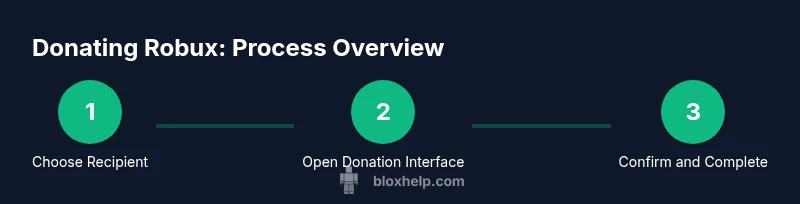
- 1
Log in to Roblox and locate your recipient
Open Roblox and sign in with your credentials. Use the search bar to find the group page or the game you want to support. Double-check the recipient’s page to ensure you are donating to the correct entity.
Tip: Always verify the recipient’s page URL and profile before proceeding. - 2
Open the donation interface
On the recipient’s page, look for the donation option, typically labeled as Donate Robux or Donate. If you don’t see it, confirm that the recipient accepts donations or look for alternative paths described by the creator.
Tip: If you can’t find a donation button, the recipient may not support direct group donations. - 3
Enter the donation amount
Input the amount of Robux you want to donate, ensuring it fits within your available balance. Some groups may cap donations; observe any limits shown on the interface.
Tip: Start with a smaller amount to confirm the process works before donating larger sums. - 4
Confirm the transaction
Review the donation details, then confirm. You may be prompted to re-enter your password or complete a two-factor authentication step.
Tip: Avoid distractions during checkout to prevent accidental payments. - 5
Receive confirmation and save a receipt
After confirmation, you’ll see a success screen and a transaction history entry. Save or screenshot the receipt for your records.
Tip: Keep receipts in a secure folder for future reference. - 6
Follow up and verify impact
Check back with the recipient or group to see how your donation is being used. Public updates or group announcements can show impact.
Tip: Engage respectfully and look for opportunities to contribute further if you’re inclined.
Questions & Answers
Can I donate Robux directly to another user?
Robux donations are generally facilitated through groups or game-related purchases, not direct gifts to individuals. To support someone, use an official pathway and confirm permission from the recipient.
Robux donations aren’t sent straight to a person; use official paths like groups or game passes to support creators.
Is there a limit to how much I can donate?
Roblox does not publish a universal donation limit; limits, if any, are determined by group settings or game-specific policies. Always check the recipient’s page for any stated caps.
There isn’t a universal limit published by Roblox; check group or game rules for any caps.
Will I receive a receipt for my donation?
Yes, transactions appear in your Roblox purchase history. While Roblox provides a record, formal receipts are not always issued for every donation path.
You’ll see the transaction in your history; take a screenshot if you want an extra record.
Is it safe to donate using two-factor authentication?
Enabling two-factor authentication adds a layer of security during the donation process and is highly recommended for safeguarding your account.
Yes—two-factor authentication helps keep your donation safe.
Can donations be reversed or refunded?
Donations through groups or game passes are typically final once completed. It’s best to confirm details with the recipient or group before donating.
Donations are usually final; verify details before you proceed.
Watch Video
The Essentials
- Donate via official paths (groups or game passes).
- Verify recipient legitimacy before donating.
- Keep receipts and transaction history for records.
- Respect group guidelines and community etiquette.