Roblox Gift Robux: A Complete Step-by-Step Guide
Learn how to gift Roblox Robux safely using official gift cards or direct Robux balances. This comprehensive guide covers options, redemption, safety tips, budgeting, troubleshooting, and alternatives, with practical steps you can follow today.


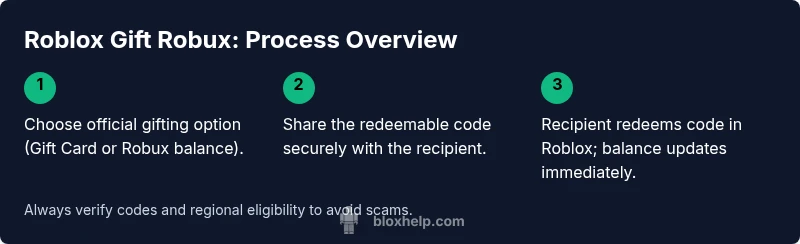
Gifting Roblox Robux is simple: buy a Roblox Gift Card or Robux balance and share a redeemable code with the recipient. You’ll need a Roblox account, a valid payment method, and the recipient’s Roblox username. This quick guide shows you the exact steps to purchase, send, and redeem Robux securely while avoiding common scams. Note regional restrictions may apply.
What Roblox Gift Robux Means
In the Roblox ecosystem, Robux is the premium currency used to unlock items, experiences, and creator perks. The phrase roblox gift robux refers to giving this currency to another player as a gift, typically through official Roblox Gift Cards or by adding Robux to someone’s balance with a redeemable code. Gifted Robux can empower friends to customize avatars, unlock game passes, and support developers. According to Blox Help, many players and guardians seek a safe, redeemable way to celebrate milestones without sharing account credentials. This section clarifies what gifting Robux involves and what it does not—emphasizing official methods and legitimate codes to avoid scams.
Roblox Gift Card vs. Robux balance
- Gift Cards: A pre-paid code you can give to someone, which they redeem in their account to add Robux to their balance.
- Robux balance: Direct Robux credits you purchase for another user’s account via the Roblox store.
Both options require the recipient’s username and a payment method to complete the purchase (for regional availability). Understanding the difference helps you choose the safest and most convenient method for your situation. In many cases, gift cards are the simplest way to control spending and prevent leakage of sensitive payment details. Users should verify they are buying from official Roblox sources to protect against scams.
How gifting Robux fits into family and friend budgets
Gifting Robux can be a thoughtful way to celebrate birthdays, achievements, or milestones, but it’s important to set expectations and boundaries. Consider starting with a modest gift and increasing only after confirming that the recipient will use the funds responsibly. As you plan, discuss gift limits with guardians or family members to avoid overspending. This approach aligns with safer online gifting practices and helps ensure the recipient can maximize the value of the Robux gift without overspending.
Roblox gift robux: what to avoid
Avoid attempting to transfer Robux through unofficial channels, third-party sites, or unverified sellers. These methods carry high risk of fraud, stolen codes, or compromised accounts. Never share your account password or private recovery information for any reason. Use official Roblox gift cards or the Roblox store for safe, traceable gifting. If a deal seems too good to be true, it probably is; stick to official sources and documented redemption processes to protect both you and the recipient.
Safety and privacy considerations for Roblox gifting
When gifting Robux, protect personal data by using private channels to share gift codes. Do not post codes in public spaces like forums or social media comments. Ensure the recipient’s account is legitimate and that they are the intended recipient by confirming their username. Parents and guardians should supervise purchases and verify that gift limits align with household rules. Following these safety practices reduces the risk of scams and helps maintain a positive gifting experience.
Authority sources and best practices for gifting Robux
Reliable guidance comes from official Roblox resources and recognized safety organizations. For responsible digital gifting, verify card authenticity, only redeem on official Roblox platforms, and report suspicious offers. This section provides links to trusted safety resources and explains how to spot common red flags when sharing Robux gifts with friends and family.
How to redeem a Roblox gift card code (recipient perspective)
Redeeming a Roblox gift card involves signing into the recipient’s account, navigating to the Gift Card redemption page, and entering the code exactly as shown. A successful redemption adds Robux to the balance, which can then be spent on games, avatar items, or passes. If the code does not work, double-check the digits, ensure regional compatibility, and contact Roblox support if needed.
Common gifting mistakes and how to avoid them
Rushing the purchase, mistyping the recipient’s username, or choosing the wrong region can lead to failed redemptions or lost gifts. Always verify the recipient’s Roblox username, confirm regional eligibility, and keep the redemption code private until you’re ready to send. Taking a moment to confirm details prevents frustration and makes the gifting experience smoother.
Alternatives to Robux gifts: what else to consider
If you’re uncertain about gifting Robux directly, consider alternatives such as Roblox Premium, game passes, or avatar items. These options can enhance a player’s experience without committing to ongoing Robux expenditures. Evaluating the recipient’s interests helps you select a meaningful gift that fits within your budget and aligns with Roblox’s ecosystem.
Authority sources and further reading
For safety guidelines and consumer protection, refer to official resources from credible sources. The following links offer guidance on online gifting safety and fraud prevention:
- https://www.consumer.ftc.gov
- https://www.scamwatch.gov.au
- https://www.nytimes.com
Tools & Materials
- Roblox account(Your own account to access gifting options and manage purchases)
- Recipient Roblox username(Accurate spelling to avoid sending to the wrong user)
- Valid payment method(Credit card, PayPal, or other supported method)
- Roblox gift card or Robux balance(Official source only; avoid unofficial codes)
- Stable internet connection(Prefer wired or reliable Wi-Fi during purchase and redemption)
- Device (PC, tablet, or phone)(Any device with Roblox access and store capability)
Steps
Estimated time: 15-25 minutes
- 1
Decide gift amount and recipient
Determine a reasonable Robux gifting amount based on your relationship and budget. Confirm the recipient’s exact Roblox username to avoid misdirected gifts. Decide whether a gift card or direct Robux balance best fits the situation.
Tip: Start with a modest amount if you’re unsure about the recipient’s plans. - 2
Choose gifting method
Choose between an official Roblox Gift Card and direct Robux gifting. Gift cards are safer to distribute and redeem, especially for younger players, while direct Robux balances can be quicker for nearby recipients.
Tip: Gift cards are easier to track and control spend. - 3
Purchase or acquire the code
Buy the official gift card or purchase Robux balance from the Roblox store. Ensure you are on an official Roblox site or authorized retailer to prevent fraud and counterfeit codes.
Tip: Keep the code private and double-check digits before sharing. - 4
Send the code securely
Share the redeemable code with the recipient through a private message or a secure channel. Do not post codes publicly to avoid theft or misuse.
Tip: Provide brief redemption instructions with the code to prevent confusion. - 5
Assist with redemption
If needed, guide the recipient through Roblox’s redeem process: sign in, go to the Gift Card redemption page, and enter the code exactly. Confirm the Robux balance updates.
Tip: Verify the code works by having the recipient confirm the balance.
Questions & Answers
Can I gift Robux to someone not on my Friends list?
Yes. You can gift via a Roblox Gift Card or Robux balance by using the recipient’s username. You don’t have to be friends, but you should verify the username to avoid gifting to the wrong person.
You can send a Robux gift to any Roblox user as long as you have the correct username and you gift through official channels.
Are there regional restrictions on gifting Robux?
Gifting options and card availability vary by region. Check Roblox’s store and official gift card availability for your country.
Regional availability can affect whether you can purchase or redeem certain Robux gifts; verify before buying.
Is it safe to share gift codes publicly?
No. Share codes privately to prevent theft or misuse. Public posts invite scammers to claim codes.
Keep codes private and only share with the intended recipient.
What if the recipient cannot redeem the code?
Double-check the digits, ensure regional compatibility, and try redemption again. If issues persist, contact Roblox support with your code and receipt.
If a code won’t work, recheck the code and region, then contact Roblox support if needed.
Can I gift Robux to a child or minor?
Yes, but parental controls and age restrictions apply. Make sure gifting complies with Roblox terms and household rules.
Gifting to minors is allowed with parental oversight and safe gifting practices.
How long does it take to reflect Robux after gifting?
Typically, redemption is immediate once the code is entered correctly. If there’s a delay, verify the code and regional eligibility, then contact support.
Most gifts are instant, but if there’s a delay, check the code and region and reach out for help.
Watch Video
The Essentials
- Choose official gifting methods to stay safe
- Verify recipient username before sending
- Keep codes private and secure
- Balance gifting with a clear budget
- Understand regional availability and restrictions