How to Use Roblox: A Practical Beginner's Guide
Learn how to use Roblox—from account setup to playing games and starting Studio projects. This beginner-friendly guide by Blox Help covers safety, navigation, and your first steps.


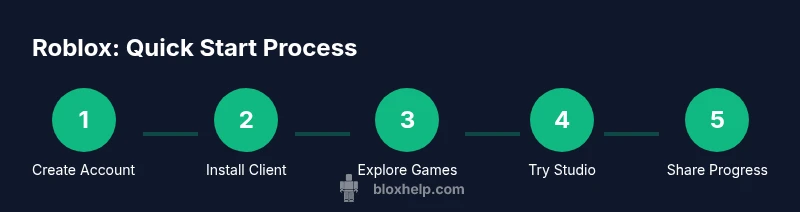
You will learn how to use Roblox by creating an account, installing the Roblox client, and exploring beginner activities like playing community-made games or trying a basic studio project. This quick guide covers setup, safety basics, navigation, and your first steps toward creating or joining experiences in Roblox. Expect practical tips, safety reminders, and links to beginner-friendly games you can try right away.
What Roblox Is and How It Works
Roblox is a global platform that blends gaming with user-generated content. Players create avatars, join games, and even build their own experiences using Roblox Studio. At its core, Roblox runs on a network of experiences created by developers and community members, so no two adventures feel the same. If you're wondering how do you use roblox, the short answer is: you sign up, install the client, and start exploring. You’ll quickly discover a wide spectrum of activities, from fast-paced platformers to collaborative building projects. This section introduces the key ideas behind Roblox so you can dive in confidently.
In Roblox, games are not installed as final software; they are experiences loaded in real time from the Roblox cloud. This means updates, new content, and bug fixes appear automatically when you reconnect to a game. The platform emphasizes accessibility and creativity: you can play solo, join a party, or collaborate with friends. Because Roblox is designed for a broad audience, you’ll encounter friendly defaults and safety features that help you control who can contact you and what content you see. The Blox Help team notes that most new players start by exploring free, kid-friendly titles and then experiment with simple building tasks to gain confidence.
Getting Ready: Accounts, Devices, and Safety
Before you jump into Roblox, make sure you have a plan. You’ll need a Roblox account, a device with internet access, and the Roblox client or mobile app installed. Roblox supports Windows, macOS, iOS, Android, and some consoles, so you can choose the setup that fits your hardware. The first thing to decide is safety and privacy. The platform offers parental controls and account restrictions that help protect younger players, so take a few minutes to review these settings before you play. According to Blox Help, most beginners benefit from starting with a kid-friendly games list and enabling basic privacy controls. Keep your login details secure, and never share personal information in chat, profile, or game messages. If you’re gaming on shared devices, set up a quick log-out routine to prevent others from accessing your account.
Creating Your Roblox Account: Step-by-Step
Creating your Roblox account is straightforward and free. Visit Roblox.com or download the Roblox app and click Sign Up. Enter a username, password, and date of birth. Complete the CAPTCHA and verify your email or phone if prompted. Choose your privacy settings to control who can message you and who can join your games. Remember: your username is public, so avoid sharing identifying information. The goal is to establish your identity on Roblox while keeping your real-world information private. If you run into issues signing up, check that you have a stable internet connection and that you’re not blocking essential cookies.
Navigating the Roblox Client and Home Screen
The Roblox client presents a clean home screen with sections for Discover, Games, and Avatar customization. Use the search bar to find games by title, genre, or creator, and use filters to narrow results by experience level, popularity, or age rating. The Home tab often highlights trending experiences and curated picks, which is a great way to discover beginner-friendly titles. Take a moment to visit your account menu, where you can adjust privacy settings, manage friends, and customize your avatar. If you’re unsure where to start, try the “All Games” section and look for titles labeled as beginner-friendly or kid-safe.
Playing Games: Discover, Join, and Play
Roblox games (experiences) are experiences you can join with a click. Start by exploring categories like Adventure, Obby (obstacle courses), or Roleplay to see what fits your interests. When you find a game you like, click Play and wait for it to load; some games require a quick update or an asset download. While you play, pay attention to in-game chat, controls, and the avatar’s actions. You’ll quickly learn common patterns—how to run, jump, or interact with objects—and you’ll start recognizing popular creators and consistent design styles across experiences.
Roblox Studio: A Quick Start for Beginners
Roblox Studio is the creator tool that lets you build and publish experiences. Start with the “Baseplate” template to learn the basics: inserting parts, manipulating objects, and using simple scripting with Lua. Don’t worry about perfection at first—focus on understanding the interface, the Explorer, and the Properties window. As you gain comfort, try a tiny build, such as a simple obstacle or a tiny room, to see how changes affect gameplay. The Studio environment rewards experimentation and iterative testing, so save frequently and test your scene often.
Building Your First Simple Experience
Begin with a single-room project or a tiny obstacle course. Plan your layout on paper and then recreate it in Studio using basic parts. Add a couple of interactive elements—like a door that opens when a character steps on a button—to learn about events and scripting. Keep assets lightweight and test often. Remember to save frequently and publish a private version for review before sharing publicly. This practice builds confidence without overwhelming you with complexity.
Safety, Privacy, and Moderation Essentials
Safety in Roblox starts with strong account hygiene and mindful sharing. Enable account security features, such as two-factor authentication where available, and set privacy options to limit who can contact you or join your experiences. Be mindful of your profile details, as they are visible to others. Roblox moderation helps remove inappropriate content, but it’s still essential to report anything unsafe. For younger players, request parental involvement to review settings and explain what behavior is acceptable in the community.
Common Beginner Challenges and Quick Fixes
New players often struggle with navigation, avatar customization, and understanding game controls. If a game won’t load, check your internet connection and try a different server. For awkward controls, revisit the control scheme in the game’s settings or menu, and consider using accessibility options. If you encounter chat issues, review the privacy and filtering options and ask a trusted adult for guidance on what’s acceptable to share in public spaces.
Next Steps and Getting More Help
With the basics in place, broaden your Roblox toolkit by exploring beginner-friendly studios, joining creator communities, and watching official tutorials. Create a short project to reinforce what you learned, then publish privately to collect feedback. Use safety settings consistently and keep an eye on updates from Roblox and reliable Roblox education channels. As you practice, you’ll build both confidence and skill that translate into more ambitious builds and better game experiences.
Tools & Materials
- Roblox account(Create your free account using a valid email or phone number)
- A device with internet access(PC, Mac, tablet, or smartphone)
- Roblox client/app(Download the Roblox launcher or mobile app)
- Optional: Headphones or speakers(To hear game audio clearly)
- Optional: Stable Wi-Fi(Better streaming and fewer disconnects)
Steps
Estimated time: 60-90 minutes
- 1
Create your Roblox account
Visit Roblox.com or open the Roblox app and tap Sign Up. Enter a username, password, and your birthdate. Complete any verification prompts and set basic privacy controls from the start. This establishes your identity on Roblox and prepares you for safe exploration.
Tip: Choose a unique username, and enable basic privacy controls early to reduce unsolicited messages. - 2
Install and sign in to the Roblox client
Download and install the Roblox launcher on your device or install the mobile app. Sign in with the credentials you created in Step 1, then allow the app to update to the latest version. A stable connection helps games load smoothly.
Tip: Use a reliable network during first launches to avoid missing updates. - 3
Explore the Home screen and discover games
Use the Discover tab and the search bar to find beginner-friendly games. Look for titles with student-friendly ratings or “beginner” tags. Try a few short games to learn basic controls and game interfaces.
Tip: Filter results by “beginner” or “popular” to quickly find accessible experiences. - 4
Join a game and learn basic controls
Click Play on a chosen game and wait for it to load. Observe how players move, interact, and communicate. Practice basic actions like run, jump, crouch, and perform simple interactions in a safe, supervised environment if possible.
Tip: Take a moment to adjust the camera and sensitivity in options for comfortable control. - 5
Try Roblox Studio with a tiny build
Open Roblox Studio, select Baseplate, and insert a few blocks to recreate a small room. Move objects to arrange space and test how a basic interaction works. Save your work frequently so you don’t lose progress.
Tip: Start with a tiny project; you can always expand later. - 6
Save, test, and share your work
Test your scene by playing from Studio to verify interactions. Save your project and consider publishing privately to gather feedback from trusted friends or mentors. Iterate based on what you learn.
Tip: Regular saves prevent data loss during experimentation.
Questions & Answers
What do I need to start using Roblox?
You need a Roblox account, a device with internet access, and the Roblox client or app. Start with free games to learn the basics.
To start, sign up, download the Roblox app or launcher, and pick beginner games to learn.
Is Roblox safe for kids?
Roblox includes safety features like account restrictions and privacy controls. Parents can enable controls and monitor activity.
Roblox offers safety features, but parental involvement helps ensure a safe experience.
Do I need Roblox Studio to play games?
No. You can play games in the Roblox client without Studio; Studio is for building experiences.
No, you can start playing games immediately and explore building later.
How do I find beginner-friendly games?
Look for 'Popular Picks' and 'All Games' categories; filter by 'Experience Level: Beginner' if available.
Try searching for 'beginner friendly' or check curated lists.
What if I forget my password?
Use the Roblox account recovery process via the login screen; follow prompts to reset.
If you forget your password, use the account recovery flow.
Watch Video
The Essentials
- Create your account and install the client
- Explore the home screen to find games and creators
- Open Roblox Studio for a basic build
- Prioritize safety and privacy settings
- Practice with beginner tutorials to build confidence