PC for Roblox: How to Build a Roblox-Ready Desktop PC
Learn how to choose and assemble a PC for Roblox, covering play and Roblox Studio, upgrade paths, and budget ranges to achieve smooth performance in 2026.


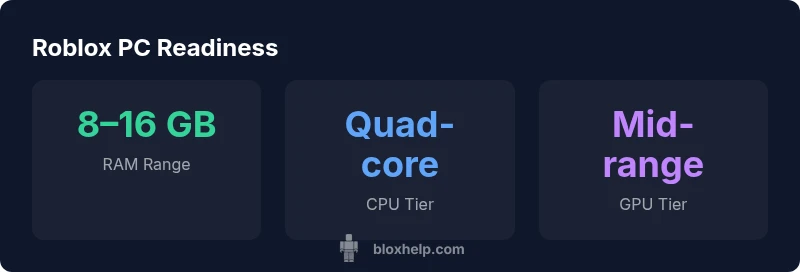
To run Roblox at smooth frame rates, a modest desktop will do: Start with at least 8GB RAM and a mid-range GPU, paired with a capable quad-core CPU. For Roblox Studio and development, aim for 16GB RAM and a dedicated GPU. In 2026, balance CPU, GPU, and RAM within your budget to optimize the pc for roblox experience.
Understanding Roblox's Hardware Demands
Roblox is designed to run on a wide range of hardware, from older desktops to modern gaming rigs. The core requirement is a balance between a competent CPU, sufficient RAM, and a GPU that can render the game at your target resolution and detail level. For players, the emphasis should be on stable memory bandwidth and consistent frame rates rather than chasing maximum eye candy. For developers using Roblox Studio, real-time scripting, editor rendering, and multiple windows demand additional headroom, especially when testing complex scenes. The term pc for roblox has become shorthand for a system tuned to deliver solid play sessions and efficient development workflows without overbuying hardware.
Minimum vs Recommended: What You Really Need
In practice, you can start Roblox on a basic setup, but the experience improves dramatically as you add memory and GPU headroom. A practical baseline is 8GB of RAM with a mid-range GPU and a capable quad-core processor. If your budget allows, 16GB RAM and a stronger GPU will deliver smoother gameplay, faster texture loads, and more comfortable multitasking when Roblox Studio is open alongside other apps. For developers, memory headroom matters more because Studio renders real-time previews and runs multiple scripts, which can consume more resources than playing alone. Aim for a system that can keep at least 60 frames per second at your target resolution on Roblox playgrounds and in Studio, and remember that turning down post-processing effects can extend the life of an entry-level GPU.
Roblox Studio vs Roblox Gameplay: What Changes
Roblox Studio places heavier demands on memory and GPU power due to the editor, asset import, and live testing. While Roblox gameplay primarily relies on GPU rendering and consistent frame rates, Studio benefits from extra RAM to reduce editing lag. If you mainly play Roblox, you can start with an 8GB/ mid-range setup, but if you plan to develop, budget for 16GB RAM and a stronger GPU, then consider a faster SSD and better cooling. Keeping drivers current and minimizing background tasks helps sustain performance in both modes.
CPU, GPU, and RAM: How to Balance on a Budget
Balancing these three components is more about your goals than chasing a single benchmark. For a tight budget focused on play, a quad-core CPU, 8GB RAM, and a mid-range GPU can deliver solid 1080p Roblox performance at medium settings. If Roblox Studio is on your roadmap, allocate funds to 16GB RAM and a stronger GPU, then consider a faster SSD and better cooling. Practical shopping tips include bundles, evaluating used hardware, and prioritizing RAM upgrades first because memory bottlenecks are common in scripting-heavy projects.
Storage, Cooling, and Peripherals: Small Details that Matter
While CPU and GPU capture most headlines, storage speed and cooling influence long-term stability. An SSD reduces load times and helps the game world stream textures smoothly. Good case airflow and quiet fans keep temperatures in check during long development sessions. Peripheral quality—keyboard, mouse, and a reliable monitor—also shapes your Roblox experience, especially when testing UI scripts and GUIs.
Laptop vs Desktop: Which Is Best for Roblox
Portability matters if you travel with your setup, but desktops typically offer the best bang for buck and upgrade paths for Roblox-focused builds. Laptops can handle Roblox play and light Studio work, especially if you choose models with 16GB RAM and a dedicated GPU, but they may be constrained by thermal limits and limited upgrade options. Consider a desktop first if you want the most performance per dollar, and reserve a laptop for on-the-go development only if you need it.
Common Pitfalls and How to Avoid Them
Don't overestimate a single spec—RAM, CPU, and GPU all contribute to Roblox performance. Avoid relying on integrated graphics for intensive Studio tasks; if possible, pair a discrete GPU with sufficient RAM. Skipping an SSD can slow load times and texture streaming, which hurts both play and development workflows. Finally, neglecting driver updates and background processes can quietly erode performance over time.
Practical Build Scenarios: Play vs Dev
Play-focused build: 8–12 GB RAM, a mid-range GPU, and a quad-core CPU balance cost and performance for smooth Roblox gameplay at 1080p. Roblox Studio workstations: 16–32 GB RAM, a mid-to-high range GPU, and an SSD for fast load times and responsive editing. If you want a ready-to-go setup, aim for an upgrade path that starts with RAM and storage improvements now and adds a better GPU later as your projects grow.
PC specs for Roblox play and development
| Aspect | Recommended Range | Notes |
|---|---|---|
| RAM | 8–16 GB | Multitasking & Roblox Studio |
| CPU | Quad-core or better | Smooth scripting & physics actions |
| GPU | Mid-range or better | Higher frame rates & visuals |
| Storage | SSD preferred | Faster load times & texture streaming |
| Budget | $300–$900 | Balances performance with cost |
Questions & Answers
What is the minimum PC spec for Roblox?
Roblox runs on a wide range of hardware. For play, an 8GB RAM setup with a mid-range GPU is comfortable; Roblox Studio benefits from 16GB RAM for editing and testing. If you’re on a tight budget, start with the basics and upgrade as needed.
Roblox works on many systems, but upgrading RAM to at least 8GB and adding a mid-range GPU makes it smoother, especially if you also use Roblox Studio.
Is Roblox Studio more demanding than Roblox playing?
Yes. Studio involves real-time editing, asset import, and live testing, which typically require more RAM and GPU headroom than playing. A 16GB RAM configuration with a dedicated GPU is a safer target for development work.
Studio tends to be tougher on your PC, so plan for more RAM and better graphics than you’d need for playing alone.
Do I need a dedicated GPU for Roblox?
A dedicated GPU improves frame rates and texture rendering, especially at higher settings or in Roblox Studio. If you’re on integrated graphics, you can still play Roblox at lower settings, but a mid-range GPU is a wise investment for future-proofing.
A dedicated GPU helps a lot for Roblox, especially if you’re editing or testing complex scenes.
Can Roblox run on Mac or Linux PCs?
Roblox supports macOS, and many Windows players also run Roblox on Linux via compatibility layers. However, performance and compatibility can vary by hardware and driver support. For best results, match your OS with a balanced Roblox-friendly PC setup.
Roblox works on Mac and some Linux setups, but check driver compatibility and setup specifics for your system.
What’s the best budget for a Roblox-ready PC?
A practical Roblox-ready build can be achieved around $300–$900, focusing on RAM upgrades first, then a solid GPU, and finally dependable storage. If you plan Roblox Studio work, expect to invest toward the higher end of that range.
You can start with a budget around a few hundred dollars and upgrade RAM before adding more GPU power.
Should I upgrade my PC if I already own a gaming laptop?
Laptops can handle Roblox play and light Studio work, but thermals and upgrade options are limited compared with desktops. If you travel often, a capable laptop is fine, but a desktop gives the best performance-per-dollar for Roblox development.
If you need power on the go, a capable laptop works; for heavy Roblox Studio work, a desktop tends to be better value.
“A well-balanced PC for Roblox doesn't require the absolute top hardware; prioritize RAM and a reliable GPU, then upgrade as your projects grow.”
The Essentials
- Balance RAM, CPU, and GPU for Roblox performance
- Roblox Studio demands more RAM than gameplay
- Prefer SSDs for faster loads and smoother streaming
- Upgrade RAM first to curb bottlenecks
- Budget ranges $300–$900 for Roblox-ready builds