How to Play Roblox for Free Using Google in 2026
Learn how to play Roblox for free using Google safely. This step-by-step guide covers official sites, account setup, cross‑platform access, and scam avoidance for 2026.


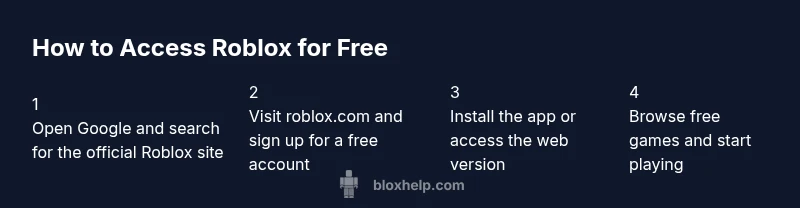
Yes. You can play Roblox for free by going through official Roblox pages found on Google, not third-party download sites. Create a free Roblox account, install the Roblox app or use the web player, and explore thousands of free-to-play games—special items cost Robux, not entry. Always verify you’re on roblox.com or the official app to avoid scams.
Why Google is Your Safe Start for Roblox
When you search for Roblox on Google, you should aim to land on official sources such as roblox.com or the official app listing. This approach minimizes exposure to misleading pages or malware. If you're curious about play roblox for free on google, use official sources like roblox.com and the mobile app. The Blox Help team emphasizes using trusted links and verified domains to begin your Roblox journey. A safe start means you won’t be asked to download untrusted software or pay upfront to access games. By following official pages, you’ll discover thousands of free-to-play experiences and the option to buy cosmetic items with Robux later if you choose.
What You Need Before You Start to Play Roblox for Free
Before you dive in, assemble a few essentials. A device with internet access (PC, smartphone, or tablet) lets you reach Roblox’s services. An official, free Roblox account is required to save your progress and join games. Use the official Roblox app or the web version at roblox.com to sign in. For safety, ensure your browser or app is up to date and your connection is secure. Optional safety tools, like parental controls, can help guide content and spending.
Understanding Free-to-Play on Roblox and What Costs Exist
Roblox operates on a freemium model: you can explore, create, and play many games for free. Some games include optional paid content, and many items inside the Roblox catalog require Robux. Free participation is the norm, but Robux purchases unlock cosmetics, gear, or access to certain experiences. It’s important to distinguish between entry costs and in-game purchases and to monitor your account balance, especially for younger players. The platform also hosts user-generated content, which means quality and safety vary by game.
Finding the Official Roblox Pages via Google
When you search play roblox for free on google, look for results that clearly indicate Roblox’s official domains (roblox.com, developer.roblox.com, or the Roblox app store listing). Verify the site uses a secure connection (https) and displays the official Roblox branding. Bookmarking the canonical Roblox page helps you avoid redirections to scam sites. If you ever see requests for personal information outside Roblox’s official site, back out and report the page.
Safety, Scams to Avoid When Searching Online
Online scams often lure users with promises of free Robux or hacked accounts. Never share passwords or payment details on unfamiliar pages. Be wary of shortened links, pop-up prompts, and unsolicited chats offering free currency. Use two-factor authentication where available and stick to verified domains. If something seems off, pause and verify on the official Roblox site or through the Support Center.
Optimizing Your Free Roblox Experience Across Devices
Roblox supports many platforms, including PC, iOS, Android, and consoles. Sign in on whichever device you prefer and save your favorites for quicker access. Free games continue to load quickly on modern devices, but performance varies with hardware and network speed. You can adjust video quality, turn off in-game purchases, and use parental controls to tailor content and spending limits across devices.
Google Search Tips for Roblox: Getting the Right Results
Use precise queries like “Roblox official site,” “Roblox free games,” or “Roblox play online without download.” Include the word official to filter for legitimate sources and avoid fake pages. Check the page’s URL and ensure it ends with roblox.com or is an official store listing. Consider adding site:roblox.com to your search to constrain results to Roblox’s domains.
Accessibility and Cross-Platform Play
Roblox is designed to run on a wide range of devices, from low-spec PCs to smartphones and consoles. Your username and progress carry across platforms when you sign in with the same account. If you plan to switch devices, ensure you’re logged into your Roblox account and that your internet connection remains stable. This flexibility makes it easy to play for free on Google-backed paths anytime.
Safety, Privacy, and Parental Controls
For younger players, enable parental controls and privacy settings to limit who can interact with accounts and what games are recommended. Regularly review app permissions and in-game chat settings. Roblox also provides Safety Features like account PINs and content moderation reports. Staying informed about privacy options helps you play responsibly and keeps your experience enjoyable.
Tools & Materials
- Device with internet access(PC, smartphone, or tablet)
- Official Roblox account(Create a free account on Roblox)
- Official Roblox app or Roblox website(Use roblox.com or the app from app stores)
- Secure connection and updated browser(Ensure https and latest browser/app)
- Optional safety tools (parential controls)(Enable content filters if needed)
Steps
Estimated time: 25-45 minutes
- 1
Open Google and search for Roblox official site
Open Google on your device and type a precise query to land on Roblox's official domains. Look for roblox.com results with official branding. This initial step ensures you’re on a safe, legitimate page.
Tip: Check the domain: links should end with roblox.com or official app store listing. - 2
Click the official Roblox result and verify
Open the link that clearly shows the official Roblox domain. Verify the site uses https and displays the Roblox logo. If you’re unsure, navigate to roblox.com directly from the address bar.
Tip: If you’re on a questionable page, back out and search again. - 3
Create a free Roblox account
Fill in the standard signup fields to create a free account. You’ll choose a username and password and confirm your date of birth for age-appropriate experiences.
Tip: Use a strong password and an email you control for recovery. - 4
Choose your access method
Decide whether to use the Roblox app or the web-based player. Both give you access to the same free-to-play experiences, with differences in UX.
Tip: On mobile, download the official Roblox app from your store. - 5
Browse for free-to-play games
Explore the catalog, filter by free-to-play, and join games that don’t require upfront payment. Remember many experiences are free to enter but may offer in-game purchases.
Tip: Look for “Free” tags and avoid paid DLCs if you only want free play. - 6
Adjust safety settings
Review privacy and security settings to prevent unwanted interactions. Enable friend requests filters and limit chat exposure when possible.
Tip: Turn on two-factor authentication when available. - 7
Join a game and start playing
Tap a game to load and enter; you can play with friends or solo depending on the title. Use the in-game controls to move, jump, and interact.
Tip: If a game loads slowly, retry or try a different title. - 8
Log out or switch accounts as needed
When you’re done, log out to protect your account if you’re sharing a device. You can close the browser or app to end the session.
Tip: Remember to sign back in with your saved credentials later.
Questions & Answers
Is Roblox free to play?
Yes. Roblox is free to start; many games are free-to-play with optional purchases.
Roblox is free to start, with many games that you can play without paying.
Do I need Roblox Premium to play?
No. You can play most games without Roblox Premium; Premium unlocks extra features and items.
You don’t need Premium to play most games; it unlocks extras.
Can I play Roblox on mobile?
Yes, Roblox is available on iOS and Android via the official app.
You can play on mobile using the official Roblox app.
Are there scams when searching on Google?
Yes—stick to official roblox.com pages and the app store to avoid scams.
Be wary of fake sites; use official Roblox domains.
How do I avoid unintended purchases?
Use in-game spending controls and disable in-app purchases if needed.
Turn off purchases or set spending limits to stay safe.
Watch Video
The Essentials
- Verify official Roblox domains before starting
- Free access exists; purchases are optional
- Protect accounts with strong passwords and 2FA
- Enable safety settings on all devices