Roblox Avatar Drawing: A Complete Step-by-Step Guide
Learn how to draw a Roblox avatar from scratch with beginner-friendly steps, shading tips, and practice drills. A practical, educator-led walkthrough for Roblox players and aspiring developers seeking hands-on art techniques.


With this guide, you’ll transform simple shapes into a recognizable Roblox avatar drawing. Start by assembling basic pencils, paper, eraser, and optional digital tools. You’ll learn proportions, blocky limbs, and Roblox-style clothing through a clear, stepwise process. According to Blox Help, begin with a clean silhouette to lock in proportions before adding features, shading, and color. This approach works for beginners and aspiring Roblox developers.
Anatomy of a Roblox Avatar
A Roblox avatar drawing relies on simple geometric forms that come together to form a recognizable, blocky character. Start with a large, rounded head and a rectangular torso, then extend cylindrical arms and legs. The signature look comes from clean, angular lines and minimal facial detail. While the shapes are basic, proportional relationships matter: a taller torso and slightly longer limbs create a balanced silhouette. Throughout this guide, we’ll focus on maintaining correct proportions while keeping the familiar Roblox aesthetic. Practice drawing these core shapes from memory, then overlay them to form a cohesive character. As you progress, you’ll notice how shading and color bring depth without breaking the avatar’s distinctive blocky feel. For aspiring developers, this same process translates into character design for games and scenes.
Sketching the Silhouette
The first step in any Roblox avatar drawing is a light, loose silhouette that captures overall pose and proportion. Begin with an oval for the head and a rounded rectangle for the torso. Connect with light, straight lines for limbs to define the pose. This stage is intentionally simple; the goal is to establish a solid foundation before adding details. Keep your lines faint so you can erase easily as the shape evolves. If you’re unsure about proportions, compare the head size to the torso; in Roblox style, the torso is roughly the same height as the head plus a bit more for the neck. Sketch several quick silhouettes to select the most dynamic pose. For visual learners, refer to the diagrams included in this article to reinforce your memory.
Blocking in the Torso, Head, and Limbs
With the silhouette established, start blocking in the main body parts using basic shapes. Draw a cube-like torso, a rounded head, and cylindrical limbs. You’ll want the torso width to be about the same as the width of the head, with arms and legs aligned to suggest a natural stance. Use light construction lines to keep the proportions flexible. This block-in stage is where you translate a silhouette into a believable figure. If something looks off, adjust the angles of joints and the length of limbs rather than forcing a perfect finish on the first pass. Remember, the Roblox avatar drawing thrives on clean, simple geometry that reads clearly at small sizes.
Detailing the Head and Face
Head details define personality while preserving the iconic Roblox silhouette. Add eyes as simple tints or small ovals, a small nose line, and a curved mouth if desired. Hair style can dramatically change the character’s vibe; keep hair shapes bold and well-separated from the head outline so the silhouette remains readable. Avoid overloading facial features— Roblox avatars often rely on minimal cues to convey expression. Practice drawing several variations to learn how tiny changes alter the overall look. When in doubt, pause to compare your head proportions with a reference image of a standard Roblox avatar.
Clothing, Accessories, and Roblox Style
Clothing should reinforce the blocky geometry: square shoulders, a straight hem for shirts, and simple shapes for pants. Accessories like backpacks, hats, or badges should sit on top of the torso without compromising the silhouette. For color harmony, limit your palette to 3-4 bold colors that replicate the Roblox aesthetic. When learning, sketch the clothing as flat color blocks before adding shading. This approach keeps the character readable and faithful to the Roblox style even at smaller in-game sizes.
Coloring and Shading Techniques
Color adds life to your Roblox avatar drawing. Start with base colors for skin, hair, clothing, and accessories, then apply light shading on the side opposite your light source. A single light source creates clean, readable shadows along the torso and limbs. Use soft pencils or light markers to build up tonal values gradually, avoiding harsh lines. For digital artists, layers are your friend: keep the base colors on one layer, shading on another, and highlights on a third. Consistent lighting will unify the avatar’s look and make it pop in Roblox scenes.
Common Mistakes and How to Fix Them
Common issues include misaligned limbs, disproportioned heads, and overly complex outfits that obscure the silhouette. Fix by simplifying shapes and rechecking proportions against a reference. Another pitfall is uneven shading—keep your light source consistent and build shadows gradually. Finally, avoid cluttering the silhouette with tiny details that hide the character’s recognizable shape. When you spot a mistake, pause, redraw only the affected area, and keep pencil marks light until you’re satisfied with the final result.
Practice Drills to Build Skill Fast
To accelerate progress, commit to short, focused drills: draw 5 silhouettes in 5 minutes, complete 10 quick head sketches, or color a single robot-like outfit in three shades. Regular, consistent practice builds muscle memory and makes the Roblox avatar drawing feel second nature. For beginners, start each session by reviewing a quick reference sheet of the basic Roblox silhouette. As you gain confidence, increase complexity by adding hair, clothing, and accessories in incremental steps.
Project: Draw a Simple Roblox Avatar in 15 Minutes
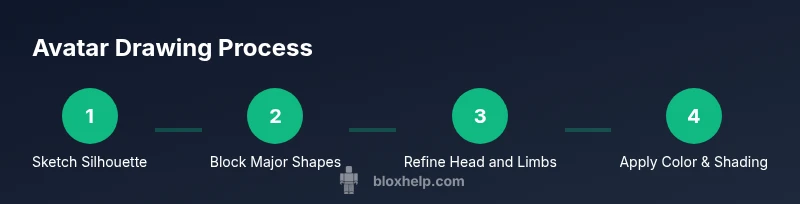
Challenge yourself with a timed exercise: in 15 minutes, sketch and color a simple Roblox avatar. Begin with a silhouette, block in major shapes, and finalize with color shading. Keep the pose dynamic but uncluttered; use a single light source and a small color palette. This exercise reinforces speed and accuracy, helping you translate ideas to pixels or prints quickly. After completing the project, compare your result with a reference and note areas for refinement.
Integrating Your Avatar into Roblox Scenes
A great Roblox avatar drawing comes to life when placed in a scene. Practice composing simple backgrounds that don’t overwhelm the character, like a neutral classroom setting or a stylized game arena. Consider how lighting, perspective, and color balance with the avatar. If you’re comfortable, experiment with different poses and camera angles to create engaging screenshots for showcasing your work. Sharing your scenes with fellow Roblox players can provide feedback that speeds up your improvement.
Advanced Tips for Aspiring Roblox Developers
For advanced artists and aspiring developers, explore vector-based shapes to keep edges crisp at any size. Build a small library of reusable parts: heads, torsos, and limbs with consistent proportions, so you can mix and match to create new characters quickly. Practice rendering outfits and accessories as separate layers to preserve flexibility for in-game customization. Finally, study Roblox avatars of various creators to understand how shading and color choices impact perceived material, texture, and style.
Tools & Materials
- Pencils (HB and 2B)(Use light pencils for initial sketches and darker for final lines)
- Eraser (kneaded or plastic)(Keep a clean eraser grip for precise corrections)
- Ruler or straightedge(Helps maintain crisp, block-like edges)
- Sketchbook or drawing paper (A4 or letter size)(Flat, smooth surface aids clean lines)
- Colored pencils or markers(Optional for color practice and final render)
- Digital drawing tablet or software(Helpful for layering and Roblox-style shading)
- Reference images of Roblox avatars(Use multiple poses to study proportions)
Steps
Estimated time: 60-90 minutes
- 1
Gather your references
Collect 5-7 Roblox avatars from official images or game screens. Note common shapes, proportion relationships, and clothing silhouettes. This prep reduces guesswork while drawing.
Tip: Bookmark a few successful references for quick comparison. - 2
Draw a clean silhouette
Sketch a light head shape and torso silhouette, then connect limbs with simple lines to establish pose. Keep lines soft to allow easy corrections.
Tip: Use a light graphite grade and avoid pressing hard on initial pass. - 3
Block in major shapes
Replace the silhouette with geometric blocks for the head, torso, and limbs. Align limbs with joints at convenient angles for balance.
Tip: Check proportions by comparing head height to torso length. - 4
Refine head and facial cues
Add basic facial cues and hair shapes without overloading details. Maintain the bold, simple Roblox look.
Tip: Keep facial features minimal to preserve readability at small sizes. - 5
Add clothing and accessories
Sketch out shirts, pants, and any accessories as flat shapes fitting the avatar’s silhouette. Preserve clean edges to maintain the blocky aesthetic.
Tip: Limit decoration to avoid masking the silhouette. - 6
Color and shade
Apply base colors, then build shadows from a single light source. Use few tones for clarity and Roblox-styled contrast.
Tip: Use layering if digital; otherwise, shade in gentle gradients with pencils. - 7
Finalize lines and clean up
Darken final outlines, erase construction lines, and ensure edges are crisp. Prepare for scanning or uploading if needed.
Tip: Zoom in to verify line consistency across the avatar. - 8
Practice the 15-minute mini-project
Complete a quick avatar in 15 minutes to improve speed and decision-making. Review and compare with a reference.
Tip: Timeboxing builds confidence under pressure.
Questions & Answers
What is the most important step in Roblox avatar drawing?
The silhouette and proportions set the overall look. Start with a clean, light silhouette and adjust proportions before adding details.
Start with a clean silhouette and correct proportions.
Can I draw Roblox avatars digitally?
Yes. The process remains the same whether you use pencils or a tablet—block shapes, refine, color, and shade.
Yes, you can draw Roblox avatars digitally using the same steps.
What materials do beginners need?
Pencils, eraser, paper, and optional colors; or a digital tablet for digital practice.
Just a pencil, eraser, paper, and a calm workspace.
How long does it take to master Roblox avatar drawing?
Mastery comes with consistent practice. Start with short sessions and gradually increase complexity over weeks.
With daily practice, you’ll improve steadily over time.
Where can I share my Roblox avatar drawings?
Post on Roblox creator forums, art communities, or social platforms to get feedback and encouragement.
Share in Roblox communities to get feedback.
Watch Video
The Essentials
- Start with a simple silhouette to secure proportions.
- Block major shapes before detailing to preserve Roblox style.
- Limit color palette for clean, readable results.
- Practice consistently to improve speed and accuracy.