Roblox Free Online Play as Guest: What You Need to Know in 2026
Learn whether you can play Roblox for free without a guest login, and how to get started with a free account in 2026. This guide covers setup, safety, cross-device play, and common questions.


Roblox no longer supports a true guest play option. To play for free, you must create a Roblox account and sign in on a supported device. A basic account is free and lets you access most games, save progress, and use privacy controls. If you’re concerned about privacy, update your settings after signing in to tailor who can contact you and what you can share.
What "guest" play means in Roblox today
In the past, players could jump into Roblox games without creating an account using a feature commonly described as 'guest play.' However, the phrase roblox free online play as guest is often searched by new users, especially after policy updates. As of 2026, Roblox does not offer a supported guest mode; you must create a free account and sign in to play. This approach ensures you can save progress, track achievements, and access a safe community with parental controls. According to Blox Help, this change aligns with platform-wide safety improvements and helps players manage privacy settings more effectively. If you’re coming from older advice, expect a modern onboarding flow that emphasizes account security and parental controls from the very start.
“]
Why the guest option was deprecated
Roblox’s evolution toward a verification-based ecosystem stems from safety concerns, moderation efficiency, and the goal of giving players a consistent experience across devices. Allowing temporary or guest access made it harder to enforce chat restrictions, report abuse, and protect younger players. The shift forces players to sign in, which in turn makes it easier for families to apply privacy settings, age-appropriate protections, and parental controls. This move also simplifies account recovery and progress tracking, reducing confusion when players switch devices or reinstall apps.
How to play Roblox for free without guest mode
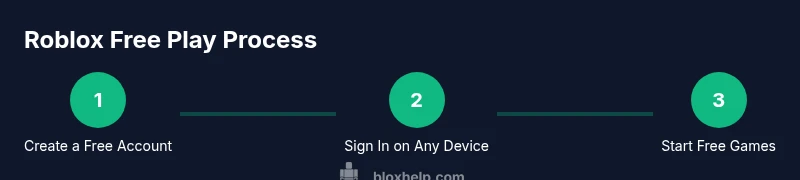
Starting with a free account unlocks the vast majority of Roblox experiences. Visit roblox.com or install the Roblox app, choose Sign Up, and complete the basic fields (username, password, birthdate). Verification is optional for basic play but recommended for account security. After you sign in, explore free-to-play games, join experiences, and build a space for your progress that travels across devices when you log in. Remember to review privacy settings before joining chat-enabled games.
Safety and privacy considerations for younger players
Privacy controls are a central feature of Roblox today. Use parental controls to restrict who can contact your child, who can join their games, and what information is visible publicly. Teach players to avoid sharing personal data, and encourage enabling two-factor authentication where available. If you encounter suspicious behavior, use the report tools and take screenshots if necessary for escalation. These practices help maintain a welcoming and secure online space for younger players.
Cross-device play and progress across devices
With a single Roblox account, your progress, inventory, and favorites sync across platforms—PC, mobile, tablet, and consoles. This continuity is one of the biggest advantages of signing in, as it allows you to pick up games exactly where you left off. If you switch devices mid-session, ensure you’re connected to the same account to avoid losing progress. Regularly updating your password and reviewing connected devices can prevent unauthorized access.
Common barriers and troubleshooting in the transition from guest to account-based play
New users may run into issues like login errors, email verification prompts, or password resets. Start by ensuring you’re using the official Roblox site or app, then follow the password recovery options if you forget credentials. If a device blocks the Roblox app, check platform compatibility and storage requirements. For privacy-related questions, revisit the account settings to tailor who can see your profile and contact you.
Alternatives for families and newcomers: balancing access and safety
If you’re concerned about sharing personal data, consider starting with privacy- and safety-focused settings within a brand-new account. Parents can enable child-appropriate restrictions, limit chat features, and set time limits. Roblox also offers family-friendly experiences and age-appropriate filters that help maintain a healthy balance between entertainment and safety. These options allow newcomers to explore Roblox’s world without exposing themselves to unwanted interactions.
Looking ahead: what to expect in Roblox’s ecosystem in 2026
The platform continues to evolve with stronger safety features, improved moderation, and broader device support. Expect ongoing refinements to privacy tools, clearer parental controls, and more transparent reporting workflows. For players, the core appeal remains the same: a vast catalog of user-generated games, varied genres, and opportunities to create, collaborate, and learn within a global community.
mainTopicQuery":"Roblox guest"],
toolsMaterials({
items:[{
name
Stable Internet Connection
required
true
note
Broadband or strong Wi‑Fi recommended
}, {
name
Device with Roblox access
required
true
note
PC, Mac, iOS, Android, or Xbox
}, {
name
Roblox Account
required
true
note
Create a free account on roblox.com
}, {
name
Privacy Settings Knowledge
required
false
note
Know how to adjust who can contact you
}, {
name
Password Manager (optional)
required
false
note
Helpful for password security
}]}),
Tools & Materials
- Stable Internet Connection(Broadband or strong Wi-Fi recommended)
- Device with Roblox access(PC, Mac, iOS, Android, or Xbox)
- Roblox Account(Create a free account on roblox.com)
- Privacy Settings Knowledge(Know how to adjust who can contact you)
- Password Manager (optional)(Helpful for password security)
Steps
Estimated time: 15-25 minutes
- 1
Open Roblox site or app
Navigate to roblox.com or open the Roblox app on your device. This is the first step to access free games.
Tip: Use the official site to ensure you're on a secure connection. - 2
Create a free account
Click Sign Up and provide required details. A free account is sufficient for most games.
Tip: Choose a unique username and strong password. - 3
Verify your email (optional)
If you want to unlock features and recover access, verify your email when prompted. Verification is usually quick.
Tip: Even if optional, verification helps account security. - 4
Sign in on a preferred device
Log in with the newly created account on your PC, phone, tablet, or console.
Tip: Devices share progress if you sign in with the same account. - 5
Explore games and join for free
Browse games labeled as free to play and click Join to start.
Tip: Filter by genre to find games you like. - 6
Set privacy controls
In Settings, adjust who can contact you and who can see your profile.
Tip: Limit chat features for younger players. - 7
Enjoy cross‑device play
Your progress saves when you sign in on any supported device.
Tip: Keep your account secure to avoid losing progress.
Questions & Answers
Can I still play Roblox as a guest in 2026?
Roblox no longer supports a true guest mode. To play, create a free Roblox account and sign in. This provides access to games and progress across devices.
Roblox no longer supports guest play; you need to create an account to play.
Is Roblox free to play?
Yes, Roblox is free to play. Many games are free to join, while some items or experiences may cost Robux or offer in-app purchases.
Roblox is free to play with optional purchases.
How do I create a Roblox account?
Visit roblox.com, choose Sign Up, provide required details, and create a username and password. Verify your email if you want extra recovery options.
Go to Roblox, sign up, and create your account.
What safety settings are available for younger players?
Roblox offers privacy and parental controls to limit who can contact players and view profiles. Parents can set restrictions through account settings.
Use privacy controls to manage who can contact you.
Can I play Roblox on multiple devices with one account?
Yes. Sign in with the same account on PC, mobile, tablet, or console to access your games and progress across devices.
You can play across devices with one account.
I forgot my password. What do I do?
Use the password recovery option on the Roblox login page and follow the steps to reset your password.
Use the password recovery to reset your account password.
Watch Video
The Essentials
- You must use a free Roblox account to play (guest mode is not supported).
- Create and secure your account to access games across devices.
- Adjust privacy settings to control interactions and protect younger players.