Roblox Without Internet: Offline Learning Guide
Explore offline Roblox learning: what’s possible without internet, practical study strategies, and how to prepare concepts when you can’t connect for beginners.


Roblox requires an active internet connection to play, and there is no supported offline mode. If you need to learn Roblox without a live connection, you can focus on offline study like scripting concepts, game design planning, and accessing downloaded tutorials. This quick answer explains what’s possible offline and how to prepare for when you reconnect online.
Why Roblox requires internet for gameplay
According to Blox Help, Roblox is a connected platform that streams assets, scripts, and multiplayer data from Roblox servers. When you launch a game, your device communicates with cloud-hosted resources to load models, scripts, and player data. Because of this client-server architecture, even games that feel single-player rely on online verification, asset delivery, and anti-cheat systems, which means you cannot fully play Roblox without internet access. For players on unstable connections, you may experience lag or failed loads, which reinforces the need for a stable online session if your goal is to enjoy the full Roblox experience. This reality shapes how you approach an offline learning plan: you can study concepts, plan projects, and practice logic offline, but you’ll need online access to actually run games or publish work.
The Blox Help team notes that while you can prepare by reading guides or drafting ideas offline, the live testing and collaboration that Roblox offers are inherently online activities. If your goal is long-term skill growth, mix offline study with regular online play and development sessions so you can apply theory to practice in real Roblox environments.
What you can do offline to learn Roblox concepts
Even though you cannot play Roblox without internet, you can build a solid knowledge base offline. Start with Lua scripting fundamentals, since Lua is the backbone of Roblox scripting. Practice by writing pseudo-code, outlining how a game mechanic should work, and drawing state machines for common features like doors, score tracking, or teleportation. Read Roblox developer documentation and reputable tutorials, then summarize key concepts in your own words. Offline note-taking helps retention and creates a reusable reference you can consult during online sessions. Blox Help Analysis, 2026 indicates that learners who document concepts offline often retain information better and can ramp up more quickly when online resources are available. Before you go offline, collect printable cheat sheets or downloaded transcripts of helpful videos to reference later. When you’re back online, test your ideas in Roblox Studio or live games to reinforce learning with hands-on practice.
Preparing for offline study: mindset and planning
Offline learning hinges on disciplined planning and a clear goal. Define a mini-curriculum focusing on Lua syntax, object-oriented design concepts, and gameplay scripting patterns. Create a habit: designate specific days and times for offline activities, track progress in a notebook, and set measurable milestones (e.g., “draft 3 function outlines” or “complete 2 practice scenarios”). Use checklists to ensure you cover theory, design, and pseudo-implementation. During offline periods, you can also build a mental model of your project, sketch UI layouts, and draft data structures. This structured approach helps you bridge the gap between offline study and online experimentation later.
Tools you need for offline Roblox learning
To study Roblox offline effectively, assemble a portable learning kit. Keep a notebook or digital notes app for quick capture, printable cheat sheets, and offline transcripts of tutorials you’ve downloaded. A quiet space with minimal distractions boosts focus, and a reliable scheduling system helps you stay on track. When you’re ready to work online again, you’ll already have well-organized concepts and plans to implement directly in Roblox Studio. If you’re using a shared device, set up a dedicated workspace to avoid cross-project confusion.
Creating a robust offline study plan
Develop a plan that pairs theory with design exercises. Start with Lua basics, then move to small project ideas like a landing page for a game, a simple obstacle, or a basic scoring system. Create a timeline with weekly goals, then review progress and adjust as needed. Document lessons learned after each learning block to build a personal knowledge base that travels with you between offline and online sessions.
Offline exercises you can practice without internet
Draft a list of exercises you can complete offline, such as outlining a game mechanic in pseudo-code, creating a data model for a leaderboard, or designing a simple level flowchart. Write step-by-step scripts in plain text, then translate them to Roblox Lua concepts when you reconnect online. You can also sketch UI layouts, camera movements, or particle effects as diagrams, which helps you visualize complex systems without running code in Roblox yet.
Testing ideas once you’re back online
When you regain online access, begin by loading your offline scripts and notes into Roblox Studio. Test each offline concept in a safe testing environment, iterate on your code, and compare actual behavior with your offline plans. Use the opportunity to debug, profile performance, and refine your design. Keeping a log of discrepancies between offline expectations and online results will speed up troubleshooting and reduce repetitive mistakes.
Safety, privacy, and account considerations offline
Never share account credentials or sensitive data while offline—balance curiosity with safety. If you’re studying on a shared device, log out after sessions and avoid storing passwords in plain text. Keep offline resources on a personal drive or cloud storage you control, and regularly back up your notes. When you reconnect online, update any learning material to reflect the latest Roblox features and security practices.
Common pitfalls and how to avoid them
Over-relying on memorized code can hinder flexible problem solving. Focus on understanding concepts rather than copying snippets. Skipping the planning phase leads to disorganized projects, so reserve time for diagrams and pseudo-code. Finally, assuming that offline resources fully substitute online testing is risky; use offline learning as a foundation, then validate ideas in Roblox Studio and live games.
Tools & Materials
- Device with internet (to install Roblox and download resources)(Initial setup, account creation, and resource download)
- Roblox app or Roblox Studio(Install from official site; required for actual testing later)
- Notebook or digital notes app(For offline notes, summaries, and diagrams)
- Printer or offline printable guides(Optional for convenient offline reference)
- Headphones(For listening to downloaded transcripts or video guides)
- Offline transcripts or downloaded tutorials(Collect transcripts or slides while online for offline study)
Steps
Estimated time: 2 hours
- 1
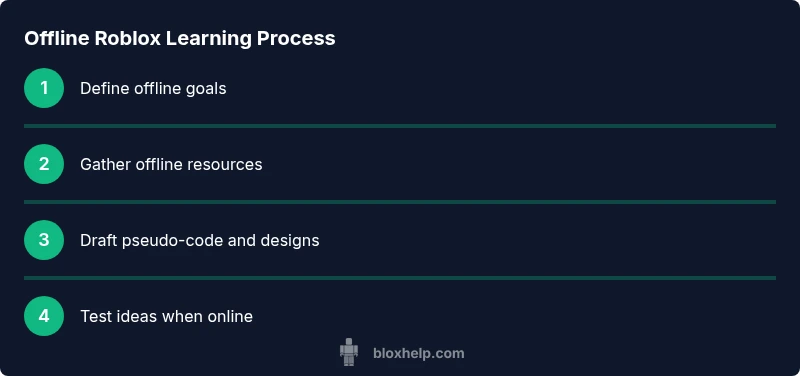
Define offline learning goals
Identify what Roblox concepts you want to master offline (Lua basics, game design principles, data structures). Write clear, measurable goals and a timeline. This keeps offline study focused and productive.
Tip: Link each goal to a concrete offline activity, like drafting a script outline or sketching a game mechanic. - 2
Gather offline resources
Before you disconnect, collect printable guides, transcripts, and notes. Organize them by topic so you can access them quickly without an internet connection.
Tip: Create a dedicated folder for offline materials and label it by topic for easy retrieval. - 3
Create a study schedule
Set a realistic routine (e.g., 30–45 minutes daily). Include theory, design, and practice blocks and track progress using a checklist.
Tip: Consistency beats intensity; even short, regular sessions yield steady improvement. - 4
Practice with pseudo-code
Write out the logic of common Roblox systems (doors, scoreboards, teleporters) in plain language or pseudo-code to reinforce concepts without running code.
Tip: Translate each pseudo-code idea into an actual Roblox Lua plan when online. - 5
Draft a mini-game design on paper
Sketch a simple game flow, UI layout, and core mechanics. This builds design thinking without needing online tools.
Tip: A clear design before coding saves time and reduces iterations later. - 6
Document offline learnings
Summarize key concepts in your own words, and build a reference sheet. This enhances retention and serves as a quick refresher.
Tip: Use bullet points and diagrams to make the reference easy to scan. - 7
Test ideas online when possible
Once you reconnect, implement the offline concepts in Roblox Studio and test them in a safe environment.
Tip: Note discrepancies between offline expectations and online results to focus debugging efforts.
Questions & Answers
Can you play Roblox offline?
No. Roblox requires an active internet connection to access servers and run games. Offline play isn’t supported by the platform.
Roblox requires internet to play, so offline play isn’t available.
What can I do offline to learn Roblox?
You can study Lua scripting basics, plan game design, draft pseudo-code, and review downloaded transcripts or guides. Use offline notes to reinforce concepts and prepare for online testing.
You can learn Lua basics and plan games offline, then test online later.
How can I test offline ideas when I’m back online?
Reconnect online, implement offline concepts in Roblox Studio, and run tests in a controlled environment. Compare actual behavior with your offline plans and iterate.
Reconnect online and test your offline ideas in Roblox Studio.
Are there any workarounds to play without internet?
There are no official workarounds to play Roblox without internet. Online connection is required to access servers and game content.
There are no official offline play options for Roblox.
Is it okay to use offline notes for Roblox scripting?
Yes. Offline notes help you remember concepts, plan scripts, and prepare for online testing more efficiently.
Offline notes are great for practicing scripting concepts.
Does Roblox Studio run offline?
Roblox Studio generally requires an online setup, but you can prepare concepts offline and implement them once you’re connected.
Studio needs internet for full setup, but offline planning helps.
Watch Video
The Essentials
- Offline Roblox play requires internet, but offline study builds foundations
- Plan, document, and practice concepts to accelerate online work
- Regular offline sessions improve retention and readiness for online testing