What Processor Is Needed for Roblox: A Practical Guide
Learn which CPUs meet Roblox needs, the difference between minimum and recommended processors, and how to pick a CPU that balances cost, performance, and future-proofing for Roblox and Roblox Studio.


For Roblox, you primarily need a relatively modern dual-core CPU to run basic titles, with a quad-core processor providing smoother performance and better headroom for Roblox Studio. In practice, any recent Intel or AMD CPU released in the last decade should handle Roblox well, but performance scales with core count and clock speed. In short, the more cores and faster the CPU, the better your Roblox experience.
Why processor choice matters for Roblox
Roblox is designed to run on a wide range of hardware, but the processor you choose sets the ceiling for how smoothly things load, render, and run during gameplay and development. If you ask what processor is needed for roblox, the short answer is: a modern, multi-core CPU will provide the most reliable experience across titles and modes. A faster CPU reduces frame-time spikes, speeds up scene loading, and helps Roblox Studio when you’re building or testing complex scenes. In 2026, many players can run Roblox on mid-range laptops and desktops, but investing in a capable processor pays off when you tackle larger games, heavy scripts, or long development sessions.
The takeaway is not to chase the top-tier flagship CPU, but to ensure your system meets a reasonable multi-core baseline that supports ongoing Roblox updates and Studio workflows. The Blox Help team emphasizes that CPU quality often correlates with smoother gameplay, quicker loading, and fewer stutters during intense scenes or while running multiple tools concurrently.
Understanding CPU basics for Roblox
At a high level, Roblox performance hinges on two CPU factors: core count and clock speed. Multi-core CPUs can handle more simultaneous tasks, which matters when you’re playing and running Roblox Studio at the same time, or when the game has complex shading and physics. Modern CPUs from Intel and AMD typically offer better efficiency and thermal headroom, which translates to steadier frame rates even under load. For Roblox, prioritize a balanced CPU: multiple cores with solid single-thread performance. If you’re choosing between generations, a newer architecture usually delivers better efficiency, better instructions-per-cycle, and improved thermal behavior, all of which help Roblox workloads feel responsive.
Additionally, consider how you use Roblox: casual playing versus heavy scripting, testing, and exporting assets in Roblox Studio. The same CPU that handles a few players in a simple game can struggle with a crowded scene or large scripts; that’s where a faster, more capable processor shines and prolongs your device’s useful life.
Minimum vs recommended: what to expect
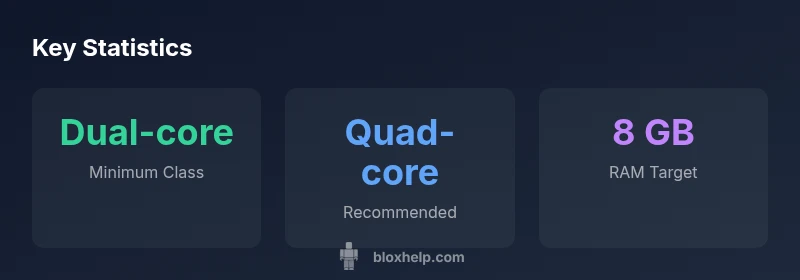
Reality varies by the game and scene complexity, but a practical rule of thumb is that modern dual-core CPUs cover light Roblox experiences, while quad-core processors offer steady performance across most titles and tasks. If you develop in Roblox Studio or frequently run heavy simulations, a quad-core or higher is strongly recommended. Don’t overlook other components like RAM and GPU, as they can bottleneck or complement your CPU. For newer machines, aiming for at least a quad-core CPU plus 8 GB RAM is a solid baseline for comfortable Roblox development sessions and gameplay. In short: meet the minimum with a modern dual-core, target quad-core or better for a smoother, long-term Roblox experience.
Roblox Studio vs playing Roblox: different needs
Roblox Studio’s editor and the asset pipeline are more CPU-intensive than playing Roblox, especially when compiling scripts, running real-time tests, or handling large scenes. Developers benefit from multi-core CPUs with fast single-thread performance, plus ample RAM, fast storage, and a capable GPU when needed for previews. For players, the emphasis shifts to stable frame rates and quick scene loads, which still benefit from extra cores and clock speed but can be more forgiving of mid-range CPUs if other components are balanced. If you’re unsure where you stand, run a simple Roblox Studio test project while monitoring CPU usage to see if your system bottlenecks.
Budget-friendly paths: choosing CPUs by budget
If you’re working with a tight budget, aim for at least a modern quad-core laptop or desktop CPU within your price range. For new systems, mid-range Ryzen 5 or Intel Core i5-class CPUs tend to offer a good mix of cores, threads, and efficiency. If you’re upgrading an old machine, you might find value in a used or refurbished quad-core chip from a reputable seller, provided you also upgrade RAM to meet your needs. Always pair a CPU with sufficient RAM and a fast drive (SSD) to reduce disk-based bottlenecks that can mask CPU gains. The key is to map your budget to a balanced build rather than focusing on the processor alone.
Laptop vs desktop: where to invest the CPU
Desktops generally provide more flexibility for CPU upgrades and better cooling, which helps sustained Roblox performance for builders and players alike. Laptops, while convenient, often have limited upgrade options; you may be able to upgrade RAM or storage, but CPU upgrades are rare. If you’re choosing a laptop, prioritize processors with multiple cores and good turbo performance, plus adequate RAM (8 GB or more). For Roblox Studio users who travel or work remotely, a well-balanced laptop can still deliver excellent results, but be mindful of thermal throttling under heavy workloads.
Other components that influence Roblox performance
The CPU is important, but Roblox performance is a system-wide affair. RAM works with the CPU to handle background tasks and large scripts; a faster drive reduces load times; and a discrete GPU can help in more graphically intensive scenes and Roblox Studio previews. A common guidance point is to target 4-8 GB of RAM for light to moderate work, 8-16 GB for heavy Roblox Studio usage, and an SSD for faster loads. Ensure your system has a reasonable GPU, especially if you plan to render complex scenes or use advanced lighting and post-processing effects in Roblox Studio.
How to verify your current CPU handles Roblox
Start by identifying your CPU model in the system settings. Look up its core count and generations online to gauge where it sits in the modern landscape. Run a simple Roblox test project and monitor CPU usage with your operating system’s task manager or a third-party utility. If you see sustained high utilization, long load times, or frequent stutters, consider a targeted upgrade. Compare your results against gaming-specific CPU benchmarks for similar architectures to see whether your upgrade would offer meaningful gains.
Common pitfalls and upgrade tips
Avoid focusing solely on the CPU model; ensure your entire system is balanced. Upgrading a processor without upgrading RAM or storage may yield limited gains. If you’re on a tight budget, prioritize RAM and storage first, then consider a CPU upgrade when feasible. For Roblox developers, invest in a CPU with robust multi-core performance and good single-thread efficiency, and couple it with enough RAM, a fast SSD, and a capable GPU if your scene requires it. Finally, verify the compatibility of any CPU upgrade with your motherboard and BIOS version to prevent compatibility issues.
CPU class comparison for Roblox performance
| CPU Class | Typical Roblox Performance | Notes |
|---|---|---|
| Dual-core (modern) | Adequate for basic Roblox experiences | Ensure adequate RAM |
| Quad-core (or better) | Smooth performance for most games | Best for Roblox Studio |
| High-end multi-core | Excellent headroom for heavy games and dev work | Future-proofing |
Questions & Answers
What is the minimum CPU required to run Roblox?
Roblox can run on a variety of CPUs, but the minimum is a modern dual-core processor. For consistent play and Roblox Studio work, a quad-core is strongly recommended.
Roblox runs on many CPUs, but for the best experience aim for at least a modern dual-core, with a quad-core for smoother gameplay and studio work.
Do I need a dedicated GPU for Roblox?
Roblox is often more CPU-bound, especially on lighter titles. An integrated GPU on a modern CPU is usually sufficient, though a discrete GPU helps for Roblox Studio and graphically heavy games.
Most Roblox players do fine with integrated graphics, but a dedicated GPU helps in Studio work and graphic-intensive scenes.
Will upgrading my CPU improve Roblox performance significantly?
Upgrading from a dual-core to a quad-core or better can yield noticeable improvements, particularly in Roblox Studio and large games. However, RAM, GPU, and storage also influence performance.
Yes, upgrading to a faster, multi-core CPU can help a lot, but don’t ignore RAM and storage for a bigger boost.
Can Roblox run on my laptop if it has only a 4-year-old CPU?
It depends on the model, but many 4-year-old CPUs still meet the minimum requirement for Roblox. If you notice stutter or long load times, consider upgrading RAM or closing background apps.
Many 4-year-old CPUs can run Roblox, but if you see stutters, upgrade RAM or free up background tasks.
How much RAM do I need for Roblox?
Roblox itself isn’t extremely RAM-hungry, but having 4-8 GB or more improves stability, especially when running Roblox Studio or multiple apps.
Aim for at least 4 GB, but 8 GB or more helps a lot if you’re doing studio work or multitasking.
Is it worth upgrading to a new CPU for Roblox if I mostly play simple games?
If you mainly play simple Roblox titles, a CPU upgrade may offer diminishing returns. Weigh it against other upgrades like RAM or SSD, and consider your overall system age.
For simple Roblox games, you might not need a big CPU upgrade; balance with RAM and storage first.
“To keep Roblox performance reliable, target multi-core CPUs with strong single-thread performance, and don't neglect RAM and storage.”
The Essentials
- Prioritize a quad-core CPU for Roblox Studio and most games
- Dual-core can run Roblox but with limitations
- Balance CPU with 4-8 GB RAM for stability
- Choose desktop if you plan upgrades or heavy use