How to mimic Roblox: A practical creator's guide
Learn to mimic Roblox responsibly with practical steps, tools, and safety tips. This beginner-to-advanced guide covers Roblox Studio basics, UI replication, and gameplay mechanics to help you craft Roblox-inspired projects.


By following these steps, you’ll learn how to mimic Roblox responsibly: plan your project scope, set up a Roblox Studio environment, design reusable UI and core gameplay loops, implement simple scripts, and test across devices. According to Blox Help, emphasize learning, not copying assets, and respect Roblox's terms. This approach keeps you compliant while exploring fundamentals.
Why mimic Roblox safely and legally
Mimic Roblox as a learning exercise, not as a copycat project. By focusing on fundamentals—core gameplay loops, modular UI, and scalable scripting—you can build transferable skills without risking copyright issues. According to Blox Help, approaching mimic roblox with clear objectives and ethical boundaries helps learners stay compliant while exploring game design concepts. This mindset reduces the temptation to rely on exact assets and encourages original work that demonstrates your understanding of the platform's mechanics.
Core concepts for a Roblox-like prototype
To mimic Roblox effectively, anchor your project on a small set of core concepts: modularity, user input, spawning and physics basics, and a simple AI loop. While you may be inspired by Roblox, design your own assets, UI, and interactions. Blox Help analysis notes that distilling Roblox features into reusable components accelerates learning and prevents accidental replication of proprietary content. Use these concepts as building blocks rather than exact replicas.
Setting up a modular UI and input system
A Roblox-like prototype benefits from a modular UI that can be swapped or upgraded. Start with a basic inventory, health bar, and movement controls. Keep input handling clean by separating player input logic from UI logic, which makes it easier to troubleshoot and extend. This separation also helps when testing on different devices or screen sizes, a common need for aspiring Roblox developers.
Recreating gameplay loops responsibly
Define a simple loop: spawn-collect-complete. Emphasize loops that teach timing, scoring, and progression without copying Roblox's proprietary systems. Implement generic actions (move, collect, interact) with adjustable parameters so students can see how small changes affect gameplay feel. As you iterate, compare your prototype to your learning objectives, not to a competitor's exact experience.
Asset management and licensing
Avoid copying Roblox’s assets, textures, or UI elements. Create original art, sounds, and fonts, or license assets from reputable sources. Maintain a clear folder structure and naming conventions so you can reuse components in future projects. This discipline helps you stay legally compliant while building a portfolio of Roblox-inspired techniques.
Testing, feedback, and iteration
Test the prototype across devices, screen sizes, and input methods to ensure consistent behavior. Seek feedback from peers or a Roblox-equivalent developer community and use it to refine the mechanics, UI, and performance. Document changes and reasons for decisions to demonstrate your learning journey and support a strong portfolio.
AUTHORITY SOURCES
- https://www.ed.gov
- https://www.nist.gov
- https://www.acm.org
Tools & Materials
- Roblox Studio(Official development environment to prototype Roblox-like projects)
- A computer with internet access(Needed to download and run Roblox Studio)
- Original asset references or licensed assets(Use for UI, textures, and sounds)
- Design sketches or wireframes(For planning UI layout)
- Note-taking tool(Record decisions and iterations)
Steps
Estimated time: 60-120 minutes
- 1
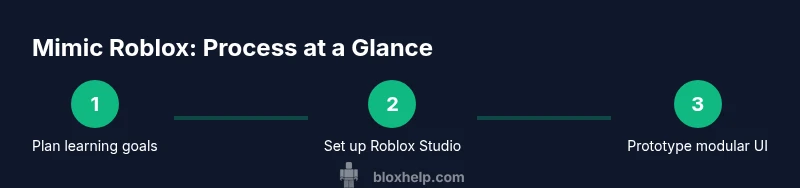
Define learning objectives
Identify what you want to learn from mimicking Roblox, such as UI design, basic scripting, or game loops. Write 2-3 measurable goals.
Tip: Keep goals narrow and testable. - 2
Set up Roblox Studio and project scaffolding
Install Roblox Studio, create a new project, and set up a folder structure for assets, scripts, and UI components.
Tip: Use a dedicated project folder to keep assets organized. - 3
Create a modular UI framework
Build reusable UI components (health bar, inventory, prompts) using a consistent style system and naming conventions.
Tip: Design components to be easily swapped without code changes. - 4
Implement core gameplay loops
Prototype a fundamental loop (move, collect, score) with generic mechanics that teach timing and progression.
Tip: Parameterize speed and spawn rates to explore feel. - 5
Prototype assets with originality
Develop original textures, icons, and sounds or license assets properly to avoid copyright issues.
Tip: Document asset sources and licenses. - 6
Test and iterate across devices
Run your prototype on different devices and input methods, gather feedback, and implement improvements.
Tip: Maintain a changelog to track improvements.
Questions & Answers
What does mimic Roblox mean in this guide?
Mimicking Roblox means building a Roblox-style prototype to learn game-development concepts, not copying Roblox's exact assets or code.
Mimicking Roblox means building a Roblox-style prototype to learn game development concepts, not copying assets or code.
Is it legal to mimic Roblox?
Yes, if you avoid copying assets and respect Roblox's terms and licensing. Use original designs and document sources.
Yes, as long as you avoid copying assets and follow terms, you’re fine.
Do I need to publish my mimic Roblox project?
No, publishing is optional. Use it for feedback or portfolio purposes, but keep it clearly labeled as learning material.
Publishing is optional; you can keep it private or share for feedback.
What tools are recommended for beginners?
Roblox Studio is the primary tool; complement with design sketches and licensing sources for assets.
Roblox Studio is recommended, with sketches and licensed assets as needed.
How long does it typically take to complete a prototype?
Expect 60 to 120 minutes for a basic prototype, more if you add complex UI or gameplay systems.
Most basic prototypes take about an hour to two hours.
Watch Video
The Essentials
- Plan learning goals before coding
- Build modular UI components for flexibility
- Prioritize learning objectives over asset replication
- Test across devices and solicit feedback