Are the Roblox servers down? A practical status and troubleshooting guide
Explore whether the Roblox servers are reliable, how to check real-time status, common outage causes, latency tips, and practical troubleshooting steps for a smoother Roblox experience in 2026.


If you’re asking, are the roblox servers up right now, the short answer is usually yes. Roblox servers are designed for high availability, but outages and regional latency can happen during peak times, updates, or network issues. To verify status, check the official Roblox status page, monitor regional indicators, and try simple tests like login attempts and in-game matchmaking. Most interruptions are short-lived and resolve quickly.
Are the Roblox servers reliable?
The question of reliability for any large online platform often centers on availability, regional variation, and how well the system handles peak loads. For Roblox, the architecture is designed to distribute workloads across multiple data centers and edge locations. This distribution supports responsiveness for players worldwide, but it also means that regional factors—such as local network congestion, time-of-day traffic spikes, and ongoing maintenance—can influence the perceived reliability. When people ask whether the servers are reliable, it’s important to separate core platform uptime from user experience issues that arise from network paths, device performance, or local routing. In practice, most players experience stable service, while a subset may encounter short-lived delays or login hiccups during updates or regional issues. The Blox Help team notes that the most consistent way to gauge reliability is to observe official status indicators and corroborate them with real-time gameplay tests. Regardless of regional differences, Roblox continuously refines server orchestration to maintain smooth gameplay across geographies.
How to check Roblox server status in real time
To form an evidence-based view of whether the Roblox servers are functioning as expected, start with official sources and simple client-side checks. First, visit the official Roblox status page, which provides real-time health indicators across regions. If you notice a regional outage, it will typically be noted there, sometimes accompanied by expected restoration times. In addition to the status page, consider platform-verified feeds like the Roblox support channels and any official social posts that announce planned maintenance. Practical checks on your end include attempting to log in, joining a game, and observing any matchmaking delays. If these tests fail in a specific region while the status page shows normal operation elsewhere, the issue is more likely regional rather than global. Finally, corroborate with third-party outage monitors, but treat them as supplementary evidence rather than definitive sources.
Common causes of server-side outages
Outages on the Roblox platform usually fall into a few broad categories: maintenance windows, software rollouts, and infrastructure incidents. Planned maintenance can briefly suspend login or matchmaking, especially during off-peak hours when impact is minimized. Unplanned outages may occur due to software bugs, cascading failures in data centers, or DDoS mitigation efforts that temporarily throttle traffic. Network backbone issues, DNS routing problems, or regional peering complications can also degrade performance without a full outage. A helpful rule of thumb is to check the official status page first, then look for regional patterns—if several users in nearby regions report problems simultaneously, the issue is more likely systemic rather than isolated to a single device. In all cases, Roblox’s engineering teams work to restore services promptly, and status updates usually reflect progress toward recovery.
Latency and gameplay: Why it happens and how to mitigate
Latency is the time it takes for your input to reach Roblox servers and for the response to return to your device. It’s influenced by your internet connection quality, your geographic distance from Roblox data centers, and the routing path your network uses. Even with robust server infrastructure, players can experience higher ping during peak times or when local networks experience congestion. To mitigate latency, try connecting via a wired Ethernet instead of Wi-Fi, choose the closest regional server when possible, ensure your router firmware is up to date, and close bandwidth-heavy applications running in the background. If you still see lag, testing with a VPN is not a universal remedy, as it can either help or hurt latency depending on routing, so use it sparingly and compare results. The goal is to reduce jitter and packet loss, not just overall speed. Tools like in-game Mbps meters or external ping tests can help you diagnose whether latency is a local problem or tied to Roblox’s servers.
Troubleshooting steps when you can't connect
If you’re unable to connect, a systematic approach helps distinguish between device issues and server problems. Start with the simplest steps: restart the Roblox app, reboot your router, and verify your device’s date/time settings are correct. Check firewall and antivirus settings to ensure Roblox traffic isn’t blocked, and temporarily disable VPNs or proxies to see if they’re impacting connectivity. If the problem persists, try a clean reinstall of the Roblox client and clear any cached data that might be causing conflicts. When you suspect a broader outage, cross-check the official status page and community reports. Finally, if you can log in but experience intermittent disconnects, switch to a different regional server if available and report consistent patterns to Roblox Support with your device specs and network details. This helps engineers diagnose whether the issue is regional or user-specific.
Roblox's approach to reliability and user impact
Roblox emphasizes reliability through distributed infrastructure and continuous monitoring. The platform uses multiple data centers and edge locations to balance load and reduce the impact of any single point of failure. Regular software updates are paired with phased rollouts to minimize disruption and provide quick rollback options if issues arise. The company also invests in network resilience, DDoS protection, and performance telemetry to anticipate problems before they affect a large portion of players. For users, the most actionable takeaway is to stay informed via official channels and to follow standard troubleshooting steps when problems arise. Roblox’s approach is to maintain high availability while communicating openly about incidents and expected resolutio0n timelines.
Proactive monitoring and reporting: what players can do
Players play a vital role in maintaining visibility into Roblox server health. If you notice persistent issues that aren’t reflected on the status page, report them with precise details: your region, approximate times, device type, and steps to reproduce the problem. Share any error messages or codes you see, as these help engineers triage faster. Maintaining local diagnostics—such as test login attempts, latency measurements, and whether issues occur during peak hours—gives a clearer picture of the scope. Consider setting up a simple monitoring routine that checks the status page daily and records any deviations. By combining official status indicators with user-reported data, the community can help accelerate resolution and reduce impact on gameplay.
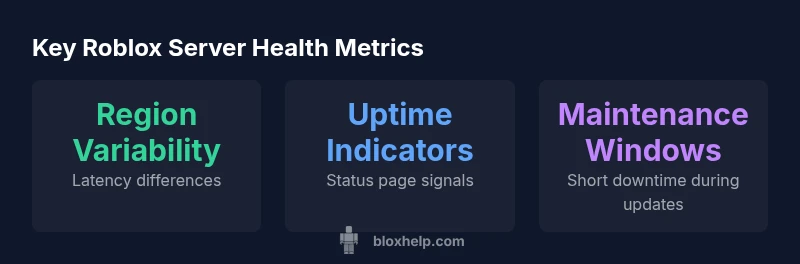
Roblox server status overview
| Aspect | Typical Behavior | Notes |
|---|---|---|
| Uptime | High availability with regional variability | Maintenance windows may cause brief downtime |
| Latency | Region-dependent, fluctuates by time of day | Check regional status indicators |
| Maintenance | Scheduled maintenance can affect login or matchmaking | Usually announced in advance |
| Login Experience | Generally smooth; may degrade during outages | Retry or switch region as a workaround |
Questions & Answers
How can I check if Roblox is down for everyone or just me?
Start with the official Roblox status page and compare it with user reports in your region. If the page shows an outage or degraded service in your area, the issue is likely regional. If not, try basic connectivity tests on your device.
Check the official status page; if it says something is down, that likely explains your experience. If it’s green, test your connection and Roblox app setup.
Why does Roblox sometimes have latency spikes even when services are up?
Latency spikes can occur due to local network congestion, routing issues, or peak-time traffic. It’s not necessarily Roblox-wide. Performing basic network checks and testing across different regions can help pinpoint the cause.
Latency spikes often come from local networks or routing. Test in different regions to see if it’s Roblox-wide or your connection.
What should I do if I can’t log in after an outage starts?
First, verify status indicators. If it’s a regional outage, wait for restoration. Meanwhile, restart your router, check for account-related issues like credential problems, and consider reinstalling Roblox if login issues persist.
Try rebooting your router and reinstalling Roblox if you still can’t log in after checking the status page.
Will Roblox notify me about outages?
Yes, Roblox usually posts notices on its status page and official channels when there are outages. You can subscribe to updates or follow the official accounts for real-time information.
Roblox posts updates on the status page and social channels during outages. Following those is the quickest way to get notified.
How can I report a Roblox outage I’m experiencing?
Document what you’re seeing: region, time, device, and steps to reproduce. Share screenshots or error codes if available and submit through Roblox Support or the official status page feedback form to help engineers diagnose.
If you’re seeing a problem, note details like region and device, then report it through Roblox Support so engineers can investigate.
“Reliable server status is a shared responsibility between Roblox and developers. By understanding the official status indicators and common latency factors, players can quickly distinguish between local issues and broader outages.”
The Essentials
- Monitor the official status page for current Roblox server health
- Latency and outages are region-specific and time-limited
- Plan for maintenance windows and potential login delays
- Try basic connectivity fixes before assuming a global outage
- Stay informed and report consistent issues to help improve reliability