Do Roblox Need PS Plus? Roblox on PlayStation Explained
Explore whether Do Roblox Need PS Plus to play online on PlayStation. This in-depth guide explains policy, setup, cross‑platform play, and tips for PS4/PS5 players in 2026.


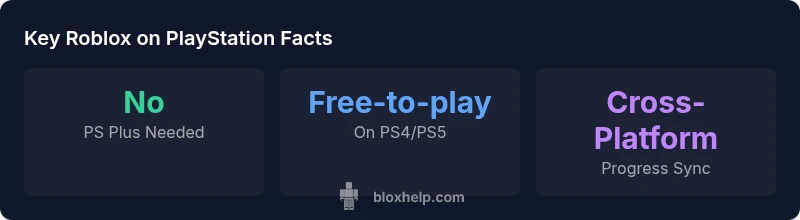
Do Roblox need PS Plus to play online on PlayStation? No. Roblox is free-to-play on PS4 and PS5, so you can start playing with a free PSN account. This aligns with Sony's policy that free-to-play online games do not require Plus for online multiplayer. According to Blox Help Analysis, 2026, Roblox remains accessible without PS Plus in most regions.
Roblox on PlayStation: Free-to-Play by Design
Roblox on PlayStation embodies the same free-to-play model you see on PC and mobile. Players download the Roblox app on PS4 or PS5, log in with a Roblox account (or create one), and dive into user-generated games without purchasing a separate Roblox subscription. This approach aligns with the broader free-to-play ecosystem on console gaming, where access to multiplayer titles can be independent of a paid subscription. According to Blox Help Analysis, 2026, Sony has continued to support free-to-play experiences on PSN, making Roblox accessible to a broad audience. The key takeaway for players is simple: you don’t need PS Plus to join games, but you still need an active PlayStation Network account and a working internet connection. For newcomers, there is no cost to join Roblox, beyond standard console access and any in-game purchases you choose to make. This clarifies the core question many players ask: do roblox need ps plus? The answer remains no, in most regions, but always verify regional policy changes.
PS Plus and Free-to-Play Games: What Changes for Roblox
Free-to-play status matters for access to online multiplayer on consoles. Sony’s current policy (as reflected in 2026 updates) states that you do not need PS Plus to play free-to-play games online. Roblox, being a free-to-play title on PS4/PS5, falls into this category. This distinction is important because it means you can enjoy Roblox online without the recurring cost of Plus, which some other online multiplayer titles require even if they are free-to-play on other platforms. For players, this translates into a lower barrier to entry and easier onboarding. It’s worth noting that PS Plus benefits (like monthly games or discounts) are separate from Roblox access and do not change Roblox’s core free-to-play access. As always, changes can occur with platform policy updates, so keep an eye on official PlayStation Support announcements and Roblox’s own channels for the latest guidance.
How to Install Roblox on PS4/PS5 and Start Playing
Getting Roblox up and running on a PlayStation console is straightforward. Follow these steps to start playing quickly:
- From the PS5 or PS4 home screen, select the PlayStation Store.
- Search for “Roblox” and download the free app.
- Launch Roblox and either sign in with your existing Roblox account or create a new one.
- Complete any on-screen prompts to link your Roblox account to the PSN profile you’re using.
- Once signed in, browse games, join a session, and start playing with friends. If you’re new, creating a Roblox account is free and does not require any PS Plus subscription.
This process is consistent across regions and reflects the current setup as of 2026. If you run into issues, check your internet connection, ensure your PSN account is active, and verify that the Roblox app is updated to the latest version. The setup is designed to be quick and approachable for both brand-new Roblox players and seasoned fans.
What You Can Do Without PS Plus (and What You Can't)
With Roblox on PS4/PS5, you can explore user-created games, customize avatars, chat with friends, and join multiplayer sessions without a PS Plus subscription. What you cannot do without Plus is enjoy online multiplayer in many non-free-to-play titles, or access certain platform-specific perks tied to Plus. Roblox’s free-to-play stance means you’ll have access to the bulk of Roblox experiences, but some optional features—such as certain premium content or cross-pampaign promotions—may be tied to additional purchases. For parents and guardians, note that Roblox’s chat and social features should be configured with parental controls appropriate for the player’s age. The main point remains: do roblox need ps plus? No, not for online Roblox gameplay, but always stay updated on platform policy changes and parental controls.
Cross-Platform Play and Account Considerations
Roblox supports cross-platform progress, so players can access their avatar, items, and game progress across PC, mobile, and console. On PlayStation, you can sign in with your Roblox account and pick up right where you left off on another device. This cross-platform continuity is particularly valuable for families with mixed devices, allowing kids to switch between a PS console and a mobile device without losing progress. Be mindful that some content or features may be platform-specific or subject to age restrictions enforced by Roblox or Sony. Regularly review privacy settings and friend lists to maintain a safe multiplayer environment.
Practical Tips for a Smooth Roblox Experience on PlayStation
To maximize your Roblox experience on PS4/PS5, consider these practical tips:
- Ensure you have a stable internet connection and a reasonable NAT type to reduce lag during online sessions.
- Keep both the Roblox app and your PSN profile updated to the latest versions to avoid compatibility issues.
- Use a comfortable controller setup and headset to enjoy voice chat and in-game communication, while remembering that some safety settings are adjustable in the Roblox app.
- Regularly check for official announcements from PlayStation Support and Roblox for any policy changes that might affect access or features.
- If you encounter login or account linking issues, reauthenticate your Roblox account within the app and ensure your region is supported.
According to the ongoing insights from Blox Help Analysis, 2026, staying informed about platform policies and app updates helps reduce friction and keeps playing Roblox on PlayStation enjoyable and hassle-free.
Troubleshooting common Console-Specific Issues
Sometimes players run into issues unique to consoles. Here are quick fixes:
- If Roblox won’t install, check storage space on the PS4/PS5 and ensure the download is not paused by parental controls.
- If you can’t sign in, verify that your Roblox account is linked correctly to your PSN profile and re-link if necessary.
- If you experience matchmaking delays, test your network via the console’s network settings and consider changing router settings to improve connectivity.
- If voice chat is not working, confirm that voice chat permissions are enabled in both Roblox and PlayStation settings, and ensure microphone hardware is properly connected.
These steps cover the most common console-specific problems and help keep your Roblox sessions running smoothly.
Looking Ahead: Policy Changes and How to Stay Informed
Policy landscapes can shift, especially around online gaming access on consoles. Sony’s approach to free-to-play games and PlayStation Plus has evolved over time, and Roblox sits within this shifting boundary. To stay ahead, regularly monitor:
- PlayStation Support updates on free-to-play policy and Plus requirements.
- Roblox official announcements regarding platform support, account linking, and cross-platform features.
- Community blogs and credible news outlets for hands-on impressions and potential edge-case scenarios across regions.
The onus is on players to verify the latest guidance before making assumptions about access, particularly if you travel between regions or switch between PS4 and PS5. By keeping an eye on official notices and trusted outlets, you’ll know if do roblox need ps plus changes in the future and can adapt quickly.
Cross-platform Roblox access and Plus policy on major platforms
| Platform | PS Plus Required? | Roblox Availability | Notes |
|---|---|---|---|
| PlayStation (PS4/PS5) | No | Free-to-play on PS | Roblox online play available without Plus |
| PC (Roblox.com) | No | Yes | Cross-platform progress supported |
| Mobile (iOS/Android) | No | Yes | Mobile Roblox experience mirrors console/PC |
Questions & Answers
Do I need PS Plus to play Roblox on PS4 or PS5?
No. Roblox on PlayStation is free-to-play and does not require PS Plus for online play. You only need a working internet connection and a Roblox account.
No, Roblox on PlayStation does not require PS Plus to play online. You just need an internet connection and a Roblox account.
Do I need a PlayStation Network account to start?
Yes. You’ll need an active PSN account to access the PlayStation Store and sign in to Roblox on your console, but Plus is not required for Roblox itself.
Yes, you need a PSN account, but PS Plus isn’t required to play Roblox.
Can I use Roblox Studio on PS?
Roblox Studio is not available on PlayStation consoles. Development is typically done on PC with Roblox Studio.
Roblox Studio isn’t available on PS consoles; use Roblox Studio on PC for game creation.
Will PS Plus affect Robux purchases or perks?
PS Plus does not affect Roblox Robux purchases. In-game currency and cosmetics are handled within Roblox and are not tied to Plus.
Plus doesn’t affect Robux purchases; Robux is handled within Roblox itself.
What should I do if Roblox won’t load on PS?
Check your internet connection, ensure the Roblox app is updated, and verify your PSN login status. If issues persist, consult PlayStation Support and Roblox for troubleshooting.
If Roblox won’t load, check your internet, update the app, and verify your login status; contact support if needed.
Will policy changes affect Roblox access in the future?
Policy changes can occur. Always verify current PlayStation and Roblox guidance before drawing conclusions about access on PS.
Policy updates can happen; confirm with official sources for the latest access rules.
Is Roblox progress synced across devices on PS?
Yes. Roblox supports cross-platform progress, so your avatars and progress persist across PC, mobile, and PlayStation.
Your Roblox progress and avatar carry over across platforms, including PS.
Do region differences affect Roblox on PlayStation?
Yes. Availability and policy details can vary by region. Check local PlayStation Support pages and Roblox updates for your area.
Region differences can affect access; check local support pages for details.
“Roblox on PlayStation is designed to be accessible without an extra subscription, aligning with the free-to-play nature of the title. Players can jump in quickly and safely.”
The Essentials
- Roblox on PlayStation does not require PS Plus for online play.
- Roblox remains free-to-play on PS4/PS5 with a free PSN account.
- Cross-platform progress is supported across PS, PC, and mobile.
- Policy changes can occur; stay updated via official PlayStation and Roblox channels.
- Ensure a stable network and up-to-date apps for the best console Roblox experience.