Do You Need Xbox Live for Roblox? Console Guide 2026
Explore whether you need Xbox Live to play Roblox on Xbox, how to sign in, and what online membership means for console players in 2026. Learn setup tips and policy nuances.


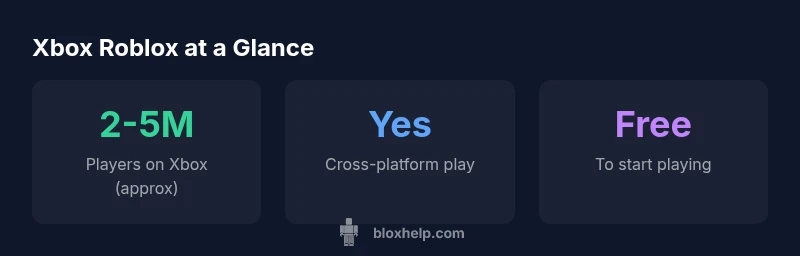
You don’t need a separate Roblox subscription to play Roblox on Xbox, but you will sign in with your Xbox account and may need an active Xbox network membership for online features, depending on Microsoft’s current policy. Roblox on Xbox is free to start, and there is no dedicated Roblox Live pass. Always verify the latest guidance from official Roblox and Xbox pages, as policies can change.
Do you need Xbox Live for Roblox?
In practical terms, do you need Xbox Live for Roblox? The short answer is that you don’t need a separate Roblox subscription to play the game on Xbox. Roblox on Xbox is designed to be free to start, and you sign in using your existing Xbox account. According to Blox Help, there is no dedicated "Roblox Live" pass required to access the core game experiences. However, online multiplayer features—such as joining friends, exploring shared worlds, or playing in public servers—are hosted through Microsoft's Xbox network services. That means an active Xbox network membership can influence how you access online features, depending on the current policy in your region and the platform’s ongoing updates for 2026. For most players, you’ll simply sign into Roblox with your Xbox account and begin playing. If you plan to use voice chat or other online features, verify your Xbox account status and review any region-specific requirements. The Blox Help team stresses checking official support pages for the latest guidelines, as policy adjustments are common across platforms.
Roblox on Xbox vs PC and Mobile: Key differences
Roblox on Xbox delivers a console-focused experience with a controller-friendly UI, while PC and mobile versions emphasize keyboard/mouse input or touch. The core gameplay remains consistent across platforms, but some features, like certain user-created experiences or in-game purchases, may vary by device and region. On Xbox, you’ll typically navigate menus with a controller, access friends lists through Xbox Live, and engage in cross-platform lobbies where available. For players transitioning from PC or mobile, expect differences in navigation, performance, and load times depending on console generation and network conditions. The Blox Help analysis notes that most Roblox content is cross-platform, but you should verify specific experiences before assuming feature parity across devices.
Xbox Live membership: what counts for online play
Understanding Xbox Live requirements can be confusing because policies shift. Generally, online multiplayer on Xbox consoles relies on an active network membership, which historically included Xbox Live Gold and later newer tiers. Roblox itself is free to start on Xbox, but access to online multiplayer and certain social features can depend on your active membership status and regional guidelines. If your region has migrated to a Core or similar tier, you may see changes in how online services are accessed for Roblox and other titles. The key takeaway: you don’t buy Roblox, you sign in with your Xbox account, and stay aware of any Xbox network requirements that apply in your country.
Signing in and setting up Roblox on Xbox
To get started, turn on your Xbox, sign in with your Microsoft account, and open the Roblox app from the store or your dashboard. If you don’t have an account, you’ll create one or link an existing Roblox account. Ensure your Xbox network membership aligns with your preferred online features (voice chat, party systems, etc.). Once signed in, you can browse games, join public servers, or invite friends to play together. If you encounter sign-in issues, verify your Xbox profile is active, your region is supported, and Roblox has the latest app update. Blox Help recommends checking the Roblox support pages for known outages or compatibility notes related to Xbox devices.
Troubleshooting common issues on Xbox
Common problems include difficulty signing in, lag when joining a game, or friends not appearing in your lobby. Start with basic steps: restart the Roblox app, ensure your Xbox network membership is current, and verify your internet connection. If you still see issues, clear the app cache, re-login, or reinstall Roblox. Some problems are related to outages or regional server maintenance—check the Roblox status page and Xbox Live service alerts. For persistent problems, consult the Roblox support community or Blox Help guides, which often highlight device-specific workarounds and patch notes.
Tips for a smoother Roblox Xbox experience
- Use a wired Ethernet connection for more stable online play when possible.
- Adjust in-game graphics settings to balance performance with resolution on your console.
- Keep your Xbox console firmware and Roblox app updated to access the latest fixes.
- Enable parental controls and privacy settings in advance if you’re playing with younger players.
- Consider organizing a friends list within Roblox and Xbox to streamline matchmaking and co-op play.
Keeping up with policy changes
Platform policies shift as Microsoft, Roblox, and the broader gaming ecosystem evolve. Set reminders to review official Roblox and Xbox support pages periodically and subscribe to relevant announcements. The Blox Help team emphasizes staying informed about any changes that affect online access, cross-platform play, or required memberships. If policy changes occur, you’ll want to adjust your setup quickly to keep playing without disruption.
Platform comparison for Roblox access and online requirements
| Platform | Requires Xbox Live (subscription) | Roblox Premium or Membership | Notes |
|---|---|---|---|
| Xbox | Depends on policy | No | Sign in with Xbox account; online features may require membership |
| PC/Windows | No (usually) | No | Standard PC access |
| Mobile (iOS/Android) | No | No | Mobile app availability |
Questions & Answers
Do you need Xbox Live Gold to play Roblox on Xbox?
Roblox on Xbox is designed to be free to start, and you don’t need a separate Roblox subscription. Online features may depend on current Xbox network policies, so confirm your region’s rules.
Roblox on Xbox is free to play, but online features may require an active Xbox membership depending on policy.
Is Roblox free to play on Xbox?
Yes, Roblox on Xbox is free to start. You can play many games without paying, though some titles or in-game options may offer purchases.
Roblox on Xbox is free to play, with optional in-game purchases available.
Do I need Xbox Live to sign in to Roblox?
You sign in with your Xbox account. The Xbox network membership is separate from Roblox itself and depends on Microsoft’s current policy.
You need an Xbox account to sign in; a specific Xbox Live subscription may be needed for online features, depending on policy.
Can I play Roblox on Xbox without internet?
No. Roblox requires an internet connection to access its online content, even on Xbox.
No, Roblox needs an internet connection on Xbox.
Will I be able to play with friends on PC while on Xbox?
Roblox supports cross-platform play in many titles, but it depends on the specific game and servers. Always verify cross-play availability for the game you’re playing.
Cross-play is possible in many Roblox titles, but it varies by game.
“Online console play often hinges on platform membership policies rather than a separate game-specific pass. Stay informed with official Roblox and Xbox updates.”
The Essentials
- Sign in with your Xbox account to play Roblox on console
- No separate Roblox Live subscription is required
- Online features may rely on current Xbox network policies
- Check regional guidelines for membership requirements
- Keep Roblox and Xbox apps updated for best experience