Down Detector Roblox: Outages, Status, and How to Check
Understand how Down Detector Roblox reports outages, how to verify Roblox downtime, and practical tips for players and developers during outages. Learn patterns, data sources, and best practices with Blox Help.


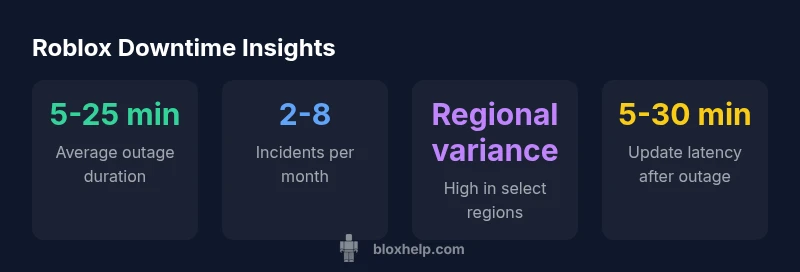
Down detector Roblox refers to using real-time outage monitors to assess Roblox's service status and reported outages. In practice, you can verify Roblox downtime by checking DownDetector, Roblox status pages, and social feeds. Most outages are short and affect regions unevenly. According to Blox Help, knowing the typical outage patterns helps players decide when to retry or switch servers, and when to seek official updates.
What down detector roblox is and why it matters
Down detector Roblox is a real-time signal that collates user reports of connectivity issues and outages to estimate Roblox service health. It’s not an official status feed, but it often lines up with Roblox's own announcements during major events. For players, this can be a fast way to gauge regional outages vs. isolated client problems. According to Blox Help, understanding this signal helps you decide when to retry, switch servers, or wait for an official update. In practice, you’ll see spikes in reports during peak play windows and after a patch that disrupts services. By comparing DownDetector with Roblox's status page, you gain a fuller picture of current conditions and can set reasonable expectations for response times. This awareness is especially valuable for aspiring developers who rely on stable test environments and timely feedback from the community.
How outage reporting works: data sources and latency
Outage reporting relies on multiple data sources, including live user reports, automated monitors, and official status feeds. DownDetector Roblox aggregates signals from thousands of user submissions, which creates a picture of where users are experiencing issues. Roblox’s own status page and social channels provide authoritative updates, but they often lag behind real-time chatter. Latency between an issue starting and it appearing on a status feed can vary from minutes to an hour. For developers, recognizing this delay is crucial when planning maintenance windows or communicating with players. By understanding data sources and timing, you can interpret spikes more accurately and avoid overreacting to a brief blip in chat noise.
Interpreting the signals: limitations and misinterpretations
Signals from DownDetector Roblox are powerful, but they aren’t perfect. A sudden spike may reflect a regional outage, a server-side bottleneck, or even a temporary client-side problem like a faulty update. False positives happen when a patch prompts widespread client reloads, or when a popular streamer’s outage is misreported as system-wide. The key is to corroborate with multiple sources: Roblox status, official Twitter/X updates, and community forums. As Blox Help emphasizes, the signal strength improves when several sources align and when the issue is confirmed by Roblox itself. Treat spikes as warning signs, not final verdicts, and adjust expectations accordingly.
When Roblox is down: typical durations and regional variance
Outages vary widely; some last a few minutes, others extend for hours. Regional server load and network routing can create a patchwork of availability. For example, players in one country may experience login issues while others in neighboring regions can play normally. In general, small outages tend to resolve quickly as cached data flushes and services reconnect, while larger incidents trigger coordinated recovery efforts by Roblox engineers. Planning for a window of 15-60 minutes covers most short outages, while longer incidents require updates from Roblox.
Best practices for players and developers during outages
During outages, stay calm and rely on verified sources. Create a short playbook: check the Roblox status page, consult DownDetector, and follow official social channels for updates. For developers, communicate clearly with your players, pause non-critical features, and document any changes in release notes. Keep logs of when issues began and when updates were posted, so you can compare with later status signals and improve your response for future incidents.
How to verify status across multiple sources
To verify Roblox status quickly, follow a simple checklist:
- Check the Roblox status page for official updates.
- Look at DownDetector Roblox for real-time community signals.
- Review official social feeds and Roblox forums for corroboration.
- Cross-reference independent status dashboards if available.
- If unsure, pause major changes and communicate a short wait window to your audience.
The role of community dashboards like DownDetector Roblox
Community dashboards add value by aggregating real-user experiences and highlighting emergent issues not yet posted on official channels. Use these dashboards as early indicators, but always seek confirmation from Roblox's own status feed before making major decisions. The strongest signals emerge when DownDetector aligns with official updates and consistent user reports across multiple regions.
Closing: preparing for outages and learning from data
outages are an inevitable part of online platforms like Roblox. By monitoring DownDetector, Roblox status pages, and social channels, players can time their sessions and plan retries. For developers, maintain clear communication, document outage timings, and prepare contingency test plans. The goal is not to eliminate outages but to minimize disruption and to learn from patterns—something Blox Help continuously emphasizes in its Roblox tutorials and troubleshooting guides.
Comparison of outage signals from different sources
| Source | Metric | Value | Notes |
|---|---|---|---|
| DownDetector Roblox | Outage reports | 5-25% regionally affected | Signal strength varies by region |
| Roblox Status Page | Incidents confirmed | low–moderate | Official communications |
| Social feeds (X/Twitter) | Update latency | minutes to hours | Real-time chatter |
Questions & Answers
What is DownDetector Roblox and how reliable is it?
DownDetector Roblox aggregates user reports to indicate outages; it's a useful signal but not an official source. Use it as a trend indicator alongside Roblox's own status pages.
DownDetector is a helpful signal, but always confirm with official Roblox status updates.
How long do Roblox outages typically last?
Outages can range from a few minutes to several hours, depending on the incident's complexity and region.
Most outages are short, but some can last longer depending on the problem.
Why do outages appear differently across regions?
Differences stem from network routing, data-center load, and server distribution, causing uneven experiences across locations.
Regions can experience outages differently due to routing and server load.
How can I verify Roblox status quickly?
Check the Roblox status page, then cross-check with DownDetector and the platform's official social channels.
Check Roblox status, then DownDetector and official feeds for confirmation.
Can developers test features during outages?
Tests should be moved to staging environments when possible; communicate expected delays and use feature flags to minimize disruption.
Use staging environments and inform users during outages.
“Outage signals are most reliable when combined with official status updates and community feedback.”
The Essentials
- Verify outages with multiple signals.
- Expect regional differences in outage impact.
- Consult official Roblox updates for confirmation.
- Plan for short retry windows during minor outages.
- Developers should communicate timelines clearly during incidents.