Roblox Redeem Codes: A Complete Step-by-Step Guide
Learn how to safely redeem Roblox gift cards and promo codes to receive Robux or exclusive items. This educational guide covers official redemption, common errors, scams, and best practices for desktop, mobile, and apps.


Redeem Roblox codes to receive Robux or exclusive items by using official channels. This quick guide covers where to redeem, how to enter gift-card or promo codes, and how to avoid scams. It explains redemption on desktop, mobile, or the Roblox app and how to verify that the rewards have been applied.
What Roblox Redeem really means
Redeem in the Roblox ecosystem refers to exchanging a code—whether from a physical gift card or a digital promo offer—for Robux credits or permanent in-game items. The redemption process is designed to be straightforward and secure, but only if you use official channels. By understanding the flow, you protect yourself from scams while maximizing the benefits of legitimate codes. This section lays the groundwork for why redeeming codes matters and what you should expect after a successful redemption. According to Blox Help, sticking to official pages ensures your account stays safe and your rewards arrive promptly.
- Key idea: Codes are a convenient shortcut to add Robux or items without a purchase beyond the initial gift card.
- Warning: Avoid third-party sites that promise instant rewards; they frequently attempt to phish credentials or steal codes.
-additionalNoteOfThisBlockOnlyNeededForClarificationWhenRenderingOptionalFields?":null},
How gift cards differ from single-use promo codes
Gift cards are physical or digital cards issued by Roblox or authorized retailers. They come with a prepaid value that you redeem on Roblox’s site, adding Robux to your balance or granting access to special items. Promo codes, on the other hand, are typically alphanumeric strings shared through promotions or events. Both types funnel through the same redemption page, but gift cards provide a steady Robux balance while promo codes unlock limited-time perks. Understanding these distinctions helps you plan redemptions around sales, events, and seasonal bonuses. The Blox Help analysis notes that staying within official ecosystems minimizes risk and confusion when codes expire or rewards update.
- Gift cards offer a steady value; promo codes tend to be time-limited.
- Always verify you’re on roblox.com or the official Roblox app when redeeming.
- If a code is not accepted, double-check that it’s entered exactly as printed and that it hasn’t expired.
-expectedOutcome":null},
Safety first: scams, phishing, and how to avoid them
Security should guide every Roblox code redemption. Scammers often use fake redemption pages, phishing emails, or social media prompts to harvest credentials. Never enter codes on unofficial sites or respond to unsolicited messages asking for your login details. Use two-factor authentication (2FA) where available, and bookmark the official redemption page to reduce the risk of spoofed sites. If something feels off, pause and verify through the official Roblox support channels. The safest practice is to redeem only through roblox.com/redeem or the official mobile/app path.
- Use official URLs and apps only.
- Enable 2FA to add a security layer on your account.
- If a code looks suspicious, do not use it and report the source.
-strengthOfThisAdvice":null},
Step-by-step overview for redeeming a Roblox gift card on desktop and mobile
Redeeming codes follows a consistent flow across devices. You’ll log in, access the redemption page, input your code exactly as shown, and confirm. After that, you’ll see your Robux balance update or receive the listed items. Though this section describes the general journey, keep in mind regional differences or device-specific nuances that might affect availability or presentation. The goal is to make the process predictable and stress-free for beginners and intermediate users alike.
- Desktop and mobile share the same core steps, with minor UI differences.
- Always have your code ready and be sure you’re on the official site before entering it.
- If you don’t see an immediate update, refresh or check your inventory and balance after a moment.
-noteOnUIConsistency":null},
Where to find legitimate Roblox codes and what to watch out for
Legitimate codes come from official Roblox gift cards bought from authorized retailers or from Roblox promotions. Avoid codes shared in random forums, social media giveaways, or unsolicited emails. If you’re unsure about a code’s source, search for the retailer’s published terms or contact Roblox support to confirm legitimacy. This guardrail prevents losing value to scams while keeping your account secure and your redemption experience smooth.
- Buy from trusted retailers or directly from Roblox.
- Be cautious of codes that require you to download extra software.
- Check purchase receipts or confirmations for authenticity.
-scamProtectionTips":null},
How redeemed Robux or items appear and how to verify success
After successful redemption, Robux should appear as a balance in your account, and any items tied to the code should show up in your inventory. Verification may take a moment; if nothing changes after a few minutes, sign out and back in or use a different device to rule out display issues. If rewards still don’t appear, consult Roblox’s official redemption help resources or contact support. This step ensures you truly receive what you paid for or promoted.
- Check both Robux balance and inventory for items.
- If the balance doesn’t update, retry on a stable connection and official page.
- Keep receipts and code images until rewards appear.
-postRedeemCheckList":null},
Troubleshooting common errors during redemption
Users frequently encounter error messages such as invalid code, already redeemed, or region restrictions. The most common fixes include re-checking the code for exact characters, ensuring it’s not expired, and confirming you’re redeeming in the correct region. If you encounter an error that you can’t resolve, use official Roblox support channels or the help center. Understanding these errors helps you avoid repeated issues and ensures a smoother redemption in the future.
- Double-check for typos, hyphens, and capitalization.
- Confirm your code’s region matches your account country.
- If an error persists, contact official support rather than third-party sources.
-errorResolution":null}
Final thoughts: staying informed and responsible while redeeming Roblox codes
Redeeming Roblox codes is a straightforward way to enhance your gameplay with Robux and items. The key is to use official redemption paths, protect your codes, and stay vigilant against scams. With careful steps and the right sources, you’ll enjoy your rewards without compromising account security. The most effective approach combines sound practices with a healthy dose of skepticism toward suspicious offers.
-responsibleUseNotes":null
Tools & Materials
- Roblox account(Active and verified; enable 2FA if available)
- Valid Roblox gift card or code(From official retailer or Roblox promotions; keep receipt)
- Device with internet access(Desktop, laptop, or mobile device)
- Web browser or Roblox app(Use official app or browser; bookmark the official redemption page)
- Two-factor authentication (2FA)(Optional but recommended for security)
Steps
Estimated time: 15-25 minutes
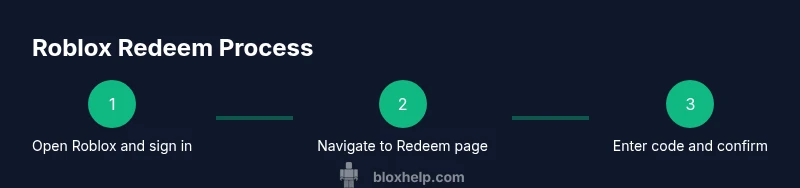
- 1
Open Roblox and sign in
Launch Roblox on your device and log into your account. Ensure you are using the official app or website so your credentials stay secure. If you’re signing in from a shared device, sign out when you’re done to protect your data.
Tip: Use a strong password and enable 2FA for added protection. - 2
Navigate to the Redeem page
Go to the official Roblox redemption page or app section where codes are accepted. If you don’t see the page, use the site’s search or help section to locate ‘Redeem Robux’ quickly.
Tip: Bookmark the exact page URL roblox.com/redeem to avoid phishing sites. - 3
Enter the code accurately
Type or paste the code exactly as printed on the gift card or email. Check for confusing characters (like O vs 0, I vs 1) and avoid spaces at the ends.
Tip: If possible, copy-paste to reduce typos. - 4
Confirm redemption
Submit the code and wait for a confirmation message. If successful, you’ll see Robux added or a new item in your inventory.
Tip: If you see an error, don’t refresh multiple times; read the message and retry from the official page. - 5
Verify rewards
Check your Robux balance and inventory to confirm the rewards are active. Sign out and back in if you don’t see updates immediately.
Tip: Take a screenshot of the confirmation for records. - 6
Troubleshoot if issues persist
If the code is invalid or already redeemed, contact Roblox support through official channels and provide your code, purchase proof, and account details as requested.
Tip: Avoid sharing codes publicly or with unverified sources.
Questions & Answers
What is Roblox redeem?
Roblox redeem means exchanging gift card codes or promo codes for Robux or items on Roblox's official platform.
Roblox redeem is exchanging codes for Robux or items on Roblox’s official site or app.
Can I redeem codes on mobile?
Yes. Redeem Roblox gift cards or promo codes using the Roblox mobile app or mobile website through the official redemption page.
Yes, you can redeem codes on mobile through the official Roblox app or mobile site.
What if my code is invalid?
If a code is invalid, double-check the characters, ensure it’s not expired, and confirm you’re redeeming in the correct region. If it still fails, contact Roblox support.
If your code is invalid, recheck the code and contact official Roblox support.
Will redeeming a code twice give me double rewards?
No. Redeeming a valid code adds Robux or items once; duplicates are rejected.
Redeeming twice won’t double rewards; duplicates are rejected.
Are gift cards region-locked?
Code validity can depend on region; redeem using the country listed on the purchase on the official site.
Codes may be region-locked; redeem in your official region.
Where can I get legitimate Roblox codes?
Purchase Roblox gift cards from official Roblox retailers or promotions; beware third-party scams.
Buy codes from official sources to avoid scams.
Watch Video
The Essentials
- Redeem codes only on official Roblox pages.
- Gift cards and promo codes use the same secure redemption flow.
- Verify rewards immediately after redemption.
- Beware scams; never share codes or credentials.