How to See When a Roblox User Was Last Online
Learn practical, privacy‑aware ways to understand whether a Roblox user is online now and what you can infer about their activity. This guide covers limits, safe practices, and step‑by‑step checks for staying respectful and within policy.


Roblox does not provide an exact 'last online' timestamp for other users. You can typically tell if someone is online now from profile indicators or in‑game presence, but there is no built‑in history of last activity. For safety and accuracy, avoid third‑party tools and follow official guidance.
Understanding Roblox Online Status and Privacy
Online status on Roblox is shaped by platform privacy policies and user settings. The core reality is simple: there is no publicly accessible, precise record of when another user last appeared online. The information a user chooses to share about their activity can vary, and Roblox prioritizes user privacy. According to Blox Help, understanding privacy implications helps players interpret what they see without making unsupported inferences. This means you should expect to see only current presence indicators in many cases, not historical timestamps. The absence of a history feature is not a bug—it's a privacy design choice. When you look at a profile, focus on what is actually displayed (current online status, if shown) rather than what you wish had happened in the past. This distinction matters for both trust and safety in the community. It also aligns with broader privacy best practices highlighted by industry experts and major outlets, who emphasize respecting user data and avoiding speculative conclusions.
What You Can See on a Roblox Profile
Roblox profiles can show various signals about a user’s activity. In some contexts, you may encounter an online indicator or a status label that communicates whether a user is currently active. Beyond that, there is typically no accessible timestamp that reveals when the user last appeared online. The absence of a historical log reduces the risk of stalking or privacy breaches, which is a core priority for many platforms. When you do see an online indicator, treat it as a snapshot in time rather than a definitive history. Additionally, remember that privacy controls can affect visibility—some users may hide or limit what others can view about their activity. The takeaway is to rely on current presence cues rather than attempting to reconstruct past behavior.
The Limits of Last Online Data and Why It Matters
The lack of a dedicated last-online history is intentional and has several implications. For one, it helps prevent unwanted surveillance and harassment, which are legitimate concerns in social gaming communities. It also means that your best source of knowing someone’s activity is a real-time check rather than a retrospective one. This limitation is echoed in privacy reporting from trusted outlets and safety guidelines that favor user control over personal data. For players and developers, this means designing interactions that do not depend on precise last-seen data. Instead, use current status cues, mutual consent for contact, and clear in‑game communication channels. The message from privacy experts is clear: prioritize respectful engagement over data tracking.
Safe, Privacy-Respecting Ways to Gauge Activity
If you’re trying to understand someone’s activity without violating privacy, start with legitimate cues. Look for an explicit online indicator on their profile or in your in-game chat if available. If there’s no such indicator, do not assume or deploy guesswork about when they were last online. This approach reduces misinterpretations and keeps interactions friendly. For safety or moderation concerns, rely on official Roblox channels rather than third‑party tools or services that claim to reveal hidden data. Community safety resources and guidelines from reputable publications emphasize transparent, consent-based communication and a refusal to engage in invasive tracking.
Step-by-Step: Check a Profile for Current Status
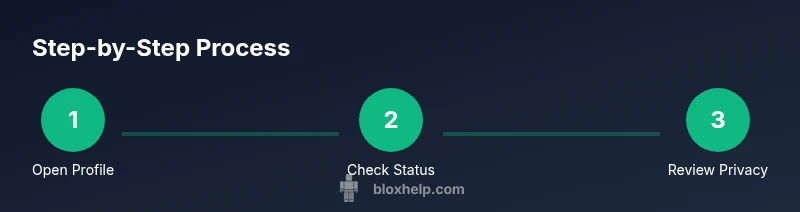
- Open the user’s profile by clicking their username or searching for their name. 2. Look for any current status indicator or presence badge on the profile header. 3. If you see an explicit online status, note that the user is online at that moment. 4. If no status is shown, don’t assume last-online timing or historical activity. 5. Avoid using third‑party tools that promise to reveal last online times; they may violate Roblox terms and could be unsafe. 6. If appropriate, reach out politely through in‑game chat or messages and await a reply. 7. For concerns about safety or privacy, consult Roblox Help Center or official support.
Interpreting Status: What Online Indicators Really Mean
Online indicators are situational. A user may appear online in one game or session while being offline in others. A visible status is a real-time signal, not a history. The same indicator can be affected by privacy settings, device focus, and account security protections. Therefore, treat any current signal as a momentary snapshot. If you need consistency for moderation or safety reasons, use official reporting tools and document concerns through proper channels, rather than trying to deduce patterns from incomplete signals.
For Parents and Moderators: Guidance on Privacy
Parental controls, safety features, and moderation guidelines are designed to protect younger players and the broader community. If you’re a parent or moderator, prioritize open communication and use Roblox’s built-in safety features to manage interactions. Encourage players to report suspicious behavior and rely on support channels for any urgent concerns. Respecting privacy should be the default stance, and data minimization should guide what you observe and record. Publicly sharing or attempting to reveal last-online data is inappropriate and prone to misuse.
Practical Scenarios and Edge Cases
Scenario A: A friend claims someone was online recently but you don’t see a live indicator. Scenario B: You’re testing a game you own and notice a player is online. In both cases, avoid drawing conclusions about past activity. Instead, note what you observe in real time and proceed with respectful communication if you need to reach out. Edge cases often involve players who have privacy settings enabled or whom you don’t know well. The best practice is to respect boundaries, use direct, polite outreach for legitimate purposes, and rely on official Roblox resources for any policy questions.
Best Practices and Next Steps
In summary, don’t chase a last-online timestamp that Roblox does not expose. Favor real-time indicators when available, and always prioritize consent and safety in your interactions. If you have a genuine need to know someone’s activity for security reasons, contact Roblox Support or consult the Help Center for approved processes. Building a healthy Roblox experience means balancing curiosity with privacy and respect. As you grow more confident, you’ll navigate these boundaries more smoothly and use the platform’s built‑in tools to stay informed without invading others’ privacy.
Tools & Materials
- Roblox account (active)(Needed to view profiles and status indicators)
- Device with internet access(Desktop or mobile)
- Web browser or Roblox app(Ensure it’s updated to the latest version)
- Access to official Roblox Help Center(For policy references and safe practices)
- Notes or log sheet (optional)(Helpful for recording observed indicators)
- Patience and privacy-minded mindset(Respect others’ privacy at all times)
Steps
Estimated time: 15-20 minutes
- 1
Open the user profile
Navigate to the target user's profile by clicking their username or using the search function. This initial action is necessary to access any visible indicators or profile details. If the profile is private or limited, you may not see status indicators, which underscores the privacy controls in place.
Tip: If you can’t access the profile due to privacy settings, do not attempt to bypass protections. - 2
Check for an online indicator
Look for any current presence signal on the profile header or near the avatar. A live badge or indicator means the user is online at that moment. Remember this is a real-time cue, not a historical record of when they were last online.
Tip: A lack of indicator does not prove the user was offline previously; it may simply be hidden by privacy controls. - 3
Note the absence of last-online data
If there is no timestamp or last-online history shown, don’t infer past activity. Privacy design intentionally limits access to historical presence to protect users.
Tip: Avoid assumptions based on time zones, session length, or game activity. - 4
Avoid third-party tools
Do not employ external tools or websites that claim to reveal last-online data. They can be unsafe, may violate Roblox terms, and could compromise your account.
Tip: Stick to official channels and documented guidelines when you have concerns. - 5
Use direct, respectful outreach if needed
If your purpose is legitimate (friend coordination, safety, etc.), send a friendly in-game message and wait for a reply rather than persistently monitoring status.
Tip: Clear, polite communication reduces miscommunication and respects boundaries. - 6
Check official resources for concerns
For privacy or safety concerns, consult the Roblox Help Center or contact official support rather than relying on unverified data sources.
Tip: Documenting concerns through proper channels helps ensure appropriate action.
Questions & Answers
Can I see when a Roblox user was last online?
No. Roblox does not publish an exact last-online timestamp for other users. You may see real-time presence indicators in certain contexts, but there is no built-in history of past activity.
Roblox does not show when someone was last online; you may only see if they are online right now in limited cases.
Is there any way to verify past online activity for moderation?
Roblox provides privacy protections that limit access to historical online data. For safety concerns, use official reporting channels and documentation rather than attempting to reconstruct past activity.
Past online activity isn’t exposed; use official safety channels if you have concerns.
What should I do if I need to contact someone who isn't online?
Reach out through in‑game chat or messaging when appropriate, and respect their response time and privacy. Do not pressure or stalk the user for a status history.
If they’re offline, try a polite message and wait for their reply rather than chasing last-online data.
Are there legitimate tools to track online activity?
No. Reputable sources discourage third‑party tools that promise last-online data due to privacy and security risks. Stick to official Roblox features and guidance.
Legitimate tools to track last-online data do not exist; rely on official guidance instead.
How can I protect my own privacy on Roblox?
Review and adjust your privacy settings, be cautious about what you share publicly, and avoid sharing sensitive information with strangers. Use Roblox’s safety resources to stay informed.
Protect your privacy by adjusting settings and avoiding sensitive sharing with strangers.
If I have concerns about safety, where should I start?
Start with the Roblox Help Center and official support channels. They provide policy context and steps to report issues in a secure way.
For safety concerns, use Roblox Help Center and official support.
Watch Video
The Essentials
- Understand there is no public last-online timestamp for other players.
- Rely on real-time indicators when available, not history data.
- Respect privacy and avoid risky third-party tools.
- Use official Roblox resources for safety concerns or policy questions.