How to Tell If a Roblox Link Is Fake
Learn concrete steps to identify fake Roblox links, verify destinations, and protect your account with practical safety practices from Blox Help.


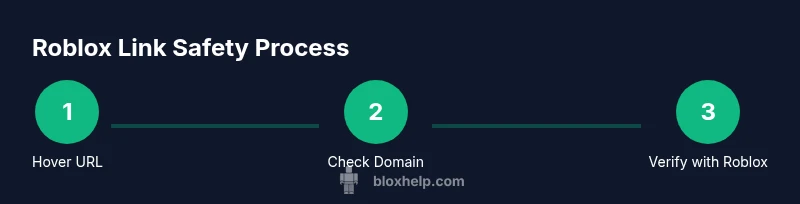
To tell if a Roblox link is fake, hover over the link to preview the destination, inspect the domain, and verify it against official Roblox resources. Watch for typos, suspicious shorteners, and unusual redirects. Never enter your Roblox password on untrusted pages. This guide shows practical checks you can apply right away.
What makes a Roblox link risky
Roblox links can be crafted to look legitimate, especially when scammers imitate official pages or popular promotions. The goal is to get you to click and provide sensitive information or download malware. In many cases, the danger isn’t a single obvious red flag, but a combination of subtle cues that, when combined, reveal a fake. According to Blox Help, staying vigilant about Roblox links is essential for a safe gaming experience. This section explains how attackers exploit trust, urgency, and social proof to lure players. By understanding these techniques, you can slow down and verify before you click. Remember: even a perfectly formatted URL can be malicious if it redirects to a phishing page that asks for login details or payment information.
Quick checks before you click
Before you click any Roblox link, run through a quick checklist. First, hover over the link to reveal the real destination URL. If the domain doesn’t clearly belong to Roblox (roblox.com, web.roblox.com, or content.roblox.com), treat it with suspicion. Second, examine the URL for unusual characters, extra words, or misspellings that imitate official pages. Third, avoid shortened URLs (bit.ly, tinyurl, etc.) unless you can expand them safely. If you’re unsure, don’t click—open a new browser tab and navigate to Roblox directly to find the page you expect. This habit reduces exposure to scams and keeps your account safer.
Understanding URL structures and domains
Legitimate Roblox pages typically use recognizable Roblox domains. Be wary of domains that imitate the brand’s look but differ in wording or country code TLDs (like .com vs .net). Scammers commonly employ homographs or Unicode tricks to resemble Roblox domains. A good rule is to compare the link to known Roblox URLs you’ve bookmarked or found on the official Roblox site. If the URL contains extra subdomains, unusual punctuation, or a non-Roblox root, treat it as suspicious. This understanding helps you spot fakery at a glance and reduces the chance of visiting a compromised page.
How to verify the destination safely
If you’re unsure about a link, verify the destination safely. Copy the link text and paste it into a reputable URL checker or the browser’s address bar after opening a neutral, isolated session. Confirm the page loads content that matches Roblox’s design language (logo, fonts, color scheme) and never enter credentials on a page that isn’t clearly Roblox. Use official Roblox resources to cross-check any promotion or event the link claims to represent. For additional safety, enable two-factor authentication (2FA) on your Roblox account so even if credentials are compromised, access remains protected.
Recognizing phishing through impersonation and social engineering
Phishing attempts often rely on impersonation and social cues. Expect urgent language like “your account will be shut down” or “claim your reward now.” Scripts may mimic Roblox’s login forms but redirect to phishing domains. Be cautious of pages asking for sensitive data beyond a login (security questions, payment details, or verification codes). Visual cues such as mismatched logos, low-resolution graphics, and awkward grammar can also signal a fake. Always slow down and verify through official channels before providing any information.
Safe clicking workflow: steps to take if in doubt
When in doubt, follow a safety-first workflow. Step 1: Do not click the link. Step 2: Open a fresh tab and navigate to Roblox directly rather than following the link. Step 3: If you must test, use a separate device or browser profile with minimal data saved. Step 4: If anything looks off, report the link and avoid engaging further. Step 5: Update your login credentials and review recent account activity if you suspect exposure. This cautious approach minimizes risk and protects your progress.
Account protection and post-click actions
Protecting your Roblox account begins with strong authentication and vigilance after a potential stumble. Enable 2FA and use a unique password stored in a trusted password manager. Immediately review recent login history and device access; revoke sessions that you don’t recognize. If you suspect you’ve entered credentials on a fake page, change your password from the official Roblox site and run a security check on linked email accounts. Regularly review connected apps and permissions to prevent future breaches.
Tools, extensions, and practices for ongoing safety
Maintain ongoing safety with practical tools and habits. Use a password manager to keep unique credentials, and enable browser warnings for phishing attempts. Bookmark only official Roblox pages and avoid clicking from unknown emails or messages. Consider enabling browser security extensions that flag suspicious domains and provide visual cues for trusted sites. Periodically review your security settings and educate yourself on current phishing trends to stay ahead of scammers.
Authority sources
- https://www.consumer.ftc.gov/articles/how-to-identify-and-avoid-phishing-scams
- https://www.us-cert.gov/ncas/tips
- https://www.microsoft.com/en-us/security/portal/microsoft-365-security/what-is-phishing
Tools & Materials
- Web browser(With updated security features and popup blockers enabled)
- Smart device(For testing links in a separate session if desired)
- Password manager(To store unique, strong Roblox credentials)
- Official Roblox pages(For cross-checking URLs and promotions)
Steps
Estimated time: 15-20 minutes
- 1
Hover and inspect the URL
Hover over the link to reveal the real destination. Look for a Roblox domain (roblox.com or web.roblox.com) and note any odd endings or extra subdomains. If the address looks off, do not click.
Tip: If you see a shortened URL, use a safe expansion tool or expand it in a controlled environment before clicking. - 2
Compare with official Roblox sources
Open Roblox directly in a new tab and compare the content you expect with what the link promises (promotion, event, or login prompt). If the page content doesn’t match Roblox’s official style or you’re redirected, skip it.
Tip: Bookmark official Roblox pages and use those links as your reference rather than following suspicious emails. - 3
Check security indicators
Ensure the destination uses HTTPS and a valid certificate. Be cautious of pages that request credentials on the same page as a login prompt but are hosted on a non-Roblox domain.
Tip: Do not enter passwords on sites that aren’t clearly Roblox or that show mixed content warnings. - 4
Test on a safe environment
If you must interact with a link to verify its behavior, do so in a sandboxed session or on a separate device. Do not use your main account on test clicks.
Tip: Keep a test Roblox account separate from your main one for risk-free verification. - 5
Report suspicious links
If you suspect a link is fake, report it to Roblox and to your community moderation channels. Sharing patterns helps improve safety for everyone.
Tip: Flag the domain as phishing and avoid distributing the link further. - 6
Review and secure your account
If you clicked a suspicious link, immediately change your Roblox password, enable 2FA, and check recent account activity for unusual sessions.
Tip: Act quickly to minimize potential damage and secure your recovery options.
Questions & Answers
Can a Roblox link look legitimate but still be fake?
Yes. Phishers copy branding cues and use convincing URLs. Always verify the destination before clicking.
Yes, it can look real but still be fake, so always verify the destination first.
Are shortened URLs always dangerous?
Shortened URLs can obscure the destination. Expand them safely before visiting to confirm the site is legitimate.
Shortened URLs aren’t always dangerous, but they hide the final destination—expand first.
What should I do if I clicked a fake Roblox link?
Change your Roblox password immediately, enable 2FA, and review recent activity for unauthorized logins.
If you clicked a fake link, change your password and check for unusual activity right away.
How can I report suspicious Roblox links?
Use Roblox’s safety reporting channels and your browser’s phishing-reporting features to alert others.
Report the link to Roblox and your browser to help protect the community.
Is there an automated way to verify links?
Automated tools can flag known phishing domains, but always verify a link manually if you’re unsure.
Automation helps, but when in doubt, verify manually.
Watch Video
The Essentials
- Verify URLs before clicking
- Do not enter credentials on questionable pages
- Use official Roblox references for verification
- Enable 2FA and monitor account activity