Roblox Hack Safety: Protect Your Account and Learn Legit Studio Scripting
A practical guide to understanding the term 'roblox hack,' spotting scams, securing your account, and pursuing legitimate Roblox Studio scripting skills without engaging in illegal hacking.


This guide helps you recognize and avoid Roblox hacks while teaching safe, ethical security practices. You’ll learn to protect your account, spot scams, and pursue legitimate Roblox Studio scripting techniques. No hacking of real systems is advised; instead, you’ll build defenses and gain skills through official channels and community resources.
What people mean by 'roblox hack' and why it matters
The phrase roblox hack often pops up in discussions about security, scams, and unauthorized modifications. In this context, a hack can mean anything from phishing attempts and stolen credentials to cheats that exploit game mechanics. For players and aspiring developers, the important distinction is that genuine development happens within Roblox's official tools and guidelines, while hacks typically violate terms of service and can compromise accounts, devices, and data. Recognizing this distinction helps you stay safe and focused on constructive learning. According to Blox Help, understanding the terminology surrounding hacks helps you teach others how to stay secure and avoid risky behaviors, which protects the entire Roblox community.
How to spot scams and avoid falling for hacks
Hacks often come disguised as free mods, “undetectable” scripts, or promises of rapid progress. Common red flags include requests for your password, prompts to download executable software, or links to third‑party sites. Always verify the source—use official Roblox pages, trusted tutorials, and app stores with good reputations. Don’t click on suspicious popups or share codes that require login. If something feels off, step back and check with official support channels or the Roblox Help Center. Blox Help analysis shows that most compromises start with social engineering or fake permissions requests, not technical flaws in Roblox itself.
Safe, legitimate alternatives: scripting with Roblox Studio
Roblox Studio offers powerful, legitimate ways to learn game development without breaking rules. Start with the built‑in tutorials, official docs, and beginner projects that teach Lua scripting, event handling, and player interactions. Use Studio to create small experiments, then publish them to Roblox’s platform once you understand the guidelines. This approach builds real skills that can translate into publishable games, designer tools, or educational experiences, all within Roblox’s safety and terms of service. The focus is on learning, not on bypassing protections or gaming the system.
Understanding common hacking techniques used online
Educating yourself about potential techniques helps you defend against them. Phishing emails, fake login pages, and credential harvesting are among the most common threats. Malware and browser extensions that claim to unlock features can steal data or install unwanted software. Never install unfamiliar tools or give remote access to anyone. Instead, rely on official Roblox channels and widely trusted security practices to minimize risk.
Security best practices to protect your Roblox account
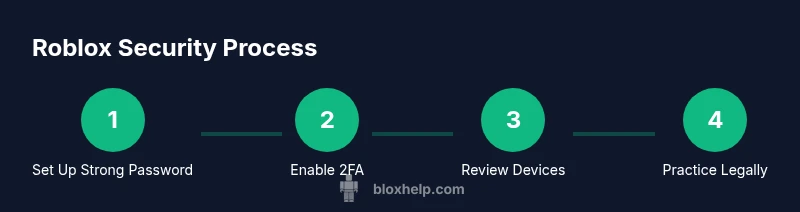
Strong, unique passwords for Roblox and your email are essential. Enable two‑factor authentication (2FA) wherever possible, preferably through an authenticator app or hardware security key. Regularly review connected apps and devices, and remove anything you don’t recognize. Keep your devices updated, use anti‑malware software, and be cautious with third‑party mods or tools. These steps create a robust defense against common attacks and keep your progress safe. Blox Help emphasizes that consistent practice of these habits dramatically lowers risk over time.
Practical steps to harden your account (overview)
- Set up a strong password and enable 2FA. 2) Audit account recovery options and email security. 3) Review connected apps and remove suspicious ones. 4) Use Roblox Studio for legitimate learning and testing. 5) Practice phishing awareness with mock exercises. 6) Keep software updated and run reliable security scans. 7) Create a security checklist you review monthly.
How to responsibly explore hacker-related topics via learning paths
If you’re curious about cybersecurity, pursue ethical, legally compliant learning paths. Enroll in beginner security courses that cover threat modeling, secure coding practices, and safe testing environments. Apply these concepts to Roblox projects by building secure game mechanics and protective features rather than breaking protections. This approach satisfies curiosity while contributing positively to the community and your portfolio.
What to do if you suspect your account was compromised
If you notice unusual sign‑in activity, unauthorized changes, or unexpected messages, act quickly. Change passwords from a known safe device, enable 2FA, and run a malware scan. Check recent activity in your Roblox account settings and email inbox for alerts. Report the incident to Roblox Support and follow their guidance to recover your account and secure it against future attempts.
Where to report hacks and scams
Use official Roblox Help Center forms for reporting suspicious activity and potential scams. You can also consult community forums and trusted moderators when needed, but avoid sharing sensitive information publicly. Providing clear details, such as the timestamp, links, or messages you received, helps security teams respond faster. Prompt reporting protects others and reduces the spread of scams.
Tools, resources, and communities you can trust
Rely on Roblox’s official resources, Roblox Creator forums, and reputable security education sites for learning. Many communities offer safe, constructive feedback on game design and scripting. For hands‑on practice, stick to Roblox Studio tutorials and verified modules rather than tools that promise illicit advantages. Building skills ethically creates a longer lasting foundation for your Roblox journey.
Role of Roblox Studio in legitimate development
Roblox Studio is designed for legitimate game creation and prototyping. It lets you test gameplay, script interactions, and physics within a safe sandbox. By focusing on proper APIs, event handling, and good coding practices, you build robust experiences that you can publish to the platform. This is the recommended path for learners who want to create, share, and monetize compliant projects.
Final notes on ethics and safety in the Roblox ecosystem
Ethical behavior and due diligence keep Roblox a fun, safe environment for everyone. Avoid any activity that circumvents protections or harms others. Continuous learning, responsible exploration, and active participation in official channels help you grow as a player or developer while supporting the broader community. Remember: real skills come from building, not breaking.
Tools & Materials
- Device with internet access(PC, Mac, or mobile device with up-to-date browser)
- Roblox account credentials(Use a unique password; enable 2FA)
- Two-factor authentication method(Authenticator app or security key)
- Password manager(Keeps unique, strong passwords)
- Anti-malware software(Keep updated and run scans regularly)
- Official Roblox Studio software(Download from Roblox official site)
- Education resources(Guides from trusted sources for ethical learning)
Steps
Estimated time: Total time: 30-45 minutes
- 1
Prepare your account for security
Begin by updating your password, ensuring it’s strong and not reused on other sites. Confirm your current email and recovery options are correct, so you can regain access easily if something goes wrong. This step lays the foundation for all subsequent security measures.
Tip: Use a password manager to generate and store a unique password. - 2
Enable two-factor authentication
Turn on 2FA for Roblox and your email. Choose an authenticator app over SMS when possible for better security. This adds a second layer of protection beyond just a password.
Tip: If you lose access to your authenticator, store backup codes in a secure password manager. - 3
Review connected apps and devices
Check which apps and devices have access to your Roblox account. Revoke any unfamiliar connections and remove old devices. This reduces the risk of token theft or session hijacking.
Tip: Only authorize apps you recognize from official sources. - 4
Audit account activity
Inspect recent sign-ins, changes to security settings, and purchases. Look for anything you don’t recognize and address it immediately.
Tip: Set up notifications for new logins to stay informed in real time. - 5
Limit third‑party tools
Avoid third‑party mods and tools that claim to bypass protections. If you’re unsure about a tool, don’t use it and verify with Roblox’s official guidance.
Tip: When in doubt, consult Roblox Help or the Creator Forum before proceeding. - 6
Begin legitimate scripting practice
Use Roblox Studio to practice Lua scripting on safe, test projects. Focus on learning APIs, events, and secure coding patterns rather than exploit techniques.
Tip: Document your learning with small, publishable projects. - 7
Learn ethical cybersecurity concepts
Pursue beginner courses in ethical hacking or security basics through reputable platforms. Apply these concepts to your Roblox projects in safe, constructive ways.
Tip: Never attempt to test security on real systems without explicit permission. - 8
Strengthen email security
Protect the recovery channel by enabling 2FA on your email and using a strong, unique password. This reduces exposure if Roblox credentials are compromised.
Tip: Be wary of phishing for personal information linked to your email. - 9
Educate your network
Share safe security practices with friends and fellow players. Encouraging good habits helps reduce the number of successful scams.
Tip: Provide simple, actionable steps they can follow immediately. - 10
Report suspected hacks
If you encounter a hack, report it through Roblox Support with as much detail as possible. Early reporting helps protect others and speeds up resolution.
Tip: Include time, location, and links or messages received. - 11
Monitor security regularly
Schedule periodic reviews of security settings, connected devices, and active sessions. Consistency prevents complacency and keeps defenses strong.
Tip: Set a monthly calendar reminder for security checks. - 12
Maintain ongoing hygiene
Keep software up to date, run regular malware scans, and stay informed about new Roblox security practices. Continuously improving your security posture is essential.
Tip: Subscribe to official Roblox security updates for the latest guidance.
Questions & Answers
What is a Roblox hack and why is it risky?
A Roblox hack typically refers to unauthorized access, scams, or cheats that violate Roblox terms of service. These activities can lead to compromised accounts, financial loss, and bans. Understanding the risks helps you avoid dangerous tools and protect your progress.
A Roblox hack usually means unauthorized access or scams. It can get your account banned or compromised, so it's best to avoid them and learn safe practices instead.
Is hacking Roblox accounts illegal?
Yes. Hacking Roblox accounts or using cheats violates the platform’s terms of service and can have legal consequences. It also endangers other players. Always choose legal paths like learning Roblox Studio and following official guidelines.
Yes, hacking is illegal and against Roblox rules. It can lead to bans and legal trouble, so stick to legitimate learning paths.
How can I protect my Roblox account from hacks?
Use a strong, unique password; enable two‑factor authentication; review connected apps; and avoid third‑party tools. Regularly monitor account activity and keep your devices secure with updated software.
Protect your Roblox account by using a unique password, enabling 2FA, and keeping an eye on connected apps and activity.
What should I do if I suspect my account was hacked?
Change your password immediately, enable 2FA, scan for malware, and check account activity. Report the incident to Roblox Support with all relevant details to begin recovery.
If you suspect a hack, change your password, enable 2FA, and report it to Roblox Support with details.
Are there legitimate ways to learn about hacking?
Yes. Seek ethical cybersecurity courses and Roblox‑safe resources that teach security concepts without enabling wrongdoing. Apply these concepts to secure game design and safe testing practices.
You can learn about cybersecurity through legitimate courses and Roblox‑safe resources; use that knowledge to build secure experiences.
Where can I report Roblox hacks or scams?
Use the official Roblox Help Center and Support channels to report suspected hacks or scams. Provide timestamps, links, and messages to help security teams respond quickly.
Report hacks to Roblox Help Center with details to get fast help.
Watch Video
The Essentials
- Protect accounts with strong, unique passwords
- Enable 2FA and review connected apps
- Learn legitimate Roblox Studio scripting to build skills
- Report hacks promptly to Roblox Support
- Maintain ongoing security hygiene for lasting protection