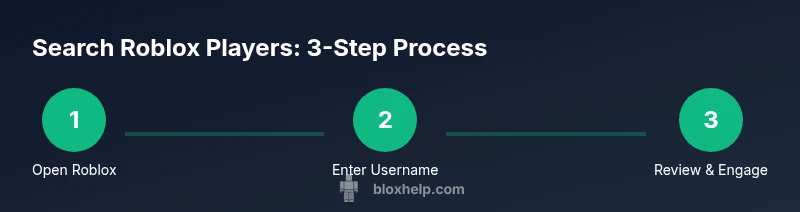
Roblox Player Search: A Practical Guide for Finding Players
Learn how to locate Roblox players by username, groups, and activity. This guide covers safety, privacy considerations, and practical steps for beginners to find and verify Roblox profiles.


Goal: You will learn how to locate Roblox players by username and profile details using built-in search tools, filters, and safety checks. Before you begin, ensure you know the exact username or a reliable partial name, and understand privacy settings that affect who appears in search results. This guide also covers finding players via groups, friends, and recent activity, with practical safety tips.
What is Roblox player search and why it matters
Roblox player search is the built-in capability that lets you locate other players by username, profile details, and activity signals across the Roblox ecosystem. For new players, this is essential for building friends lists, joining groups, and coordinating gameplay. According to Blox Help, mastering the basics of Roblox player search reduces friction when you’re trying to join a server or reconnect with a friend after a long session. By understanding what you can search for and how results are shown, you can streamline your Roblox journey and avoid false leads. In practice, you’ll start with a simple username search, then refine results by location, groups, or recent activity. The quality of your search experience also depends on privacy settings and profile visibility, which Roblox balances to protect younger players while still enabling community connections. You’ll see a mix of public profiles, private accounts with limited visibility, and profiles tied to specific games or groups. This section lays the groundwork: what the search feature does, how results are generated, and why consistent search habits matter as you explore Roblox’s social landscape.
Basics of Search in Roblox and Privacy Considerations
Before you start hunting for a player, understand that Roblox implements privacy controls that affect who can be found and what information is visible. Some users keep profiles fairly open, while younger players may have restrictions that limit discoverability. According to best practices from community guides, always respect privacy cues and avoid chasing profiles that appear to be intentionally hidden. In this section you’ll learn how to check visibility indicators, what kinds of information you can rely on when identifying a person, and how to protect your own account while performing searches. The goal is to search efficiently without compromising safety or violating terms of service.
Username vs. partial-name search: your first move
The most reliable Roblox player search starts with the exact username when you know it. If you only know part of a name, try a few common variants or nickname spellings, but be prepared to see many unrelated results. The platform typically lists approximate matches first, followed by more precise entries based on the information Roblox can safely expose. This section covers practical strategies for narrowing down results quickly, including using capitalization cues and cross-referencing profile avatars to confirm the right person.
Advanced search filters and best practices
When available, use filters such as region, language, and groups to narrow results. Even without explicit filters, you can improve accuracy by focusing on players who share your games, groups, or recent activity. Always cross-check a profile’s bio and avatar details, and consider recent activity to confirm it’s the person you’re seeking. This section provides tactics to combine multiple signals for higher confidence in matches.
Finding players via friends, groups, and games
If a direct username search doesn’t return the person you’re after, leverage mutual connections. Look for players in shared groups, those who have played the same games, or friends of your friends. This approach helps when usernames are common or when users change display names. You’ll also learn how to use in-game lobbies and friend suggestions to expand your search beyond a single query.
Common pitfalls and how to avoid them
Impersonation and outdated profiles are common traps when searching for players. Always verify multiple signals before sending friend requests or messages, such as mutual groups, game history, and cross-platform presence if available. Be cautious with links or requests received through non-official channels, and report suspicious accounts. This section summarizes warning signs and best practices to keep your Roblox journey safe.
Tools & Materials
- Stable internet connection(Prefer wired Ethernet or strong Wi‑Fi; reliability affects search results.)
- Roblox account login(Sign in to access and perform searches.)
- Device with Roblox installed or accessible via browser(PC, Mac, iOS, or Android; ensure you can reach the search bar.)
- Screen with a visible search bar(Home page or game hub where the search field appears.)
- Note-taking tool or bookmarking method(Optional for tracking profiles you want to revisit.)
Steps
Estimated time: 15-25 minutes
- 1
Open Roblox and sign in
Launch the Roblox app or visit the Roblox website and sign in with your account. Make sure you’re on a page that shows the search bar, not inside a game. This initial step ensures you can access all search features and profile data.
Tip: If you can't access the search bar, check your current page context or try reloading the home screen. - 2
Locate the search bar
Find the search field at the top of the home page or within the app navigation. The search bar is your primary input for usernames, nicknames, or game-related terms. Knowing its location speeds up every subsequent step.
Tip: If you’re using a small screen, try landscape mode or zoom out a bit to easily reach the search field. - 3
Enter a username or partial name
Type the exact username if you know it; if not, enter a plausible partial name. Observe the immediate suggestions or results that appear as you type and adjust your query accordingly. This step forms the basis of your Roblox player search.
Tip: Use capitalization if you know it, and try a few spelling variants or common nicknames. - 4
Review search results
Scan the list for familiar avatars, bios, or recent activity indicators. Open profiles that look promising to verify details like group membership or game history before making contact.
Tip: Mutual groups or friends are strong indicators you’ve found the right person. - 5
Open the profile to confirm identity
Click the suspected profile to view its bio, games played, and friend lists. Confirm the identity through multiple signals rather than a single visual cue.
Tip: If privacy settings hide crucial details, look for other corroborating signals like groups or recent activity. - 6
Use available filters or signals
Apply any region or language filters if available, and consider activity history or mutual groups to narrow results. If filters aren’t present, rely on cross-referenced signals.
Tip: Combining several signals yields higher confidence in your match. - 7
Decide how to engage
If you know the profile is legitimate and you want to connect, send a friendly, respectful message or a safe friend request. Respect privacy and avoid pressuring a response.
Tip: Proceed with caution; if the other user declines contact, respect their choice. - 8
Document and review your findings
Keep a simple log of profiles you’ve found, their groups, and last activity. Review periodically and prune connections that no longer align with your goals.
Tip: Regularly review privacy settings on both ends to maintain safety.
Questions & Answers
How do I search for a Roblox player if I only know part of their username?
Partial username searches can yield broader results. Start with what you know, then refine by looking for mutual groups or recent activity. If the exact match remains elusive, try variations or ask mutual friends for the correct handle. Always verify outcomes with multiple signals before interacting.
Partial usernames can work, but verify results with groups or activity before contacting anyone.
Can I search for players who are not my friends or outside my region?
Yes, Roblox allows you to search for players beyond your friends list. Visibility may vary by privacy settings and age restrictions. If you don’t see a profile, try using mutual groups, recent activity, or linked social accounts where applicable.
You can search beyond friends; use groups or activity to corroborate.
Why can't I find a particular player even though they exist?
Common reasons include privacy settings limiting visibility, recent username changes, or accounts being private. Double-check spelling, consider variants, and check mutual groups or friends. If still unavailable, the user may have restricted discoverability.
It may be privacy, a name change, or discoverability limits.
Is it safe to message or friend request a player I find?
Only contact players who appear willing to engage and always maintain respectful language. Do not share personal information, and avoid clicking suspicious links. If a player ignores requests or reports harassment, respect boundaries and use Roblox reporting tools.
Yes, but keep it respectful and guard personal information.
Does Roblox search work the same on mobile and PC?
Basic search functions are available on both platforms, though the UI may differ. The core concepts—typing a username, reviewing results, and verifying profiles—remain consistent across devices. If you notice a UI difference, adapt by locating the search icon in your device’s layout.
Core search works the same on mobile and PC, with UI differences.
Watch Video
The Essentials
- Search with exact usernames for precision
- Verify profiles before adding or messaging
- Use groups and mutual friends to locate players
- Respect privacy and safety guidelines