How to Create a Roblox Account: A Complete Beginner's Guide
Learn how to create a Roblox account safely and quickly. This guide covers prerequisites, step-by-step signup, security settings, and common issues for new players, with practical tips from Blox Help.


Goal: create roblox account quickly and securely. You’ll need an email or phone number for verification, a unique username, and a strong password. This quick answer covers the essentials for signing up on PC, mobile, or console, plus safety tips to protect a new player. Blox Help provides this practical, beginner-friendly guide.
Why you should create a Roblox account
According to Blox Help, a Roblox account is your key to unlocking the platform's vast library of games, social features, and creative tools. With one account you can save progress, customize an avatar, and maintain a consistent identity across devices. Creating an account also helps you tailor privacy and safety settings from day one. For new players, this foundational step makes signup smoother, whether you’re exploring obbys, building experiences in Roblox Studio, or playing with friends. The value is having a single hub where your game progress and social activity sit, so you can focus on learning and having fun.
As you begin, keep safety in mind: a verified account with strong credentials protects your presence online, and thoughtful privacy settings reduce unwanted contact. If you’re unsure where to start, this guide from Blox Help walks you through the essential considerations and practical choices you’ll make at signup.
Requirements and safety basics
Before you create an account, know the basics about eligibility and safety. Roblox allows players of various ages to sign up, but younger users may need parental consent and supervision per platform policies. You’ll need a valid email address or phone number for verification, a unique username that does not reveal personal information, and a strong password. Roblox also supports privacy controls to limit who can chat or interact with you. From a safety perspective, enable account verification and consider two-factor authentication if available on your device. By planning your setup now, you reduce the risk of account theft and unwanted interactions later. The goal is to make signup straightforward while keeping safety front and center. Also remember that you are responsible for keeping your personal data private while you explore Roblox's vast worlds.
Choosing a strong username and password
The username you choose becomes your Roblox identity, so pick something memorable but not tied to real-world personal details. Avoid using real names, birth dates, or contact information in your handle. For passwords, aim for a minimum of 12 characters with a mix of upper and lower case letters, numbers, and symbols. Don’t reuse passwords across sites, and consider enabling a password manager to store your credentials securely. A well-chosen username paired with a strong password significantly reduces the chance of someone guessing or compromising your account. Finally, periodically review your account details to ensure nothing personal is exposed in your public profile.
Step-by-step overview of the signup flow
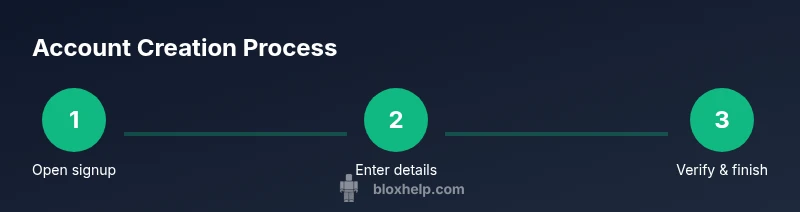
The signup flow is designed to be intuitive across devices. Start on the Roblox homepage or app, tap Sign Up, and enter the required fields: a username, password, and date of birth. You may be asked to verify your contact method via email or SMS. Complete any CAPTCHA challenges and accept the Terms of Use. After submission, you’ll receive a confirmation that your account is created and ready for personalization. If you’re signing up for a child account, ensure you have parental approval before proceeding.
Security and privacy settings to enable after signup
Once your account is live, review security and privacy settings to protect yourself and control interactions. Enable two-factor authentication if offered, set your account to require verification for changes, and adjust who can contact you or join your experiences. In Privacy Settings, you can choose who can message you, who can follow you, and who can see your activity. Regularly review these options as you grow your library of games and collaborations. Consider enabling content filters and limiting search visibility to protect younger players.
Troubleshooting common signup issues
Signup issues usually come down to invalid contact details, taken usernames, or incomplete verifications. If you don’t receive a verification email, check your spam folder or re-send the link. If a username is already in use, try variations until you find an available one. CAPTCHA challenges can fail on mobile networks; retry on a stable connection. When in doubt, consult Roblox Help or reach out to support with details about your device and account. Always ensure you are on the official Roblox site or app to avoid phishing.
What happens after you create your account
After signup, you can customize your avatar, join friends, and explore games tailored to your interests. Your progress is tied to your account across devices, so you can continue where you left off. As you grow, consider enabling parental controls if required by your guardian, and gradually adjust privacy settings to balance discovery and safety. The Roblox world opens up once you have a verified, secure account. With time you can also explore Roblox Studio to build experiences and publish them once you meet the platform's requirements.
Authoritative sources for safe signup
For best practices on password security and account safety, refer to authoritative sources from the government and major publications. These resources complement Roblox-specific guidance and help reinforce safe online habits for players of all ages.
Tools & Materials
- Email address or phone number(Used for verification and account recovery)
- A device with internet access(PC, smartphone, or tablet)
- Strong password(At least 12 characters with mixed case, numbers, symbols)
- Parental consent (if under 13)(Required by Roblox policy for minors)
- Password manager (optional)(Helps store and generate strong passwords)
Steps
Estimated time: 15-25 minutes
- 1
Check eligibility and prerequisites
Confirm you meet age requirements and have the necessary verification method (email or phone). Gather a desired username and a strong password before starting.
Tip: If you’re under 13, arrange parental involvement before signup. - 2
Open Roblox signup interface
On your device, navigate to the Roblox site or open the Roblox app and tap Sign Up.
Tip: Use a reliable browser or the official app to avoid phishing. - 3
Enter required signup details
Provide a unique username, create a strong password, and enter your date of birth. Prepare to verify your contact method.
Tip: Choose a username that you’ll be comfortable using long-term. - 4
Verify your contact method
Send a verification code via email or SMS and enter it when prompted. This step helps secure your account and enable recovery options.
Tip: Check spam/junk folders if you don’t see the message quickly. - 5
Complete CAPTCHA and terms
Finish any CAPTCHA challenges and agree to Roblox’s Terms of Use. These steps prevent automated signups.
Tip: If CAPTCHA fails, refresh and try a different network. - 6
Finalize account creation
Submit the signup form and wait for a confirmation that your account is created. Sign in to start personalizing your avatar.
Tip: Keep your password secure and do not share it. - 7
Set up privacy and safety
Configure who can contact you, who can join you in games, and what you share publicly.
Tip: Start with stricter defaults and relax them as you grow comfortable. - 8
Test sign-in and explore
Log out and sign back in to confirm access. Explore games, friends, and settings to get familiar with the environment.
Tip: Regularly review security settings after major updates.
Questions & Answers
Is Roblox free to create an account?
Yes, creating a Roblox account is free. Some games or avatar items may have in-app purchases, but the signup itself does not require payment. You can explore with a free account and upgrade later if desired.
Roblox accounts are free to create; you may encounter optional purchases inside games and for cosmetics.
Do I need an email or phone to create an account?
A valid email address or phone number is typically required for verification and recovery. This helps secure the account and speeds up password resets if you forget your password.
You’ll usually need an email or phone to verify and recover your account.
Can a child sign up, and what about parental controls?
Yes, children can sign up with parental consent where required. Roblox provides parental controls to limit who can contact them and what content they can access.
Children can sign up with supervision; parental controls help manage who can interact with them.
What should I do if I forget my password?
Use the account recovery options linked to your email or phone to reset your password. If you don’t receive a code, check spam folders or request a new code after a short wait.
If you forget your password, use the recovery options to reset it.
How can I improve account security after signup?
Enable two-factor authentication if available, choose a strong password, and review privacy settings regularly. Avoid sharing codes or personal information with others.
Turn on two-factor authentication, keep a strong password, and review privacy settings often.
Is there a separate Roblox account for Roblox Studio?
Roblox Studio uses the same account system; you sign in with your Roblox credentials to access development tools and publish experiences. No separate account is usually required.
Roblox Studio shares your Roblox account, so sign in with your main credentials.
Watch Video
The Essentials
- Create roblox account using a valid contact method and strong credentials.
- Verify your email/phone and secure the account with privacy settings.
- Follow best practices for safety to protect your profile.
- Utilize the step-by-step flow to signup on any device.
- Regularly review settings to adapt to Roblox updates.