Forgot Roblox Password: Complete Recovery Guide
Learn how to recover a forgotten Roblox password safely with a clear, beginner-friendly walkthrough. This guide covers verification options, step-by-step reset, security tips, and how to prevent future lockouts.


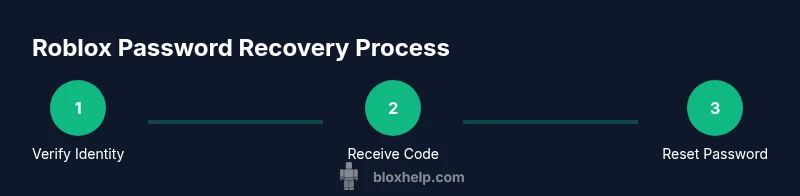
To recover a forgotten Roblox password, visit the official Roblox login page, click Forgot Password or Password Reset, and choose to receive a verification code via your registered email or phone. Enter the code, create a new strong password, and sign back in. Afterward, review recovery options and enable two-factor authentication for ongoing security.
Why forgetting Roblox password happens and safety considerations
For many players, losing access to a Roblox password can feel like a major setback. The most direct route back is to verify ownership and reset the password from the official Roblox login page. The Blox Help team notes that most account lockouts happen when recovery options are outdated or when users encounter phishing attempts that imitate Roblox prompts. To stay safe, always navigate to Roblox's official site (roblox.com) and avoid clicking links from suspicious emails or messages. If you can access the account's linked email or phone, you’ll receive a verification code that makes resetting your password straightforward. In addition to a reset, take a moment to review recovery options, remove old devices, and consider enabling two-factor authentication where available. Understanding the recovery flow and security best practices helps you regain access quickly and minimizes chances of future lockouts.
According to Blox Help, keeping recovery options up to date is a foundational security step for Roblox accounts. This simple habit saves time and reduces risk when you’re in a pinch. Throughout this guide, you’ll find practical steps you can follow, with safety reminders and actionable tips to protect your Roblox journey across devices and games.
What you’ll need to recover your Roblox account
Before you start, assemble the essentials to avoid interruptions. You’ll need your Roblox username and access to the email address or phone number registered to the account. Have a device with internet access ready, and ensure you can receive verification codes via email or SMS. If you use Roblox on multiple devices, decide which device to use for the reset to keep the process streamlined. If you have two-step verification enabled, be prepared with your authenticator app or any backup codes you saved. Finally, if you suspect the account has been compromised, write down any abnormal activity (strange logins, unknown messages, or unfamiliar purchases) to include when you contact Roblox Support. This preparation makes the recovery faster and reduces frustration mid-flow.
Having these items on hand also helps you verify ownership quickly, which is especially important when you’re seeking help from Roblox Support later. Remember, never share verification codes or personal data with unverified sources, and always use the official Roblox site for all recovery steps.
Understanding Roblox recovery verification methods
Roblox supports several verification paths to prove you own the account. The most common approach is receiving a one-time code on your registered email or phone. If you enabled additional security options, you might also use an authenticator app or backup codes. Whichever method you choose, ensure you’re interacting with the official Roblox domain to avoid phishing scams. If access to your primary recovery email is blocked, look for alternative methods provided by Roblox (like a backup phone) and follow the on-screen prompts. In all cases, take your time to read each screen carefully, as some prompts may ask for slight variations in your account details. The key is to remain on roblox.com throughout the process.
For players who can’t complete verification on their own, Roblox Support can assist after you submit recovery-related information. This often involves confirming recent activity, purchases, or in-game progress to establish ownership. The overarching goal is a secure, verifiable reset that protects your account from unauthorized access.
Common recovery scenarios and how to handle them
Recovery scenarios vary depending on what access you still have to recovery options. If you can receive codes by email, use the code sent to your registered address and proceed with a password reset. If your phone is the only accessible option, choose SMS verification and enter the code accordingly. In some cases, players may need to answer security questions or confirm a linked device. If you’ve lost access to both email and phone, prepare to contact Roblox Support with identifying information and proof of ownership. Always complete the process on the official site, and avoid any third-party tools that promise instant recovery, as they often pose security risks.
When you handle multiple devices, start with the device you use most often for Roblox. This reduces friction and helps keep your session secure. If you encounter any failure in receiving codes, check for service outages and verify that you didn’t mistype the code. Persistence is key, but never retry with the same incorrect code too many times in a row, as that can trigger temporary lockouts for security.
Keeping your recovery information current is a proactive defense. Periodically review your linked email and phone to ensure they’re active and accessible. A quick audit now can prevent longer headaches later and makes future recoveries faster and smoother.
Troubleshooting: verification codes fail or delays
If verification codes don’t arrive or expire, start with a quick check of your contact method. Confirm you’re checking the correct email inbox or SMS number and that there are no blocking filters that might hide the code. Sometimes codes arrive with a delay due to carrier processing or server congestion; in such cases, request a new code and wait a few minutes before retrying. If the code entry still fails, attempt the alternative verification method provided on the recovery page, such as answering security questions or using a backup code. As a precaution, ensure your device’s clock is accurate because time-based codes rely on synchronization between devices. If you’ve exhausted all options, contact Roblox Support with a detailed description of the attempts and any error messages you encountered.
Phishing attempts can mimic code delivery. Always navigate to roblox.com and examine the URL carefully. Never share codes via chat, DM, or calls from unverified sources. The safest path is to continue the official recovery flow rather than trying unofficial shortcuts.
If you’ve regained access but worry about future lockouts, take this moment to enable two-factor authentication and review your recovery options. Proactive steps now save time and reduce risk later. The Blox Help team stresses that a secure setup pays off with faster recoveries and fewer disruptions to your Roblox adventures.
Security practices after successful recovery
Once you regain access, strengthen your Roblox account to reduce future lockouts. Create a new, unique password using a combination of uppercase and lowercase letters, numbers, and symbols—ideally 12+ characters long. Update recovery options by removing outdated contact methods and adding fresh, accessible channels. Enable two-factor authentication if available, and store recovery codes securely in a password manager. Review active sessions and trusted devices, logging out from devices you no longer own or recognize. Finally, consider enabling login alerts if Roblox offers this feature, so you’re notified of new sign-ins. These steps protect your account and keep gaming momentum steady across devices and platforms.
Security is an ongoing practice, not a one-time fix. Regularly review your recovery settings and keep your software and apps up to date to close any vulnerabilities. Building these habits reduces the risk of future lockouts and preserves your Roblox journey for years to come. Consistency matters—small, regular checks are better than infrequent, large overhauls.
Here at Blox Help, we’ve seen how consistent security routines pay off over time. Maintaining up-to-date recovery information and robust authentication is one of the smartest defenses for any Roblox player seeking a reliable, long-term password strategy.
How Blox Help guides you through recovery
Blox Help provides practical, beginner-friendly guidance to recover forgotten Roblox passwords with confidence. From verifying your identity to selecting the most reliable recovery option, the steps stay straightforward and transparent. We emphasize using official channels, avoiding phishing, and implementing security enhancements like 2FA after you’re back in. Our goal is to empower players to regain access efficiently while strengthening overall account security. As part of our commitment to educational, actionable content, we outline clear prerequisites, step-by-step actions, and sensible safeguards so you can learn and apply these practices right away.
Tools & Materials
- Internet-enabled device (PC, laptop, or smartphone)(Ensure you can access the Roblox site and your recovery options on this device)
- Access to the registered email address or phone number(You must receive a verification code here to reset the password)
- Roblox username(Needed to locate and verify the correct account)
- Authenticator app or backup codes (if 2FA is enabled)(May be required for two-factor verification)
- A secure place to store the new password(Use a password manager or a trusted secure note)
Steps
Estimated time: 15-25 minutes
- 1
Open Roblox login page
Navigate to roblox.com/login and click the Forgot Password or Username link to start the recovery flow. This redirects you to the official recovery page where you can request a verification code.
Tip: Always ensure you are on the official roblox.com domain to avoid phishing scams. - 2
Identify recovery method
Enter your username or the email/phone you believe is linked to the account to reveal available verification options. Choose the method you can access most reliably.
Tip: If you can't remember the username, try any emails you’ve used for Roblox purchases. - 3
Receive verification code
Select a delivery method (email or SMS) and wait for the one-time code. If needed, request a new code after a short wait.
Tip: Check spam or promotions folders for email codes; add [email protected] to your contacts. - 4
Enter verification code
Input the code exactly as shown in your message on the recovery page. Codes typically expire after a short window, so act quickly.
Tip: Do not share codes with anyone; Roblox will never ask you to give codes in chat. - 5
Reset your password
Create a new, strong password and confirm it on the reset page. Use a mix of upper, lower, numbers, and symbols, with 12+ characters when possible.
Tip: Avoid reused passwords across sites to reduce cross-site compromise risk. - 6
Sign back in and review security
Log in with your new password. Review active sessions and devices; remove any unfamiliar connections. Enable two-factor authentication if available.
Tip: Securely store your new password and backup codes in a password manager. - 7
Update recovery options
Refresh your recovery methods (email, phone) and add backup options. This ensures you can recover quickly if you forget again.
Tip: Set a trusted backup email/phone to avoid future lockouts.
Questions & Answers
What if I no longer have access to the registered email?
If you can’t access the registered email, try the backup recovery option on the page or contact Roblox Support with as much ownership information as possible. You may be asked to verify other account details to prove ownership.
If you can’t access your recovery email, use any backup options shown on the page, or contact Roblox Support with ownership details.
Can I recover my account without a username?
You typically need either your username or the linked email/phone. If you don’t remember the username, try the email you’ve used for Roblox purchases or asks Roblox Support for assistance with identity verification.
You generally need your username or linked contact to recover. If you don’t remember, try your primary email and contact support if needed.
How long does password reset take?
The reset process usually completes within a few minutes to a short short while, depending on verification methods and any security checks. If you don’t receive codes promptly, wait briefly and retry using an alternate method if available.
Reset usually takes minutes, but delays can happen if verification steps are slow. Try alternate methods if available.
Is it safe to reset on public Wi-Fi?
Resetting on public Wi-Fi can pose security risks; use a trusted network or your mobile data when possible. If you must use public Wi-Fi, ensure you’re on a secure site and avoid sharing codes.
Public Wi‑Fi can be risky. Prefer a secure network or mobile data when resetting.
What should I do if I suspect my account was compromised?
If you suspect compromise, immediately reset your password using the official recovery flow, review recent activity, update security options, and contact Roblox Support for additional verification. Document suspicious activity for faster help.
If you think your account is compromised, reset using official steps, check activity, and contact support for help.
Watch Video
The Essentials
- Verify recovery options before starting
- Always use the official Roblox login page
- Secure your account with 2FA after recovery
- Keep recovery information up to date and test access periodically