How to Find Your Roblox Password: Step-by-Step Guide
Learn how to securely recover or reset your Roblox password using official methods, stay protected from phishing, and build a strong, unique password you’ll remember.


This guide helps you recover or reset your Roblox password securely. You'll learn official recovery options, what information you may need, and steps to create a strong, unique password. We'll also cover enabling extra security and avoiding phishing. By the end, you’ll regain access and improve your Roblox account security.
Why securing your Roblox password matters
Keeping your Roblox password strong and unique is your first line of defense against unauthorized access and costly in-game purchases. If someone guesses or copies your password, they can lock you out, drain Robux, or impersonate you in chats and groups. According to Blox Help, password hygiene — including avoiding reuse across sites and updating it regularly — dramatically improves long-term account security and reduces risk of credential stuffing attacks. In Roblox, attack vectors often exploit weak or reused passwords, so establishing a robust password strategy is essential for beginners and advanced players alike.
Beyond bad actors, a compromised password can undermine your progress, steal avatars, or erase progress in games. This is why the recovery process you’ll learn about today focuses on legitimate, official methods and best practices for safeguarding your account. You’ll also see practical tips that apply to other online services, so you can apply the same discipline across accounts. The goal is not just to regain access, but to maintain ongoing protection, so you won’t face repeated lockouts or phishing scams.
Understanding Roblox's recovery options
Roblox provides several legitimate routes to regain access when you forget or lose your password. The standard method starts with the login page: click Forgot Password or Username to begin the reset process. If you can access the registered email or phone, Roblox will send a reset link or verification code to prove you own the account. If you no longer have access to that email or phone, you can use Roblox's account recovery options, which ask for identifying details like your username, approximate account creation date, and details about recent activity. Always rely on Roblox’s official site and support channels to avoid phishing attempts. Remember, you should never share your password with anyone, and Roblox support will never ask for your actual password.
Step-by-step path: reset password when you can access your email
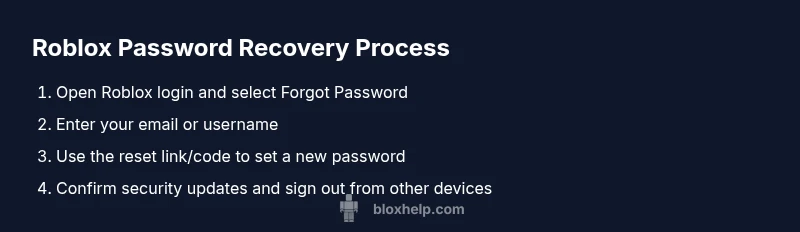
When you can access the associated email or phone, start at roblox.com/login and select Forgot Password or Username. Enter the email or username you use on the account. Check your inbox for a secure reset link or a verification code, then follow the prompts to create a new password. Choose a password that is long, unique to Roblox, and not used on any other site. After you reset, sign out of all devices and review security settings. If you don’t see the reset message within a few minutes, check spam folders and ensure you’re using the correct email.
Recovery when you can't access your email or phone
If the account recovery path is your only option, prepare details that help verify ownership. This often includes your Roblox username, approximate date of account creation, any past purchases, and recent activity (like games played or items bought). Go to Roblox Support and submit a recovery form under Account Access. Be patient; support teams handle requests in sequence, and you may be asked for additional information. Do not create alternate accounts to bypass verification—the official route is the safest way to recover access.
Creating a strong Roblox password
A strong Roblox password should be at least 12-16 characters long and use a mix of upper and lower-case letters, numbers, and symbols. Avoid common words, obvious sequences, or anything tied to your personal information. Consider using a passphrase made of unrelated words or a password from a trusted manager. If you use a password manager, store the password securely and enable auto-fill only on trusted devices. After creating a new password, update any other services that used the same credential to prevent lateral movement.
Enabling two-step verification and other defenses
While Roblox commonly relies on email verification, you should enable any available two-step verification or in-app security prompts to add a second barrier to access. Regularly review active sessions and sign out from devices you don’t recognize. Consider enabling login alerts if Roblox or your email service offers them, which can notify you of unusual activity. Pair these steps with a strong password strategy and you’ll strengthen your overall security posture.
Safe practices to avoid phishing and scams
Phishing attempts often mimic Roblox’s branding or send urgent messages asking you to click a link and enter your credentials. Always verify the sender’s address, avoid clicking suspicious links, and never share your password. If you’re unsure, navigate directly to Roblox by typing the URL into your browser or use the official app. Never provide your password over chat or email, and report suspicious messages to Roblox Support.
Authority sources and ongoing best practices
For trusted guidelines on password security, refer to established standards from reputable sources. In addition to Roblox’s official help pages, consider security recommendations from national privacy and cybersecurity authorities and major organizations. These sources help you stay current with safe habits for password hygiene and online accounts.
Practical recovery checklist
- Verify you can access your registered email or phone. - Prepare your Roblox username and any known purchase history. - Use the official Forgot Password flow first; if needed, submit the recovery form. - After regaining access, enable security features and update your password. - Keep a record of trusted devices and enable login alerts where available.
Tools & Materials
- Internet-enabled device (PC, smartphone, or tablet)(You can use a browser or the Roblox app to access account recovery options)
- Access to the registered email address or phone number on the Roblox account(Needed to receive reset links or verification codes)
- Roblox username (and any previous usernames)(Helpful for recovery if email access is not possible)
- Password manager or secure note(Useful for generating and storing a strong password)
- Authenticator app or backup verification methods (if available)(Optional security layer for ongoing protection)
Steps
Estimated time: 15-25 minutes
- 1
Open Roblox login page
Navigate to roblox.com/login and click 'Forgot Password or Username?' to begin the recovery. This starts the official reset process and guides you through verifying ownership.
Tip: Have your username ready in case you can’t access the email right away. - 2
Enter your email or username
Provide the email you used on Roblox or your username. If you no longer have access to that email, proceed with the alternative recovery options offered on the page.
Tip: Double-check the spelling to avoid delays in receiving the reset link. - 3
Check for the reset link or code
Open your email and click the Roblox password reset link, or enter the verification code on the page. Follow the prompts to create a new password.
Tip: If you don’t see the message within a few minutes, check spam or junk folders. - 4
Create a new password
Choose a long, unique password that you don’t use on any other site. Confirm the password on the reset page and securely save it.
Tip: Use a password manager to generate and store it safely. - 5
If you can’t access email, start recovery
Go to Roblox Support and submit an account recovery request. Provide details like username, creation date, and recent activity.
Tip: Avoid submitting multiple requests; consolidate information to speed review. - 6
Secure the account after recovery
Enable any available two-factor verification, sign out from unfamiliar devices, and review security settings.
Tip: Turn on login alerts if available to monitor access in real time.
Questions & Answers
Can I recover my Roblox password without access to my email?
Yes. If you can't access your email, use Roblox's account recovery form and provide as much identifying information as possible to prove ownership.
You can recover your Roblox password by using the official account recovery form if you can't access your email.
How long does a Roblox password reset take?
When a reset link is sent and received promptly, you can set a new password within minutes. If you need to submit a recovery form, the review time varies by request volume.
A reset link usually takes a few minutes; recovery form requests vary by support queue.
Is two-factor authentication required for Roblox?
Two-factor authentication is not strictly required, but enabling it greatly enhances security and reduces the risk of unauthorized access.
Two-factor authentication isn’t mandatory, but it’s highly recommended for extra protection.
What should I do if I don’t remember my Roblox username?
Try the Forgot Password flow with your email; if you still can’t locate it, check past purchase receipts or contact Roblox Support for guidance.
If you don’t remember your username, start with your email in the recovery flow or contact support for help.
How can I tell if my Roblox account was compromised?
Look for signs like unexpected purchases, changed email or password, or login notifications from unfamiliar locations.
Watch for strange purchases or login alerts to spot a compromise early.
Watch Video
The Essentials
- Use a unique password for Roblox that isn’t shared elsewhere.
- Follow official recovery routes and avoid phishing attempts.
- Enable security features like two-factor verification when possible.
- Keep your email and phone access secure to prevent lockouts.