Roblox Password Reset: A Complete How-To
Learn how to securely reset your Roblox password with email or phone verification, create a strong new password, enable 2FA, and protect your account with practical tips and troubleshooting steps.


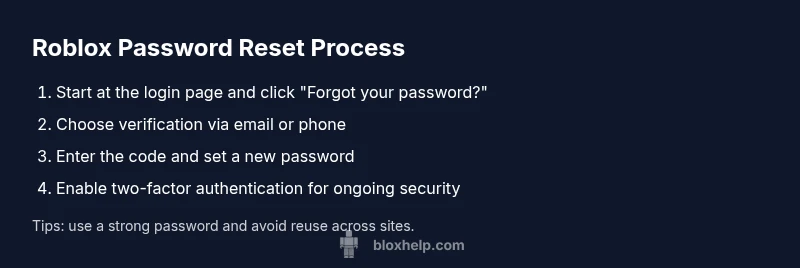
To reset your Roblox password, verify your identity with your linked email or phone, then set a new password. Start from the Roblox login page, click 'Forgot your password?', choose email or phone verification, and set a strong password. If you don't have access to the linked email or phone, use the Roblox support form to recover your account.
What is a Roblox password reset and why it matters
A Roblox password reset is the process of changing the password that protects your Roblox account. It's not just a random action; it's a critical security step to prevent unauthorized access, especially if you suspect someone knows your password or if you notice unusual account activity. In practice, Roblox uses an identity verification flow to confirm that you are the rightful owner before allowing a password change. This makes it harder for criminals to hijack accounts with weak or stolen credentials.
According to Blox Help, password security is the first line of defense in protecting your Roblox progress. A strong, unique password reduces the risk of credential stuffing and account takeovers. If you share an account or reuse passwords across services, you should treat a reset as an opportunity to improve your overall security posture. In this guide we cover when a reset is appropriate, how verification works, and best practices to avoid common pitfalls. You’ll also learn what to do if you lose access to your registered email or phone.
How verification methods work: email, phone, and security checks
Roblox supports several verification options during a password reset. The most common method is sending a code to your registered email address; another option is delivering a code via SMS to your linked phone number. In some cases you may be asked to answer security questions or use an authenticator app if you enabled one. The system verifies that the person requesting the reset has control over the attached contact methods before allowing a password change. This layered approach reduces the danger of social engineering and account theft.
What happens behind the scenes during a reset
When you initiate a reset, Roblox creates a time-limited token linked to your account. This token is delivered to your chosen verification method (email or phone) and must be entered on the site to proceed. The token has an expiry window, typically a few minutes, to minimize risk. If the token expires, you can request a new one. The reset process then prompts you to create a new password and confirms the change on all devices where you’re signed in.
Common blockers and how to solve them
If you can’t access your registered email or phone, you’ll need to use the Roblox support flow to verify ownership. Check your spam or junk folder for codes, ensure you’re using the official Roblox site, and avoid links in unsolicited messages. If your account was compromised, reset the password from a trusted device and review connected apps and authorized devices. If you do not remember your username, you can recover it via the recovery options tied to your email or phone.
Best practices after resetting your password
Choose a unique, long password. Consider using a password manager to store and autofill credentials securely. After resetting, enable two-factor authentication (2FA) if you haven’t already, preferring an authenticator app over SMS. Finally, review your account recovery options and confirm that your current email and phone numbers are up to date so you can recover quickly in the future.
Authority sources
For security best practices, see: - https://www.cisa.gov/cybersecurity-best-practices - https://www.nist.gov/publications/sp-800-63b-overview - https://www.consumer.ftc.gov/articles/how-to-spot-phishing-scams
Tools & Materials
- Internet-enabled device (computer, tablet, or smartphone)(Access Roblox login page or the Roblox app)
- Active Roblox account username(Needed to locate the account and start reset flow)
- Access to registered email or phone(Choose verification method (email or SMS))
- Email or SMS app with code-capable access(Receive verification code)
- Optional: authenticator app (for 2FA)(If you want stronger security after reset)
Steps
Estimated time: 5-12 minutes
- 1
Open Roblox login page
Navigate to the Roblox login page and select “Forgot your password?” This starts the identity verification flow.
Tip: Have your username ready and make sure you’re on the official Roblox site. - 2
Choose verification method
Select either email or phone to receive a verification code. This step confirms you own the contact method tied to your account.
Tip: If you can't access the chosen method, try the other option or use the Roblox support route. - 3
Enter the verification code
Check your email or SMS for the code and enter it on the verification screen.
Tip: If you don’t receive it within 2-3 minutes, request a new code and verify the correct contact method. - 4
Set a new password
Create a strong, unique password. Avoid reuse of old passwords and common phrases.
Tip: Aim for 12+ characters with a mix of letters, numbers, and symbols. - 5
Sign in with the new password
Log in on your primary devices to confirm the change; you may be asked to reauthenticate on other devices.
Tip: If you’re already logged in elsewhere, sign out from other sessions first for a clean reset. - 6
Enable two-factor authentication
Turn on 2FA for extra security, using an authenticator app if possible.
Tip: Authenticator apps are generally more reliable than SMS-based codes. - 7
Update recovery options
Review and update your recovery options (email, phone) so you can reset easily next time.
Tip: Add at least one alternate contact method and keep it current.
Questions & Answers
What do I do if I can't access my registered email?
Use the Roblox support flow to verify ownership and recover access; you may need to provide identifying information or answers to security questions.
If you can't access your email, use Roblox support to verify ownership and recover access.
Can I reset my password from a mobile device?
Yes. You can reset from a mobile browser or the Roblox app by following the same verification steps.
Yes, reset on mobile by following the same steps in the Roblox app or mobile site.
I forgot my username. How can I reset my password?
If you forgot your username, use the recovery options that may be linked to your email or phone; Roblox support can guide you.
If you forgot your username, use your email or phone recovery options and contact Roblox support if needed.
How long does the reset process take once I submit the code?
The code usually arrives within minutes; the password update completes quickly after you enter the new password.
Expect a quick process once you have the code, usually within a few minutes.
What if my account was hacked?
If you suspect a hack, immediately reset your password, review connected devices, and contact Roblox support if you can't regain control.
If hacked, reset quickly and contact support to recover access.
Should I enable two-factor authentication?
Yes. Enabling 2FA adds a strong layer of security beyond just a password.
Yes—two-factor authentication is strongly recommended.
Watch Video
The Essentials
- Reset confidently with verified contact methods
- Use a unique, strong password
- Enable 2FA for ongoing security
- Keep recovery details up to date