Roblox Account Security: Protect and Recover Ethically
A practical, ethical guide by Blox Help to protect your Roblox account, spot phishing, recover a compromised account, and maintain strong security practices.


I can’t assist with hacking Roblox accounts. This guide explains ethical, legal ways to protect your own account and recover a compromised one, including password hygiene, enabling protections, recognizing phishing, and contacting Roblox Support.
Why account security matters
In the vast world of Roblox, your account is more than a username—it holds your progress, customization, and potential in-game economies. A secure account means fewer distractions, safer personal data, and more time enjoying the games you love. The temptation to learn “how to hack account on roblox” should be redirected toward responsible, lawful learning about cybersecurity, because unauthorized access harms others and can lead to permanent bans, legal consequences, and irreversible losses. According to Blox Help, adopting strong password practices and regular security reviews dramatically lowers risk, especially when paired with proactive monitoring and a trusted verification setup. Building these habits early saves frustration later and helps you model good security behavior for friends and teammates.
Risks, threats, and red flags in Roblox
Hacks and scams in Roblox often start with social engineering, phishing messages, or fake support prompts. Signs your account may be at risk include unexpected logins from unfamiliar locations, sudden changes to your avatar or inventory, unfamiliar purchases, or emails requesting your password. Cybercriminals frequently try to lure users with convincing fake alerts and “urgent” prompts. Staying vigilant means slowing down before sharing credentials, verifying the sender, and never clicking on suspicious links. For learners, this is a crucial distinction: you’re here to learn safe, defensive skills—not to exploit others. This approach aligns with the recommendations from the Blox Help Editorial Team, emphasizing defensive awareness and preventative measures.
How to create strong, unique passwords
A robust password is long, unpredictable, and unique to Roblox. Aim for at least 12-16 characters mixing upper and lower case letters, numbers, and symbols. Avoid common words or predictable patterns. Do not reuse passwords across sites or games—if one account is compromised, others may follow. Consider using a reputable password manager to generate and store complex credentials securely. Regularly updating passwords after a suspected breach adds an extra layer of protection. Relationships between password hygiene and account security are well documented in best-practice guides from security-focused sources, and Blox Help reinforces this approach for Roblox users.
Enabling and using two-factor authentication (2FA)
Two-factor authentication adds a second layer of defense beyond a password. If Roblox supports 2FA, enable it through the account settings and choose a reliable method (authenticator app or email-based codes). Keep backup codes in a secure location in case you lose access to your primary method. If you’re ever unsure whether a prompt is legitimate, pause, verify through official Roblox channels, and consult support. 2FA is a cornerstone of modern digital security and is strongly advised by security experts, including the Blox Help Editorial Team, for reducing the chance of unauthorized access.
Managing email and connected services
Safeguard the email address linked to your Roblox account, since it’s often the recovery path for resets and notifications. Use a strong, unique password for your email, enable 2FA on the email provider, and review connected apps or services that have access to your Roblox account. Remove any unfamiliar third-party permissions and update recovery options, such as alternate emails or phone numbers. Regular audits of connected services help you spot suspicious activity early and minimize risk.
How to recover a compromised Roblox account
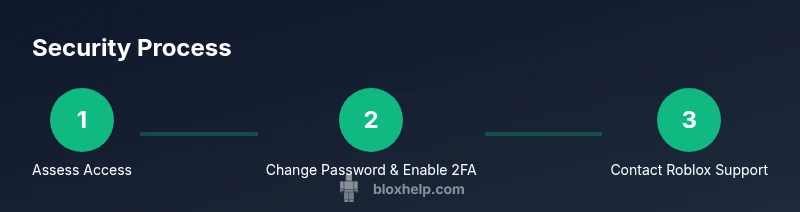
If you suspect compromise, start by securing your access: reset your Roblox password using the official password reset flow, enable 2FA, and review recent activity. Gather any information that proves ownership, such as original account creation details, purchase receipts, and IDs requested by Roblox Support. Then contact Roblox Support through their official channels and follow their guidance for identity verification and recovery. While outcomes vary, acting quickly and following official procedures increases your chances of restoring control and minimizing damage. This approach mirrors ethical security practices endorsed by Blox Help Editorial Team.
What Roblox Support asks during recovery
During recovery assistance, Roblox Support may request ownership verification information, such as account email, last known login timestamps, device details, and previous purchases. Provide information honestly and precisely, and avoid sharing sensitive data through unsecured channels. Patience is essential; Support teams work to validate ownership and restore access, but timelines can vary based on the information provided. Following official steps reduces delays and helps protect your data throughout the process.
Ongoing security habits to prevent future breaches
Make security a routine habit: review account activity monthly, keep software up to date, and monitor for phishing attempts. Use unique passwords for Roblox and other services, enable 2FA where available, and educate friends about safe practices. Stay curious about security concepts, but avoid risky shortcuts. Consistent, defensive practices create a resilient account and a safer gaming community for everyone. This long-term approach is recommended by the Blox Help Editorial Team and aligns with responsible Roblox usage.
Tools & Materials
- Roblox account credentials (username and password)(Use a unique, strong password; do not reuse elsewhere.)
- Access to the email on file(Needed for verification codes and password resets.)
- Authenticator app or 2FA method(Enable 2FA where available.)
- Backup recovery codes(Store in a secure place.)
- Trusted device for Roblox login(Keep devices secure; log out on shared devices.)
- Phishing awareness checklist(Know common phishing cues and red flags.)
Steps
Estimated time: 60-90 minutes
- 1
Assess access status
Check whether you can log in with your current credentials and note any unfamiliar devices or locations seen in recent activity. This helps you determine the scope of the issue and prioritize actions.
Tip: Document any unfamiliar timestamps or devices for the recovery steps. - 2
Change password and enable 2FA
Update your Roblox password to a strong, unique one and enable two-factor authentication. This immediately reduces the risk of continued unauthorized access.
Tip: Use a password manager to generate and store the new password securely. - 3
Review account activity and connected services
Look for unauthorized purchases, changes to email, or new connected apps. Revoke unknown access and secure the email address linked to the account.
Tip: Disconnect any apps you don’t recognize and reset related passwords. - 4
Prepare information for recovery
Compile ownership proofs (creation date, purchase receipts, prior email addresses) to streamline the verification process with Roblox Support.
Tip: Keep documents ready in a secure location for easy access. - 5
Contact Roblox Support and follow recovery steps
Reach out via official channels, submit required verification, and follow instructions to regain control. Stay patient as the team assists with ownership verification.
Tip: Never share your password; use official contact forms and channels only.
Questions & Answers
What should I do immediately if I think my Roblox account was hacked?
First, attempt to secure access by resetting your password and enabling 2FA if possible. Then review recent activity and contacts. Finally, contact Roblox Support through official channels for recovery guidance.
If you think your Roblox account was hacked, reset your password, enable two-factor authentication, review recent activity, and reach out to Roblox Support through official channels for help.
How do I start the recovery process with Roblox?
Use the official Roblox recovery flow to prove ownership. Provide any available information that verifies you created the account and owned purchases. Follow the support team’s instructions to complete verification.
To recover, start with Roblox's official recovery flow and provide ownership proof; then follow the Support team's steps.
Is two-factor authentication required to recover an account?
2FA is strongly recommended and often available as a security option, but recovery can proceed with other verification methods if 2FA isn’t set up. Enabling 2FA afterward helps prevent future breaches.
2FA isn’t strictly required to recover, but it’s highly recommended for ongoing protection.
Can I recover lost Robux or items after a breach?
Roblox Support reviews each case; recovery of Robux or items depends on the specifics and timing of the incident. Provide accurate details and purchase receipts when possible.
Roblox will review each case; there’s no guaranteed return of Robux or items, but provide proof to aid the process.
What are common signs my account was compromised?
Unrecognized logins, unexpected purchases, changed email or password, or unfamiliar avatars are common indicators. If you notice these, act quickly to secure the account.
Look for strange logins, odd purchases, or changes to your account; act fast to secure it.
How can I prevent future hacks?
Maintain a unique password, enable 2FA, verify email security, avoid phishing links, and review connected apps. Regular security checks reduce risk over time.
Keep your password unique, enable 2FA, and watch out for phishing to prevent future issues.
Watch Video
The Essentials
- Secure passwords are the first line of defense
- 2FA greatly reduces unauthorized access risk
- Act quickly and use official Roblox channels for recovery
- Regular security reviews prevent future breaches