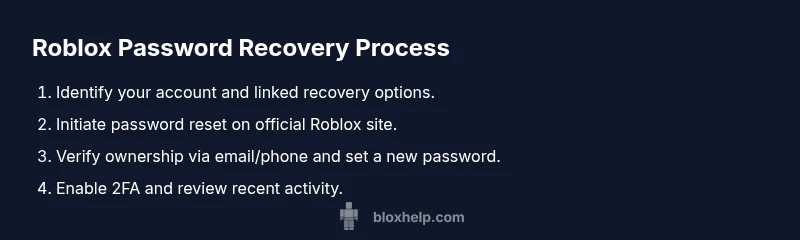
Roblox Password Recovery and Security: Safe Practices
Learn how to securely recover your Roblox password, recognize scams like rogue password finders, and strengthen your account with official recovery steps and best practices.


This guide shows you how to securely reset your Roblox password and protect your account from scams. You’ll learn official recovery steps, how to recognize phishing and rogue tools like a ‘roblox password finder’, and practical practices to keep your account safe. Specifically, you’ll perform the official password reset, verify ownership via your linked email or phone, enable two-step verification where available, and adopt strong password habits to reduce future risks.
Why Roblox password security matters
Roblox accounts unlock access to your games, virtual items, and progress. A compromised password can let attackers alter your avatar, steal items, or lock you out entirely. The risks aren’t purely financial; they include lost progress and a degraded playing experience. According to Blox Help, staying informed about password security and following official recovery paths dramatically reduces your risk. Be cautious of any tool that promises to reveal or “find” Roblox passwords—these are almost always scams designed to harvest credentials or install malware. A solid security mindset starts with recognizing threats and choosing official, verified recovery channels rather than shortcuts.
To build resilience, keep recovery data current (email/phone), use unique passwords for each site, and treat any unexpected message about your account as a potential phishing attempt. Regularly remind yourself that Roblox will never ask for your password in chat, email, or non-Roblox apps. By staying proactive, you preserve access to your games, friends, and in-game purchases without exposing sensitive information.
Understanding legitimate password recovery in Roblox
Official recovery relies on Roblox’s secure login workflow and verified contact channels. If you forget your password, Roblox prompts you to identify the account (usually by username) and confirms ownership through linked verification options—your registered email address or phone number. The system may present security questions or a verification code sent via email or SMS. Never share these codes with others. Phishing attempts often imitate Roblox emails, but legitimate messages will come from official Roblox domains and use secure links. Keep your contact details up to date so recovery requests aren’t blocked by outdated information.
Knowing the steps helps you act quickly without accidentally giving away access. Always ensure you are on the official roblox.com domain before entering any credentials, and stop if something feels off. If you don’t recognize a verification prompt, abort the process and start again from the official Roblox site.
Safe reset: how to reset your Roblox password
Begin on the official Roblox login page and select the option “Forgot Password or Need Help?”. Enter your username and follow the prompts that verify ownership via your linked email or phone. Roblox will send a reset link or a code you must enter on the site. Use the link immediately, as reset tokens expire after a short window. Once you set a new password, sign in on a trusted device only, and review recent account activity for anything unfamiliar. If you don’t receive the reset email, check your spam folder and ensure you’re using the primary email on file. Don’t reuse passwords from other sites—unique credentials are essential for security.
After resetting, log out of any sessions you don’t recognize and consider enabling additional protections if your account supports them. The official process is designed to minimize risk, but you still need to be vigilant against phishing attempts that may try to mimic the normal flow.
How to spot and avoid password-finder scams
A widely circulated risk is the so-called “roblox password finder” or similar tools that claim to reveal passwords or bypass authentication. These tools are almost always scams or malware lures. They typically ask you to install software, enter credentials, or give them access to your device. Always use the official Roblox site for password-related actions and never enter your login details on third-party sites or apps. Verify the URL, look for HTTPS, and confirm the site domain before interacting with any security prompts. If someone promises instant access to your password in exchange for payment or software, report it and avoid engaging.
Education is the best defense here: never share one-time codes, never paste passwords into unknown portals, and rely on Roblox Support for any suspicious activity. If in doubt, contact Roblox Support directly via the official help center rather than following external links.
Best practices for Roblox account security
Strong, unique passwords are the foundation of security. Aim for at least 12 characters and include uppercase letters, lowercase letters, numbers, and symbols. Use a reputable password manager to generate and store passwords securely, so you don’t reuse passwords across sites. Enable two-step verification if your account supports it, which adds a second factor beyond your password. Keep your contact options (email and phone) current so you can receive verification codes. Regularly review connected devices and recent login activity, and sign out from devices you no longer use. Finally, stay vigilant for phishing attempts and never reveal codes or passwords to anyone, even if they claim to be Roblox staff.
What to do if your account is compromised
If you notice unusual activity, act quickly. Reset your password using the official Roblox site, and sign out from all devices. Check the linked email for security alerts or password-change notices. If you can’t regain access through standard recovery, contact Roblox Support via the official help center and provide any relevant account details to prove ownership. Run a malware scan on your devices and review recent apps and browser extensions. After recovery, enable two-step verification and review your security settings to minimize future risk.
Taking immediate, official steps minimizes potential damage and helps restore control over your account. Staying proactive with routine checks can prevent many issues before they escalate.
Final verification checklist
- Confirm you can log in on a trusted device with your new password.
- Ensure two-step verification is enabled if supported.
- Verify recovery options (email/phone) are up to date.
- Review account activity for the last 30–60 days and sign out from unfamiliar sessions.
- Do not use unofficial password tools or password finders in the future; rely on Roblox’s official recovery processes and security tips.
Verdict: official recovery is the safest path
The verdict is clear: always use official Roblox recovery channels and security features. The Blox Help team emphasizes avoiding any third-party password finders or scams. By following official steps, enabling 2FA, and maintaining current recovery options, you significantly reduce the risk of account compromise and preserve your Roblox experience.
Tools & Materials
- Device with internet access(Laptop, smartphone, or tablet)
- Roblox account username(Needed to start recovery)
- Access to the registered email or phone linked to the Roblox account(For verification codes)
- A strong new password(12+ characters with mixed case, numbers, and symbols)
- Authenticator app (optional)(If your account supports 2FA)
- Phishing awareness checklist(Keep handy and review before finishing recovery)
Steps
Estimated time: 15-30 minutes
- 1
Verify your username
Open Roblox and locate the account username or confirm it from any linked devices or emails. This step ensures you start the recovery for the correct account and prevents misdirection to a different profile.
Tip: If you’re unsure of the exact username, check old emails from Roblox or searches in the app store logs. - 2
Initiate password reset
Go to the official Roblox login page and click on 'Forgot Password or Need Help?'. Enter your username and follow prompts that will guide you to ownership verification through your linked email or phone number.
Tip: Always use the official site (roblox.com) to begin recovery; avoid bookmarks or third-party pages. - 3
Verify ownership and receive reset token
Roblox will send a verification code or a reset link to your linked email or phone. Retrieve the code or click the link promptly, as tokens expire after a short window.
Tip: If you don’t see the message, check spam/junk folders and ensure the contact on file is correct. - 4
Set a new strong password
Create a new password that is unique to Roblox—ideally 12+ characters with a mix of uppercase, lowercase, numbers, and symbols. Do not reuse passwords from other sites.
Tip: Consider using a passphrase approach (random words with symbols) for memorability and strength. - 5
Sign in on trusted devices and review activity
Sign in to Roblox on devices you trust, and review recent login activity for unfamiliar sessions. Sign out from any devices you don’t recognize.
Tip: If you see unknown activity, revoke access from those sessions immediately. - 6
Enable 2FA and secure recovery options
If your account supports it, enable two-step verification (2FA) and verify that your recovery email and phone number are up to date.
Tip: 2FA adds a critical extra layer of protection against unauthorized access.
Questions & Answers
What should I do if I think my Roblox password was compromised?
Immediately reset the password using the official Roblox site, check linked email, and enable two-step verification. Scan devices for malware and review recent account activity.
If you think your password was compromised, reset it on Roblox, secure your email, and enable extra security.
What is a 'roblox password finder', and is it safe?
Password finder tools claiming to reveal Roblox passwords are not safe and are typically scams. Use official channels for recovery.
Avoid password finder tools; they're scams.
How long does a Roblox password reset take?
Reset duration varies by verification flow, but most users complete it within minutes. If delays occur, re-check your connected email/phone and retry from the official site.
Reset usually takes a few minutes to an hour.
Can enabling two-step verification protect Roblox accounts?
Yes. 2-step verification adds a second code at sign-in, which makes unauthorized access substantially harder even if someone knows your password.
Yes, enabling 2FA adds extra protection.
What should I do if I suspect phishing?
Do not click strange links or share codes. Verify URLs, check the sender's domain, and report suspicious messages to Roblox Support.
Don't click suspicious links; verify the site and report it.
How can I create a strong Roblox password?
Aim for 12+ characters with mixed case, numbers, and symbols. Use a password manager to store it securely and avoid reusing passwords across sites.
Make a long, mixed password and store it securely.
Watch Video
The Essentials
- Use official Roblox channels to reset passwords
- Never trust 'password finder' tools
- Enable 2FA to add a security layer
- Regularly review account activity for anomalies
- Keep recovery options up to date