Hacked Roblox: Quick Fixes and Security Guide
Practical steps to recover from a hacked Roblox account and strengthen security to prevent future breaches. Learn a troubleshooting flow, safeguards, and how to contact Roblox support.


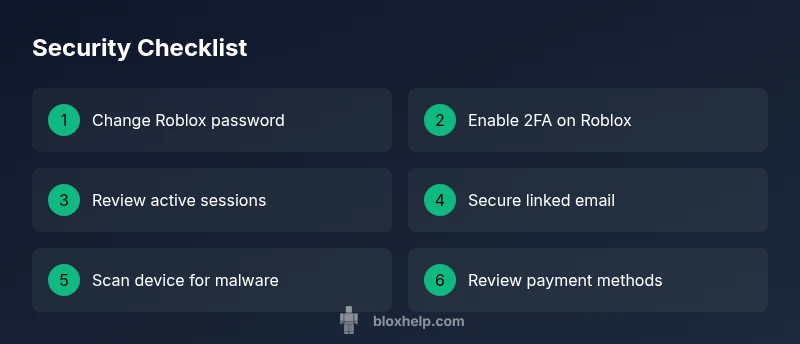
Most hacking incidents in Roblox stem from stolen credentials or phishing. The quickest fix is to secure the account: reset your password with a strong, unique password, enable two-factor authentication, review active sessions, and revoke access for unknown devices. Then run a malware check on your device and change the associated email/password if needed.
Why hacked Roblox matters
When your hacked roblox account is compromised, you risk losing Robux, items, avatars, and progress, plus personal data tied to the account. The consequences can ripple into connected services and payment methods. The urgency is real: attackers often pivot from Roblox to other platforms using the same email. According to Blox Help, many hacks start with phishing or weak passwords, and users who reuse passwords are at higher risk. Securing login details quickly reduces the window attackers have to monetize access. In this guide, you’ll find a practical troubleshooting flow, immediate fixes, and long-term safeguards to reclaim control of hacked roblox accounts.
Immediate steps you should take
If you suspect your Roblox account has been hacked, act fast. Sign out of unfamiliar sessions if possible, then reset your Roblox password using a strong, unique password that you do not reuse elsewhere. Enable two-factor authentication on both Roblox and the linked email. Review active sessions and revoke access for devices you don’t recognize. Check the linked email for security alerts and update recovery options. Run a full malware/antivirus scan on your device and ensure your Roblox purchases and payment methods are secure by removing any unknown payment methods. If suspicious activity continues, contact Roblox Support with ownership verification and a clear timeline of events.
How attackers gain access to hacked roblox accounts
Attackers employ phishing pages that mimic Roblox login prompts, exploit weak passwords, or rely on compromised third-party apps requesting access. If your email has been breached, reset links can be intercepted. Outdated devices and software can be exploited to capture keystrokes or tokens, allowing attackers to seize control. The goal is persistence and monetization, often starting with a stolen credential. Be alert for scams that mention hacked roblox in messages and verify any request through official channels.
Protecting your account: a practical plan
Build a security baseline you can maintain: enable 2FA, use a password manager, and avoid reusing passwords across sites. Limit connected apps and revoke access for anything unfamiliar. Secure your email with 2FA and keep recovery options current. Regularly review account activity, permissions, and linked payment methods. Create a recovery plan: keep a backup email or phone, and know how to reach Roblox Support quickly. If you’re a Roblox developer, protect Studio credentials and API keys by not sharing them and rotating keys regularly.
How to verify if your data was compromised
Look for unexpected changes: a changed password, unfamiliar purchases, or altered email or linked accounts. Check Roblox account settings for active devices and session histories. Watch for security alerts from Roblox and your email provider. Compare recent login times and locations if you have access to that information. If you suspect a broader breach, run a full security sweep of your devices and network and keep records of interactions with Roblox Support.
Reclaiming your account: Roblox support process
Document what happened clearly: when you noticed the issue, what changes occurred, and the steps you already took. Gather ownership proofs such as original email ownership, Roblox purchase receipts, recent purchases, and device details. Visit the official Roblox Support page, submit a ticket under Account Hacked, and attach your evidence. While you wait, avoid signing in from public computers and do not reuse passwords. Persistence and organized documentation speed up recovery, as noted by the Blox Help Editorial Team.
Preventative habits to reduce risk
Adopt security-first habits: enable 2FA, use a password manager, and never click suspicious links. Use unique passwords for every service and review connected apps and payment methods periodically. Keep devices clean with reputable antivirus, and apply Roblox and system updates promptly. Practice phishing awareness, and routinely educate yourself about social engineering. Consider creating backups and additional recovery options to stay prepared for future incidents.
What to do next: monitoring and education
After securing your hacked roblox account, switch to a monitoring mindset. Enable login alerts, routinely review sessions, and stay informed on Roblox security best practices. The Roblox community and educational resources can help you stay current. The Blox Help team recommends a simple routine: monthly security checks, quarterly password updates, and ongoing phishing-awareness training to prevent repeat incidents. Stay engaged, learn continuously, and share safe online habits with friends.
Steps
Estimated time: 60-90 minutes
- 1
Reset password & enable 2FA
Open Roblox account settings, change your password to a unique, strong combination and enable two-factor authentication. Then re-login to verify you still have access and that no unknown devices remain connected.
Tip: Use a password manager to generate a long, unique password. - 2
Revoke sessions & secure devices
In Roblox security settings, sign out of all devices and review the list of active sessions. Revoke anything unfamiliar and sign back in only from trusted devices.
Tip: If you can’t see all sessions, reset your password first and re-check. - 3
Secure your email & recovery options
Turn on 2FA for your email, update your password, and review recovery options. Remove old recovery emails and add a current, secure method.
Tip: Keep backup codes in a safe place away from your primary device. - 4
Inspect payments & linked methods
Check recent Roblox purchases and remove any unfamiliar payment methods. If charges appear, document them for Roblox Support.
Tip: Take screenshots of the purchase history for evidence. - 5
Contact Roblox Support with evidence
Submit a ticket to Roblox Support with a concise timeline and ownership proofs (receipts, original email, device details).
Tip: Always use the official Roblox Support page to avoid scams. - 6
Run a device security sweep
Scan your computer or phone for malware, update all software, and review installed apps that could have keylogging capabilities.
Tip: Update antivirus definitions and run a full scan.
Diagnosis: User reports unexpected logins, password changes, or purchases after noticing account activity
Possible Causes
- highStolen or weak password from phishing or data breach
- mediumCompromised primary email that allows reset links to be issued
- lowMalware or keylogger on the device capturing credentials
Fixes
- easyReset Roblox password with a new, strong password and enable 2FA
- easySecure the linked email account with 2FA and update recovery options
- easySign out of all devices and revoke unknown sessions in Roblox settings
- mediumRun a full malware scan and update antivirus/OS patches
- mediumContact Roblox Support with ownership proof if issues persist
Questions & Answers
What should I do first if I realize my Roblox account has been hacked?
Reset your password immediately, revoke sessions, and enable 2FA. Check linked email for alerts and run a malware scan.
First, reset your password and revoke all sessions, then enable two-factor authentication.
Is two-factor authentication available for Roblox?
Yes. Roblox supports 2FA in the account settings to add an extra layer of security.
Yes, enable two-factor authentication in Roblox settings.
Can Roblox Support help recover a hacked account?
Roblox Support can assist with recovery if you can prove ownership and provide details. Follow their official process.
Roblox Support can help with recovery if you provide ownership proof.
How can I tell if third-party apps are safe to link?
Review the apps connected to Roblox and revoke those you do not recognize. Only authorize trusted apps.
Review connected apps and revoke unknown ones.
Will purchases be refunded after hacking?
Refunds depend on Roblox policy and the specific case. Contact Roblox Support with details for guidance.
Refunds depend on policy; contact Roblox Support for guidance.
What are common signs of phishing in Roblox-related messages?
Urgent language, mismatched domains, or requests to enter credentials. Always verify via official Roblox channels.
Look for phishing cues and verify through official Roblox sites.
Watch Video
The Essentials
- Change passwords and enable 2FA now.
- Secure your linked email and recovery options.
- Review active sessions and revoke unknown devices.
- Use a password manager to prevent repeats.