Password Security for Roblox: Safe Recovery and Protection
Learn safe, legal ways to recover or protect Roblox passwords. This guide covers password security, account recovery steps, and how to avoid scams and credential theft.


This guide shows how to legally recover and protect a Roblox account by using official password reset steps, enabling two-factor authentication, and safeguarding credentials. If you encounter tools promising a 'password finder for roblox', avoid them—they’re typically scams or unsafe. Use trusted recovery channels only. This quick answer outlines practical steps and safety checks to protect your account from thieves.
Understanding the risks of password finders and why they’re unsafe
Password finders for roblox promise quick access to passwords. In practice, these scams typically require you to input credentials, install shady software, or surrender personal data. They can lead to account theft, financial loss, and compromised personal information. As a Roblox player or developer, you should treat any tool that claims to reveal passwords as suspicious. In many cases, legitimate recovery cannot be outsourced; Roblox does not offer third-party password revelation services. Instead, official recovery relies on having access to the linked email, phone, or authenticator app to verify you own the account. The best defense is a layered approach: maintain a unique password, enable two-factor authentication, and monitor account activity. The term password finder for roblox often appears in phishing emails, social media scams, or dubious software bundles. You should never download unknown programs or give remote access to devices for this purpose. If you suspect a scam, report it to Roblox support and secure your login immediately.
This section sets the stage for safe practices and clearly distinguishes legitimate recovery options from fraudulent promises. It also introduces the core idea that you should never rely on any tool that claims to reveal someone else’s password. In practice, safe players focus on official channels, strong credentials, and ongoing vigilance against credential theft.
Safe, official password recovery options for Roblox
Roblox provides official pathways to recover access if you forget or lose control of your password. Start at the Roblox login page and click the option labeled ‘Forgot your password or username?’ You’ll be prompted to enter your username or the email linked to the account. Roblox will send a password reset link to that email address, or present you with alternative verification options if email access isn’t possible. If you don’t receive the reset email within a few minutes, check your spam folder and ensure you entered the correct address. For mobile users, you may receive push or SMS verification depending on settings. Always use the official Roblox site or app for this process, never third-party sites that claim to bypass password protection. Completing the reset through official channels reduces risk and protects your data.
In addition to the reset link, you can review your active sessions from the Roblox account settings after regaining access. This helps you spot unauthorized logins early and revoke them. If you still cannot access the email or phone tied to your account, Roblox Support provides identity verification steps to help recover ownership. Remember, legitimate recovery never requires you to download untrusted software or share sensitive files.
How Roblox handles password resets and account verification
When you initiate a password reset, Roblox validates your ownership of the account using connected verification methods—primarily the linked email or phone. If you cannot access those verification channels, you’ll need to contact Roblox Support directly and provide information to prove ownership, such as recent purchase details, account creation date, or other identifiers you may have associated with the account. Roblox does not support revealing passwords through any external tool or service. This process protects users from theft and reduces the risk posed by phishing schemes and fake password finders. Once access is restored, reviewing recovery options and enabling additional security measures is highly recommended to prevent future breaches.
Understanding how the system verifies identity helps you plan steps ahead of time and minimizes downtime during recovery. Because security policies can evolve, this section emphasizes following official Roblox prompts and avoiding any non-authorized services.
Strengthening Roblox account security: 2FA and beyond
Two-factor authentication (2FA) adds a critical layer to Roblox security by requiring a second form of verification beyond your password. If available in your region, enable 2FA in your account security settings, choosing a method you control such as an authenticator app or SMS, and keep recovery options up to date. In addition to 2FA, adopt best practices like a unique, long password, avoiding password reuse across sites, and using a reputable password manager to generate and store credentials securely. Regularly review connected apps and devices, sign out from sessions you don’t recognize, and monitor login alerts. While Roblox security features may vary by account type or platform, these steps significantly reduce the risk of unauthorized access.
The big picture is protecting the account on multiple fronts: something you know (a strong password), something you have (authentication method), and consistent monitoring of your login activity.
Spotting scams: common tricks used by password finder schemes
Scammers often use social engineering to mimic Roblox support or promise instant access via a ‘password finder’ tool. Typical tricks include asking you to install software, enter your password, or provide verification codes that bypass standard security. They may lure you with rewards or urgency, claiming the account is at risk. The safest response is to ignore these messages, never share codes, and report suspicious links. Always verify the sender’s identity by visiting the official Roblox site directly rather than following email links. When in doubt, ask for support through official channels and seek guidance from trusted sources like Roblox Help Center.
This section highlights practical red flags you can apply immediately, reducing susceptibility to credential theft and phishing. Remember: no legitimate service will request your password or full verification codes.
Managing passwords safely across devices and browsers
Maintaining safe passwords across multiple devices requires discipline and the right tools. Use a reputable password manager to generate unique passwords for Roblox and other services, sync across devices securely, and avoid storing passwords in plain text files. Enable device-level security such as screen locks and biometric authentication, and ensure all software is up to date. Be mindful of browser autofill settings and regularly clear saved credentials from shared or public devices. If you use shared computers, avoid saving passwords altogether and sign out fully after each session. This approach minimizes exposure in public or shared environments and creates a sustainable habit for long-term security.
What to do if your password was compromised
If you suspect your Roblox password has been compromised, act quickly. Immediately perform a password reset through the official Roblox site or app, revoke any unfamiliar devices or sessions, and check account activity for unauthorized changes. Enable 2FA if you haven’t already, and review all recovery options to ensure you can regain access easily in the future. Run a malware scan on your devices if you notice unusual activity or unexpected software. Report the incident to Roblox Support with any pertinent details, including device information and times of suspicious logins. By documenting and responding promptly, you can minimize damage and restore control over your account.
The long-term routine: keeping your Roblox account secure
Security is an ongoing effort. Establish a routine that includes quarterly password reviews, enabling 2FA, and auditing connected apps and devices. Keep your contact information up to date and practice phishing awareness. Periodically back up important Roblox data, such as account recovery options and security settings, in a secure password manager notes repository. Consider setting up account notifications for new logins and device changes. A proactive mindset—paired with official recovery channels and strong device hygiene—greatly reduces the odds of future compromises. This routine is the core of sustainable Roblox account protection.
The overarching takeaway is to embed security into everyday habits, not just during a breach incident. Regular checks and updated protections compound over time to deliver robust defenses.
Additional resources and next steps
To deepen your understanding of password security and account protection, consult reputable sources such as government and university-backed guidelines and major publications. For password best practices and digital identity standards, see NIST’s Digital Identity Guidelines at https://pages.nist.gov/800-63-3/. For broader cybersecurity recommendations and best practices, refer to resources from CISA at https://www.cisa.gov/ and related authorities. These references help you align Roblox security practices with widely accepted standards and keep your approach current as threats evolve.
Tools & Materials
- Trusted web browser(Keep updated; avoid public or shared devices for sensitive actions)
- Roblox account username or linked email(Needed to initiate official password reset)
- Access to email or phone(Required for verification codes or links)
- Authenticator app or security key (optional)(Enhances 2FA security if Roblox supports it)
Steps
Estimated time: 15-25 minutes
- 1
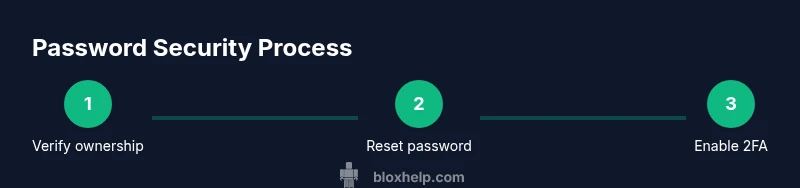
Verify ownership and prepare recovery details
Open the Roblox login page and gather the username, the linked email or phone, and any recent purchase details. This prepares you to prove account ownership during the reset process.
Tip: Have a recent email account or phone available for verification - 2
Initiate official password reset
Click 'Forgot your password or username?' on the login screen and enter your username or email. Follow the prompts to request a reset link from Roblox.
Tip: Use the official Roblox site; avoid third-party portals - 3
Check your verification channel
Access the email or phone you used for verification. Enter any code or click the reset link provided by Roblox to proceed with a new password.
Tip: Always verify the sender’s domain to avoid phishing - 4
Create a strong new password
Choose a long, unique password using a mix of letters, numbers, and symbols. Do not reuse passwords from other services.
Tip: Consider a password manager to generate and store strong credentials - 5
Enable two-factor authentication
If Roblox offers 2FA, enable it and select a preferred method (authenticator app or SMS). This adds a second layer of protection beyond the password.
Tip: Keep backup codes in a secure location - 6
Review security settings and recovery options
After regaining access, review connected devices, active sessions, and recovery email/phone. Update or remove old recovery options as needed.
Tip: Sign out of devices you don’t recognize
Questions & Answers
Is there a legitimate 'password finder' for Roblox, or should I avoid them entirely?
There is no legitimate password finder for Roblox. Official recovery uses Roblox's password reset and verification channels. Avoid tools or services that claim to reveal or force passwords.
There is no legitimate password finder for Roblox; use Roblox’s official password reset instead.
What if I no longer have access to the email or phone linked to Roblox?
If you can't access the linked email or phone, contact Roblox Support and provide ownership details to verify your identity. They can guide you through alternative verification steps.
If you can’t access your linked email or phone, contact Roblox Support for alternative verification.
How do I enable two-factor authentication on Roblox?
If 2FA is available for your account, enable it in the security settings and choose a preferred verification method. This adds a second protection layer beyond the password.
Enable two-factor authentication in Roblox security settings if available.
What should I do if I still can’t reset my password after following official steps?
Double-check the recovery channel, ensure you’re using the official Roblox site, and reach out to Roblox Support for identity verification assistance. Do not attempt to bypass security.
If you can’t reset, contact Roblox Support for identity verification.
Are password managers recommended for Roblox accounts?
Yes. A reputable password manager helps generate and store unique passwords securely, reducing reuse and reducing the chance of credential theft.
Yes, use a password manager to keep strong, unique Roblox passwords.
Does Roblox automatically reset passwords after suspicious activity?
Roblox may prompt users to reset passwords after suspicious activity, but you should initiate resets via official channels and verify all security steps.
Roblox may prompt a reset after suspicious activity; always use official channels.
Watch Video
The Essentials
- Use official password reset channels only
- Enable two-factor authentication for Roblox
- Never trust or install password finder tools
- Regularly review account security settings
- Stay vigilant against phishing and scams