Protect Your Roblox Account: Hacks Prevention in 2026
Learn practical steps to protect Roblox accounts, prevent hacks, and recover quickly if compromised. Blox Help guides you through passwords, 2FA, phishing defenses, and safe device practices.


This guide explains how to protect Roblox accounts and avoid hacks. You’ll learn best practices for strong passwords, enabling two-factor authentication, spotting phishing attempts, securing devices, and what to do immediately if you suspect a breach. Following these steps reduces risk and helps you recover swiftly.
How to prevent account hacks on Roblox
For players and parents alike, the question 'how to get hacked on roblox' often arises when someone encounters phishing links, leaked passwords, or suspicious app prompts. This guide focuses on prevention: practical, concrete steps you can take to minimize risk, reduce the blast radius of any breach, and recover quickly if an incident happens. According to Blox Help, a strong security posture isn't about one magic trick—it's a layered approach that combines good password hygiene, account recovery options, device security, and ongoing vigilance. In this section you’ll find the fundamentals: understanding threat models, setting up defenses, and keeping your Roblox experience safe.
If you’re researching defense strategies, this section reframes concerns around risks and emphasizes preventive habits rather than methods for breaking in. By building awareness and routines, you’ll lower your chances of needing crisis remediation later.
Best practices for strong passwords and 2FA
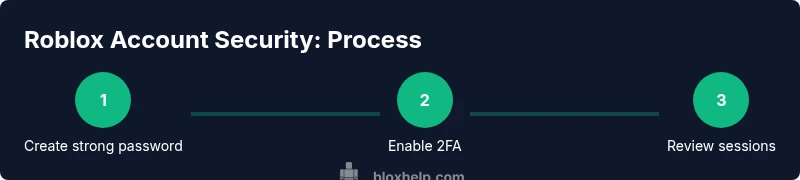
A robust password is the first line of defense against hacks. Use a long, unique password for Roblox, and store it in a reputable password manager. Turn on two-factor authentication (2FA) for Roblox and for the associated email account you use to recover the Roblox password. Prefer authenticator apps over SMS codes. Keep backup codes in a secure location. According to Blox Help, these practices dramatically reduce risk and give you stronger control over account recovery.
Strong passwords paired with 2FA create a barrier that is difficult for attackers to breach, even if one factor becomes exposed. This aligns with general cybersecurity guidance from trusted sources and is a baseline for Roblox account security.
Phishing awareness and scam recognition
Phishers use emails, messages, and fake login pages to trick you into giving credentials. Always check the URL; type roblox.com directly into the address bar rather than clicking links in emails. Look for signs of phishing: misspelled domains, urgent language, requests to share codes, or prompts to install software. If in doubt, go to Roblox via your bookmark or the official site and verify your login prompts. This guidance aligns with best practices recommended by Blox Help and security authorities.
Being skeptical of unsolicited prompts reduces risk by preventing credential leakage and account takeovers.
Verifying linked accounts and sessions
Regularly review your account's active sessions and linked devices. Sign out of any device you do not recognize. Check the email associated with your Roblox account for unexpected security alerts. If you see unfamiliar changes to your account email or password, assume compromise and proceed with password reset and 2FA reactivation. This proactive check helps limit damage if a breach occurs.
If a device you don’t recognize appears in your session list, remove it immediately and re-secure your login path.
Securing devices and networks
Keep your operating system, browser, and Roblox client up to date to minimize vulnerabilities. Use reputable antivirus and enable firewall protections. Avoid logging in on public Wi‑Fi networks or shared devices. If you must, use a trusted VPN and ensure the device’s user accounts are protected with separate passwords. Regular device hygiene is a foundation for Roblox security.
Security hygiene on devices creates a stronger moat around your Roblox account and reduces the odds of credential theft through malware or data leakage.
Safe use of third-party tools and Roblox plugins
Only use official Roblox features and approved tools. Some third-party programs claim to offer account management or automation, but they can introduce malware or leak credentials. Do not paste your Roblox password into external apps. When in doubt, disable or remove any plugin that asks for login details. This caution helps keep your account secure.
Rely on trusted tools and avoid shortcuts that compromise authentication pathways.
Recovery steps if your Roblox account is compromised
If you suspect a breach, act quickly: reset your password from a secure device, enable 2FA, and review recent account changes. Check the associated email for alerts from Roblox and reset that password too if needed. Contact Roblox Support with evidence of the breach (screenshots, device history) and follow their instructions to recover ownership.
Early action helps you reclaim control and minimizes potential loss from unauthorized purchases or changes.
Ongoing protection and monitoring
Security is an ongoing process. Set up monthly security checks: verify password health, review sessions, and confirm that 2FA remains enabled. Keep your recovery options current, and educate any younger players in your household about phishing and safe login habits. By staying vigilant, you reduce risk and improve resilience after any incident.
A routine review habit keeps security fresh and adapts to new threats as they emerge.
Protecting younger players: parental controls and education
If you’re guiding younger Roblox players, enable parental controls to limit who can contact them and what apps can be linked. Teach basic password hygiene and the importance of not sharing credentials. Use device-level protections, screen-time limits, and activity monitoring to create a safer gaming environment.
Promoting safe practices among younger users helps sustain a safer Roblox community and reduces the likelihood of social-engineering attempts against junior players.
Tools & Materials
- A device with internet access(Phone, tablet, or computer)
- A strong, unique password(12+ characters; avoid common words)
- A reputable password manager(Generate and store complex passwords securely)
- Two-factor authentication (auth app preferred)(Enable for Roblox and associated email)
- Backup recovery options up-to-date(Current recovery email and phone)
- Security software and up-to-date OS(Antivirus and auto-updates enabled)
- Phishing awareness checklist(Bookmark Roblox official site; verify links)
- Secure network practices(Avoid public Wi‑Fi for login; use trusted networks)
- Parental controls (optional)(Helpful for younger players)
Steps
Estimated time: 40-60 minutes
- 1
Create a strong, unique Roblox password
Draft a password using 12+ characters with a mix of upper and lower-case letters, numbers, and symbols. Use a password manager to generate and store it securely. This makes credential guessing far less likely and simplifies recovery if needed.
Tip: Do not reuse passwords across websites or services. - 2
Enable Roblox 2FA and secure your email
Turn on two-factor authentication for Roblox and for the email used for recovery. Prefer an authenticator app over SMS so codes aren’t intercepted. Save backup codes in a secure location.
Tip: Authenticator apps are more resilient than SMS for 2FA. - 3
Review active sessions and revoke unknown devices
In Roblox settings, check active sessions and sign out any device you don’t recognize. If you notice changes you didn’t authorize, reset your password and re-enable 2FA.
Tip: Sign out all sessions after a major password change. - 4
Be cautious of phishing attempts
Avoid clicking unsolicited links; verify the domain directly in your browser. Don’t share codes or passwords in chat or DM messages.
Tip: Bookmark official Roblox login page and use it every time. - 5
Secure your devices and network
Keep your OS and apps updated, run reputable antivirus, and avoid logging in on public networks. Consider a VPN when on shared networks.
Tip: Auto-update features reduce exposure to new threats. - 6
Keep recovery options up to date
Ensure your recovery email and phone are current so you can regain access if you’re locked out.
Tip: Test recovery options occasionally to ensure they work. - 7
If you suspect a breach, act quickly
Reset passwords, enable 2FA, review account details, and contact Roblox Support with evidence. Quick action limits damage.
Tip: Document changes with timestamps for faster support. - 8
Establish ongoing protection
Set a monthly reminder to review security settings, update credentials, and refresh recovery details.
Tip: Make security a regular habit, not a one-time task.
Questions & Answers
What should I do first if I think my Roblox account was hacked?
Go to Roblox.com, reset your password, enable 2FA, and review account changes. Check your recovery email for alerts and contact Roblox Support if you can’t regain access.
First, reset your password and enable 2FA, then review changes and contact Roblox Support if you still can’t regain access.
Can Roblox's security features prevent hacks entirely?
Roblox provides password protection and 2FA, but user actions are essential. Regularly updating credentials and monitoring sessions greatly reduces risk.
Roblox helps, but your actions—password hygiene and monitoring—are crucial.
How can I tell if my account is compromised?
Unexplained password changes, unfamiliar purchases, or changes to linked email indicate compromise. Check recent activity and contact support if you notice anything suspicious.
Watch for password changes or strange activity and act quickly.
Is 2FA available on Roblox?
Yes. Roblox supports two-factor authentication via authenticator apps for added security. Enable it in your account settings.
Yes, you can use an authenticator app for 2FA.
Should I use third-party tools to manage Roblox passwords?
Stick with reputable password managers and official Roblox features. Avoid plugins or apps asking for Roblox login details.
Use trusted password managers and stay away from apps asking for Roblox passwords.
What devices should I check for suspicious activity?
Review the list of devices in your account settings and sign out from unfamiliar ones. Update recovery options afterward.
Check your device list and sign out anything unfamiliar.
Watch Video
The Essentials
- Use a unique, strong password and 2FA.
- Spot phishing; verify domains and bookmark Roblox official pages.
- Regularly review sessions and revoke unfamiliar devices.
- Keep devices and networks secure with updates and antivirus.
- If hacked, reset credentials quickly and contact Roblox support.