How to Get Your Roblox Account Back: Complete Recovery Guide
Learn how to get your roblox account back with ownership proofs, official Roblox Support steps, and follow-up security tips. This educational guide covers required information, submission tips, and common roadblocks to help you recover quickly.


How to get your roblox account back means proving ownership, reaching Roblox Support, and regaining access across devices. You’ll need your username, any linked email or phone, and proof of ownership (recent purchases, device data). Follow the step-by-step process to begin recovery confidently and avoid common mistakes. This guide shows how to prepare, what to submit, and how to verify after recovery.
Understanding Roblox Account Recovery: Why access is lost and how to fix it
When your Roblox account is unavailable, you’re faced with a decision: restore access through official channels or risk further complications by using third-party tools. According to Blox Help, successful recovery hinges on clear ownership signals and adherence to official processes. The recovery journey rests on three pillars: identity verification, communication through Roblox Support, and maintaining a clean record of activity that helps verify ownership. You may be asked to confirm your username, the email or phone on file, recent purchases, the last device you used, and any linked authentication apps. Roblox’s security model prioritizes legitimate ownership verification over conjecture, so prepare documentation that ties you to the account. Be patient—support queues can be lengthy, and accuracy matters more than speed. This section outlines what to gather, how to submit a request, and how to minimize delays.
Gather essential information before you start
Before initiating a recovery request, assemble the basics: your Roblox username, the email or phone linked to the account, and access to that email or phone. You’ll also want proof of ownership, such as past purchase receipts or Roblox gift card history, and details about the devices you’ve used to log in. If you cannot access the primary email, note any alternate contact methods you can verify with Roblox. Having this information ready reduces back-and-forth with Support and speeds up the review process. In addition, prepare a brief account activity log that lists recent logins, purchases, and any password changes you remember.
How to document ownership: proofs that help
Ownership proofs are the backbone of a successful recovery. Gather receipts for purchases on the account, the original email address, and any linked phone numbers. Screenshots showing recent activity, purchase histories, or subscription details can be powerful indicators of legitimate ownership. If you’ve previously enabled two-factor authentication, note the authenticator app or backup codes. If you ever shared account information with a trusted friend or used a family account, make a note. The goal is to present a coherent narrative that explains how you access and control the account, without exposing sensitive data.
Step-by-step overview of the recovery journey
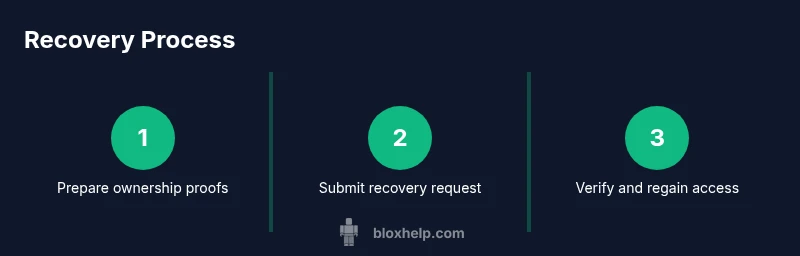
Understanding the recovery journey helps you anticipate what happens next. Start by visiting Roblox’s official support page and selecting the account recovery option. Prepare all ownership proofs and any required personal identifiers. Submit the request through the official form, ensuring that your information matches what Roblox has on file. After submission, monitor your email for updates or requests for additional details. Respond promptly to any follow-ups with precise information. Finally, once Roblox validates your ownership, you’ll be invited to reset your password and re-secure your account across devices.
What to do if you no longer have access to your email or phone
Not having access to the contact methods on file can complicate recovery, but there are official options. Use the Roblox Help Center’s recovery form and indicate that you no longer have access to the registered email or phone. Provide alternative verification details, such as a proof of purchases, device data, or friends’ confirmation that you were an active user (if applicable). Roblox Support will guide you through the next steps, which may include identity verification questions or submitting documents. Do not create new accounts or use unofficial channels, as that can complicate the recovery process.
Submitting a recovery request to Roblox Support: best practices
When you submit a recovery request, accuracy is key. Double-check your Roblox username, the email on file, and any linked devices. Include clear descriptions of recent activity and attach any proofs of ownership. Use a stable internet connection and a trusted device to avoid interruptions. If you can, paste a concise timeline of your account activity to help Support reproduce the sequence of events. After submission, keep an eye on your inbox for confirmation and next steps. Remember: never share verification codes or passwords with anyone, even if they claim to be Roblox staff.
What happens after you submit a recovery request
Roblox Support will review your submission and may request additional information. The review process varies by case, but thorough documentation generally leads to faster resolution. If your request is approved, you will receive instructions to reset your password and restore access. After regaining access, sign out from unfamiliar devices, review connected apps, and update your security settings. If the request is denied, you will typically receive a reason and recommended next steps. Stay calm and consider submitting again with more robust ownership proofs.
Security checks and post-recovery steps to protect your account
After recovery, immediately enable stronger security: turn on two-factor authentication where available, update your password with a unique and complex combination, and review recent login history for unfamiliar sessions. Remove any third-party apps that you don’t recognize, and ensure your email account itself is secured with a strong password and 2FA. Regularly review your connected devices and permissions, and set up alert notifications for unusual activity. These steps help minimize future risk and improve your overall Roblox account hygiene.
Authority and external resources
External resources can help you understand best practices for online security and identity verification. Visit official guidance from trusted organizations for broader context:
- https://www.cisa.gov/identity-theft
- https://www.consumer.ftc.gov/articles/0272-protecting-your-online-identity
- https://www.nist.gov/topics/cybersecurity
Tools & Materials
- Roblox username(Current or last known username associated with the account)
- Access to linked email or phone(Email inbox or SMS access on file)
- Proof of ownership documents(Receipts, purchase history, or device data)
- Purchase history / Roblox gift card records(Helpful but not always required)
- Support request form access(Official Roblox Help Center recovery form)
Steps
Estimated time: 25-45 minutes
- 1
Gather essential information
Collect your username, linked email or phone, and proof of ownership. If you can, compile a concise activity log showing recent logins and purchases to support ownership claims.
Tip: Having everything in one place reduces back-and-forth with Support and speeds up the review. - 2
Visit the official recovery form
Open Roblox Help Center and navigate to the account recovery option. Use a secure device and network to submit the form to avoid data interception.
Tip: Always use the official Roblox site and avoid third-party recovery pages. - 3
Submit ownership proofs
Attach receipts, purchase histories, device data, and any other evidence that links you to the account. Ensure your details match what Roblox has on file.
Tip: Present a clear narrative of how you access and control the account. - 4
Provide alternate verification if needed
If you cannot access the primary email/phone, include alternative contact details and any identity verification you can provide.
Tip: Do not exaggerate or misrepresent facts; accuracy matters more than speed. - 5
Monitor for responses and respond promptly
Check your email for confirmations or requests for more information. Reply quickly with precise details to avoid unnecessary delays.
Tip: Set up notifications for the recovery inbox to avoid missing updates. - 6
Reset password after verification
Once ownership is confirmed, follow Roblox prompts to reset your password and review security settings.
Tip: Choose a strong, unique password and enable 2FA if available. - 7
Review and secure your account
Sign out from all devices, revoke unknown apps, and update recovery options to prevent future access issues.
Tip: Keep a record of your new recovery information for future protection. - 8
Follow up if recovery is delayed
If there’s no progress after a reasonable period, submit a polite follow-up request referencing your prior submission.
Tip: Patience and precise details yield better outcomes than repeated broad inquiries. - 9
Document lessons for future safety
Note what worked well and what didn’t to improve future security practices and recovery readiness.
Tip: Regularly update security settings and review connected devices.
Questions & Answers
I can't access the email on my Roblox account; what should I do?
If you can’t access the email on file, use the official Roblox Help Center recovery form and indicate you no longer have access. Provide alternative verification details such as purchase receipts or device data. Roblox Support will guide you through the next steps and may request additional information.
If you can’t access the email on file, use the official recovery form and be ready to verify ownership with alternative details.
How long does Roblox account recovery take?
Recovery durations vary by case, but thorough documentation typically speeds up the review. You’ll receive updates via the registered contact method and should respond promptly to any requests for more information.
Recovery times vary by case; you’ll receive updates by email and should reply quickly if more details are requested.
Can I recover a hacked account without proof of ownership?
Roblox requires ownership verification to prevent misuse. If you cannot provide proofs, use the official recovery path and provide any information that can link you to the account, such as purchase history and device data.
Proof of ownership is required to recover a hacked account. Use the official forms and provide what you can link to the account.
What should I do to prevent this in the future?
Enable two-factor authentication (2FA) where available, secure your email, keep recovery options up to date, and regularly review connected devices and apps. These steps reduce the likelihood of future access issues.
Enable 2FA, secure your email, and review connected devices to prevent future problems.
What if my account is banned but I think it was a mistake?
If you believe a ban is mistaken, use Roblox’s appeals process and provide any relevant evidence that supports your case. Follow the formal procedure outlined by Roblox Support for appeals.
If you’re sure the ban is a mistake, submit an official appeal with supporting evidence.
Watch Video
The Essentials
- Prove ownership with solid evidence.
- Use only official Roblox recovery channels.
- Respond quickly to requests for more information.
- Secure the account after recovery with 2FA and updated passwords.