How to recover Roblox account
Learn how to recover a Roblox account with our step-by-step guide. Verify ownership, reset your password, and secure your account for long-term access.


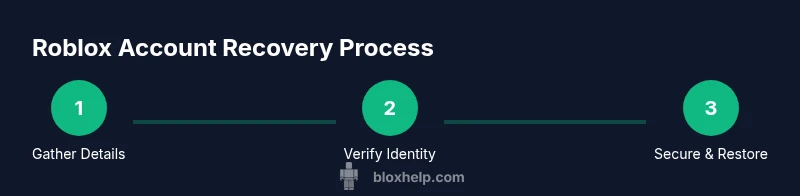
To recover a Roblox account, start at the login page and use Forgot Password to receive a reset link. Enter your username or the email on file, then verify your identity with the attached email or phone number. If you can’t access those, contact Roblox Support with your account details and recent purchases to prove ownership.
Why recovering Roblox accounts matters
A Roblox account is your gateway to games, avatars, and in-game purchases. Security incidents often happen when recovery options aren’t up to date or when players lose access to their email. By understanding the recovery process, you reduce downtime and protect your virtual items. This guide emphasizes practical steps you can take to regain access quickly and safely, with an emphasis on verifying ownership and restoring access without compromising security. With persistence and the right information, you can recover most accounts even after password loss or device changes. The aim is not only to regain access but to strengthen defenses against future issues, ensuring you can continue creating and playing with confidence. According to Blox Help, recovering a Roblox account is easiest when you have access to the email on file and the account details that Roblox recognizes during verification.
Key concepts and terminology
Understanding the recovery flow helps you avoid common mistakes. Key terms include: username, email on file, verification codes, password reset, and owner verification. You’ll typically encounter two paths: a self-serve password reset via email or phone, and a formal ownership verification through Roblox Support if the automated route fails. Knowing these terms helps you follow the steps without confusion and reduces back-and-forth with support.
Prepare your recovery data
Before you begin, gather essentials: your Roblox username, the email address on file, and any linked phone numbers. If you have two-factor authentication, locate the recovery codes or access to the authenticator app. Collect recent purchase history, order numbers, and any receipts from in-game purchases—these items can serve as ownership proofs. Having these on hand minimizes delays and strengthens your case when contacting support. Also ensure your device has reliable internet access and that you can receive verification codes to the registered email or phone.
Step-by-step recovery flow
Follow a logical flow to maximize your chances of success. Start with the self-serve password reset on the login screen and seek verification via the email or phone on file. If you cannot access those options, prepare to file a support request with proof of ownership. The flow may involve submitting details about your account, recent purchases, and the approximate last login times. A calm, methodical approach reduces friction and speeds up recovery in many cases.
How to reset password safely
When you receive a reset link, open it on a secure device and create a strong, unique password. Avoid reusing passwords across sites or sharing them with others. After you regain access, review account settings to ensure the recovery email and phone numbers are current. Turn on two-factor authentication if available and replace any weak recovery indicators (e.g., outdated security questions) with robust options. Regularly update your password in line with best practices from trusted security resources.
Verifying ownership when you can't access email/phone
If you lose access to the recovery channel, you can still pursue ownership verification. Collect physical identifiers you can provide during the support process, such as screenshots of game histories, receipts, or the approximate time of last purchases. When communicating with Roblox Support, clearly outline your case, include any identifiers associated with your account, and be ready to answer security questions. Persistence is often required, but detailed, accurate information improves your odds.
What Roblox Support needs from you
Support teams typically ask for details that establish account ownership, such as your username, linked emails or numbers, recent activity, and proof of purchase. Provide exact purchase dates, item names, and any alternative emails you may have used. If possible, attach receipts or digital transaction IDs. Clear, organized information reduces back-and-forth and helps resolve the case efficiently.
After you recover: securing the account
Once access is restored, immediately review your security settings. Update your password to a strong, unique one and enable two-factor authentication if available. Review connected devices and sessions, revoke suspicious ones, and add or update recovery options. Regularly check your email for alerts about suspicious activity and consider enabling alerts for new login attempts. Building these habits reduces risk over time and keeps your Roblox experience secure.
Common pitfalls and how to avoid them
Avoid sharing verification codes, passwords, or personal details with anyone claiming to be Roblox support unless you reach the official support channel. Don’t skip verification steps—each piece of information you provide strengthens your claim. Beware phishing emails that mimic Roblox communications; always navigate to the official login page directly. Finally, don’t delay recovery steps; timely action prevents longer downtimes and reduces the risk of permanent data loss.
Additional resources and templates
Use a simple template when contacting support: include your username, last known email, a brief description of the access issue, and a list of verification items you can provide. Save copies of receipts and screenshots for quick reference. For reference, consult reputable security resources on password management and identity verification to inform your approach.
Tools & Materials
- Roblox account username(Exact in-game name you use to log in)
- Registered email address on file(Email connected to the Roblox account)
- Registered phone number on file (optional)(Used for SMS verification if enabled)
- Access to recovery email/phone(Able to receive verification codes)
- Recent purchase receipts or order numbers (optional)(Helpful if Roblox asks ownership proofs)
- A device with internet access(Phone, tablet, or computer to access Roblox)
Steps
Estimated time: Estimated total time: 1-3 hours
- 1
Gather recovery details
Collect your username, the email on file, and any phone numbers associated with the account. Retrieve any recent purchase receipts that may help prove ownership. Having everything ready speeds up the verification process.
Tip: Create a short checklist you can reference while recovering. - 2
Open the login page and start reset
Navigate to the Roblox login page and click Forgot Password. Enter your username or email, then choose a verification method available to you. This starts the automated password-reset process.
Tip: Use a trusted device and a secure network. - 3
Enter verification code
Check your email or SMS for a verification code and enter it on the recovery page. If you don’t receive a code, request a new one and verify that you’re using the correct contact method.
Tip: If codes fail, avoid requesting repeated codes in quick succession. - 4
Reset your password
Create a new password that’s strong and unique. Avoid reusing old passwords and consider using a password manager to store it securely. Confirm the change and try to log in again.
Tip: Password should be at least 12 characters with a mix of letters, numbers, and symbols. - 5
If automated reset fails, contact Roblox Support
Prepare to submit ownership evidence: account details, purchase history, and any other identifiers. Provide a concise, organized explanation of the issue and your preferred contact channel.
Tip: Be patient; support responses can take time depending on verification load. - 6
Provide ownership proofs
Attach receipts, transaction IDs, or screenshots that show activity on the account. The more precise your data, the faster the verification can proceed.
Tip: Avoid sharing sensitive data beyond what is requested by official support channels. - 7
Wait for confirmation
Roblox Support will review your submission and respond with next steps. Timelines vary based on verification needs, so monitor your email for updates.
Tip: Check spam folders and ensure your contact details are correct. - 8
Secure and recover accessibility
Once you regain access, update recovery options and enable two-factor authentication if available. Review active sessions and remove unfamiliar devices.
Tip: Set up 2FA to reduce risk of future compromises. - 9
Test access and finalize
Log in from a trusted device to confirm access. If you still can’t access, retry the process or escalate with another support request.
Tip: Document each attempt for future reference.
Questions & Answers
What should I do if I can’t access the email on file?
If you can’t access the email, use the Roblox Support route to verify ownership with other data like purchase history and user details. Prepare to supply any information you can, and stay in contact with the support team for additional steps.
If you can’t access the email on file, contact Roblox Support and provide other ownership details to verify your account.
How long does the recovery process take?
Recovery timelines vary based on the verification required. Expect a response after you submit ownership information, which could take from several hours to a few days depending on the case.
Recovery times vary; you’ll receive updates as Roblox reviews your information.
Can I recover a deleted or compromised account?
Compromised accounts can often be recovered by following the same verification steps and updating security settings. If the account was deleted by mistake, contact Roblox Support for guidance on restoration options.
If an account was compromised or deleted, follow the recovery steps and contact Roblox Support for help.
Should I enable two-factor authentication after recovery?
Yes. Enabling two-factor authentication adds a layer of security by requiring a second verification step for future sign-ins.
Definitely enable two-factor authentication after you recover to keep the account secure.
What information should I not share with support?
Do not share passwords or verification codes with anyone outside official Roblox channels. Only provide information that is requested by Roblox Support and keep sensitive data protected.
Never share passwords or codes outside official Roblox channels.
Can I use a mobile device for recovery?
Yes, you can use a mobile device to access the recovery page, receive codes, and complete verification. Ensure you are on a trusted network.
You can use a mobile device for recovery on a trusted network.
Watch Video
The Essentials
- Verify ownership first to regain access.
- Prepare accounts details and receipts beforehand.
- Secure the account after recovery with 2FA.