How to Stop a Roblox Hacker: A Practical Safety Guide
Learn practical, step-by-step strategies to stop a Roblox hacker, secure your account, and prevent future breaches with 2FA, strong passwords, and vigilant monitoring.


Goal: Stop a Roblox hacker by quickly securing your account and preventing further access. In this guide you’ll learn to act fast: change your password, log out of all devices, enable two-factor authentication, review linked apps, and verify your recovery options. You’ll also learn how to report suspicious activity to Roblox and set up ongoing protections. This actionable plan comes from the Blox Help team to keep your Roblox journey safe.
Why Roblox Security Matters
Roblox is a platform that blends gaming with social interaction, user-generated content, and cross-device access. As a player or aspiring developer, your account is the gateway to in-game items, progress, and a personalized avatar. A hacker who gains access can disrupt games you own or participate in, steal progress, or misuse linked services. According to Blox Help, understanding the common attack vectors helps you build stronger defenses and reduces the chances of a breach. This article covers how to stop a roblox hacker and keeps you in command of your own digital space. By following practical steps, you can minimize damage, reclaim control quickly, and prevent future incursions while enjoying Roblox safely.
Key ideas you’ll gain include recognizing phishing attempts, implementing robust credentials, and maintaining ongoing vigilance across devices and apps. Remember: the sooner you act, the more you limit a hacker’s window of opportunity. The guidance here emphasizes actionable steps anyone can take, regardless of technical background, to preserve your Roblox experience.
As you read, keep in mind that security is an ongoing practice, not a one-time fix. The goal is to create a resilient environment where hackers have fewer chances to slip in. The approach blends account hygiene, device safety, and clear reporting processes so you can respond decisively when something looks off.
How Hackers Target Roblox Accounts
Hackers exploit a variety of weaknesses to gain access to Roblox accounts. Phishing emails and fake login pages lure users into entering credentials on compromised sites. Password reuse across different services is a major risk, because a breach on another site can cascade into Roblox. In addition, insecure devices, outdated apps, and social engineering can give attackers footholds. Some attempts rely on intercepting session tokens or compromising email accounts tied to the Roblox account, which lets criminals reset passwords or alter recovery options. Being aware of these tactics helps you spot red flags before damage occurs. By maintaining strict credential discipline and device security, you reduce the odds of a successful intrusion. Your awareness is a primary defense; your actions after notice determine whether you regain control quickly or suffer prolonged access loss. This section equips you to recognize and interrupt these tactics early.
From a practical perspective, the most effective defenses are straightforward: secure your passwords, enable 2FA, and monitor for unusual sign-ins. Even without advanced tech skills, you can implement these protections, and they pay dividends over time. The goal is to build a robust shield around your Roblox identity, so you can focus on playing and creating rather than worrying about attackers.
Core Defenses You Should Enable
Implementing strong, layered defenses is essential for protecting a Roblox account. First, use a unique, long password for Roblox that you do not reuse anywhere else. A password manager makes this easy and helps you generate unpredictable strings. Second, enable two-factor authentication (2FA) so that signing in requires a second verification step. An authenticator app is typically more reliable than SMS-based codes. Third, secure the associated email account with its own strong password and 2FA, because email compromise can lead to password resets. Fourth, review connected devices and third-party apps linked to Roblox. Revoke access for anything unfamiliar or no longer in use. Fifth, enable login alerts or sign-in notifications if Roblox supports them, so you’re alerted to new sessions.
Beyond login security, keep your devices safe. Update your operating system and apps, install reputable antivirus software if you’re on a PC, and avoid public Wi‑Fi for sensitive activity unless you use a VPN. Finally, ensure recovery options (alternate email, phone, backup codes) are current and accessible only to you. These steps form a reliable safety net that dramatically reduces the risk of persistent attacks and helps you detect unauthorized activity early.
Step-by-Step Response Plan When You Suspect a Hack
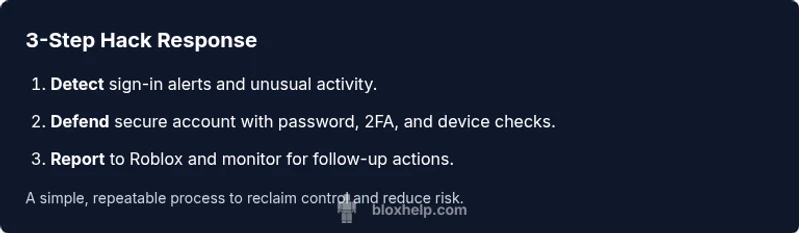
When you suspect a hack, act decisively to contain the breach and preserve evidence for recovery. Begin by logging out of all devices from the Roblox account page and immediately changing your password to a strong, unique one. Enable/verify 2FA if you haven’t already, and check your account settings for any unfamiliar changes to email address, phone number, or linked apps. Review recent login history for unfamiliar locations and revoke access to any suspicious devices. If you can still access the account, secure it locally by updating recovery options and ensuring only you have access. Finally, contact Roblox Support with a clear description of the issue and any evidence you have (screenshots, emails, or login alerts).
Pro tip: document each change with timestamps and screenshots. This helps support teams assess the breach quickly and accurately. If you’ve lost access, use the account recovery flow and provide proof of ownership (like purchase history or unique Roblox items). The sooner you report and gather evidence, the higher the chance of restoring control and limiting damage.
Reclaiming a Hacked Roblox Account
Reclaiming an account starts with verifying ownership and proving you are the rightful owner. Begin by attempting to reset the password from the Roblox login screen, ensuring you have access to the registered email or phone number. If the attacker has changed recovery options, use Roblox’s account recovery process and prepare any evidence that proves you owned the account before the breach (old purchases, platform activity, or gift card records). Once you regain access, immediately enable 2FA, review settings for any unauthorized changes, and revoke all unfamiliar sessions or connected apps. If you cannot recover the account on your own, contact Roblox Support and provide a detailed timeline of events and evidence you’ve collected.
In many cases, early action improves outcomes. Be persistent and follow up with support if you don’t receive a resolution quickly. Community forums and help articles can also offer guidance and share user experiences with similar breaches. The process may take time, but steady steps often lead to full recovery and a tightened security posture moving forward.
Ongoing Security Habits for Roblox Players
Security is an ongoing habit, not a one-time setup. Schedule monthly checks of your account activity and connected devices, and rotate passwords every few months, especially after a known breach elsewhere. Maintain a password manager to store unique credentials and enable 2FA on Roblox and your email. Be cautious of phishing attempts: never click suspicious links or share codes, and verify the sender’s domain before entering credentials. Educate friends and family about password hygiene too, since compromised accounts can affect your in-game communities. By embedding these routines into your gaming life, you build a resilient shield against hacks and create a safer Roblox experience for yourself and others.
Additionally, back up important in-game items or progress if possible, and enable any platform-level security features as they become available. Regular audits of your privacy settings and friends lists can also prevent social engineering escalations. Adopting these practices reduces risk and reinforces your readiness to respond when something looks off.
Common Mistakes to Avoid and Quick Fixes
Avoid reusing passwords across sites or using easily guessable phrases. Do not disable security features even if you’re in a rush to re-enter the game. Don’t ignore sign-in alerts or hide unfamiliar devices under the rug; treat them as red flags. Quick fixes include re-securing the account, rotating passwords, and enabling 2FA as the baseline defense. If you suspect phishing, report the email or page to Roblox and delete it. Finally, never share your Roblox login details with friends, guides, or third-party software claiming to boost performance. Maintaining discipline around these points prevents many common attack vectors and makes it easier to recover if something goes wrong.
Getting Help: Roblox Support and Community Resources
If you’re dealing with a hack, Roblox Support is your primary channel for reclamation and guidance. File a report with as much detail as possible: the time you noticed suspicious activity, descriptions of any changes, and evidence like screenshots or emails. While you wait for a response, reinforce security by updating passwords and enabling 2FA. Community resources such as official help articles, forums, and creator groups can offer practical tips and share experiences. Remember, you’re not alone—many players have navigated similar issues and can point you to the right steps. The key is to stay proactive, document changes, and follow Roblox’s official recovery processes until you regain control.
Additional Resources and Tools
- Official Roblox Support Center and Help articles for account security and recovery.
- Password manager recommendations for creating and storing strong credentials.
- Authenticator apps and device security best practices to maximize 2FA effectiveness.
- Community forums and guides from experienced Roblox players and developers to share safe practices and warning signs.
By combining official channels with practical tools, you build a robust defense against hackers. Remember, ongoing vigilance is the best protection for your Roblox journey.
Tools & Materials
- Strong, unique password(Use a password manager to generate and store a long, random password (12+ characters).)
- Two-factor authentication (2FA)(Use an authenticator app or hardware key for most secure 2FA; avoid SMS where possible.)
- Secure email account(Ensure the email on file with Roblox is itself secured with a strong password and 2FA.)
- Updated Roblox app and device security(Keep apps and OS updated; use reputable antivirus on PCs; enable device lock on mobile.)
- Evidence collection tools(Screenshots, purchase receipts, and exact timestamps help with account recovery.)
- Record of recovery options(Verify and update alternate emails and phone numbers for account recovery.)
- Access to Roblox Support channels(Have a clear description of events and any evidence ready to share with support.)
Steps
Estimated time: 60-120 minutes
- 1
Identify suspicious activity
Review recent login history, changes to account settings, and any unfamiliar apps or sessions. Document timestamps and any unusual in-game behavior to establish a timeline.
Tip: Take screenshots of any suspicious changes and keep them in a dedicated folder for quick reference. - 2
Secure your password
Change your Roblox password to a long, unique password not used elsewhere. Use a password manager to generate and store it securely.
Tip: Avoid common phrases and include a mix of upper/lowercase letters, numbers, and symbols. - 3
Enable 2FA and verify recovery options
Turn on two-factor authentication and ensure your recovery email/phone are current. If already enabled, re-check the authentication method and backup codes.
Tip: Keep backup codes in a secure location separate from your device. - 4
Review linked devices and apps
Check for unfamiliar devices, sessions, or third-party apps with access to your Roblox account and revoke anything you don’t recognize.
Tip: If in doubt, revoke access and reauthorize only trusted apps. - 5
Reclaim account ownership
If the attacker changed recovery options, use Roblox’s recovery flow and provide proof of ownership (receipts, purchases, etc.).
Tip: Be patient; you may need to follow up with support multiple times. - 6
Contact Roblox Support
Raise a formal ticket with a detailed timeline and supplied evidence. Include usernames, affected items, and any communications.
Tip: Attach screenshots and a concise incident summary to speed up verification. - 7
Harden your setup for the future
Post-recovery, enable 2FA on all relevant accounts, rotate passwords regularly, and monitor for any new suspicious activity.
Tip: Set calendar reminders to review security every 30–60 days. - 8
Educate yourself and your circle
Learn to identify phishing attempts and social engineering; share best practices with friends to reduce risk in the community.
Tip: Never share codes or passwords, even with seemingly helpful messages.
Questions & Answers
What counts as a Roblox account hack?
A Roblox account hack involves unauthorized access, changes to login credentials, recovery options, or linked apps. It can also include suspicious purchases or altered settings. Recognizing the signs early helps you respond quickly and preserve your progress.
A Roblox hack is when someone else gains access to your account and can change your password or recovery options. Look for unfamiliar logins, changes, or purchases and act fast to secure your account.
What should I do immediately if I suspect a hack?
Act quickly: log out of all devices, change your password to a unique one, enable 2FA, review recovery options, and contact Roblox Support if needed. Document changes with timestamps and screenshots to assist the recovery process.
If you suspect a hack, log out from all devices, change your password, enable 2FA, and contact Roblox Support with any proof you have.
Can Roblox restore a hacked account?
Roblox Support can help restore access after you provide ownership proof and complete the recovery steps. Restoration times vary, but staying engaged with support accelerates the process.
Roblox Support can help restore access if you prove ownership and follow the recovery steps; the timeline varies.
How do I enable 2FA on Roblox?
Go to your Roblox account settings, locate security options, and enable two-factor authentication. Follow the on-screen prompts to set up an authenticator app or backup method.
In your account settings, turn on two-factor authentication and choose an authenticator app for added security.
How can I prevent future hacks?
Maintain unique passwords, enable 2FA, keep recovery options current, review connected devices periodically, and stay vigilant against phishing attempts.
Use unique passwords, enable 2FA, and watch for phishing to prevent future hacks.
Is it safe to share my passwords with friends for help?
No. Never share passwords or codes with anyone. If someone offers help, work with official Roblox Support or trusted sources instead.
Password sharing is unsafe. Stick to official support and legitimate guides for help.
Watch Video
The Essentials
- Act quickly to contain a breach and protect recovery options.
- Enable 2FA and use unique passwords for Roblox.
- Review connected apps/devices and report evidence to Roblox Support.
- Maintain ongoing security habits for long-term protection.