Roblox Password Recovery: How to Reset Your Account
Learn how to recover a Roblox password quickly and safely. This guide covers official reset steps via email or phone, plus security tips to keep your account protected.


If you’ve typed in 'roblox i forgot my password,' you’re not alone. This quick-guide helps you recover access by resetting your password through your linked email or phone, plus safe steps if you’ve lost access. It also covers phishing awareness, what information Roblox will request, and how to keep your account secure after you regain control.
Understanding Roblox Password Recovery
When you realize you forgot your Roblox password, the first goal is to prove you are the account owner and securely reset access. Roblox relies on recovery options that you set up earlier—usually an email address or a phone number tied to the account. This process is designed to prevent unauthorized changes while offering a clear path back into the game. According to Blox Help, staying proactive about recovery options reduces downtime and minimizes the chance of phishing attempts during the reset. If you search for roblox i forgot my password, you may see multiple help articles; follow the official pathways to minimize risk and ensure you regain access without exposing sensitive data. The most dependable routes involve access to your registered email or phone, plus familiarity with the official Roblox reset flow. Keeping your contact details up-to-date is essential for future security and smoother recoveries, especially if you use Roblox for trading or collaborative projects.
To maximize safety, never share codes or personal data outside the official Roblox pages. If you suspect a scam, compare the URL and look for Roblox domains ending in roblox.com and official security banners. Blox Help emphasizes a cautious approach: your goal is to confirm ownership and then strengthen defenses for the long term.
Safe recovery paths for roblox i forgot my password
There are two primary, safe pathways to recover a Roblox password: email-based verification and phone-based verification. An email reset is fastest when you still have access to the linked mailbox. If your phone number is linked, a verification code via SMS can also unlock the account. In some cases, you may need to answer security questions or provide identifying information to Roblox Support. Always use the official Roblox login page or app during this process, and avoid third-party tools or fake sites that imitate Roblox to steal codes. The Blox Help analysis shows that recovery success increases when you have both email and phone options configured; this redundancy allows you to switch methods if one channel becomes unavailable.
If you cannot access either method, prepare to contact Roblox Support directly. Have ready any identifiers such as your username, approximate account creation date, recent purchases, or IP addresses you’ve used. Roblox will verify ownership through a structured process, which may take longer but is the safest option when access channels are compromised. Remember to log out from other devices after recovery to prevent session hijacking and review account activity for unfamiliar logins.
Identity verification best practices during reset
Identity verification is the backbone of a secure reset. You should be prepared to provide the exact email address or phone number tied to the account, plus the username and any recent in-game activity details you can recall. Roblox sometimes asks for recent purchases or items you previously owned to confirm ownership. The safer practice is to complete verification through your own devices and networks rather than public computers, which can expose you to shoulder-surfing or fake reset pages. According to NIST password guidelines shared through their public pages, using unique, strong identifiers and minimizing reuse across services drastically lowers risk during password resets. Throughout the process, ensure you only interact with Roblox domains and apps; phishing sites often try to mimic legitimate layouts with similar logos and color schemes. It helps to bookmark the official login page so you don’t accidentally navigate to a fraudulent site.
In short, verify your identity using recognized channels, keep tracking information handy, and avoid sharing codes beyond the official Roblox interface.
How to prepare before you start the reset
Preparation saves time and reduces stress during a password recovery. Gather your recovery options, verify you can access them, and have a clean device ready for the reset. Confirm that your email inbox or phone can receive messages or SMS codes, respectively. If you’ve enabled two-factor authentication (2FA) in the past, prepare to use your authenticator app or backup codes. It’s also helpful to set up a password manager before you begin, so you can store a new password securely and recall it easily in the future. As you proceed, keep a notepad or password vault handy for any codes you receive during the process. By planning ahead, you avoid delays caused by lost codes or slow email delivery. Finally, ensure you’re on a trusted network to prevent eavesdropping on sensitive information.
A careful start sets the tone for a smooth recovery and a safer account afterward.
Step-by-step: reset your Roblox password (prose overview)
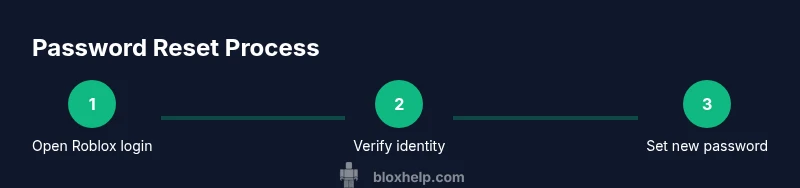
This section provides a narrative walkthrough of the reset process, complementing the step-by-step actions below. Start by visiting the official Roblox login page and selecting the forgotten password option. You will be guided to enter the email or username associated with your account and choose a verification method. Roblox will send a code to your chosen channel; enter the code on the site to proceed. Finally, create a new, strong password and log back in to review account settings. The recovery flow can vary slightly depending on your security setup, but the core idea remains the same: prove ownership, verify via a trusted channel, and secure your account with a new password and updated recovery options. Throughout, watch for phishing attempts and avoid entering codes on non-Roblox pages. If you encounter obstacles, contact Roblox Support with your account details for assistance.
This overview aligns with our step-by-step instructions and reinforces safe practices while you regain access.
After regaining access: securing your account
Once you’re back in, the immediate priority is to secure the account against future unauthorized access. Enable two-factor authentication if Roblox supports it for your account type. Update your recovery options by adding a secondary email or phone number, and review connected devices for any you don’t recognize. Use a password manager to store the new password securely and avoid reusing passwords across platforms. Regularly review your account security settings, such as connected apps and authorized devices. If you notice anything suspicious, report it to Roblox Support promptly. Keeping a routine of security checks reduces the risk of future lockouts and protects your progress, clothing and accessories, and any in-game purchases youve made.
Troubleshooting common issues during password recovery
If you encounter issues, start by confirming you’re on the official Roblox site and that your browser is up to date. Clear browser cookies if you see repeated errors or loading problems, and try a different browser or device. If you still cannot receive the verification codes, verify that your contact information is correct in Roblox account settings and retry the process after a short wait. Email delays happen from time to time, so check your spam folder for security messages and ask your email provider if there are blocking filters. If you suspect your account is compromised during the process, stop and contact Roblox Support immediately, especially if you see unfamiliar purchases or login locations. Patience and careful verification are key to a secure, successful recovery.
Tools & Materials
- Access to the registered email account(You must be able to receive password reset emails.)
- Access to the linked phone number (SMS verification)(Needed if you choose phone verification.)
- Device with internet access(Phone, tablet, or computer.)
- Official Roblox login page or Roblox app(Use only roblox.com or the official app.)
- Backup verification method (Authenticator app or codes)(Optional but helpful for 2FA recovery.)
- Password manager or secure notebook(Store your new password safely.)
Steps
Estimated time: 15-25 minutes
- 1
Open Roblox login and start reset
Navigate to the official Roblox login page and click on the option that says Forgot password or username.Enter the email or username associated with your account and choose a verification method.
Tip: Make sure you are on the official Roblox site to avoid phishing. - 2
Choose a verification method
Select the verification channel you currently have access to, such as email or SMS. If you cannot use either, proceed to contact Roblox Support for alternatives.
Tip: Try both options if available to speed up recovery. - 3
Enter the verification code
Check your email or phone for the code and enter it exactly as shown. Codes expire after a short window; request a fresh code if needed.
Tip: If you don’t see the code, check spam/junk folders or request a new one. - 4
Create a strong new password
Choose a long, unique password with a mix of upper/lowercase letters, numbers, and symbols. Avoid common words or reused passwords.
Tip: Use a passphrase or a password manager for memory and security. - 5
Sign in and review account activity
Log in with your new password and immediately review recent login activity, devices, and connected apps. Remove any unknown sessions.
Tip: If something looks off, sign out other devices and re-secure the account. - 6
Set up two-factor verification and update recovery options
Enable 2FA if available and add or update recovery options to prevent future lockouts. Save backup codes in a secure location.
Tip: Store backup codes securely in a password manager.
Questions & Answers
What should I do if I can't access my registered email anymore?
Try to recover using your linked phone number or contact Roblox Support with your account details. Providing the username and any recent activity helps verify ownership.
If you can't access your email, use your phone verification or contact Roblox Support with your account details.
How long does Roblox support take to respond during password recovery?
Response times vary, but providing complete account information can speed up the process. Be prepared to wait a few hours to a couple of days in busy periods.
Response times vary; including all needed details helps speed things up. Expect some wait during busy times.
Can I reset my Roblox password without my username?
Having your username is typically required to initiate a reset. If you forgot the username, Roblox Support can guide you through identity verification steps.
Usually you need your username, but Roblox Support can help verify your identity if you don’t remember it.
Will resetting my password affect my in-game progress or items?
Resetting your password does not erase in-game progress or owned items. It simply restores account access once you verify ownership.
No, password resets don’t remove your games or items; they just unlock access again.
Is two-step verification required to recover my account?
2FA is highly recommended and often available after you regain access. It adds an extra layer of security to prevent future unauthorized access.
Two-step verification is highly recommended after you recover your account.
Watch Video
The Essentials
- Reset via official Roblox channels only.
- Verify recovery options are current and complete.
- Enable 2FA to prevent future lockouts.
- Beware of phishing and share-safe practices.
- Keep backup codes and passwords securely stored.