Is Roblox with Xbox? A Practical Guide
Discover whether Roblox works on Xbox, how to install, sign in, cross-platform play, and troubleshooting on Xbox One and Xbox Series X|S. Expert tips from Blox Help.


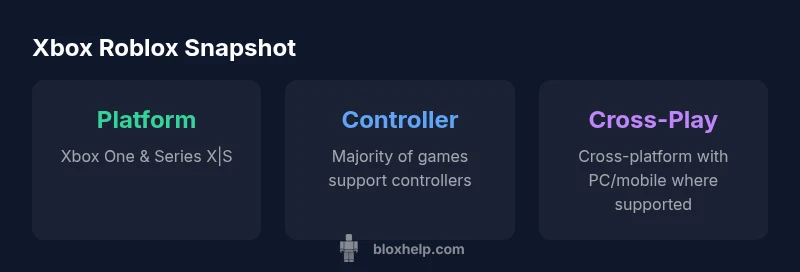
Yes. Roblox runs on Xbox consoles, including Xbox One and Xbox Series X|S, through the Roblox for Xbox app. You sign in with your Roblox account, install the game from the Microsoft Store, and use a controller to play. Some experiences may differ by control scheme and age-rating, but most Roblox games are playable on Xbox.
Roblox on Xbox: The Core Compatibility
According to Blox Help, Roblox on Xbox is officially supported on Xbox One and the newer Series X|S family. The Roblox for Xbox app serves as the gateway, linking your Microsoft console to your Roblox account so you can access a universe of user-generated games without leaving your living room. The experience is designed around a traditional console control scheme, which makes most titles approachable for players who primarily use a gamepad. While the core experience is consistent across platforms, you should expect some differences in control mappings, UI flows, and performance optimizations depending on the title and the console model.
Importantly, you don’t need a separate purchase to play Roblox on Xbox—the game itself is free-to-play. However, individual games in Roblox may offer in-game purchases or creator-made monetization. The platform emphasizes cross-compatibility, so progress and cosmetics you own on other devices typically carry over when you sign in with the same Roblox account. For new players, the first step is to install the Roblox app from the Microsoft Store, then sign in with your existing Roblox credentials. If you’re just starting, consider enabling parental controls and privacy settings early to tailor your experience for younger players or family use.
Getting Started: How to Play Roblox on Xbox
Getting Roblox on your Xbox is straightforward, but a few details can help you avoid common snags. First, ensure your Xbox is connected to the internet and logged into an active account. Navigate to the Microsoft Store, search for Roblox, and install the Roblox for Xbox app. Launch the app, then sign in with your Roblox account—this is the same account you might use on PC or mobile, which allows you to synchronize your avatars and inventory across devices. Once signed in, you can browse games, add favorites, and join friends in real-time. If you run into input issues, check the controller mapping within individual games and adjust accessibility settings in the Xbox system menu. Finally, keep the app updated to access new features and bug fixes as Roblox expands support for Xbox players.
Cross-Platform Play and Game Compatibility
Roblox on Xbox thrives on cross-platform play, but it isn’t universal for every title. Many popular games support play across Xbox, PC, and mobile, allowing you to team up with friends regardless of device. However, some experiences are optimized for a specific input method, so gameplay may feel different when using a controller versus a keyboard and mouse. If you’re aiming to play with a friend on PC, verify that the specific game you’re interested in supports cross-platform sessions and that you both are signed into the same Roblox ecosystem. Additionally, some in-game features (like chat or advanced editing options) may have platform-specific limitations, so check the game’s page or creator notes for details.
Troubleshooting Common Xbox Launch Issues
If Roblox on Xbox won’t start or one of your favorite games won’t load, there are a few reliable fixes. Start by checking your internet connection and ensuring the Roblox app is fully updated. A simple sign-out and sign-in can refresh linked accounts, and restarting the console can resolve minor software glitches. If issues persist, you can uninstall and reinstall the Roblox app to clear corrupted data. It’s also worth checking Xbox Live service status in case there are ongoing issues affecting online play, and verifying storage space on your console to ensure the app has room to operate smoothly. For persistent problems, consult Roblox community forums or the Blox Help troubleshooting guide for game-specific tips.
Best Practices for Xbox Roblox Sessions
To optimize your Xbox Roblox sessions, follow these best practices: keep the Roblox app updated to access the latest features and security patches; allocate sufficient hard drive space for games and assets; enable privacy controls appropriate for your household; consider quick-party play with friends to reduce matchmaking delays; and use parental controls if younger players are involved. If you’re playing in a shared living space, a wired ethernet connection or a reliable 5 GHz Wi-Fi network can reduce latency and improve consistency. Remember to log out when finished and review privacy settings periodically to reflect any changes in your family’s online safety preferences.
Roblox on Xbox: Input and cross-play overview
| Platform | Input Method | Notes |
|---|---|---|
| Xbox Console | Controller | Supports most Roblox experiences; some titles may require keyboard/mouse for advanced features |
| Cross-Platform | Cross-Play | Sign in with your Roblox account to access shared progress |
| Mobile/PC | Touch/Mouse & Keyboard | Some experiences optimized for touch; performance varies |
Questions & Answers
Can I play Roblox on Xbox Series X|S?
Yes. Roblox runs on Xbox Series X|S through the Roblox for Xbox app. Use a controller and sign in with your Roblox account to access the full library.
Yes—Roblox is supported on Xbox Series X|S; just install the Roblox app, sign in, and you can play with a controller.
How do I install Roblox on Xbox?
Open the Microsoft Store on your Xbox, search for Roblox, install the Roblox for Xbox app, then launch and sign in with your Roblox account.
Go to the Microsoft Store on your Xbox, install Roblox, open it, and sign in with your Roblox account.
Is Roblox cross-play with PC or mobile on Xbox?
Many Roblox experiences support cross-platform play, meaning you can play with friends on PC or mobile as long as the game supports it.
Many games let you play with friends on other devices, but it depends on the specific game.
Can I develop Roblox games on Xbox?
Roblox Studio is not available on Xbox. Development tools are primarily on PC or other supported devices.
Roblox Studio isn’t on Xbox; you’ll need a PC to create games.
Are there parental controls for Roblox on Xbox?
Yes. Use Xbox parental controls and Roblox privacy settings to tailor experiences for younger players.
There are parental controls you can set on Xbox and in Roblox.
Do I have to pay to play Roblox on Xbox?
Roblox itself is free to play on Xbox; some games offer in-game purchases or paid experiences.
Roblox is free, with optional in-game purchases in some games.
What should I do if a game won’t load on Xbox?
Check your internet connection, confirm the Roblox app is updated, restart the app or console, and verify sign-in status.
Try restarting the app and checking your internet if a game won’t load.
“Roblox on Xbox expands access for players by leveraging cross-platform play and familiar controls; most experiences work well with a controller.”
The Essentials
- Install Roblox from the Microsoft Store and sign in with your Roblox account
- Most Roblox games work great with a controller on Xbox
- Cross-platform play is common, but verify per title
- Keep the Roblox app updated and review parental controls
- Troubleshoot startup issues by checking internet, app updates, and storage