Roblox vs Xbox: Is Roblox the Same Platform? A Clear Comparison for Gamers and Developers
Explore the differences between Roblox and Xbox, including platform scope, access, creation tools, monetization, and safety. This guide clarifies what each is best for and how they relate.


No — Roblox and Xbox are not the same. Roblox is a user-generated platform and game creation system, while Xbox is a console and service ecosystem owned by Microsoft. The two intersect when Roblox runs on Xbox consoles, but their purposes, content, and business models remain distinct. Understanding that distinction helps players decide where to focus playtime and developers where to publish experiences. This article explains the similarities, key differences, and what each platform is best for.
Roblox vs Xbox: What the question really asks
At first glance, the question is simple: is Roblox the same as Xbox? The short answer is no, but the comparison matters for players and creators who want to understand which ecosystem aligns with their gaming goals. According to Blox Help, Roblox is best described as a platform for user-generated experiences and a built-in development environment, while Xbox represents a hardware line and a connected services ecosystem. Grasping this distinction sets the stage for deeper analysis and practical guidance for both newcomers and seasoned developers.
Defining Roblox and Xbox: Core scope and ownership
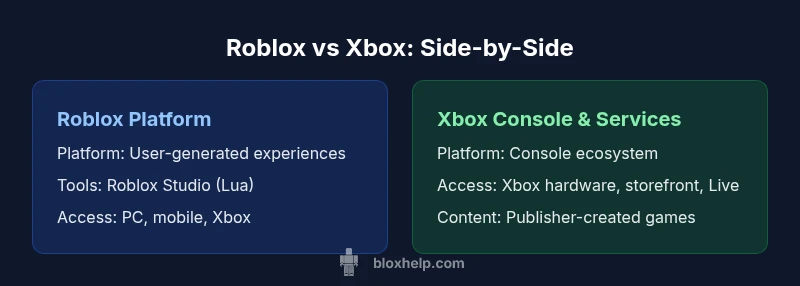
Roblox is a standalone platform owned by Roblox Corporation. It combines a game library with a proprietary creation tool called Roblox Studio, allowing users to build, publish, and monetize their own experiences. Xbox, by contrast, is a console brand under Microsoft that encompasses hardware (the Xbox console family), a digital storefront (Xbox Store), online services (Xbox Live), and a curated game lineup. While both support multiplayer gaming, Roblox centers on user-generated content and education in coding and game design, whereas Xbox focuses on publisher-created titles, hardware performance, and a broad gaming ecosystem.
Accessibility and cross‑platform reach
Roblox runs on multiple devices, including PC, mobile, and supported consoles (notably including Xbox). Its cross‑platform play means friends on different devices can join the same experiences if the developer enables it. Xbox offers its own cross‑play and cross‑buy features, particularly within its own ecosystem and compatible games. The overlap happens when Roblox is available on Xbox; in that case, players can access Roblox content through the Xbox interface, use Xbox Live for social features, and keep progress linked to their Roblox account. This accessibility is a strength for players who want a seamless transition between devices, but it does not blur the fundamental differences in how content is created and managed.
Creation vs consumption: Tools and publishing
A core distinction is content creation. Roblox Studio is a powerful, beginner-friendly toolkit that lets creators design and publish experiences directly to the Roblox platform. It supports scripting with Lua, asset creation, and community sharing. Xbox does not provide a public, platform-wide content creation tool for end users in the same sense; instead, it centers on publishing games from studios through the Xbox ecosystem, with development pipelines and certification processes. For aspiring developers, Roblox offers a lower‑barrier entry to publish; for traditional game developers, Xbox provides access to a larger distribution network and console optimization.
Content library, monetization, and value propositions
Roblox monetization centers on Robux, the in‑platform currency, which creators can earn through engagement and purchases within their experiences. The ecosystem rewards ongoing upkeep, feature additions, and community events. Xbox monetization leans on game sales, downloadable content, and subscription services such as Xbox Game Pass, with royalties and licensing managed through the Microsoft store. Players experience a vast catalog of experiences on Roblox that are free to start but may require purchases inside the games, whereas Xbox offers a library of native console games, many of which are paid upfront or require a subscription model. The value proposition thus differs: Roblox emphasizes flexible creativity and social experiences, while Xbox emphasizes premium, curated game experiences on hardware.
Safety, moderation, and parental controls
Roblox emphasizes community moderation, parental controls, and safety filters aimed at a younger audience, with age-appropriate settings and reporting tools. Xbox provides its own family safety settings, account restrictions, and content ratings that apply to console gameplay and online interactions. When comparing safety, both ecosystems require careful configuration by guardians or players: Roblox for content created by users, and Xbox for a broader range of online services. Understanding these controls helps families tailor the experience to their comfort level and ensures a safer, more enjoyable environment across platforms.
Developer ecosystems and opportunities
Roblox has a thriving developer community built around Roblox Studio, Lua scripting, and a distribution model that makes it possible to reach millions of players with relatively low upfront costs. The Xbox ecosystem offers development opportunities through official channels like the ID@Xbox program, a path for independent studios to publish on Windows and Xbox, albeit with stricter submission processes and technical requirements. For creators, Roblox is often the entry point to practical game design and monetization, while Xbox provides a stepping stone to professional, console-grade production and partnerships with larger publishers.
Use-case scenarios: who benefits most from each platform
Choose Roblox if you want to experiment with game design, learn scripting, and publish experiences that reach a global audience regardless of device. Roblox is especially appealing for beginners and hobbyists who want immediate feedback and a social creator economy. Choose Xbox if your priorities are high‑fidelity, console-native games, curated experiences from established developers, and a traditional storefront with a robust online service. The decision hinges on whether your goal is to create and share interactive content (Roblox) or to enjoy a library of polished titles with a hardware focus (Xbox).
Practical steps to get started and compare platforms
To begin evaluating Roblox vs Xbox for your needs, list your goals: do you want to learn game development or play complex console games? If learning and publishing are your aims, install Roblox Studio and explore starter tutorials, then publish a small experience to the platform. If you own an Xbox or plan to game primarily on a console, explore the Xbox ecosystem, check Game Pass options, and sample a few titles to gauge how they align with your preferences. Finally, test cross-platform play for your favorite friends to understand live experience differences and performance trade-offs across devices.
Comparison
| Feature | Roblox Platform | Xbox Console & Services |
|---|---|---|
| Platform Type | User-generated platform + development toolkit | Console hardware + online services + storefront |
| Ownership & Publisher | Roblox Corporation; user-created content ecosystem | Microsoft; Xbox brand and game publisher network |
| Accessibility & Devices | PC, mobile, some consoles; cross-play supported via Roblox accounts | Xbox Series X/S, Xbox One, PC (via Xbox app) |
| Content Creation Tools | Roblox Studio with Lua scripting; publish to Roblox | No public end-user creation tool; games published by studios |
| Monetization Model | Robux currency; creator earnings via engagement and purchases | Game purchases, DLC, and subscription models (Game Pass) |
| Safety & Parental Controls | Roblox safety features and parental controls; community moderation | Xbox family safety settings; parental controls across console and live services |
| Cross-Platform Play | Cross-device play within Roblox ecosystem; progress tied to Roblox account | Cross-play with Windows 10/11 titles; Xbox Live identity-linked experience |
| Audience & Content Scale | Primarily younger audiences; emphasis on user-generated content | Wide age range; emphasis on professionally produced games and services |
| Development Path | Low-barrier entry for creators; community-driven updates | Professional development routes; certification and publishing standards |
| Best For | Aspiring developers and social gaming communities | Console-native gamers seeking premium titles and ecosystem features |
Benefits
- Clear insights into how user-generated content differs from console publishing
- Highlights cross-platform opportunities and device considerations
- Identifies monetization and safety frameworks for creators and players
- Offers practical guidance for beginners and aspiring developers
- Supports informed decisions for families managing access
What's Bad
- Overlaps can blur perceived differences if a user isn’t aware of content creation tools
- Monetization and moderation policies differ in scale and complexity across platforms
- Cross-platform limitations may affect progress syncing and social features
- Developer ecosystems have distinct entry barriers and certification steps
Roblox and Xbox serve different purposes; neither is a perfect substitute for the other
Roblox excels as a creator-driven, cross-device platform; Xbox excels as a curated console ecosystem with premium titles. Your choice depends on whether you prioritize user-generated content and accessibility (Roblox) or console-native experiences and a traditional publisher ecosystem (Xbox). The two platforms complement rather than replace each other for many users.
Questions & Answers
Can Roblox be played on Xbox?
Yes. Roblox is available on Xbox consoles, which means Xbox players can access Roblox experiences through the Xbox interface. It supports cross-device play with other Roblox platforms, depending on the developer's settings. If you already have a Roblox account, you can sign in to continue your progress on Xbox.
Yes, you can play Roblox on Xbox; just sign in to your Roblox account to access your games.
Is Roblox free to play on all platforms?
Roblox is free to start on most platforms, with optional purchases inside games and the Robux currency system for creators. Some experiences may require purchases, but the core platform does not require upfront fees to enter. Always review in‑game pricing and parental controls before playing.
Roblox is free to start, with optional in-game purchases and Robux for creators.
Do Roblox games work across PC, mobile, and Xbox?
Many Roblox games are designed to be cross‑platform, enabling players on PC, mobile, and Xbox to join the same experiences if the developer enables it. Progress is generally tied to your Roblox account, not the device. However, some titles may have platform-specific features or limitations.
Most Roblox games support cross‑platform play, but some features may vary by device.
Can you develop Roblox games on Xbox?
Roblox game creation is primarily done in Roblox Studio on PC. While Roblox experiences can be played on Xbox, the platform does not provide full Studio access on consoles. Beginners should start on PC to learn Lua scripting and then publish to Roblox for cross‑device access.
Roblox Studio is PC‑based; you publish experiences for Roblox, which can be played on Xbox later.
Do you need a special Xbox subscription to play Roblox online?
Playing Roblox online on Xbox uses your Roblox account for social features; it does not require a separate Xbox subscription beyond what is needed for standard online services. Features like party chats and online play are tied to your Xbox Live profile and privacy settings.
No extra Roblox-specific subscription is required beyond typical Xbox online services.
What safety features differentiate Roblox and Xbox parental controls?
Roblox emphasizes community moderation and parental controls within the Roblox app, with age filters and reporting tools. Xbox provides family safety settings for console usage, screen time limits, and content restrictions across games and online services. Combining both helps tailor a safer experience for younger players.
Roblox and Xbox both offer safety controls; combine them for safer family use.
The Essentials
- Identify your primary goal: creation vs. curated games
- Check device availability and cross-platform support before deciding
- Leverage Roblox Studio to learn skills that transfer to other engines
- Use Xbox for high-fidelity titles and console-centric features
- Configure safety and parental controls early for younger users