How to Use a Roblox Gift Card: A Complete Guide
Learn how to redeem a Roblox gift card to buy Robux or Roblox Premium. This step-by-step guide covers desktop and mobile redemption, troubleshooting, and safety tips.


If you're wondering how do you use a roblox gift card, this quick answer shows the essentials: redeem the code on Roblox, choose to add Robux or a Premium subscription, and keep your PIN safe. The following sections cover desktop and mobile redemption, troubleshooting, and tips. Whether you’re new or returning, you’ll walk away with clear steps and best practices.
What you gain by using Roblox gift cards
Using Roblox gift cards gives you direct access to Robux or a Roblox Premium membership without linking a bank card. For many players, this is the cleanest way to control spending, plan purchases, and gift a friend a playable budget. According to Blox Help, the flexibility of gift cards is one of their strongest benefits: you can decide how much to spend, you can price-proof your purchases, and you avoid subscription auto-renewals unless you choose to sign up for Premium separately. Gift cards also make great gifts for younger players who may not manage credit cards or PayPal. Redeeming a card is quick and straightforward, and you can switch between Robux purchases and Premium as your needs change. Additionally, you can accumulate Robux over time and use it for in-game items, avatar customization, and access to certain Roblox experiences that are premium-only. Bear in mind that the value is locked to Robux or Premium credits, so you’ll want to align the amount with your goals, whether that’s a month of Premium or a batch of Robux for a big purchase.
Understanding Roblox gift card denominations and PINs
Roblox gift cards come with a code and a PIN that must be redeemed on the official platform. The code is the key to adding Robux or Premium credits to your account, and the PIN helps verify ownership and usage. Denominations exist for budgeting convenience, and they are designed so you can choose an amount that fits your goals without wiring in a payment method during redemption. The PIN is typically found beneath a scratch-off panel on physical cards or delivered in digital form via email. Keep your PIN private and store it in a secure location until you redeem. If you misplace or forget the PIN, check the email or the card’s packaging for the correct digits. Do not share this information publicly, as someone could misuse it to access your account balance.
Redeem options: where to redeem
Redeeming a Roblox gift card is straightforward on two main platforms: the Roblox website (on a computer) and the Roblox mobile app. On either platform, you’ll land on the same redemption flow that asks you to enter the gift card code and choose an outcome. The redemption screen lets you decide whether you want to convert the code into Robux or into a Premium subscription. You’ll need to be signed in to the Roblox account you want to credit. If you are using a family account or under parental controls, you may need approval from a guardian. Always use the official Roblox redemption page to ensure a secure connection and avoid phishing attempts. After redeeming, verify the balance in your Roblox account so you can plan purchases confidently.
Step-by-step redemption on desktop
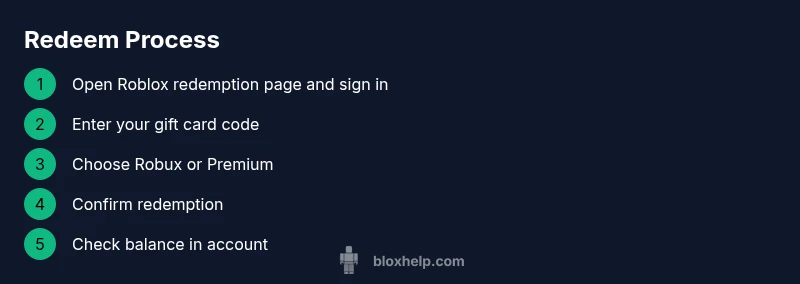
To redeem on a desktop computer, follow these general steps: sign in to your Roblox account on the official site, navigate to the Gift Cards page, and enter your card code in the provided field. Then pick whether you want Robux or a Premium plan, and confirm the transaction. Once completed, return to your account balance to confirm the added funds. If you see an error, double-check the code for typos, try again, and ensure you are redeeming from a country where the card is valid. It can take a few moments for the balance to update. Pro tip: have the card handy and copy-paste the code to minimize mistakes.
Step-by-step redemption on mobile
Open the Roblox app or mobile browser and sign in. Tap the menu or more options to find the Gift Cards page, or search for “Redeem Gift Card.” Enter the code exactly as shown, then choose Robux or Premium and confirm. If you’re using a phone hotspot, avoid slow connections that can interrupt the process. After processing, verify your Robux balance in the account page. If you’re asked for confirmation or parental approval, follow the prompts.
How Robux vs Premium works after redemption
Redeeming a gift card will credit your account balance either as Robux or as a Premium membership. If you choose Robux, the balance appears in your Robux wallet and can be spent on games, items, and avatar customization. If you choose Premium, you’ll gain access to monthly Robux as part of the subscription and unlock additional creator features. You can switch between Robux-funded purchases and Premium as your needs change, but remember that Premium is a recurring subscription, and Robux is the in-game currency. Budgeting your spending with a card helps avoid unexpected charges and makes it easier to plan big purchases. If you encounter issues with premium status, verify your subscription status in the account settings.
Troubleshooting common issues
If a code is rejected, re-enter it carefully and verify you are on the official Roblox redemption page. Check that the card is valid for your region and account type, and ensure the code hasn’t already been redeemed. If you still can’t redeem, contact Roblox support with the code and purchase location; do not share your PIN publicly. For mobile users, ensure the app has permission to access the internet and that you have a stable connection. If the balance doesn’t reflect after redemption, sign out and back in or refresh the page. Blox Help recommends keeping receipts or confirmation emails until the balance shows correctly.
Security and safety tips for gift cards
Treat your gift card code and PIN like cash. Do not share codes in chat, forums, or social media, and only redeem on the official Roblox site or app. Purchase gift cards from trusted retailers and avoid third-party sellers offering suspicious discounts. If your card is lost, report it to the retailer and Roblox support as soon as possible. Regularly review your balance and transaction history to catch unauthorized activity early. By following these practices, you keep your Roblox account secure and minimize the risk of fraud.
Common myths and best practices
Myth: Gift cards can alter account settings or bypass parental controls. Reality: Gift cards only affect Robux or Premium balance; parental controls still apply. Best practice: Always verify the redemption steps on the official site, and never share PINs. Myth: Gift cards expire within weeks. Reality: Check regional terms; some cards may have expiration policies. Practice: Record the PIN in a secure place and redeem in one sitting to minimize retries. Myth: Any retailer can sell Roblox gift cards, so beware of counterfeit codes. Reality: Only buy from trusted outlets, and always verify the code before redeeming.
Tools & Materials
- Gift Card with PIN(Physical card or digital code; keep PIN private)
- Device with internet access(Desktop or mobile device with Roblox access)
- Roblox account(Signed-in account to redeem to)
- Web browser or Roblox app(Use the official Roblox redemption page/app)
- PIN storage method(Optional secure note or password manager for PIN)
Steps
Estimated time: 5-15 minutes
- 1
Find Gift Card PIN
Locate the PIN on the card or in the purchase email. Copy the digits exactly as shown to avoid redemption errors.
Tip: Mask or store the PIN securely until you redeem. - 2
Sign in to Roblox
Open Roblox on your desktop or mobile and sign in with the account you want to credit.
Tip: If you share an account, ensure you are using the correct profile. - 3
Open the redemption page
Navigate to the official Roblox Gift Cards redemption page or find the option in the app menus.
Tip: Always use the official site/app to avoid phishing. - 4
Enter the code
Type or paste the gift card code exactly as shown. Double-check for mistakes before submitting.
Tip: Use copy-paste to minimize typos. - 5
Choose Robux or Premium
Select whether you want Robux credit or a Roblox Premium subscription with the card.
Tip: Remember Premium is a recurring charge; Robux is a one-time credit. - 6
Confirm redemption
Review the selected option and confirm. You should see a balance update in your account.
Tip: If the balance doesn’t update, refresh the page and try again. - 7
Verify balance
Go to your balance or wallet to confirm the credits have appeared.
Tip: Take a quick screenshot of the confirmation for your records. - 8
Secure PIN and receipt
Keep the PIN and receipt safe in case you need to verify details later or troubleshoot.
Tip: Do not share the PIN with others.
Questions & Answers
Can I redeem a Roblox gift card for Robux on any account?
Gift cards are redeemed to the account you sign in with on the official page. Make sure you redeem to the intended account and that you meet regional terms.
Yes, redeem to the account you are signed into; use the correct region and account.
Is there a limit to how much Robux I can have after redemption?
There is no single universal limit; it depends on your Roblox account status and any applicable regional rules. Plan purchases accordingly.
No fixed universal cap—just manage the balance through your account settings.
What should I do if the gift card code is invalid?
Double-check the code for typos and ensure you are on the official redemption page. If it still fails, contact Roblox support with the code and purchase details.
If the code doesn’t work, re-enter carefully and contact support if needed.
Can I redeem a Roblox gift card on mobile or only on desktop?
Redemption works on both desktop and the Roblox mobile app. Use the method you find most convenient and stable.
Yes—redeem on either desktop or mobile app.
What happens to my Premium if I redeem Robux later?
If you redeem for Robux first, Premium must be purchased separately if desired. You can later subscribe to Premium without losing Robux balance.
Robux balance and Premium are separate; you can get Premium later if you want.
Will Roblox gift cards expire?
Expiration terms vary by region. Check the card’s terms or retailer information to understand any expiry rules.
Terms vary by region, so check the card’s details to confirm expiry.
Watch Video
The Essentials
- Redeem for Robux or Premium from desktop or mobile
- Keep PIN secret and secure
- Verify balance after redemption
- Use official Roblox pages to avoid scams
- Record receipts for future reference