How Does a Roblox Card Work? A Beginner's Guide
Learn how Roblox gift cards work, where to buy them, how to redeem codes, and tips to avoid scams. A clear, beginner-friendly guide by Blox Help.


By the end, you’ll understand how Roblox gift cards work, where to buy them, and how to redeem the codes to add Robux or Premium time to your account. We’ll cover card types, regional limits, and common scams to avoid, plus simple steps to verify a code’s validity in minutes.
What is a Roblox gift card?
A Roblox gift card is a prepaid code you can redeem on the Roblox platform to add Robux or Premium time to your account. In practice, it serves as a secure, offline way to purchase digital currency without sharing a payment method. Understanding how the card works helps you plan purchases, avoid scams, and maximize your Roblox experience. When you buy a card, you receive a code that you paste into the redemption page to claim value that becomes Robux or Premium time, depending on the card type.
This guide explains the basics, common pitfalls, and best practices so you can navigate gift cards confidently, whether you’re new to Roblox or upgrading your toolkit as an aspiring developer.
Roblox card types and denominations
Roblox offers several card formats designed for different outcomes. The most common are Robux gift cards, which grant virtual currency for in-game purchases, and Premium-time cards, which extend a Roblox Premium membership period. Some cards are labeled for specific value bands, while digital codes provide instant access without a physical card. Regardless of type, the redemption process is the same: enter the unique code on Roblox’s redemption page to convert it into usable balance or time. Always verify the card type before purchase to ensure you’re getting the value you want.
Denominations vary by region and retailer, so check what’s available where you are. Keeping track of your goal helps you choose the right card without overspending.
Where to buy Roblox gift cards
Official Roblox outlets and reputable retailers stock Roblox gift cards, including physical cards at stores and digital codes from authorized partners. Availability can depend on your country or region, so it’s important to buy from trusted sources to avoid fake or compromised codes. Digital codes are often delivered instantly by email, while physical cards arrive in a box with a scratch-off or PIN that reveals your code. When purchasing, look for authorized retailers and avoid third-party marketplaces that lack strong seller ratings.
If you’re shopping for a younger player, consider buying from a retailer that offers clear age-appropriate content and straightforward return policies. For developers, digital codes can be more convenient for quick gifting on launch days or milestones.
Redeeming Roblox gift codes: step-by-step overview
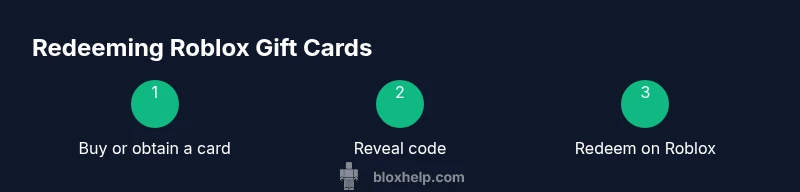
Redeeming a Roblox gift card is quick and straightforward, whether you’re on a computer or a mobile device. First, sign into your Roblox account. Then access the Redeem page from the Roblox site or app, depending on your device. Enter the code exactly as printed on the card, including letters, numbers, and dashes if present. After submission, the value is credited to Robux or Premium time, and you’ll see the updated balance in your account. If you’re redeeming a digital or physical card, make sure you’re on the official Roblox site to avoid phishing scams. For best results, redeem codes when you’re connected to a stable internet connection.
Remember: codes are case-insensitive on Roblox, but you should still type them carefully to prevent errors. If the code doesn’t work, double-check the code, ensure it hasn’t been redeemed before, and confirm you’re in the correct region.
Roblox card vs digital code: pros and cons
Roblox gift cards and digital codes serve the same purpose but differ in how you receive them. Physical gift cards offer a tangible present and can be gifted offline, while digital codes are delivered instantly via email or online retailers. Digital codes are ideal for last-minute gifts or remote gifting, but you should watch out for phishing attempts if you receive links from unknown sources. Physical cards require physical handling and may incur clearance times at stores, but they’re less prone to online scams since you’re purchasing from a trusted brick-and-mortar location. Both options ultimately credit your Roblox account with Robux or Premium time, so choose based on convenience and safety.
Security, scams, and safe purchasing practices
Always purchase Roblox cards from reputable retailers and official Roblox channels. Treat codes like cash: don’t share them publicly or post them in chats. Be wary of unsolicited emails or messages offering discount codes, and never enter a code on suspicious sites. After redeeming, monitor your account for unexpected balance changes and report anything suspicious to Roblox support immediately. Use two-factor authentication on your Roblox account to add a layer of protection.
Regional availability and expiration rules
Roblox gift cards are generally region-specific, meaning the card’s value and availability can depend on your country. Check the card’s region label before purchase to ensure it matches your Roblox account region. Most cards do not expire, but some promotions or regional programs may have time limits. Always read the card’s terms and conditions to understand any expiration or redemption window rules.
Troubleshooting common issues with Roblox cards
If a code doesn’t work, verify you entered it exactly as shown, confirm you are redeeming on the official Roblox site, and check that the card hasn’t been previously redeemed. If problems persist, contact Roblox Support with the card’s code and retailer information. For digital codes, ensure the recipient’s email is correct and that the code hasn’t been used. Avoid third-party services that promise instant fixes; use official channels for safety and reliability.
Maximizing value and budgeting with Roblox gift cards
Plan ahead by mapping out how much Robux or Premium time you need over the coming weeks. Use gift cards strategically during major sales or events to maximize value. If you have multiple cards, stack them in small batches to track usage accurately and prevent overspending. Always keep track of your balance and set spending limits to align with your Roblox goals.
What to do if the code doesn’t work or is invalid
If you encounter an invalid code, recheck the digits and letters for any misreads, ensure you are redeeming in the correct region, and confirm that the card hasn’t already been redeemed. If the problem persists, contact the card issuer or Roblox Support with proof of purchase. Do not resort to unofficial refund schemes; use official channels for a prompt resolution.
Tools & Materials
- A Roblox account(Active account to redeem codes)
- A device with internet(PC, smartphone, or tablet with a browser or Roblox app)
- Gift card with code(Physical card or digital code from a trusted retailer)
- Pen and notebook(Optional for noting down codes before redemption)
Steps
Estimated time: 15-25 minutes
- 1
Decide your goal
Decide whether you want Robux, Premium time, or both. Set a budget and a clear goal so you know how much value to redeem.
Tip: Define a budget limit to avoid overspending. - 2
Find a trusted card
Choose a Roblox gift card from official Roblox retailers or approved partners. Verify the region and denomination before purchase.
Tip: When in doubt, buy digitally from Roblox’s official partners. - 3
Reveal the code
If you have a physical card, scratch to reveal the code carefully. If digital, locate the code in your purchase receipt or email.
Tip: Handle the code securely and avoid sharing it publicly. - 4
Sign in to Roblox
Log into the Roblox account you want to credit. Open the Redeem page from the official site or app.
Tip: Always use the official Roblox site or app to redeem. - 5
Enter the code accurately
Type the code exactly as shown, including letters and numbers; codes are typically case-insensitive on Roblox.
Tip: Double-check before submitting to avoid lockouts. - 6
Redeem the code
Submit the code and wait for the confirmation message that Robux or Premium time has been added to your account.
Tip: If you don’t see a change, reload your balance page and try again. - 7
Verify your balance
Confirm that the new Robux balance or Premium time is reflected in your account settings.
Tip: Keep a record of successful redemptions for reference. - 8
Use your balance wisely
Spend Robux or enjoy Premium features gradually according to your Roblox goals.
Tip: Avoid impulse purchases; plan for long-term benefits. - 9
Troubleshoot if needed
If the code fails, re-check the code, confirm region compatibility, and contact Roblox Support or the card issuer.
Tip: Do not share codes with others during troubleshooting.
Questions & Answers
What is a Roblox gift card?
A Roblox gift card is a prepaid code that can be redeemed on Roblox to add Robux or Premium time to your account. It’s a convenient, offline way to control spending and gift value. Codes are redeemable on the official Roblox site or app.
A Roblox gift card is a prepaid code you redeem on Roblox to get Robux or Premium time. You redeem it on the official site or app.
Where can I buy Roblox gift cards?
Roblox gift cards are sold at official Roblox retailers and trusted partners, both in stores and online. To avoid scams, stick to reputable sellers and verify the card’s origin before purchase.
Roblox gift cards are sold at trusted retailers and online partners; buy from official sources to stay safe.
Do Roblox gift cards expire?
Most Roblox gift cards do not expire, but some promotions or regional offers may have time limits. Always read the terms on the card or receipt to confirm any expiration rules.
Most Roblox gift cards don’t expire, but check the terms just in case.
Are Roblox cards region-locked?
Yes, some Roblox cards are region-locked, meaning the denomination and redemption options depend on your country. Check the card’s region label before you buy or redeem.
Some cards are region-locked, so make sure the card matches your country before redeeming.
What if a code doesn’t work?
If a code doesn’t work, recheck the digits, ensure you’re on the official Roblox site, and verify the card hasn’t already been redeemed. Contact the card issuer or Roblox Support for assistance.
If a code doesn’t work, double-check it and contact support for help.
Should I buy Robux directly or via a gift card?
Gift cards can be a safe, controllable way to add Robux or Premium time without linking a payment method. Compare the value and convenience with direct purchases to decide what fits your goals.
Gift cards can be a safe way to add Robux or Premium time without using a payment method.
Watch Video
The Essentials
- Redeem codes on official Roblox channels
- Keep codes secret until redemption
- Gift cards add Robux or Premium time instantly
- Check regional restrictions before buying
- If a code fails, contact support rather than guessing