How Roblox Gift Cards Work: A Practical Guide
Learn how Roblox gift cards work, how to redeem them for Robux, and practical gifting tips. A clear, beginner-friendly guide by Blox Help to help players understand funding options.


This guide explains how Roblox gift cards work—from where to redeem and how Robux is credited, to how gifting cards to friends operates. You’ll learn about denominations, regional rules, and safe usage. By the end, you’ll be able to redeem a card confidently and plan purchases or gifts with accuracy.
What Roblox Gift Cards Are
According to Blox Help, Roblox gift cards are a straightforward way to add Robux to your account without entering a payment method. They come in digital codes or physical cards, each with a unique redeemable code. When you redeem a card, the Robux balance becomes available in your account and can be used to purchase avatar items, game passes, and other digital goods. This card provides a reliable funding option for players who want to control spending or gift a friend a thoughtful surprise. The concept is simple: a prepaid balance that you apply to your Roblox account, then spend as you wish.
Because Roblox gift cards exist in multiple regions, the exact denominations and redemption rules can vary. Always check the card packaging or the vendor’s site for regional details. For new players, this is often their first practical introduction to budgeting in Roblox without linking a debit or credit account.
How Redemption Works
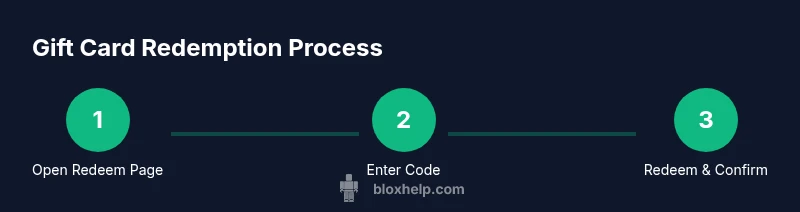
Redeeming a Roblox gift card is designed to be straightforward on both desktop and mobile devices. First, sign in to your Roblox account. Then navigate to the official redemption page (roblox.com/redeem). Enter the gift card code exactly as printed, with no stray spaces, and click Redeem. If successful, the Robux balance updates immediately in your account. On some devices, you may need to refresh the page or reopen the app to see the new balance. If the code is invalid, you’ll receive a clear error message and should re-check the code or try the process again. This process aligns with basic digital wallet concepts: a prepaid value that you apply to your account.
Robux Balance and What It Enables
A gifted Robux balance enables you to purchase avatar customization items, game passes, and other in-game content. The funds are stored within your account and can be allocated across games and experiences you enjoy. Because Robux purchases are integrated, you can use the balance in any game that accepts Robux, not just one title. If you were hoping to convert Robux into a Premium subscription, note that Premium is typically managed through separate checkout options and payment methods rather than directly through gift-card credit. This aligns with standard monetization models used across major online platforms.
Denominations and Buying Options
Gift cards come in a range of values depending on your region and retailer. Physical cards are common in stores, while digital codes are delivered by email or instant download. The key point is that the value is preloaded and can be spent across Roblox’s catalog and experiences. Since exact numbers vary, plan your purchase by considering how much you want to add to Robux and how many items you’d like to buy. Always verify the denomination on the packaging or the retailer’s listing before purchase.
Gifting and Regional Variations
Gifting a Roblox card is simple: you provide the code or purchase a digital gift to give to a friend. Some regions have different rules about redemption, and some cards may be region-locked, meaning you can only redeem them on a Roblox account tied to a specific region. Based on Blox Help Analysis, 2026, gift-card policies can vary by region, so always check local terms and the retailer’s policy before purchasing or sharing a code. When gifting, consider including a short note so your recipient understands the balance and how to redeem.
Safety, Scams, and Safe Practices
Because gift cards can be targeted by scammers, treat codes like cash. Do not share codes publicly or click suspicious redemption links. Always redeem codes on official Roblox platforms (roblox.com) and keep the code private until you’re ready to redeem. If you suspect a counterfeit card or fraudulent retailer, contact customer support promptly and avoid making purchases with questionable cards.
Common Scenarios and Practical Tips
If you want to fund your own account, redeem one card at a time and verify the balance after each redemption. To gift a friend, share the code securely or purchase a digital gift via a trusted retailer. Keep cards in a safe place and avoid copying codes into untrusted apps. When in doubt, consult the official Roblox Help resources for updated policies and supported regions.
Troubleshooting and When to Contact Support
If a code doesn’t work, first re-check the printed code for accuracy and ensure you’re on the correct Roblox site. Sign out and back in, then try the redemption again. If problems persist, reach out to Roblox Support with the code and purchase details. For digital deliveries, confirm that the email or download link wasn’t blocked by spam filters. The process is designed to be resilient, but occasional errors can happen with network or backend issues.
Tools & Materials
- Roblox account(Must be your own account or you have permission to redeem.)
- Unused Roblox gift card code(Keep the code unexposed until redemption.)
- Device with internet access(PC, tablet, or smartphone.)
- Stable internet connection(Avoid mid-redemption interruptions.)
- Trusted browser/app(Use official Roblox site or app.)
Steps
Estimated time: 15-25 minutes
- 1
Open the Redeem Page
Navigate to roblox.com/redeem on a trusted device and sign in to your Roblox account. This page is the official gateway for converting a gift card code into Robux. The goal is to access the exact redemption field.
Tip: Tip: Bookmark the official redeem page to avoid phishing links. - 2
Enter the Gift Card Code
Type or paste the code exactly as printed, and avoid stray spaces. Accuracy is crucial to avoid a failed redemption. If you’re copying, use paste and then remove any accidental spaces.
Tip: Tip: Use copy-paste to minimize typos, then re-check the last character. - 3
Click Redeem and Confirm
Click the Redeem button and confirm the action when prompted. The system will apply the value to your Robux balance if the code is valid. If you see an error, double-check the code and try again. This step is critical to ensure the right amount is added.
Tip: Tip: If it fails, refresh the page and retry once. - 4
Verify Your Robux Balance
Open your Robux balance area to ensure the added Robux appears. Depending on device, you may need to reload the app. This confirms the successful transfer of value.
Tip: Tip: Log out and back in if the balance doesn’t update. - 5
Spend Robux on Purchases
Browse Roblox games, avatar items, and passes to spend your Robux balance. You can use the balance across titles that support Robux. Be mindful of how much you’re spending and track your remaining balance.
Tip: Tip: Keep a rough budget in mind to avoid overspending. - 6
Share or Gift a Card
If you’re gifting, share the code securely with the recipient or use a trusted retailer’s gift option. Avoid posting codes publicly. This step extends the gift beyond your account.
Tip: Tip: Use encrypted messaging to share codes safely. - 7
Secure Your Gift Card Codes
Store codes in a safe place and avoid storing them in plain text on devices that others can access. Treat codes like cash and keep them private until redemption.
Tip: Tip: Consider using a password-protected note or a secure password manager entry. - 8
If Redemption Fails, Contact Support
If you encounter persistent issues, contact Roblox Support with the code, order details, and screenshots. They can verify validity and assist with resolution.
Tip: Tip: Provide proof of purchase and code when requesting help.
Questions & Answers
How do I redeem a Roblox gift card?
Sign in to Roblox, go to the official Redeem page, enter your code exactly, and confirm. The Robux balance should appear immediately if successful.
Sign in, go to the Redeem page, enter the code exactly, and confirm. Your Robux balance updates immediately on success.
Can I use Roblox gift cards to buy Premium?
Gift cards add Robux to your balance, which you can use for purchases in Roblox. Premium is a separate subscription that is purchased through the Roblox checkout.
Gift cards add Robux to your balance, which you can use for purchases. Premium is bought separately.
Are Roblox gift cards region-locked?
Some regions have regional restrictions on gift card redemption. Always check the card packaging or retailer terms for your location.
Some regions limit where gift cards can be redeemed. Check local terms on the card.
What if my gift card code is invalid?
Double-check the code for accuracy and ensure you’re on the official Roblox site. If it still won’t work, contact support with your code and purchase details.
Double-check the code and try again on the official Roblox site. If it still fails, contact support with your details.
Is there a limit on Robux from gift cards?
Robux limits depend on your account and Roblox policies. Check the Roblox Help Center for current guidelines and any region-specific rules.
Robux limits depend on account policies; check Roblox Help for current rules.
Can I gift a Roblox gift card to someone else?
Yes, you can share the code directly or purchase a digital gift. Ensure the recipient redeems it on their own account.
Yes, you can share or gift a card, and the recipient redeems it on their account.
Watch Video
The Essentials
- Gift cards convert to Robux balance.
- Redeem codes on official Roblox pages.
- Balance funds purchases across Roblox titles.
- Regional rules can vary by card.
- Keep codes secure and verify balance after redeeming.