How to Make a Roblox Game on Mobile: A Practical Guide
Learn a practical workflow to create a Roblox game using mobile testing. Plan, build with Roblox Studio on PC, test on mobile, and publish with best practices for beginners.


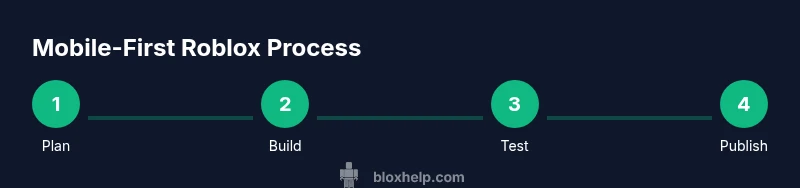
To make a Roblox game using a mobile-friendly workflow, plan your concept, then build in Roblox Studio on a PC and use the mobile app only for testing and publishing. Start by sketching your level, assets, and core mechanics, then design with Roblox Lua scripts and studio tools, finally transfer to mobile for run-time testing and iteration.
Understanding the mobile development reality
Creating a Roblox game primarily follows a PC-based workflow, but you can design with mobile in mind and test on mobile devices. Roblox Studio runs on Windows and
Planning your Roblox mobile game: scope and design
Before touching code or assets, define your game's core loop, target audience, and monetization approach. Use a one-page design document to capture the concept: genre, goals, player progression, and platform-specific constraints. On mobile, touch controls should be intuitive: bigger buttons, generous margins, and simple gestures. Create a basic wireframe of UI screens (intro, HUD, inventory) and map out how players will progress from start to finish. Choose a manageable scope: a small playground or puzzle game is better than a large open world at first. Use a lightweight art style to minimize performance strain. Plan asset reuse: modular pieces, re-skinning, and palette consistency help you scale later. Finally, set milestones and a testing plan that includes frequent mobile checks.
The desktop-first workflow: why Studio on PC remains essential
Roblox Studio is the official development environment for Roblox games. It provides editors for terrain, models, scripts, lighting, and UI that mobile tools can’t replicate. Start your project on PC to design core gameplay logic with Roblox Lua, assemble assets, and configure data storage for player progress. Build with templates and the Roblox Asset Library to speed up development. Use Play Solo and Play Here to test locally, then deploy a test build to the Roblox mobile app for real-device checks. Organize scripts and dependencies to keep performance manageable and predictable. When you move to mobile testing, optimize textures, simplify physics, and ensure touch controls work across different screen sizes.
Getting assets and you: modeling, textures, and audio
Leverage Roblox's Asset Library to source models, textures, and sounds. Import only what you can optimize for mobile: low-polygon models, compressed textures, and lightweight audio. Create a small set of reusable assets (character, environment pieces, props) that can be combined into multiple levels for faster iteration. If you make your own art, consider a flat/shadowed style to minimize GPU load. For audio, keep loops short and avoid large multi-sample files; keep formats-friendly to Roblox. Organize assets into folders by scene and reuse materials to minimize memory use. Plan for a wide range of mobile hardware and test on several devices to catch performance bottlenecks early.
Scripting fundamentals for Roblox on mobile
Even though you’ll primarily code in Studio on PC, scripting is the heartbeat of interactivity. Roblox Lua is event-driven: respond to touches, collisions, and UI events to create gameplay. Start with a simple script that spawns a collectible, increments a score, and saves progress with a DataStore. Use LocalScripts for UI and input handling so content runs on the client, and regular Scripts for server-authoritative logic. Keep modules compact and well-documented; modular code is easier to optimize for mobile. Test frequently to catch issues early. Use Roblox’s output console to catch errors and implement guards to prevent memory leaks.
Building the core loop: gameplay, UI, and progression
Design the game loop around clear goals, feedback, and rewards. For mobile, ensure main interactions are accessible with one-handed controls; use large tappable areas and consistent hitboxes. Create a simple progression system—leveling, power-ups, or cosmetic rewards—to encourage ongoing play. Implement an intuitive HUD: on-screen controls, score, and health bars should be visible without clutter. If your game uses in-app purchases, test currency flows carefully and ensure pricing is obvious in the mobile UI. Provide a brief tutorial and optional hints to onboard new players.
Testing and debugging on mobile devices
Regular testing on real devices is essential. Install the Roblox mobile app and log in with your account to test the final build. Use Studio's Test and Play modes to simulate multiplayer locally, then publish a private beta to gather feedback. Check touch controls for responsiveness, input latency, and layout across phone sizes. Monitor performance metrics such as frame rate, memory usage, and loading times; simplify assets if necessary. Collect user feedback through a simple in-game help screen or a post-play survey to iterate quickly.
Publishing, deployment, and post-launch iteration
Once your mobile-ready build passes testing, publish to Roblox with a clear description and thumbnail that reflects mobile play. Use Roblox's versioning to create a release that players can opt into, and monitor analytics for daily active users, session length, and retention. After launch, iterate quickly: fix bugs reported by mobile players, adjust touch controls, and introduce new content to maintain interest. Consider a small seasonal event or cosmetic reward to re-engage players. Always maintain compatibility with older devices and push performance updates when needed.
Common pitfalls and how to avoid them
Avoid overcomplicating the first release; start small and scale up as you learn what mobile players respond to. Performance bottlenecks often come from heavy textures, excessive physics, or large terrain; optimize assets and use streaming where possible. Don’t neglect accessibility: ensure buttons are easy to tap and text is legible on small screens. Inadequate testing across devices leads to unseen bugs; test on multiple OS versions and screen sizes. Finally, skip a formal update plan at your peril—keep a simple roadmap and schedule for content drops.
Authority Resources
To deepen your understanding of development principles, explore credible sources that cover programming, game design, and research-backed practices.
- https://nsf.gov
- https://mit.edu
- https://www.nature.com
Tools & Materials
- Roblox Studio (PC)(Windows or macOS; ensure latest version of Roblox Studio is installed.)
- A computer with internet access(Stable connection for downloading assets and syncing with Roblox servers.)
- Mobile device (iOS/Android) with Roblox app(Used for testing run-time gameplay and UI on real hardware.)
- Design document / wireframes(One-page GDD or storyboard to keep scope realistic.)
- Optional: Asset-library access(Saves time by reusing models/textures.)
Steps
Estimated time: 3-6 hours
- 1
Plan your game concept
Define target audience, genre, core loop, and monetization approach. Create a one-page design doc outlining gameplay goals, progression, and mobile constraints.
Tip: Draft a simple one-page GDD before touching Studio to reduce scope creep. - 2
Set up your project in Roblox Studio on PC
Create a new project with a baseplate, organize folders for scripts, UI, and assets, and set up a basic scene layout. Establish naming conventions for easy navigation as you scale.
Tip: Enable autosave and versioning early to prevent data loss. - 3
Build core gameplay and UI
Implement essential gameplay mechanics and a basic touch-friendly UI. Use LocalScripts for UI and server Scripts for critical logic.
Tip: Keep UI scalable for different phone sizes and ensure big tap targets. - 4
Test locally and on real devices
Use Studio’s Play modes to simulate gameplay and test on a connected mobile device via the Roblox app. Check controls, performance, and progression flow.
Tip: Test across at least two device sizes to catch layout issues. - 5
Publish and iterate
Publish a mobile-friendly version, monitor analytics, and address user feedback with quick updates. Plan fresh content drops to sustain engagement.
Tip: Prepare a lightweight update plan and track key metrics.
Questions & Answers
Can I create Roblox games on mobile by myself, or do I need a PC?
Roblox Studio currently runs on desktop platforms, so you’ll design and code primarily on a PC. You can use the Roblox mobile app for testing and publishing to mobile devices.
Roblox Studio is desktop-only, so use a PC for development and the mobile app for testing.
Do I need to know Lua to build a Roblox game on mobile?
Yes. Roblox Lua is the scripting language used to build interactivity. You’ll write scripts in Studio on PC, then test them on mobile during iteration.
Lua scripting is essential for interactivity and flows in Roblox games.
Is Roblox Studio free to use for beginners?
Roblox Studio is free to download and use for game development. You only pay once you publish experiences or purchase in-game items.
It’s free to start building with Roblox Studio.
How long does it take to make a simple mobile-friendly game?
The timeline varies with scope, but a small, well-planned game can move from concept to a playable prototype in a few hours and a polished version over days.
It varies, but a small project can take a few hours to days depending on features.
Can I monetize a Roblox game created for mobile?
Yes. Roblox supports monetization through in-game purchases, game passes, and cosmetics. Plan a fair monetization approach that enhances gameplay.
Yes, you can monetize via in-game purchases and cosmetics.
What common mistakes should I avoid on mobile development?
Avoid overambitious scope, neglecting touch accessibility, and skipping testing on real devices. Start small and iterate with mobile-specific feedback.
Don’t overshoot scope; test on real devices early and often.
How do I publish my Roblox game to mobile?
Publish through Roblox Studio to your account, then enable mobile access and share the link with players. Keep monitoring performance after release.
Publish via Studio and monitor mobile performance after launch.
The Essentials
- Plan the concept before building
- Use desktop Studio for core development and mobile for testing
- Keep UI touch-friendly and performance-minded
- Test on multiple devices and iterate quickly
- Publish with a clear update plan and monitor analytics