How to Make Roblox Games: A Step-by-Step Beginner Guide
Learn how to make Roblox games from scratch with Roblox Studio. This comprehensive guide covers setup, Lua scripting, building scenes, testing, and publishing.


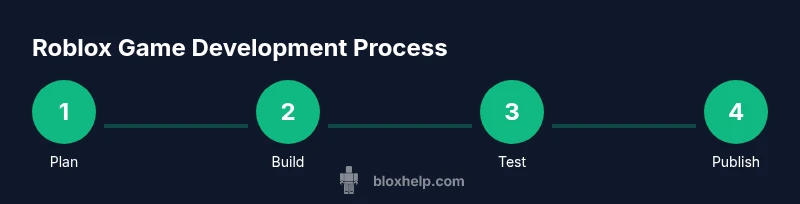
You will learn how to make Roblox games by setting up Roblox Studio, learning the basics of Lua scripting, building a simple scene, and publishing your creation. This guide covers essential prerequisites, a clear step-by-step process, testing tips, and best practices to keep your project organized and scalable.
Why making Roblox games matters
Creating Roblox games is more than just a pastime; it’s a practical way to learn foundational game development skills, from spatial reasoning and design to basic programming. When you make a Roblox game, you gain hands-on experience with 3D space, interactions, and iterative thinking. According to Blox Help, starting with a concrete project helps you retain concepts more effectively and stay motivated as you see your ideas come to life. Sharing your project with friends turns learning into a collaborative, feedback-driven process, which accelerates improvement and keeps you accountable. As you explore Roblox Studio, you’ll discover how tools for building, scripting, and UI come together to deliver a cohesive experience. The journey may vary in pace, but the payoff—an playable game and a growing portfolio—remains within reach for beginners who stay curious and persistent.
Prerequisites and setup
Before you start building, ensure you have a Roblox account and Roblox Studio installed on a compatible computer. Roblox Studio is free to download and runs on Windows and macOS, with additional features available once you publish. Create a new project or open an existing place to begin. Take a moment to explore the workspace: the Explorer panel, the Properties panel, the Viewport, and the various editors. A stable internet connection helps when you fetch assets from the Roblox library and publish your game. Save frequently, organize assets into folders, and keep a simple milestone plan to track progress as your project grows.
Navigating Roblox Studio: UI essentials
Roblox Studio presents a familiar layout for anyone who has worked with 3D editors. The Explorer lists all objects in your scene; the Properties panel controls attributes such as size, color, material, and behavior. The Viewport is where you assemble your world. Use the built-in tools to move, rotate, and scale parts, and leverage assets from the Roblox library. Start with a basic baseplate, add simple terrain or a skybox, and configure lighting to set the mood. Mastering these basics speeds up your workflow when you begin scripting and implementing gameplay mechanics.
Lua basics for Roblox: variables, functions, and events
Roblox uses Lua as its scripting language for gameplay logic. Begin with core concepts: variables store data, functions group code, and events respond to user actions or game state changes. A simple script might track a player’s score, spawn items, or trigger a door when a button is pressed. Practice by writing short scripts that print messages to the output, move parts, and interact with Roblox services like Workspace, Players, and ReplicatedStorage. As you gain familiarity with syntax, you’ll be ready to connect logic to actual gameplay elements in your scene.
Building your first playable scene
Start with a compact, repeatable scene: a baseplate, a couple of platform pieces, and a collectible object. Place a few simple obstacles and a goal. Create a Script inside a part to respond to touches and award points. Use assets you understand well first to minimize complexity, then gradually introduce new models from the Roblox library. Pay attention to scale, camera perspective, and control responsiveness. A clean, well-structured scene makes iteration faster and reduces debugging time.
Scripting gameplay: coins, doors, and simple mechanics
Add core gameplay mechanics with Lua to give your game immediate feedback. For example, implement a collectible coin that increases a score, then disappears after collection. Add a door that opens when a player earns enough points, or a bridge that appears after a level completes. Use RemoteEvents for client-server communication when actions need synchronization. Start with small, isolated scripts and only integrate them once you’re sure each piece works, which keeps debugging focused and efficient.
Testing, debugging, and iteration
Testing is essential for quality and player experience. Use Play mode in Roblox Studio to simulate real gameplay, examine the Output window for errors, and watch for unusual physics interactions. Break your project into modules to isolate issues, use print statements or assertions to verify values, and revert to a known good state after major changes. Keep a changelog of fixes and improvements to track progress across sessions. Regular iteration reveals edge cases and helps you refine gameplay, performance, and UX.
Publishing and sharing your game
When your game is ready, publish it to Roblox and configure key settings—name, description, genre, and privacy. Decide whether to publish as a solo developer or as part of a team, which affects ownership and permissions. After publishing, monitor player feedback and basic telemetry to guide future updates. Be mindful of Roblox’s guidelines and eligibility criteria for monetization and VR/console compatibility, and plan your next update accordingly to sustain interest.
Best practices and avoiding common pitfalls
Organization saves time: maintain a clear folder structure, name objects intuitively, and comment your code. Start with a minimal viable product and resist feature creep; iterate in small, testable steps. Regularly back up your project and test across multiple devices to catch platform-specific issues early. Strengthen your Lua fundamentals first, then explore more advanced topics like ModuleScripts and Roblox services. A methodical approach builds scalable projects and reduces rework as your game grows.
Tools & Materials
- Roblox account(Needed to publish and collaborate on projects.)
- Computer with Windows/macOS(Capable of running Roblox Studio smoothly.)
- Roblox Studio installed(Download from the official Roblox site.)
- Stable internet connection(For asset fetches and publishing.)
- Text editor or code viewer(Optional for editing scripts outside Studio.)
- Project organization templates(Folders for assets, scripts, and UI assets.)
Steps
Estimated time: 2-6 hours
- 1
Set up your account and install Studio
Create or sign in to Roblox, then download and install Roblox Studio. Open the Studio and configure basic preferences to match your workflow. This initial setup ensures you can access essential tools and start building without interruptions.
Tip: Create a dedicated project folder and enable autosave to protect your work. - 2
Create a new place and explore the UI
Start a new place using a base template, then inspect the Explorer, Properties, and Viewport. Practice selecting objects, changing properties, and moving around in 3D space. This familiarity speeds up later steps where you add gameplay logic.
Tip: Use the search in Explorer to quickly locate objects you create or import. - 3
Write your first Lua script
Add a Script into a part and write a simple Lua snippet to print a message and move the part. Connect your script to a basic event like .Touched so you can see interaction results. This step establishes your workflow for more complex behavior.
Tip: Comment your code as you go to remind yourself why you did each change. - 4
Build a tiny playable scene
Arrange a baseplate, a few platforms, and a collectible. Ensure the player can move, collect, and see a score change. This small scene becomes your sandbox for testing mechanics before scaling up.
Tip: Test frequently in Play mode to catch alignment and collision issues early. - 5
Add a couple gameplay mechanics
Implement a coin that increases score, and a door that opens when the score threshold is met. Use simple RemoteEvents for client-server messages if you’re handling UI or score display across clients.
Tip: Work in isolation first; keep a module for shared utilities to avoid duplicate code. - 6
Test, debug, and iterate
Run iterative tests, inspect the Output window for errors, and fix issues one at a time. Maintain a short changelog and revert to previous iterations when necessary. Re-test after each major change to confirm fixes.
Tip: Create a minimal reproducible example for tricky bugs to speed debugging. - 7
Publish and solicit feedback
Publish your place to Roblox and fill out the description and category. Invite friends to test and provide feedback, then use their insights to plan improvements for the next update.
Tip: Document post-publish goals and a rough roadmap to guide future work.
Questions & Answers
Can I publish a Roblox game for free?
Yes. Publishing a Roblox game is free with a Roblox account. There are guidelines for monetization and eligibility, but getting your initial game live does not require paid access.
Yes, you can publish a Roblox game for free with a regular Roblox account.
Do I need to learn Lua to make Roblox games?
Lua is Roblox's scripting language for gameplay logic. Start with basics like variables and events, then progressively build more complex mechanics as you gain confidence.
Yes, Lua is essential for scripting in Roblox.
Is Roblox Studio free to download and use?
Roblox Studio is free to download and use. You can create, test, and publish projects without a paid plan, though some advanced features may require publishing.
Yes, Roblox Studio is free to download and use.
How long does it take to learn Roblox scripting?
Time varies by person. Start with small goals, practice regularly, and build a few small projects to reinforce concepts. Consistent practice accelerates progress.
It varies, but steady practice speeds up learning.
Can I monetize Roblox games?
Yes, Roblox offers monetization pathways through Robux revenue. Review current policies and guidelines, and plan your game design around sustainable engagement and fair monetization.
Yes, but follow Roblox's monetization guidelines.
Where can I find assets legally for Roblox?
Use Roblox Library assets with proper attribution and licensing. For outside assets, ensure you have rights to use them and avoid copyright issues.
Use Roblox Library assets and respect licenses.
Watch Video
The Essentials
- Learn Roblox Studio basics and UI.
- Master simple Lua scripting for gameplay.
- Build small, testable scenes before expanding.
- Publish and iterate with player feedback.
- Keep assets organized and versions tracked.