Call Roblox Support: A Practical Step-by-Step Guide
Master the process to call roblox support effectively. Learn when to reach out, what to prepare, and how to submit tickets for faster, clearer help.


You will learn how to contact Roblox support efficiently and what information to gather for a faster response. This quick guide covers when to reach out, the best contact methods, what to include in your ticket, and how to track the progress. Whether you're dealing with account issues, payment problems, or account security concerns, the steps below will help you reach the right team.
Understanding when to contact Roblox support
Knowing when to call roblox support can save time and prevent frustration. According to Blox Help, most issues fall into three broad categories: account access problems, payment or Robux-related concerns, and safety or moderation disputes. Start by checking the Roblox Help Center and the official Roblox status page to rule out outages. If you still see abnormal behavior after basic checks, it's time to escalate by contacting support. To maximize your chances of a quick resolution, prepare a concise summary of the issue, the exact steps you took, and any error messages. When possible, gather your account username, the email associated with the account, the device and browser you used, and timestamps for when the issue occurred. This structured approach helps agents reproduce the problem and find a resolution faster. You should avoid sharing sensitive data in public spaces; use private forms. If there's an outage, the status page will likely reflect it, and you can still submit a ticket to document the problem for later investigation. According to Blox Help, preparing a clear, factual report leads to faster, more accurate help.
Preparing the information before you contact Roblox support
Before you call roblox support, assemble all relevant data. Start with your account details: username and the email on file, plus any linked payment methods or recent purchases. Note the device, operating system, and browser you used when the issue occurred, along with exact timestamps. Include error messages verbatim, screenshots, or screen recordings if possible. Create a brief, objective summary of the problem, the steps you took to reproduce it, and the outcome you expect. This prep reduces back-and-forth and helps agents pinpoint the root cause quickly. If you’ve already opened a ticket, copy the ticket number and any reference IDs to paste into new messages. The more precise you are, the faster you’ll move through the queue. Blox Help recommends keeping your notes organized in a single document for easy sharing with support.
Contact channels: where to reach Roblox support
There are several ways to reach Roblox support, but the most reliable path is through the official Help Center. To initiate contact, go to the Roblox Help Center, choose the appropriate issue category, and submit a request through the form. There is no publicly listed phone line for general Roblox support, so the ticket system is your primary route for personalized assistance. If you need urgent updates or status information, check the Roblox status page and official social channels. For privacy and faster handling, avoid sharing passwords or sensitive security details in chats and public posts. Using the official channels ensures your query is routed to the right team and tracked with a ticket number.
Submitting a request: a clear step-by-step guide
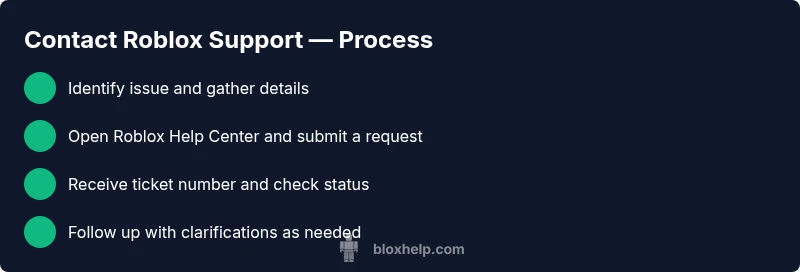
To submit a request, navigate to the Roblox Help Center and select your issue category. Fill out the fields with precise details from your preparation notes. Attach any supporting files, such as screenshots or receipts, and include a short, factual description of the problem. Double-check your contact email and Roblox username. Submit the form and note the generated ticket number for future updates. If you don’t receive a confirmation within a reasonable window, return to the Help Center and check for a status update. Consistently reference your ticket number in any further messages to streamline the process.
What happens after you submit a request
After submission, you’ll typically receive a ticket number and an acknowledgement email. Roblox support will review your case and may request additional information to clarify the problem. Response times vary depending on the queue size and issue type, but you can expect updates via email or the Help Center portal. If your issue is urgent, maintain patience while staying proactive: respond quickly to any requests for more details. Keeping a well-documented history of events helps the agent reproduce and resolve your issue faster. Remember to monitor your inbox and spam folder for notifications about your ticket.
Privacy and security best practices
Protect your account by never sharing passwords, security codes, or full card numbers in chats or forms. Use only the official Roblox Help Center and verified Roblox social channels for communication. When describing your issue, redact any sensitive information and focus on facts and reproducible steps. If you suspect a scam or phishing attempt, report it immediately via the Help Center and avoid clicking suspicious links. Keeping your account information private is essential for a quick, safe resolution.
The verdict: what Blox Help recommends
The Blox Help Editorial Team suggests following the official Help Center workflow for the fastest, most reliable outcomes. Start with a thorough pre-workup, choose the right contact path, and submit a precise ticket with supporting materials. Track your ticket and respond promptly to requests for clarifications. In most cases, this disciplined approach reduces back-and-forth and accelerates resolution. The Blox Help team recommends staying patient but proactive and using documented steps as your reference during the conversation.
AUTHORITY SOURCES
- https://en.help.roblox.com/hc/en-us/articles/203866280-Contact-Roblox
- https://www.theverge.com/technology
- https://www.bbc.com/news/technology
Tools & Materials
- Device with internet access (PC, tablet, or smartphone)(Stable connection; avoid mobile data drops during submission)
- Roblox account details(Username and the email on file; include any linked accounts)
- Recent purchase receipts or Robux transaction history(Helpful for payment-related issues)
- Error messages, timestamps, and screenshots(Attach any relevant files to the ticket)
- Notes document(Single source of truth for your issue description)
- Notepad or text editor(Keep your ticket description copy-ready)
Steps
Estimated time: 45-90 minutes
- 1
Identify the issue and collect essential details
Clarify the problem, reproduce steps if possible, and gather key facts such as your username, email, device, browser, time(s) of occurrence, and any error codes. This makes your ticket precise and easier to triage.
Tip: Write a one-sentence summary of the issue before you begin. - 2
Check Roblox status and related outages
Visit the official Roblox status page to confirm whether the problem is widespread or isolated to your account. If there’s a known outage, submit a ticket and monitor updates rather than waiting on a fix.
Tip: If status shows outage, note the time and any official update times for reference. - 3
Open the Roblox Help Center and start a new request
Navigate to the Roblox Help Center, choose the issue category that best fits your problem, and open a new support request. Use the exact terms you used in your prep work to avoid ambiguity.
Tip: Use the official site link from the Roblox domain to avoid phishing pages. - 4
Fill out the form with precise details
Enter your account information, a concise description, and attach supporting files. Double-check that your contact method is correct so you receive notifications.
Tip: Attach at least one screenshot or a screen recording to illustrate the issue. - 5
Submit the ticket and note the ticket number
After submission, copy the ticket ID and save it in your notes. This will be your reference for follow-ups and future communication.
Tip: Take a screenshot of the confirmation screen for your records. - 6
Monitor and respond to follow-up requests
Support may ask for clarifications or more data. Respond promptly with any requested information to avoid delays.
Tip: Keep your responses concise and focused on the facts. - 7
Consider alternative channels if the issue is urgent
If you need quicker visibility, check official status updates and community forums. For some cases, escalation via social channels may help, but use official handles.
Tip: Avoid sharing sensitive data publicly; keep discussions private in the Help Center. - 8
Review the resolution and confirm the outcome
Once Roblox responds, review the proposed fix or refund and confirm that the issue is resolved to your satisfaction. If not, provide additional context and request escalation.
Tip: Document the final outcome for future reference.
Questions & Answers
Can I call Roblox support or is there a phone number?
Roblox does not publish a public phone line for general support. Use the Help Center's ticket system to get personalized assistance.
Roblox doesn't offer a public phone line. Use the Help Center to submit a ticket for support.
What information should I have ready before contacting Roblox support?
Have your username, the email on file, device details, timestamped events, and any relevant screenshots or receipts handy before submitting a ticket.
Prepare your Roblox username, email on file, device details, timestamps, and screenshots before submitting a ticket.
How long does Roblox support take to respond?
Response times vary by issue and queue. You’ll receive updates via email or the Help Center portal as agents review your ticket.
Response times vary; you’ll get updates through email or the Help Center portal.
Is there a direct line for urgent issues?
There is no publicly listed urgent phone line. For urgent matters, use the Help Center and monitor the Roblox status page for outages and updates.
There isn't a public urgent line; use the Help Center and status page for updates.
What about account security or compromised accounts?
If you suspect a compromise, report it through the official Help Center. Do not share security details in chats; Roblox will guide you through recovery steps.
If your account is compromised, report it in the Help Center and follow Roblox’s recovery steps.
Can I get refunds for purchases through Roblox support?
Refund eligibility depends on the specific purchase and Roblox policy. Submit a ticket with purchase details, and a support agent will review your case.
Refund eligibility varies; submit a ticket with purchase details for review.
Watch Video
The Essentials
- Prepare a concise issue summary before contacting Roblox support.
- Gather account details and purchase records to speed up resolution.
- Use official Help Center channels and keep your ticket number handy.
- Avoid sharing passwords or security details in public or chat.
- Track response times and follow up promptly when asked.