How Do I Email Roblox: The Practical Guide
Learn the official path to contact Roblox, craft a clear, effective email, attach evidence, and track your ticket. This step-by-step guide from Blox Help covers templates, safety tips, and what to expect.


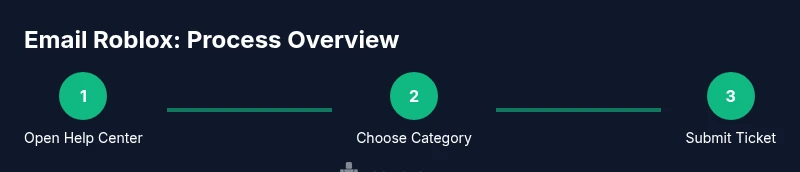
To email Roblox, start with the official Help Center and submit a support ticket—this is the recommended route rather than sending mail to an inbox. If you search for how do i email roblox, use the Help Center's contact options, describe your issue in the subject and body, and attach screenshots. Expect a response within 24–72 hours, depending on demand, and verify you’re on Roblox’s official site to avoid scams.
understanding When and why you might email roblox
If you’re wondering how do i email roblox, this section explains when the official Help Center contact is appropriate. Typically, issues that affect access, purchases, account safety, or reported bugs benefit from a formal support ticket. The Blox Help team notes that direct messages on social media are not reliable for issue resolution. Therefore, starting at help.roblox.com and selecting the right contact option yields a traceable, trackable reply. Always ensure you’re on the legitimate Roblox site to protect personal data and avoid phishing. By following the Help Center flow, you’ll reach the correct team—billing, account security, or technical support—so your issue is handled by staff with the right tools. This approach also creates a documented trail you can reference later.
finding the Official Roblox Contact Options
The official Roblox contact options live within the Help Center on help.roblox.com. Before you begin, verify you’re on the official site and avoid third-party pages. Roblox uses a ticket-based system rather than a public email inbox, which helps route inquiries to the correct team. Based on Blox Help analysis, this routing improves response accuracy and allows you to track your ticket. In practical terms, you’ll find category choices such as Account Access, Billing, and Technical Issues. Selecting the right category is essential to speed up resolution and reduce back-and-forth.
preparing Your Email: What to Include
Preparation is key. Gather your Roblox username, the email on the account, approximate dates of incidents, transaction IDs if relevant, and a brief description of the problem. Attach any screenshots or logs that illustrate the issue. Writing this information down before you open the Help Center saves time and reduces back-and-forth. Remember to protect sensitive data—do not share passwords or security codes in the message. The goal is to present a concise, verifiable case that the Roblox support team can reproduce and investigate.
writing a Clear Subject Line and Message Body
Craft a precise subject line that captures the issue in a few words, for example: “Help with password reset – username: YourUser” or “Billing dispute on order #12345.” In the body, describe what happened, what you expected, and what actually occurred. Include your Roblox username, the device and browser or app version, and any steps you took. Keep the tone respectful and factual. If possible, reference dates and supporting evidence to speed up the investigation.
attaching Evidence: Screenshots, Logs, and Account Details
Images and logs help Roblox reproduce and resolve issues faster. Attach relevant screenshots showing error messages, payment receipts, or account activity. Include brief captions that explain what each attachment proves. If you have a transaction ID or order number, include it in the body as well. For privacy, redact sensitive information (like full payment methods) unless it’s essential for the case. Proper evidence reduces ambiguity and improves the odds of a swift resolution.
submitting and Tracking Your Ticket in the Help Center
Submit the ticket through the Help Center and save the confirmation number. If you don’t receive an email promptly, check your spam folder and ensure your message was sent to help.roblox.com. You can add a follow-up note to the same ticket after a certain period if you don’t see progress. Regularly checking the ticket status keeps you informed and prevents your issue from getting buried in a queue. The Help Center provides status updates and a history of communications.
common scenarios: email templates that help
Template 1: Account access issue Subject: Help with account access – username: YourUser Body: Brief summary, last successful login date, device used, and a request for password or account recovery steps. Attach screenshots of error messages.
Template 2: Billing dispute Subject: Billing issue – order #12345 Body: Explain the charge, date, amount, and desired resolution. Include receipts and a request for refund if applicable.
Template 3: Bug or crash report Subject: Bug report – game crashes on startup Body: Describe the device, app version, steps to reproduce, and any error codes. Attach logs or screen recordings if possible.
safety, security, and best practices when contacting roblox
When emailing Roblox, protect your personal data. Do not share passwords or security codes. Use the official Help Center rather than third-party contact methods. Be wary of phishing attempts: if an offer sounds too good to be true or asks for sensitive information, stop and verify through the Help Center. As a best practice, create a concise, factual ticket, and avoid long digressions. Keep all communications professional and focused on resolving the issue.
what happens next and how to follow up
After submitting, expect a response within 24–72 hours, depending on demand and issue type. Roblox may request additional information or propose a fix. If you don’t hear back within a reasonable window, submit a follow-up within the same ticket thread or reference your confirmation number. The Blox Help team recommends maintaining a calm, data-driven tone in all replies to improve clarity and speed up the resolution.
Tools & Materials
- Computer or mobile device with internet access(Stable connection; use a device you routinely access Roblox from)
- Roblox account username and account email(Use the exact username and the email on file for the account)
- Screenshots, receipts, and logs(Attach relevant evidence; redact sensitive data if not essential)
- Draft subject line and body text(Prepare concise, factual content before submitting)
- Confirmation number from the Help Center(Keep a record after submission)
Steps
Estimated time: 15-25 minutes
- 1
Open the official Roblox Help Center
Navigate to help.roblox.com and locate the Help Center link. This is the official support channel and the first step to starting your email inquiry.
Tip: Verify you’re on the official site to avoid phishing. - 2
Choose the right contact category
Within the Help Center, select the category that best matches your issue (e.g., Account, Billing, Technical). This ensures your ticket is assigned to the correct team.
Tip: A precise category reduces back-and-forth and speeds resolution. - 3
Draft a clear subject line
Create a specific subject that captures the issue in 6–8 words (e.g., 'Billing discrepancy on order #12345'). A precise subject helps triage.
Tip: Include your username in the subject if space allows. - 4
Write a concise, factual message body
Explain what happened, what you expected, and what actually occurred. Include dates, actions taken, and your device or platform.
Tip: Avoid long digressions; stick to objective facts. - 5
Attach supporting evidence
Upload screenshots, receipts, or logs that demonstrate the issue. Caption each attachment briefly.
Tip: Only share data essential to the case to minimize risk. - 6
Submit the ticket and save the confirmation
Submit once, then save the confirmation number and any reference links for follow-up.
Tip: If needed, bookmark the ticket URL for quick access. - 7
Monitor for replies and provide updates
Check the Help Center and your email for responses. If you need to add information, use the same ticket thread.
Tip: Respond promptly if Roblox asks for more data. - 8
Follow up if there’s no progress
If 3–5 business days pass without a reply, submit a polite follow-up referencing your ticket number.
Tip: Keep tone respectful; it improves cooperation. - 9
Escalate sensitive cases when needed
For urgent safety or security issues, request escalation through the Help Center path and clearly state urgency.
Tip: Do not share passwords or PINs in any email.
Questions & Answers
Can I email Roblox directly for urgent issues?
Roblox primarily handles inquiries through the Help Center ticket system. There isn't a public customer service email listed for general questions. For urgent or account-safety matters, use the Help Center to request escalation.
Roblox uses a Help Center ticket system rather than a public email address. Use the Help Center for urgent matters and request escalation if needed.
What information should I include in the email?
Include your Roblox username, the email on the account, a brief, factual description of the issue, dates, and any relevant screenshots or receipts. Avoid sharing passwords or security codes in the message.
Provide your username, the email on file, a concise description, dates, and attach supporting evidence. Do not include passwords.
How long does Roblox take to respond?
Typical response times range from 24 to 72 hours depending on the issue and volume. Complex cases may take longer. You’ll receive updates in the Help Center and via email if you’ve requested them.
Expect replies within one to three days; more complex cases may require additional time.
What if I can’t access my account or email on file?
If you can’t access the account or the email on file, use the Help Center’s account recovery paths or security-related options. Provide alternate verification details as requested by Roblox’s security team.
If access is blocked, use the account recovery options in the Help Center and be ready to verify your identity.
Can I track my ticket status after submission?
Yes. The Help Center provides a ticket status page you can check with your confirmation number. You can add follow-up messages in the same thread.
You can track it in the Help Center with your confirmation number and add updates if needed.
Are there risks of phishing when emailing Roblox?
Always verify you are on the official Roblox Help Center domain. Do not click suspicious links or share credentials. If in doubt, navigate to help.roblox.com directly.
Be careful of phishing. Check the site URL and avoid sharing passwords or codes via email.
Watch Video
The Essentials
- Follow official Help Center routes, not third-party emails.
- Provide a clear subject and organized body with evidence.
- Expect a response within 24–72 hours; follow up if needed.
- Protect your data by not sharing passwords or sensitive codes.
- Keep a ticket record for all future reference.